dbForge Data Generator for Oracle: Realistic Test Data for Every Table, Keys Intact
dbForge Data Generator for Oracle is Devart's Windows tool for filling Oracle schemas with large volumes of realistic test data, using 200+ ready-made generators for names, addresses, phone numbers, IDs, card numbers and more, while keeping foreign keys and check constraints consistent. It costs $169.95 a year (or $329.95 for a perpetual license) and is made for developers, testers and DBAs who need a believable test database without copying production data.
Testing against ten hand-typed rows hides the bugs that show up at a million, and copying production into test brings real customers' names and card numbers with it. Data Generator fills every table of a schema in one run, with values that look real, respect your constraints and can be regenerated the same way next week.
Quick facts
- Version: 2026.2.96, released November 9, 2026
- Developer: Devart
- Platform: Windows 7 to 11 and Windows Server 2008 to 2025, with .NET Framework 4.7.2
- Databases: Oracle 9i through 23ai and 26ai, Oracle Cloud, Real Application Clusters and Oracle on Amazon RDS, with or without an Oracle client
- Generators: 200+ meaningful generators in categories such as Business, Health, IT, Location, Payment, Personal and Product, plus 15+ basic ones (regular expression, weighted list, SQL query, table or view, files, Lorem Ipsum)
- Edition: one edition, sold as a 1-year subscription or a perpetual license
- Download: 58.43 MB
- Price: $169.95 a year, or $329.95 perpetual with a year of updates
- Trial: 30 days, full functionality (the download asks you to sign in with a free Devart account)
- What we checked: version 2026.2.96 and its November 9, 2026 date on Devart's download page and revision history, the 58.43 MB download size listed there, the Oracle versions in Devart's requirements page, and the order page price of $169.95 for the default 1-year subscription (renewing yearly at the same price) and $329.95 for the perpetual license, on November 13, 2026. We didn't generate data into our own Oracle schema.
Before you buy
- It creates data; it doesn't mask copies of production. If you need to anonymize real rows, this is the wrong tool; it builds new, fake rows from scratch.
- A subscription stops working when it ends. The perpetual license keeps working after its year of updates; renewing it only brings new versions and support.
- Check the refund terms. Devart's order page promises a refund within 30 days if you're not satisfied (on annual subscriptions and perpetual licenses), but its ordering FAQ ties refunds to technical problems its support can't fix, so make up your mind during the trial.
- dbForge Studio for Oracle Enterprise ($429.95 a year) includes this generator, plus the IDE, compare tools and documenter. The Studio's Standard and Professional editions don't include it.
Download Free TrialBuy Now
Overview
You open a new data generation project, connect to the target schema, and Data Generator lists every table and column with a generator assigned to each one: in Devart's own screenshots an Email column gets the Email generator and a foreign key column takes its values from the parent table. You change what you want, preview the first rows, and choose how many rows to create, either a fixed number, a share of the existing data, or as many as fit in a time limit.
Then the Data Population Wizard writes the INSERT script. You can open it in the built-in editor, save it to a file, or run it straight against the database, optionally truncating the tables first, disabling triggers and constraints during the load and rolling back on error.
Devart keeps the tool on the same release cycle as its other Oracle tools. The September 2026 build added quick data generation for selected tables from Database Explorer, May 2026 enabled generation for columns with unsupported data types, and December 2025 added support for Oracle AI Database 26ai.
Features
200+ meaningful generators, grouped by category
dbForge Data Generator for Oracle ships generators for realistic values such as IDs, post codes, phone numbers, countries, credit card numbers, first and last names and product categories, grouped into categories like Business, Health, IT, Location, Payment, Personal and Product.
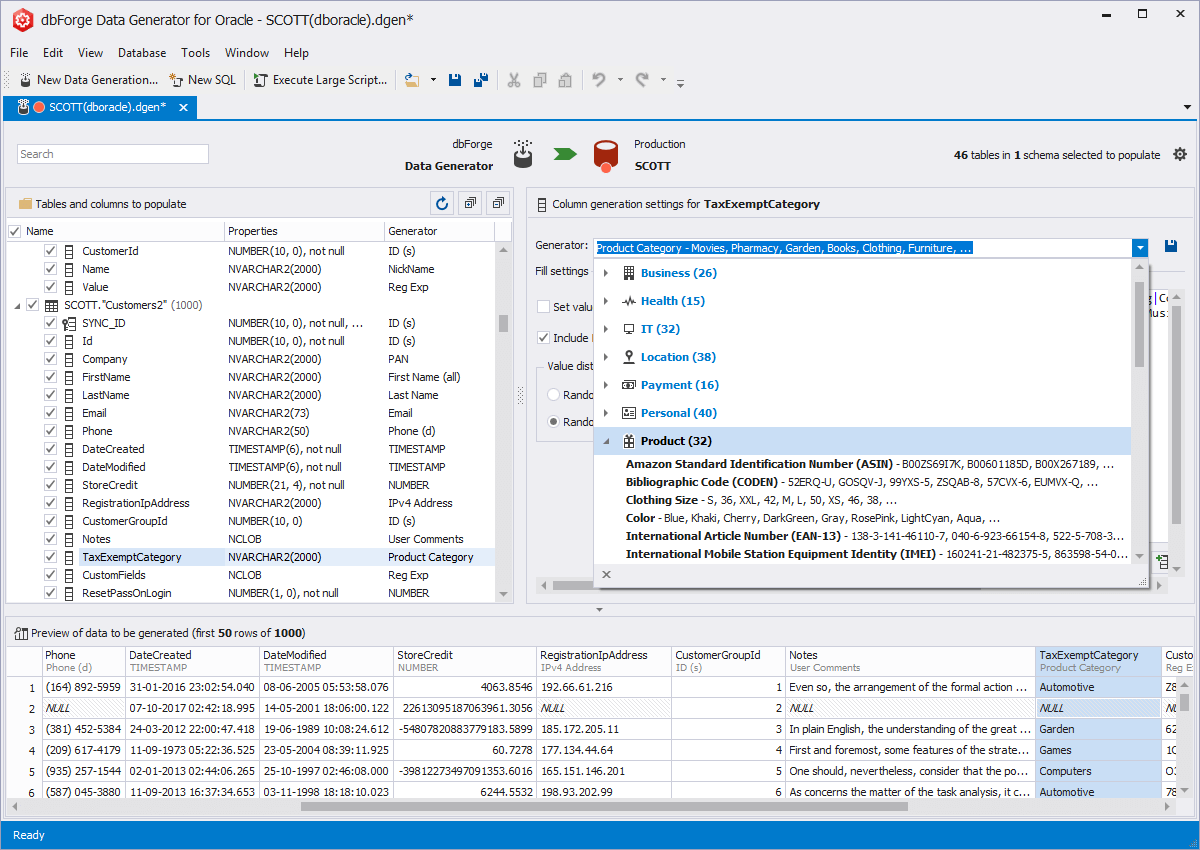
Picking a generator for the TaxExemptCategory column of SCOTT.CUSTOMERS: the Product category is open, and the grid below previews the first 50 of 1,000 generated rows.
Control over volume, NULLs, uniqueness and locale
dbForge Data Generator for Oracle lets you set the number of rows (fixed, a proportion of existing data, or by time), truncate the table first, choose random-by-seed or sequential values, the share of NULL and empty values, uniqueness, value ranges and distribution, and country-specific data. A fixed seed lets you rebuild the same dataset when you rerun the project.
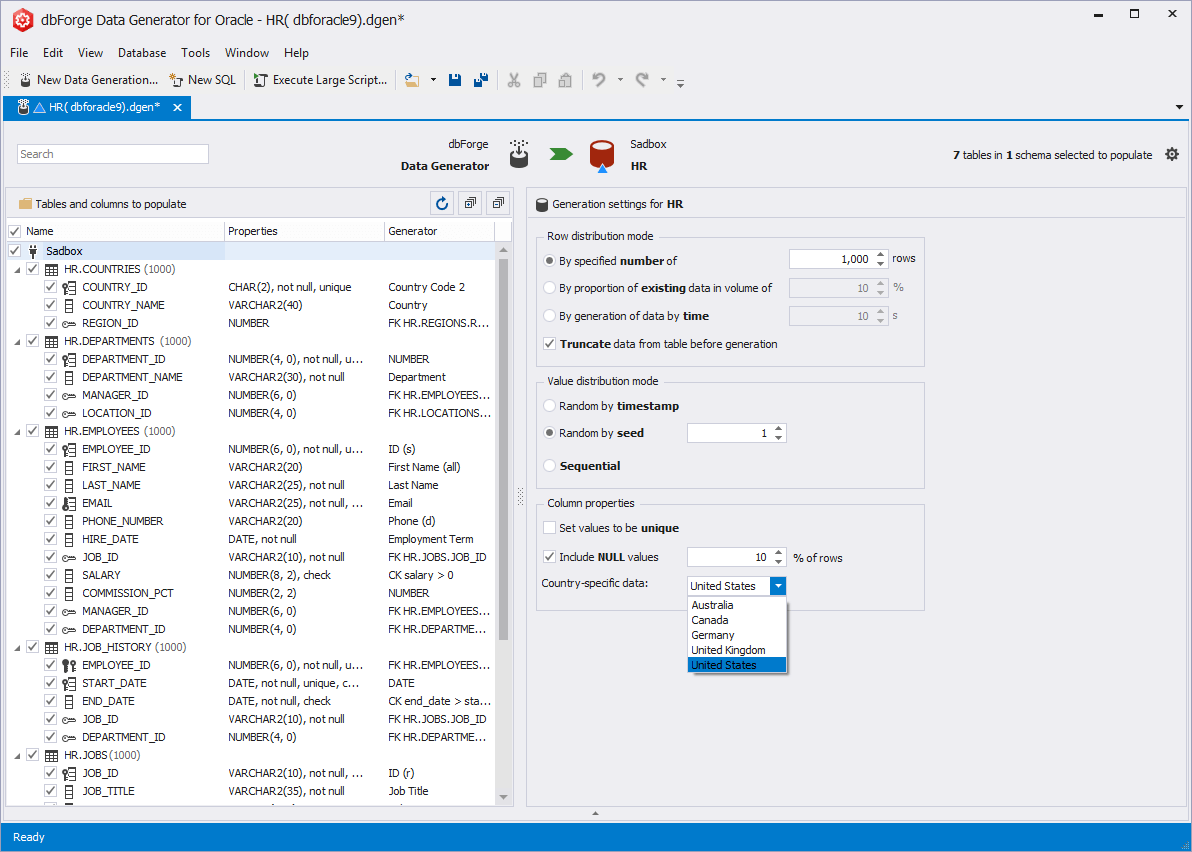
Settings for HR.COUNTRIES: 1,000 rows, truncate before generation, random by seed, 10% NULLs, and a country list for country-specific data.
Foreign keys and check constraints respected
dbForge Data Generator for Oracle supports foreign keys, assigned to a column automatically or by hand, so child rows point at real parent rows, and it supports CHECK constraints so values stay valid. You can also disable triggers and check constraints during population for speed, and choose what happens when an error occurs.
Your own generators and basic building blocks
dbForge Data Generator for Oracle includes 15+ basic generators, among them Regular Expression, Weighted Lists, SQL Query, Table or View, Files, Folder, Shuffled Text and Lorem Ipsum. You can build a custom generator from a template or from scratch and save it for reuse, instead of adjusting the same predefined one in every project.
Script, run, or schedule from the command line
dbForge Data Generator for Oracle can open the population script in its editor, save it as a file or run it against the database, with options such as rollback on error, disabling foreign keys, and SQL*Plus commands. Saved projects run from the command line, a .bat file or PowerShell.
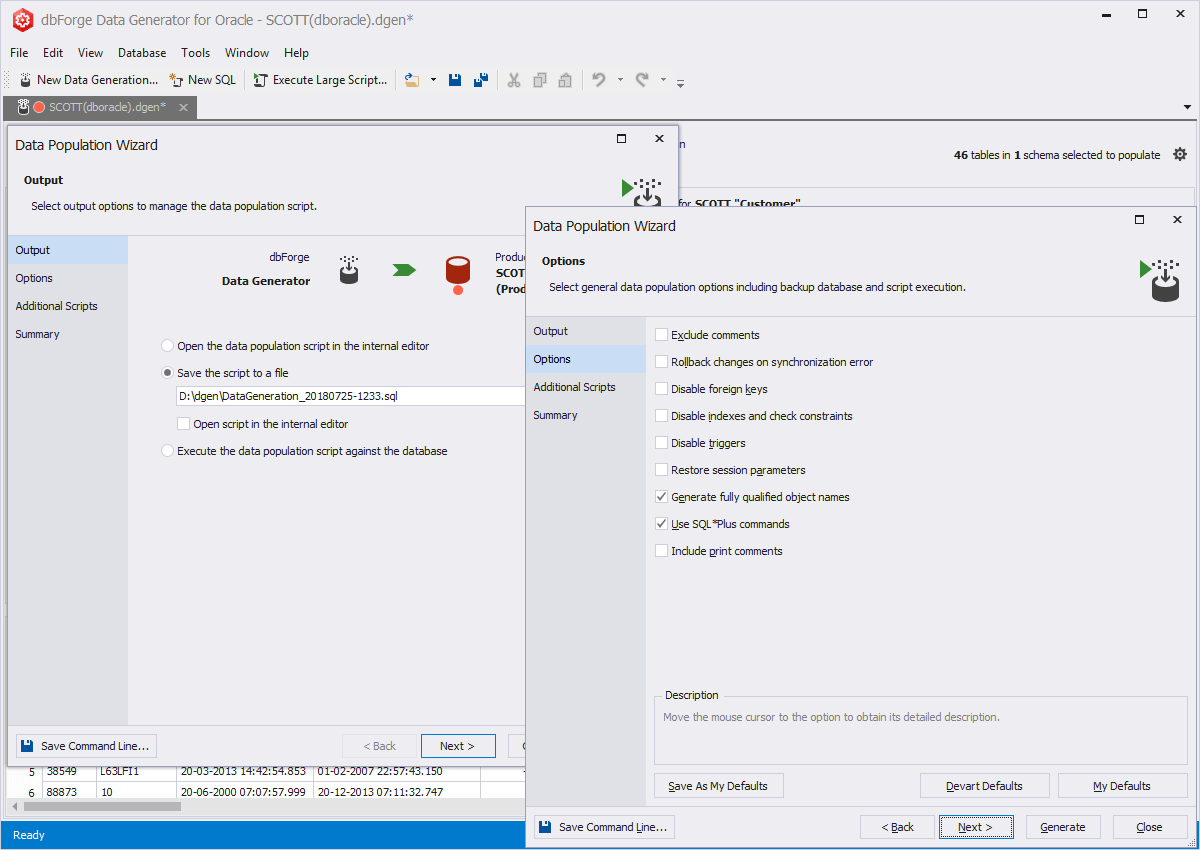
The Data Population Wizard: save the script to a file, with options for rollback on error, disabling foreign keys, indexes and triggers, and SQL*Plus commands.
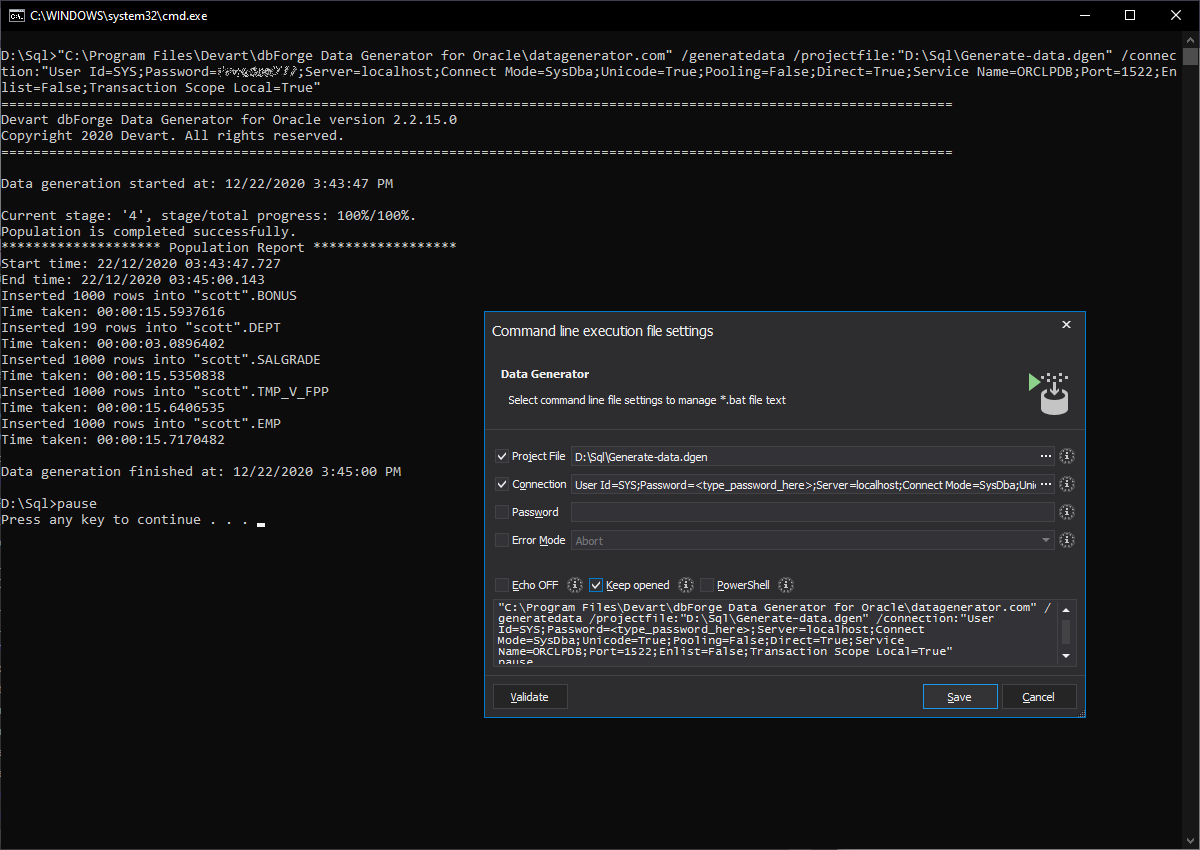
An older build (2.2.15) running a saved project from the command line, inserting 1,000 rows into each SCOTT table, next to the command-line execution file settings.
Benefits
- Realistic load tests. Millions of plausible rows show the slow queries and index gaps that a ten-row test table hides.
- No real personal data in test. You don't copy production customers into a test environment at all.
- Repeatable datasets. A saved project with a fixed seed produces the same data again, so a failed test can be reproduced.
Real-World Uses
- Seeding a new development schema with consistent customers, orders and order lines on day one.
- Performance testing a report query against ten million generated rows before release.
- Rebuilding a test database nightly from a .bat file before the automated test run.
- Demos and training with names and addresses that look real but belong to nobody.
Who It's For, and Who Should Skip It
Buy it if you develop or test Oracle applications and regularly need to fill schemas with lots of believable, consistent data.
Skip it if you need to mask or subset existing production data (this tool only generates new data), if you'd use it only once for a handful of rows, or if you already have dbForge Studio for Oracle Enterprise, which includes it. It's Windows-only.
Usage Guide
- Download and install Data Generator for Oracle from Devart's download page (sign in with a free Devart account).
- Create a new data generation project and connect to the target schema.
- Select the tables to populate and review the generator chosen for each column.
- Adjust settings: row count, NULL share, uniqueness, value ranges and the seed.
- Preview the first rows in the grid at the bottom.
- Populate: in the Data Population Wizard, open, save or execute the script.
- Automate: save the project and generate a command line or .bat file for scheduled runs.
Where It Falls Short
- No masking of existing data. It generates rows; it doesn't anonymize the ones you already have.
- Some exotic column types are filled generically. Devart only recently enabled generation for columns with unsupported data types, so check the preview for your special types.
- Expensive next to the Studio. At $169.95 a year it's well over a third of dbForge Studio for Oracle Enterprise, which includes it with the IDE and compare tools.
- Windows only, and Oracle only: Devart sells separate generators for SQL Server and MySQL.
What Users Say
Independent user reviews of the Oracle edition are almost nonexistent: SourceForge and SoftwareSuggest show no reviews of it, and Devart's product page lists customer logos rather than quotes. That doesn't say anything bad about the tool, but it does mean the 30-day trial on your own schema is the only real test. Check in particular how it handles your largest tables, your custom types and your check constraints before buying.
Comparisons
Data Generator vs dbForge Studio for Oracle Enterprise
dbForge Studio for Oracle Enterprise costs $429.95 a year and includes the data generator, database documentation, data and schema compare and the full PL/SQL IDE. Data Generator alone, at $169.95, makes sense when test data is the only gap.
Data Generator vs writing INSERT scripts
A PL/SQL loop with DBMS_RANDOM costs nothing, but you write and maintain the logic for every column, keep foreign keys consistent yourself and get random strings instead of names and addresses. Data Generator pays off once you populate more than a few tables, or the same schema repeatedly.
Editions and Pricing
Data Generator for Oracle has a single edition. The order page opens on the 1-year subscription at $169.95; you can switch there to a perpetual license, to 2 or 3 years of support, and add priority support.
| License | Price | What happens later |
|---|
| 1-year subscription | $169.95 | Renews yearly at $169.95; stops working if not renewed |
| Perpetual | $329.95 | Keeps working; includes 1 year of updates and support |
Devart takes 5% off for 5 to 9 licenses, 10% for 10 to 19 and 15% for 20 or more.
FAQs
Can dbForge Data Generator for Oracle fill tables linked by foreign keys?
Yes. dbForge Data Generator for Oracle supports foreign keys, assigned automatically or by hand, and fills those columns with values from the parent table, so data integrity holds across tables.
Can I generate the same data again later?
Yes. dbForge Data Generator for Oracle can generate values randomly by seed, so keeping the same seed in a saved project lets you rebuild the same dataset.
Does it need an Oracle client?
No. dbForge Data Generator for Oracle can connect directly to the server, and it also works with Instant Client or several Oracle Homes.
Does it support Oracle on Amazon RDS and Oracle Cloud?
Yes. dbForge Data Generator for Oracle supports Oracle 9i through 26ai, Oracle Cloud, Real Application Clusters and Oracle on Amazon RDS.
Which column types can it fill?
dbForge Data Generator for Oracle supports NUMBER, VARCHAR2, NVARCHAR2, CHAR, NCHAR, DATE, TIMESTAMP, both INTERVAL types, BLOB, CLOB, NCLOB and XMLTYPE.
What happens if I let the subscription lapse?
A dbForge Data Generator for Oracle subscription stops working at the end of its term until you renew. Devart charges 20% more to renew 3 or more months after the end, and 60% more after 12 months.
System Requirements
- Windows 7, 8, 8.1, 10 or 11, or Windows Server 2008, 2012, 2016, 2019, 2022 or 2025
- .NET Framework 4.7.2 or later
- Oracle 9i to 26ai, Oracle Cloud, RAC or Oracle on Amazon RDS
- About 59 MB for the installer download
Conclusion
dbForge Data Generator for Oracle is worth $169.95 a year if you regularly build or rebuild Oracle test databases: the 200+ realistic generators, consistent foreign keys and repeatable seeds save hours of throwaway PL/SQL every time. The main reason not to buy it alone is the price next to dbForge Studio for Oracle Enterprise, which includes it, so anyone who'd also use an Oracle IDE should look there first. Try it free for 30 days on a copy of your schema.
Download Free TrialBuy Now