dotConnect for SQLite: an ADO.NET Provider for SQLite With Built-In Encryption and EF Core Support
dotConnect for SQLite is a $269.95-a-year ADO.NET data provider from Devart for C#, VB.NET and F# developers who store data in SQLite files. It runs on .NET 5 to 11 and .NET Framework 2.0 to 4.8 on Windows, Linux and macOS, supports Entity Framework Core 1 to 11, EF6, Dapper and NHibernate, and adds database encryption, script and dump components, SQL tracing and Visual Studio tools that the free SQLite drivers don't have.
The usual reason to look at it: your desktop or mobile app keeps customer data in a local SQLite file, and you need that file encrypted without bolting on a separate native library, or you have a large WinForms codebase built on typed datasets that you want to keep working in current Visual Studio. If you only need to open a database and run queries, the free Microsoft.Data.Sqlite package already does that.
Quick facts
- Version: 7.3.248, released November 11, 2026 (added .NET 11 support)
- Developer: Devart
- Database: SQLite 3 and later, including encrypted databases (SEE, CEROD, SQLiteCrypt, SQLCipher)
- .NET platforms: .NET 5 to 11, .NET Core 2.0 to 3.1, .NET Standard 2.0/2.1, .NET Framework 2.0 to 4.8, ASP.NET Core, Blazor, .NET MAUI
- Operating systems: Windows, Linux and macOS, x64 and x86
- ORMs: EF Core 1 to 11, Entity Framework 1 to 6, Dapper 1.x and 2.x, NHibernate 1.x to 5.x, LinqConnect
- Packages: Devart.Data.SQLite, Devart.Data.SQLite.EFCore and Devart.Data.SQLite.EF6 on NuGet. The Windows installer is 23.26 MB
- Price: $269.95 for one developer with one year of updates and support. Server $799.95, OEM for 10-100 devices $4,999.95. Express edition free
- Trial: fully functional for 30 days, no credit card, free Devart account needed to download
- What we checked: version 7.3.248 and the 23.26 MB download size on Devart's download page, the revision history back to 2022, the Developer vs Express feature matrix, and the order page on November 13, 2026: $269.95 for the default single-developer, one-year license, $799.95 for Server and $4,999.95 for OEM for 10-100 devices. We didn't install it or run it against a database.
Download Free TrialBuy Now
Overview
Devart has sold this provider since version 1.00, and the revision history runs to well over 200 builds. The pace has stayed steady: version 6.0 (June 2022) added .NET 6 and Apple Silicon Macs, 6.1 (March 2023) added built-in AES, Blowfish, CAST-128, RC4 and Triple DES encryption, 7.0 (December 2025) added .NET 10, Visual Studio 2026 and key-based licensing for .NET Framework, and 7.3 (November 2026) added .NET 11. Recent builds also put .NET Framework assemblies into the NuGet packages, signed the packages, and added sqlite-vec vector data types.
The classes follow the ADO.NET model (SQLiteConnection, SQLiteCommand, SQLiteDataReader, data adapter, provider factory, connection string builder), so code written for System.Data.SQLite or Microsoft.Data.Sqlite moves over with renamed types. The installer bundles its own sqlite3 library, so nothing else needs to be installed on the target machine.
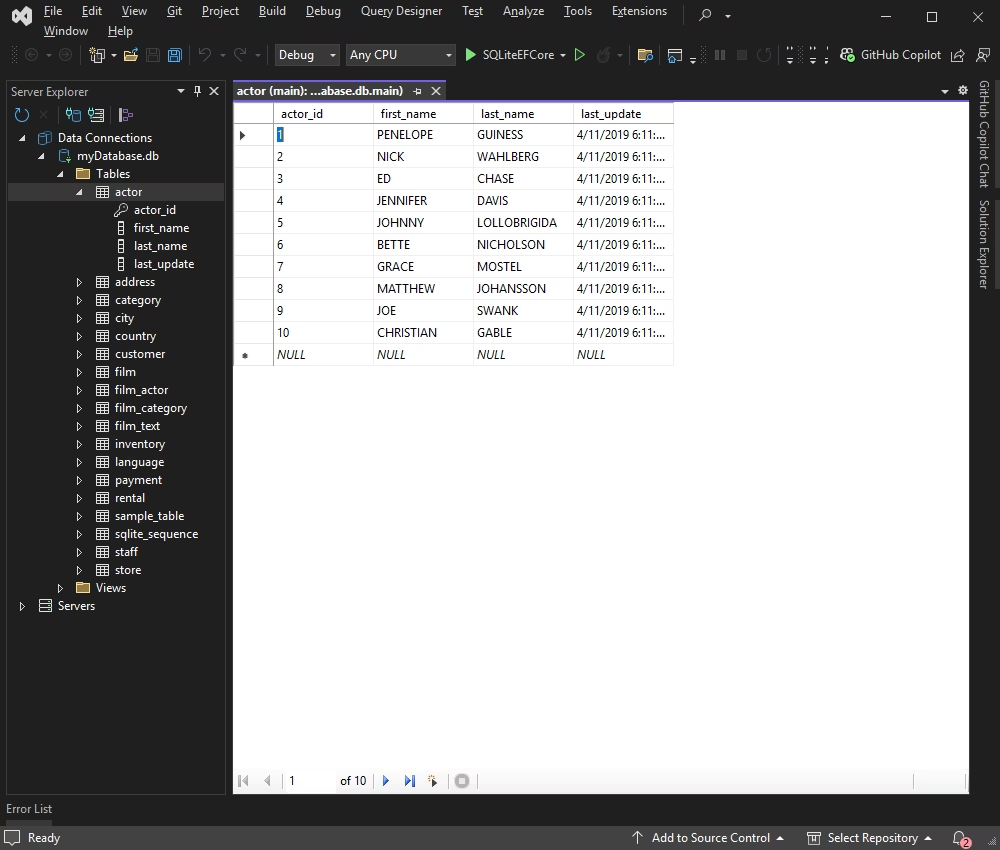
Visual Studio's Server Explorer with a SQLite database open through dotConnect for SQLite: the Sakila sample tables and the actor table's rows.
Features
Encrypted SQLite databases
dotConnect for SQLite can encrypt a database file itself, with AES-128, AES-192, AES-256, Blowfish, CAST-128, RC4 or Triple DES, set through the connection string (Encryption=AES256;Password=...). It also works with the official SQLite Encryption Extension (SEE), CEROD, SQLiteCrypt and SQLCipher, so it can open files encrypted by other tools. Encryption is a Developer-edition feature; the free Express edition doesn't have it.
EF Core, EF6, Dapper and NHibernate
dotConnect for SQLite ships separate EF Core and EF6 packages and supports Entity Framework Core 1 to 11, including spatial data through NetTopologySuite, inheritance mapping (TPH, TPT and TPCT models) and full-text search. It also works with Dapper, NHibernate (runtime support) and Devart's LinqConnect. Devart's visual model designer, Entity Developer, integrates with it but is a separate product with its own license.
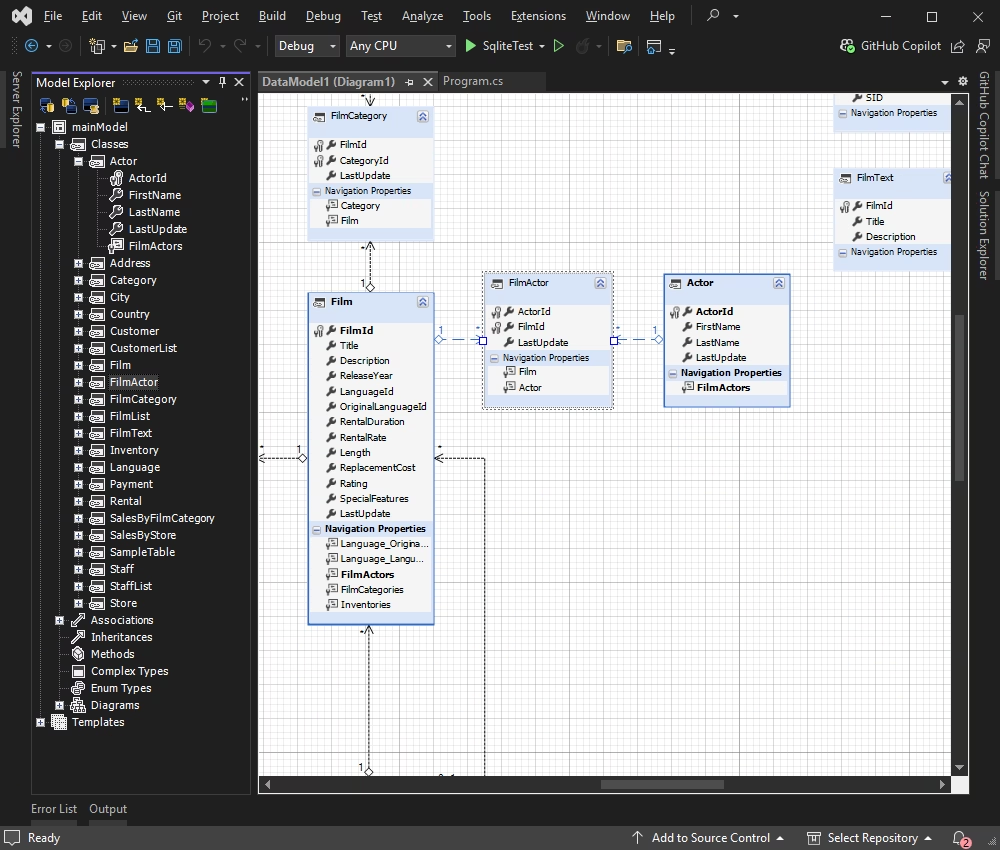
An entity model generated from the Sakila SQLite database in Devart's Entity Developer (sold separately), with the Film, FilmActor and Actor classes and their navigation properties.
Scripts, dumps, backups and tracing
dotConnect for SQLite includes SQLiteScript for running multi-statement scripts, including huge script files loaded on the fly, and SQLiteDump for saving a database or part of it as a script and restoring it later. It supports the SQLite Online Backup API, user-defined functions, loadable extensions, and snapshots that restore a transaction to a saved state. SQLiteMonitor and the separate dbMonitor utility trace every statement per component.
SQLiteDataTable and smarter fetching
dotConnect for SQLite's SQLiteDataTable fetches, edits and saves a single table or query result without a separate adapter. It can fetch rows in the background (NonBlocking mode), on demand as a grid scrolls, or page by page, defer loading of large columns, and build master-detail relations from queries. WinForms apps also get the DataLink component and InterForm technology for binding data across forms.
Visual Studio design-time tools
dotConnect for SQLite adds a SQLite data source to Server Explorer in Visual Studio 2015 to 2026, where you create or open a database file, choose UTF-8 or UTF-16 encoding and the date/time format, and browse tables and data. The Developer edition adds a DataSet Wizard for typed SQLite datasets, a DataSet Manager and Editor, component editors with SQL highlighting, and a Migration Wizard for projects using the ODBC or OLE DB providers.
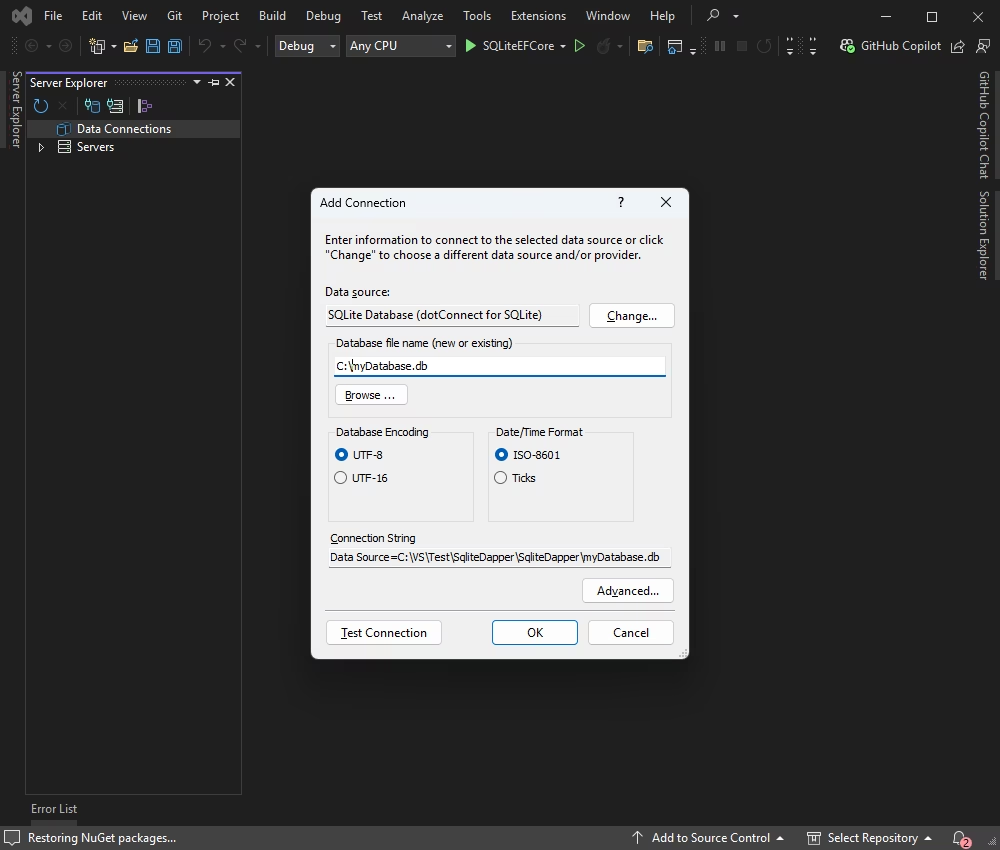
The Add Connection dialog with SQLite Database (dotConnect for SQLite) as the data source: database file name, UTF-8 or UTF-16 encoding, ISO-8601 or Ticks date format, and the generated connection string.
Benefits
- Encryption without extra native code. Protecting a local database file is a connection string setting, not a separate encryption library to compile and ship per platform.
- One provider for old and new code. The same vendor library covers a .NET Framework 2.0 WinForms app and a .NET 11 service on Linux.
- Less plumbing. Script running, dumps, backups, tracing and paged fetching come as ready components.
- Someone to call. A paid license includes a year of updates and Devart support, and Devart's own testimonials mention fast bug fixes.
Real-World Uses
- A desktop app with private data. A clinic or accounting app keeps each customer's records in an AES-256-encrypted SQLite file on the user's PC.
- Opening SQLCipher files from .NET. A support tool reads databases created by a mobile app that encrypts them with SQLCipher.
- EF Core on a local store. A Blazor or .NET MAUI app uses EF Core migrations and LINQ against an embedded SQLite file.
- Shipping seed data. An installer builds a fresh database from a SQLiteDump script, and a support tool dumps a customer's database for debugging.
Who It's For, and Who Should Skip It
It's for .NET teams that need encrypted SQLite files, typed-dataset tools in Visual Studio, or vendor support on their data layer, and shops that already use other Devart dotConnect providers and want the same API everywhere.
Skip it if your app just needs a SQLite connection and EF Core: Microsoft.Data.Sqlite and System.Data.SQLite are free and widely used. If you need SQLite plus SQL Server, Oracle or MySQL in one library, look at dotConnect Universal instead. And the free Express edition is only useful on .NET Framework, since it has no .NET Core support.
Usage Guide
- Get the trial. Sign in with a free Devart account on the download page and run the Windows installer with Visual Studio closed.
- Or add the package. In any IDE, run
dotnet add package Devart.Data.SQLite, plus Devart.Data.SQLite.EFCore for EF Core.
- Connect. In Visual Studio, open Server Explorer, add a connection, choose SQLite Database (dotConnect for SQLite), pick a new or existing .db file and click Test Connection.
- Write code. Use
SQLiteConnection, SQLiteCommand and SQLiteDataReader from the Devart.Data.SQLite namespace. Add Encryption=AES256;Password=... to the connection string to encrypt a file.
- License it. After buying, add your activation key (for the NuGet assemblies it goes in the connection string as
License Key=...) and remove trial assemblies before building the release.
Before you buy
The price is a subscription to updates and support: $269.95 covers one developer for one year. The order page also offers a perpetual license, two- and three-year terms, Team and Site licensing and premium support, all chosen there. Apps you build ship the Devart runtime assemblies with no per-installation fee; redistributing the provider to other companies needs the OEM license.
Where it falls short
- License keys travel with your app. The cross-platform assemblies read the activation key from the connection string or a key file, and Devart's forum shows "Feature is not supported" errors when the wrong key (the license number instead of the activation key) or an edition without the needed feature is used.
- The free edition is limited. Express has no encryption, no EF support and no .NET Core support.
- Design-time tools are Windows-only. On Linux and macOS you get the NuGet library, not the wizards.
- Entity Developer costs extra. The visual model designer shown on Devart's pages is a separate purchase.
- Frequent fixes. Recent builds fixed issues with URI-format data sources on Windows and Linux, pooled connections left inside a transaction, and wrong RecordsAffected counts, so stay current.
What Users Say
Public reviews are scarce. This is a niche developer component, and the review directories (Capterra, GetApp, Software Advice, G2) list it with few or no written reviews of their own. What users have said in public is on Devart's testimonial page and forum.
Testimonials on Devart's site
"I have got to say that you guys are the most responsive group when it comes to fixing bugs. Many of the problems I have posted about have specifically been addressed in a subsequent release of your dotConnect for SQLite or Entity Developer products." (Simon Kingaby, Piedmont Natural Gas)
"Really like your product, by the way. I had previously used the EFSQLiteProvider example provided by MS, and actually got that working in our system, but was it ever slow!! Installing dotConnect for SQLite was easy, and the speed improvement was obvious." (Robin Warren, Ibis Biosciences)
"I used dotConnect for SQLite provider on my testing development and I can say it was fast!, reliable and really suitable to easily develop SQLite database based projects." (Yigit Aktan, Senior Solution Engineer, Premier Mission Critical (PMC) Team at Microsoft)
Devart forum
The forum threads are mostly about licensing on .NET Core and .NET Standard: trial keys come from the installer, so NuGet-only users must install the product once, and a key for an edition without Entity Framework support throws "Feature is not supported" at runtime. Devart staff answer these threads directly.
The themes are consistent: users credit Devart's speed at fixing reported bugs and the provider's performance, and the friction is in licensing setup rather than in the data access itself. Devart's testimonials are hand-picked and undated, so weigh them accordingly.
Comparisons
dotConnect for SQLite vs Microsoft.Data.Sqlite and System.Data.SQLite
Microsoft.Data.Sqlite is Microsoft's free, lightweight provider and the default for EF Core; System.Data.SQLite is the free provider from the SQLite team. Both cover connections, commands and EF. dotConnect for SQLite costs $269.95 a year and adds built-in encryption, support for several encryption extensions, SQLiteScript and SQLiteDump, tracing, SQLiteDataTable with paged fetching, typed-dataset tools in Visual Studio and vendor support. If you need none of those, use a free provider.
Express vs Developer edition
The free Express edition has the common ADO.NET classes, native SQLite data types, .NET Framework support and Visual Studio 2015 to 2026 integration. The Developer edition adds:
- .NET Core and modern .NET support
- built-in and extension-based encryption
- SQLiteScript, SQLiteMonitor, SQLiteDump, SQLiteDataTable and SQLiteDataSet
- Entity Framework, LinqConnect and NHibernate support, and Entity Developer integration
- DataSet Wizard, Manager and Editor, dbMonitor, ASP.NET providers and Sync Framework support
Editions and Pricing
Every paid license is ordered with the same Buy Now button: you pick the edition, term, license type and support on the order page. Prices below are the one-year, single-license prices on November 13, 2026.
| Edition | Price | Who can use it |
|---|
| Express | Free | Basic .NET Framework connectivity, no encryption, EF or .NET Core |
| Developer (the order page's default, labelled Professional at checkout) | $269.95 per year | One developer, all features |
| Server | $799.95 per year | One server of one organization |
| OEM for 10-100 Devices | $4,999.95 per year | Redistribution to third parties inside your application |
The order page also offers 2- and 3-year terms, Team and Site licensing, larger Site and OEM tiers, a perpetual license, premium support, and volume discounts of 5% to 15% from five licenses up.
FAQs
Can dotConnect for SQLite open SQLCipher-encrypted databases?
Yes. dotConnect for SQLite supports the SQLCipher, SEE, CEROD and SQLiteCrypt extensions alongside its own built-in encryption, in the Developer edition.
Does dotConnect for SQLite work on Linux, macOS and Apple Silicon?
Yes. dotConnect for SQLite's NuGet packages run on Windows, Linux and macOS with .NET 5 to 11, .NET Core or .NET Standard, and Apple Silicon Macs have been supported since version 6.0 (June 2022). The installer and Visual Studio tools are Windows-only.
Does dotConnect for SQLite support EF Core 10 and 11?
Yes. dotConnect for SQLite supports Entity Framework Core 1 through 11, with EF Core 11 and .NET 11 added in version 7.3.248 on November 11, 2026.
Can I use dotConnect for SQLite in a .NET MAUI or Blazor app?
Yes. dotConnect for SQLite lists .NET MAUI, Blazor and ASP.NET Core among its supported platforms, and Devart publishes getting-started videos for both on its YouTube channel.
Do I pay royalties to ship an app built with dotConnect for SQLite?
No. Apps built with dotConnect for SQLite ship its runtime assemblies with no per-installation fee. Redistributing the provider itself to other companies needs the OEM license.
Is there a free version of dotConnect for SQLite?
Yes. dotConnect for SQLite Express is free, with the common ADO.NET classes and Visual Studio integration for .NET Framework. Encryption, Entity Framework, .NET Core and the data components need the Developer edition.
Can I get a refund for dotConnect for SQLite?
Yes. Devart refunds dotConnect for SQLite purchases within 30 days if you aren't satisfied. Since the 30-day trial has no limits, test it on your own project first.
System Requirements
- .NET 5.0 to 11.0, .NET Core 2.0 to 3.1, .NET Standard 2.0/2.1, or .NET Framework 2.0 to 4.8
- SQLite 3 or later (the installer includes the SQLite library)
- Windows, Linux or macOS, x64 or x86
- Visual Studio 2015 to 2026 for the design-time tools (Windows)
- A free Devart account to download the trial
Conclusion
dotConnect for SQLite is worth $269.95 a year when you need what the free providers don't give you: encrypted database files set up in the connection string, support for SQLCipher and SEE files, dump and script components, tracing, and typed-dataset tools for older WinForms code, all from a vendor that ships updates every month or two. The main reason not to buy it is that Microsoft.Data.Sqlite is free and fine for plain EF Core or ADO.NET access, and the free Express edition is too limited to replace it. Try the 30-day trial with your real database first.
Download Free TrialBuy Now