dotConnect for PostgreSQL: A Paid ADO.NET Provider Against Free Npgsql, and When It Earns the Price
dotConnect for PostgreSQL is a commercial ADO.NET data provider that connects .NET applications to PostgreSQL, with Entity Framework Core, Dapper and NHibernate support and design-time tools for Visual Studio. The Developer edition costs $269.95 for one developer at checkout, and a free Express edition covers basic connectivity on .NET Framework.
Most .NET developers on PostgreSQL use Npgsql, which is free and very good. So the honest question is what you get for the money. The answer is tooling: SSH and HTTP tunnels in the provider, Visual Studio wizards, bulk loading and monitoring classes, a commercial support desk and the visual ORM designer Entity Developer working alongside it.
Quick facts
- Version: 9.2.237, released October 30, 2026
- Developer: Devart
- Databases: PostgreSQL 8 to 18, EnterpriseDB, EDB Postgres Advanced Server, Pervasive Postgres SQL, Heroku Postgres
- .NET: .NET 5 to 10, .NET Core 2.0 to 3.1, .NET Standard 2.0 and 2.1, .NET Framework 2.0 to 4.8
- ORMs: EF Core 1 to 10, Entity Framework 1 to 6, Dapper, NHibernate, LinqConnect
- Client needed: none, it connects over TCP/IP
- Price: $269.95 Developer license with a year of updates; next-year renewal $139.95
- Trial: 30 days, full product, no card, with a free Devart account
- Guarantee: 30-day money-back guarantee; Devart's ordering FAQ is stricter and refunds only when a technical problem its support can't fix stops the product working
What we checked: version 9.2.237 and the 32.05 MB installer size on Devart's download page, the features and editions pages, the revision history, $269.95 and a $139.95 renewal on the order page on November 6, 2026. We did not install the provider or run any performance test.
Before you buy
Try Npgsql first if your needs are ordinary. Plain queries and EF Core on PostgreSQL work well with the free provider. dotConnect makes sense when you want the features listed below enough to pay for them.
Plan for licensing in your build pipeline. The provider checks a license, either through a license key in the connection string or through license resources in .NET Framework projects. It has caught people out on cloud build agents, so try your real deployment during the trial.
Download Free TrialBuy Now
Overview
dotConnect for PostgreSQL implements ADO.NET directly over PostgreSQL's protocol, so there are no client libraries to install. It installs from a Windows setup program or arrives through the Devart.Data.PostgreSql NuGet package, and it runs on Windows, Linux and macOS.
Devart ships updates often. Version 9.2.192 in September 2026 added SCRAM-SHA-256-PLUS authentication and PuTTY PPK3 keys, 9.2.223 in October added the Exact Timezone option, and 9.2.237 at the end of October made the NuGet packages digitally signed and fixed connection interceptors in EF Core.
Features
EF Core, Dapper and NHibernate support
dotConnect for PostgreSQL supports Entity Framework Core 1 to 10, Entity Framework 1 to 6, Dapper and NHibernate, along with spatial data through NetTopologySuite 2.6, inheritance mapping and stored procedures. Paired with Entity Developer, a separate Devart designer, it generates entity classes and a DbContext from your database.
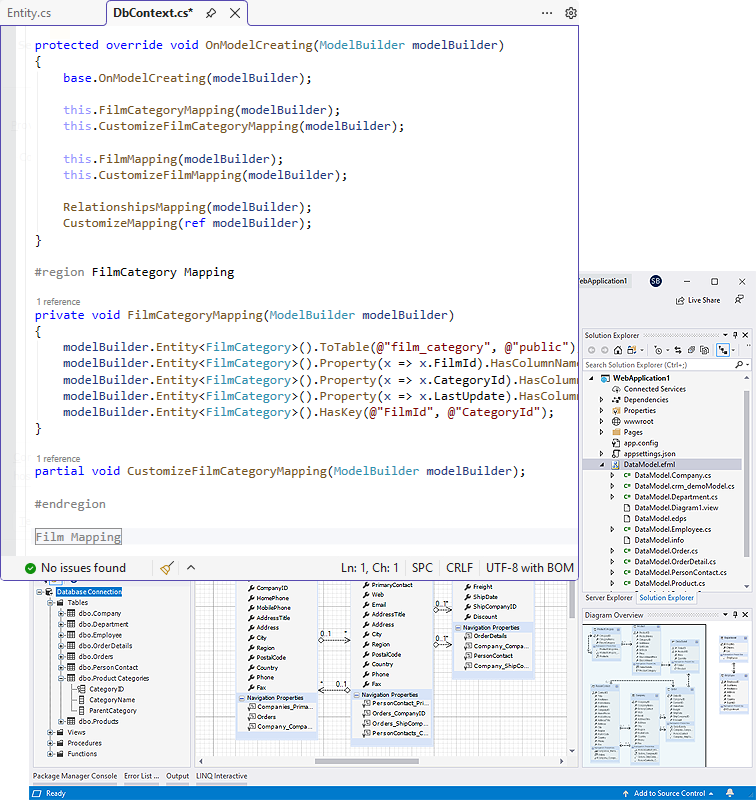
Generated DbContext code in the editor, with the entity model and diagram from Entity Developer underneath.
Visual Studio tools
dotConnect for PostgreSQL adds itself to Visual Studio 2015 to 2026 as a data source. You get Server Explorer connections, a DataSet Wizard and Manager, component and property editors, SQL code completion, and a Migration Wizard for moving from ODBC or OLE DB providers.
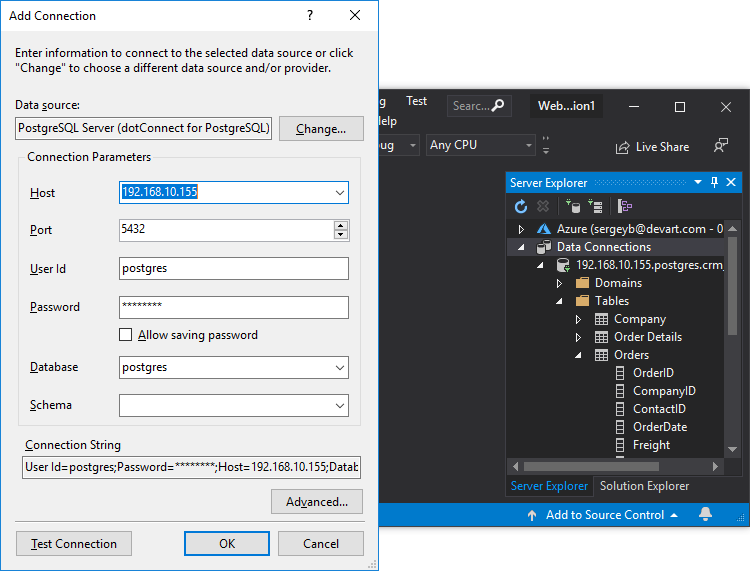
Visual Studio's Add Connection dialog with the dotConnect data source, next to Server Explorer showing tables and columns.
SSL, SSH, proxy and HTTP tunnels
dotConnect for PostgreSQL has SSL/TLS and SSH built in, can connect through proxy servers and HTTP tunnels, and runs in FIPS 140-2 mode on Windows. A server that is reachable only through a bastion host can be used with connection settings alone, with no separate tunnel process.
PostgreSQL-specific classes
dotConnect for PostgreSQL includes PgSqlLoader for bulk loading, PgSqlDump for backups, PgSqlScript for running scripts, PgSqlMonitor for tracing, and PgSqlAlerter for NOTIFY and LISTEN events. It maps PostgreSQL's own data types, including arrays, geometric types and large objects, to .NET classes. These are Developer edition features: Express leaves them out.
Performance controls
dotConnect for PostgreSQL offers connection pooling, batch processing, protocol-level prepared statements, compression and automatic fetch block sizing. Failover and load balancing support are built in too. Devart makes performance claims for the product, but we found no independent benchmark against Npgsql, so measure your own workload.
Benefits
- Fewer moving parts around the connection. Tunnels and SSH live in the connection string, not in a separate service.
- One support contract. A team with a production problem has someone to ask, with premium support as a paid option.
- Easy provider switching. Devart sells matching dotConnect providers for Oracle, MySQL and others, with a similar API and tools.
- Long reach backward. It still supports .NET Framework 2.0 and PostgreSQL 8, handy for old systems.
Real-World Uses
- A desktop .NET application reaches a PostgreSQL server through an SSH bastion, with credentials managed in the connection string.
- A team using Entity Developer designs an EF Core model visually and regenerates code as the schema changes.
- A data import job uses PgSqlLoader to push large files into PostgreSQL from a .NET service.
- A long-running .NET Framework 4.8 product keeps a supported PostgreSQL provider while it moves to .NET 10.
Who It's For, and Who Should Skip It
It fits companies that want a supported vendor behind their database layer, use Entity Developer or other Devart tools, or need SSH and tunnels inside the provider.
Skip it if you build ordinary ASP.NET Core or EF Core services on PostgreSQL: Npgsql is free, widely used and the base of most EF Core PostgreSQL setups. Skip the paid edition too if you need only simple .NET Framework connectivity, since Express does that for free.
Usage Guide
- Create a free Devart account and download the installer, or add the Devart.Data.PostgreSql NuGet package to your project.
- Copy your license key from your Devart account when you start the trial or buy.
- Reference the namespace Devart.Data.PostgreSql in your code.
- Create a PgSqlConnection with a connection string containing host, port, database, user ID, password and license key.
- Call Open, then use PgSqlCommand and PgSqlDataReader as you would with any ADO.NET provider.
- For EF Core, add the EF Core package and call its PostgreSQL configuration in your DbContext. Devart's Get Started pages walk through it.
Where it falls short
Licensing is the most common trouble. Forum threads describe builds that work locally and then fail on a server because the NuGet and installed assemblies handle licensing differently.
You are off the main road. Most PostgreSQL examples, blogs and libraries for .NET assume Npgsql, so you will sometimes translate them yourself.
Express is more limited than the name suggests. The free edition has no .NET Core support, no SSL or SSH, and no Entity Framework support, so it does not suit modern projects.
What Users Say
Public reviews of this provider are scarce. Capterra and Software Advice show a single review, written in French, at 5 out of 5, so the more useful evidence comes from developers talking in public.
Developers weighing it against Npgsql
Jorge Maldonado, an ASP.NET Core developer, on the pgsql-general mailing list, February 14, 2022:
"I have been using Devart dotConnect for PostgreSQL for some time. I know about npgsql data provider but I have never used it. Lately, I have been considering using npgsql instead of the Devart product."
He added: "I have googled on performance comparison but have not found very much information." Four years later we had the same result.
A comparison guide
Tim Lewis, C# Corner, March 30, 2026: "Devart dotConnect is a high-performance ADO.NET provider designed for enterprise .NET applications." The same post calls Npgsql "the most popular open-source PostgreSQL connector for .NET" and lists the paid license as dotConnect's main drawback.
Problems reported on Devart's forum
User brad2575, May 6, 2022: "I am having the error posted below when running code in AWS hosted server. Everything works fine locally." Devart staff explained that the installed .NET Framework assemblies and the NuGet packages use different licensing, and the fix depends on which one a project references.
User Xor, December 20, 2021: "I'm trying to build my application on Azure DevOps hosted agents and seem to have some issues with embedding the license." The user solved it weeks later by placing precompiled license files differently, and Devart's advice was to add a step that installs the provider on the build server.
The recurring themes: long-time users stay for tooling and support, the price is the first objection, and the practical pain is license handling on build servers. Both issues above are from 2021 and 2022, and version 9.0.0 in December 2025 added license key-based licensing for .NET Framework assemblies, so treat them as things to test rather than as current bugs.
Comparisons
dotConnect for PostgreSQL vs Npgsql
Npgsql is free and open source, and it has the largest community among .NET PostgreSQL providers. dotConnect charges for a broader product: visual tools in Visual Studio, built-in SSH and HTTP tunneling, LinqConnect and vendor support. If you do not need those, Npgsql is the better choice.
Editions and Pricing
| Edition | Price | What it is |
|---|
| Express | Free | Basic connectivity on .NET Framework |
| Developer | $269.95 | Full product, one year of updates |
| Server | $799.95 | Separate license type on the order page |
| Site / OEM | From $4,999 | Licenses for 10 to 100 devices, or more |
Volume discounts start at 5 licenses. Renewal for the Developer edition is $139.95, rising by 20% if you renew 3 or more months late and by 60% after 12 months. Paying for two or three years up front lowers the yearly cost.
FAQs
Does dotConnect for PostgreSQL work on Linux?
dotConnect for PostgreSQL runs on Linux and macOS through its NuGet packages on .NET Core and .NET 5 to 10. The Windows installer and Visual Studio tools are Windows only.
Is dotConnect for PostgreSQL faster than Npgsql?
We found no independent benchmark that answers this. dotConnect for PostgreSQL has batching, prepared statements and connection pooling, but so does Npgsql, so test with your own queries.
What happens when the dotConnect for PostgreSQL license year ends?
dotConnect for PostgreSQL keeps working under its perpetual license, for the version you hold. Renewal buys newer builds and support.
Does dotConnect for PostgreSQL support PostgreSQL 18?
dotConnect for PostgreSQL lists support for PostgreSQL server versions 8 to 18, along with EnterpriseDB and Heroku Postgres.
Can I use dotConnect for PostgreSQL with Amazon Redshift?
dotConnect for PostgreSQL has Redshift fixes in its revision history, including one for stored procedures in October 2026, but Redshift is not on the main compatibility list, so confirm your use case in the trial.
Is dotConnect for PostgreSQL refundable?
dotConnect for PostgreSQL has a 30-day money-back guarantee on its order page. Devart's ordering FAQ is stricter, though: it refunds within 30 days only when a technical problem or bug keeps the product from working and support can't fix it, so contact support first.
System Requirements
- .NET 5.0 to 10.0, .NET Core 2.0 to 3.1, .NET Standard 2.0 and 2.1, or .NET Framework 2.0 to 4.8
- PostgreSQL server 8 to 18
- Visual Studio 2015 to 2026 for the design-time tools
- Windows, Linux or macOS, x64 and x86
Conclusion
dotConnect for PostgreSQL is worth buying for a specific kind of team: one that values Visual Studio tooling, built-in SSH and tunnels, and a vendor to call, or that already works with Entity Developer. That support and tooling is the one reason to pay.
The main reason not to is Npgsql. For a typical EF Core service it is free, proven and what the rest of the ecosystem expects, so use the 30-day trial to confirm that dotConnect gives you something you would actually miss.
Download Free TrialBuy Now