dotConnect for Magento (Adobe Commerce): A SQL Layer Over Your Magento Store for .NET Code
dotConnect for Magento, which Devart now sells as dotConnect for Adobe Commerce, is a $339.95 ADO.NET data provider that lets C# and VB.NET applications query and update a Magento 2 or Adobe Commerce store (orders, customers, inventory) with SQL or Entity Framework Core, instead of coding against Magento's web API. It also still connects to legacy Magento 1.x stores. It runs on .NET 5 to 11 and .NET Framework 4.5 to 4.8 on Windows, Linux and macOS, as a perpetual license with a year of updates.
The classic job it's built for: a .NET back office (ERP, warehouse, accounting) that has to pull Magento orders in and push stock levels out, written by a team that knows SQL far better than Magento's REST conventions.
Quick facts
- Version: 3.3.248, released November 11, 2026
- Developer: Devart. Same product as "dotConnect for Adobe Commerce", same NuGet package (Devart.Data.Magento)
- Stores: Magento 2 and Adobe Commerce (Service Version Ver2), and Magento 1.x (Ver1)
- Authentication: Magento 2 with user name and password or an OAuth 2.0 access token. Magento 1.x with user name and API key. Optional store view code
- .NET: .NET 5 to 11, .NET Core 2.0 to 3.1, .NET Standard 2.0/2.1, .NET Framework 4.5 to 4.8
- ORMs: Entity Framework Core 1 to 11, Entity Framework 4 to 6, Dapper, NHibernate
- Download: 16.50 MB Windows installer with Visual Studio 2015 to 2026 integration, or NuGet
- Price: $339.95 Developer, $799.95 Server, $4,999.95 OEM for 10-100 devices. Perpetual, one year of updates
- Trial: 30 days, no feature limits
- Refunds: within 30 days when a technical problem support can't fix stops the provider from working
- What we checked: version 3.3.248 and the 16.50 MB download on Devart's site, the connection-string reference, the revision history back to 2016, and the order page on November 14, 2026, which lists the product as dotConnect for Adobe Commerce at $339.95 for the default single-developer license. We didn't connect it to a Magento store.
Download Free TrialBuy Now
Overview
Magento became Adobe Commerce after Adobe bought it in 2018, and the open-source edition is still called Magento Open Source. Devart followed the rename on its product page and order page, but the provider's classes still carry the old name (MagentoConnection, MagentoCommand, MagentoDataReader), and so do the NuGet packages, which keeps old code compiling.
A connection names the store's Domain, the Service Version (Ver2 for Magento 2 and Adobe Commerce, Ver1 for Magento 1.x), credentials, and optionally a StoreViewCode when a single installation runs several storefronts or languages. Queries that map directly to the store's API run there. Anything more complex is split, with Devart's local SQL engine finishing the joins and filters.
The Magento 2 side has grown in small, practical steps: inserts into SalesOrder, an OrderItems field and the ShippingAddress fields on SalesOrder, and an updatable InventoryStockItems table. Version 3.0 in December 2025 added interactive OAuth at runtime.
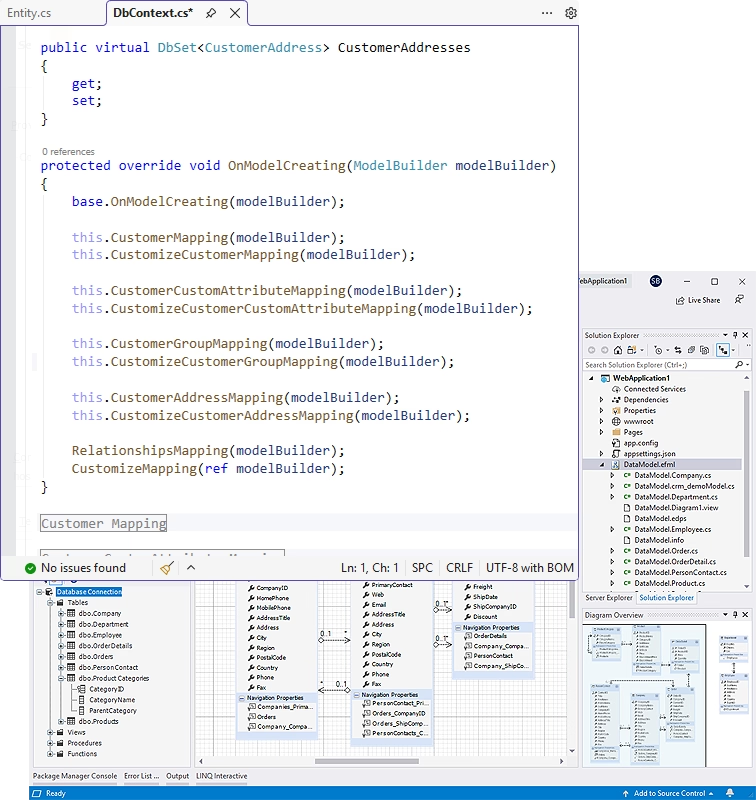
A generated EF Core DbContext in Visual Studio with mappings for Customer, CustomerCustomAttribute, CustomerGroup and CustomerAddress. The model diagram at the bottom is a sample model.
Features
Orders you can read and create
dotConnect for Magento's SalesOrder table on Magento 2 connections carries the order header, an OrderItems field with the lines, and ShippingAddress fields, and it accepts INSERT. So an order-import job can read new orders with one SELECT, and a channel integration (a marketplace or phone-order system) can write orders into Magento with SQL.
Stock updates from your own system
dotConnect for Magento made InventoryStockItems updatable, which is the piece most ERP integrations need: when quantities change in the warehouse system, an UPDATE on InventoryStockItems pushes them to the store.
Customers, groups and custom attributes
dotConnect for Magento exposes the customer side as Customer, CustomerGroup, CustomerAddress and CustomerCustomAttribute entities, the same ones you see mapped in the EF Core model above. Customer custom attributes matter in Magento because many stores keep B2B data (tax IDs, account managers) there.
Multi-store and read-only connections
dotConnect for Magento's StoreViewCode option points a connection at one store view, which you need when prices, names or descriptions differ by storefront or language. A Readonly option restricts a connection to SELECT for reporting code that should never touch the store.
EF Core models and Visual Studio integration
dotConnect for Magento has a separate EF Core package (Devart.Data.Magento.EFCore) for scaffolding a DbContext from the store, and supports Entity Framework 4 to 6, Dapper and NHibernate. In Visual Studio it adds a Server Explorer data source with an API version selector in the connect form, and Devart's dbMonitor shows the web requests behind each query.
Benefits
- Integration code your SQL developers can maintain. The Magento side reads like any other data source.
- One provider for old and new stores. Agencies still supporting a Magento 1 client and migrating others to Magento 2 can use the same code style for both.
- Less glue code. Authentication, paging and response parsing are handled by the provider.
Real-World Uses
- ERP order import: a Windows service selects new rows from SalesOrder every few minutes, with their items and shipping address, and writes them into the ERP.
- Warehouse stock sync: after each pick or delivery, the warehouse system updates InventoryStockItems so the store never oversells.
- Customer group pricing: a CRM tool reads Customer and CustomerGroup to show sales reps which B2B tier an account sits in.
- Migration tooling: a one-off .NET tool reads customers from a legacy Magento 1 store (Ver1 connection) for a move to Magento 2.
Who It's For, and Who Should Skip It
It's for .NET teams integrating Magento or Adobe Commerce with internal systems, and for Magento agencies whose back-end tooling is in C#.
Skip it if your integration is built in PHP inside Magento itself (a Magento module is the natural place for it), or if you only need spreadsheets and BI, where Devart's Excel Add-in, ODBC driver and SSIS components for Adobe Commerce fit better. Skip it too if you need every corner of Magento's API: the provider maps the common entities, and less common endpoints may still need direct REST calls. Test your exact tables during the trial.
Usage Guide
- In the Magento admin, create an integration or an admin user with API access to the resources you need.
- Install the provider on Windows for Visual Studio integration (free Devart account for the download), or add the Devart.Data.Magento package from NuGet.
- In Server Explorer, add an Adobe Commerce connection: the store's Domain, Service Version Ver2, and user name and password or an access token. Add a StoreViewCode if needed, then test.
- Open a
MagentoConnection in code and run SQL through MagentoCommand, or scaffold an EF Core model.
- If the connection fails, check the Domain value: forum threads show the exact base URL (with or without www or a /store path) is the usual culprit, and Fiddler shows which URL is actually called.
Before you buy
- The order page names the product "dotConnect for Adobe Commerce". That's this provider.
- Buy Now opens it with the single Developer license selected. A deployment on a company server needs Server ($799.95), and an app sold to other merchants needs OEM. Change the edition, update term and premium support on the order page.
- Per Devart's ordering FAQ, refunds within 30 days are for technical problems that support can't resolve, so test against your store, including your hosting's security settings, during the trial.
Where it falls short
- Connections can be fiddly. Forum users connecting to remote Magento 1 stores hit "Error accessing web service", "Invalid XML" and "Procedure 'login' not present" errors that came down to the domain format and the store's API setup.
- Magento 1 relies on its old SOAP API. Magento 1 reached end of life in 2020, and Ver1 connections depend on the store's old SOAP API being enabled and reachable.
- Thin documentation. The Connecting walkthrough in Devart's docs shows an empty list of required parameters and a Magento 1 style example (domain, user, API key). The connection-string reference is the page to use.
- Entity coverage isn't published in one list. You learn the available tables from Server Explorer or GetSchema in the trial.
What Users Say
There are no rated reviews of this provider on G2, Capterra or similar sites. What users have said in public is in Devart's forum for its cloud providers, and it's mostly about getting connected.
Devart forum, May 2016 to January 2017: a remote store that wouldn't connect
A trial user (robinhood1995) reported that his own web service reached the store fine, but the provider returned "Error accessing web service." Devart's engineer (Pinturiccio) suggested domain variants without "https://www", and later "https://www.domainname.com/store/ or https://www.domainname.com/", and added: "You can also use Fiddler to find out to which URL your web service sends requests and use this URL as the domain parameter in MagentoConnection."
Months later the user wrote: "I have tried all I can think of and I cannot get the addin to connect to my site," now with "Procedure 'login' not present." He also asked for a trial extension after being pulled onto another project, and Devart answered by email.
Devart forum, August 2016: data retrieval error
Another user (kwasek83) connected to a Magento 1.9.2.4 store but got "Procedure customerCustomerList not present" when retrieving tables. Devart's admin (Shalex) asked whether that edition included the SOAP API and whether the server had full internet access, since Magento might be trying to load a SOAP schema.
Both threads are Magento 1 era and end without a posted fix, which is a fair warning: the provider is only as reliable as the store's API configuration. Magento 2 connections use a different API, and Devart has kept adding Magento 2 fields since. Either way, connect to your real store during the trial before you buy.
Comparisons
vs. Magento's REST API with your own code
Magento 2's REST API is complete and free, and every extension adds its own endpoints there first. Coding it yourself gives you full coverage at the cost of writing token handling, search criteria, paging and models. The provider trades some coverage for SQL, joins and EF Core.
vs. dotConnect for BigCommerce
Same Devart family, price and licensing, for the other big e-commerce platform. If you integrate stores on both platforms, the two providers give your code the same ADO.NET shape.
Editions and Pricing
| Edition | Price | Use |
|---|
| Developer (selected by Buy Now) | $339.95 | One developer building and testing |
| Server | $799.95 | Running the integration on one company server |
| OEM for 10-100 devices | $4,999.95 | Bundling it in a product you distribute |
| Site, OEM 100+ devices | On the order page | Whole company or wider distribution |
FAQs
Is dotConnect for Magento the same as dotConnect for Adobe Commerce?
Yes. dotConnect for Magento was renamed dotConnect for Adobe Commerce on Devart's site and order page. The download, NuGet package and class names still use "Magento".
Does dotConnect for Magento work with Magento Open Source 2.4?
dotConnect for Magento connects to Magento 2 stores through the Ver2 service version, which covers Magento Open Source and Adobe Commerce 2.x. Check your store's API permissions and test the tables you need in the trial.
Can dotConnect for Magento work with a store that has several store views?
Yes. dotConnect for Magento's StoreViewCode connection option selects the store view, so you can open one connection per storefront or language.
Does dotConnect for Magento connect to the Magento database directly?
No. dotConnect for Magento talks to the store's web API over HTTPS, not to its MySQL database, so it respects Magento's business logic and permissions and works with hosted stores where database access isn't available.
Can I still connect dotConnect for Magento to a Magento 1 store?
Yes, with Service Version Ver1, a user name and the API key from the store's user settings. Magento 1 itself is no longer maintained, so treat this as a migration aid.
Is a dotConnect for Magento license permanent?
Yes. dotConnect for Magento licenses are perpetual. The first year of updates and support is included, and renewing gets newer versions after that.
System Requirements
- .NET 5 to 11, .NET Core 2.0 to 3.1, .NET Standard 2.0/2.1, or .NET Framework 4.5 to 4.8
- Windows, Linux or macOS. Installer and Visual Studio 2015 to 2026 integration on Windows
- A Magento 2, Adobe Commerce or Magento 1.x store with API access for your user
Conclusion
dotConnect for Magento is worth $339.95 to a .NET team that has to keep Magento or Adobe Commerce in step with an ERP or warehouse system, because orders, stock and customers become SQL tables and EF Core entities instead of API plumbing. The best reason to buy is that order import and stock sync, the two jobs nearly every store integration needs, are directly supported with SalesOrder inserts and updatable InventoryStockItems. The reason to hesitate is connection setup: older forum threads show users who never got a remote store to connect, so prove it against your real store, on your hosting, during the 30-day trial before paying, and budget for the Server license if it will run on a server.
Download Free TrialBuy Now