Code Review Bundle: Review Assistant and Code Compare Pro for a 10-Developer Visual Studio Team
Code Review Bundle is Devart's package of its two Visual Studio code review tools, Review Assistant (review requests, comments on code lines, defect tracking) and Code Compare Pro (file and folder diff with three-way merge), licensed for 10 users of each for $739.95. It's for Windows .NET teams that review code inside Visual Studio 2015 to 2026 on Git, TFS and Azure DevOps, Subversion, Mercurial or Perforce, and it costs $310 less than buying the same 10-user licenses of both tools separately.
The bundle exists because the two tools work better together: with both installed, reviewers comment straight from Code Compare's comparison view, and code regions that carry review comments are highlighted in the diff. If your team already reviews pull requests in a web tool, you probably don't need either one.
Quick facts
- What's in it: Review Assistant (10 users) and Code Compare Pro (10 users), from Devart's bundle page
- Versions: Review Assistant 4.3.11 and Code Compare 5.5.11, both released March 6, 2026 (both added Visual Studio 2026 support)
- Developer: Devart
- Platform: Windows, as Visual Studio extensions (Code Compare also runs on its own). Review Assistant needs a server on SQL Server, SQL Server Express or LocalDB
- Version control: Git, TFS and Azure DevOps, Subversion, Mercurial and Perforce
- Price: $739.95 for 10 users with one year of support and upgrades. 25 users $1,479.95, 50 users $2,219.95, 100 users $3,329.95, unlimited $6,659.95
- Separately: $1,049.95 for the same 10-user licenses ($699.95 for Code Compare Pro, $349.95 for Review Assistant)
- Trial: 30 days of both tools. After that, Review Assistant falls back to its free 3-user, 1-project plan and Code Compare to its Free edition
- What we checked: the bundle page's contents and price table, both tools' revision histories, the 19.14 MB and 12.85 MB installers listed on the bundle download page, the Visual Studio Marketplace ratings, and the order page on November 13, 2026: $739.95 for the default 10-user bundle with one year of support, plus the 25, 50, 100 and unlimited-user prices. We didn't run a review with a team.
Download Free TrialBuy Now
Overview
Review Assistant turns code review into a workflow inside Visual Studio: an author or reviewer opens a review on any set of committed revisions, reviewers comment on lines, blocks, files or binary files, the author fixes flagged defects and adds the fix revisions, and the review moves through rounds until it's accepted. A small server (SQL Server, Express or LocalDB) stores the reviews and sends notifications. Code Compare is the diff and merge tool underneath: it compares files and folders, understands the structure of C#, C++, Visual Basic, JavaScript, Java and XML, and resolves merge conflicts in a three-pane view.
Both tools are mature rather than fast-moving. Their release histories show long gaps (Code Compare went from February 2020 to May 2024 between versions, the release that added Visual Studio 2022), and both added Visual Studio 2026 in March 2026. The bundle itself hasn't changed since Devart set it up; what you're buying is the two current products at a lower price.
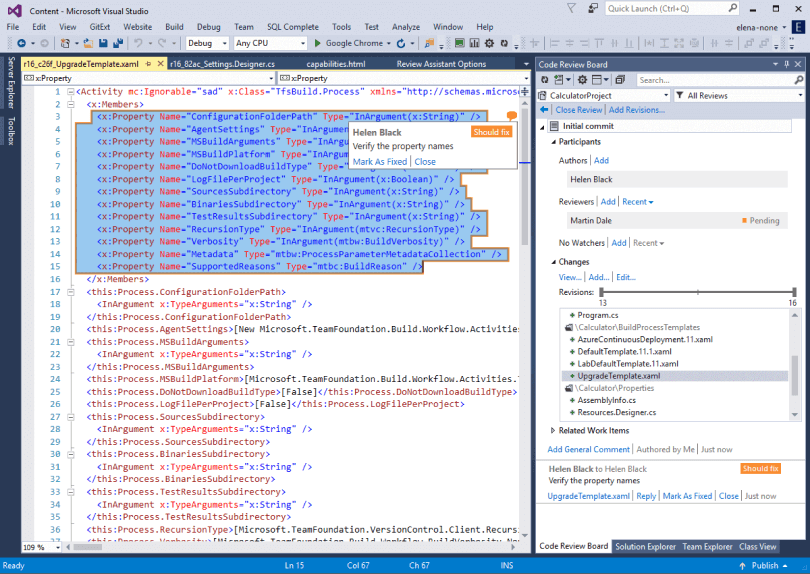
A Review Assistant comment flagged "Should fix" on selected lines of a XAML file, with the Code Review Board showing the review's author, reviewer, revisions 13 to 16 and changed files (older Visual Studio).
Features
Flexible review workflows (Review Assistant)
Review Assistant offers a simple workflow and a strict one with a moderator. Any developer can start a post-commit review on any set of revisions, the code author is pulled from the repository automatically, several authors can share a review, and one review can include code from several repositories. It can also enforce a policy that blocks check-ins without a review.
Threaded comments and fix-and-verify rounds (Review Assistant)
Review Assistant lets reviewers comment on lines, blocks, files, binary files or the whole review, flag comments as defects, and discuss them in threads without meetings. Authors see open comments in the code editor, defect statuses are color-coded, and an author restarts the review by adding the fix revisions, so reviewers see exactly what changed in response to each comment.
Review reports (Review Assistant)
Review Assistant's reports show who is holding up reviews (Reviews Status), which repository revisions have been reviewed (Code Coverage), author and reviewer statistics, and a detailed report that exports a review and its comments in printable form.
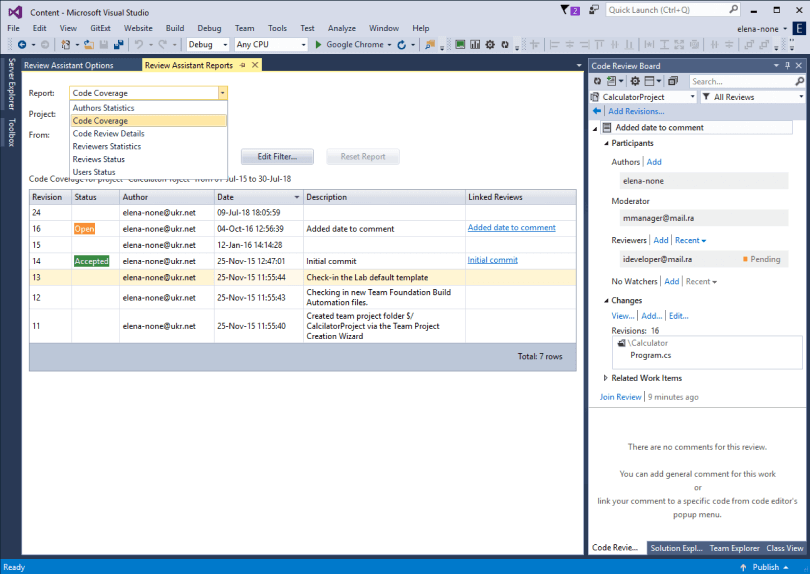
Review Assistant Reports with the Code Coverage report: each revision's status (Open, Accepted), author, date and linked review, with the report list (Authors Statistics, Code Review Details, Reviewers Statistics, Reviews Status, Users Status) open (older Visual Studio).
Structure-aware comparison (Code Compare Pro)
Code Compare Pro compares source files by structure as well as text: it matches methods, matches similar lines even after refactoring, detects moved blocks, and shows structural changes in a Difference Explorer, for C#, C++, Visual Basic, JavaScript, Java and XML. Text comparison highlights changes within lines, collapses unchanged regions and lets you edit and merge with a click.
Three-way merge (Code Compare Pro)
Code Compare Pro adds three comparison panes (horizontal or vertical) and works as your version control system's merge tool: non-conflicting changes merge automatically, conflicts are highlighted, and each one is resolved with a click. It also compares whole folders, which helps when comparing branches.
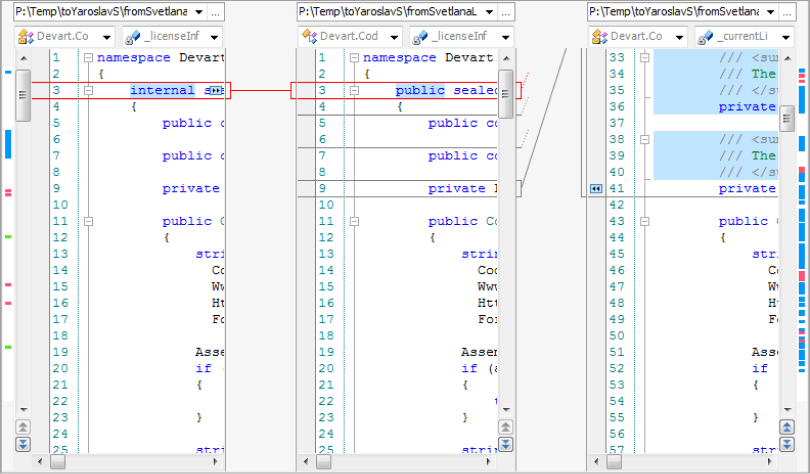
Code Compare's three-pane comparison of three revisions of a C# file, with a modified line linked across the panes and change markers in the margins.
What you only get with both tools
Code Review Bundle's two tools are integrated: Review Assistant uses Code Compare's Visual Studio extension, so you can add review comments while comparing file revisions, see existing review comments from a comparison document, and get code regions with comments highlighted alongside the inserted, deleted and modified blocks. Devart also describes in-place code review for external version control clients such as TortoiseSVN.
Benefits
- Reviews without leaving Visual Studio. Comments, fixes and the diff all live in the IDE your team already uses.
- Works with older version control. TFS, Subversion, Mercurial and Perforce teams get structured reviews that web pull-request tools built for Git don't give them.
- A better diff for everyone. Ten Code Compare Pro seats replace Visual Studio's built-in comparison for daily work, not just reviews.
- About 30% off. $739.95 instead of $1,049.95 for the same 10-user licenses.
Real-World Uses
- Formal reviews on TFVC or Subversion. A regulated team uses the strict workflow with a moderator and the check-in policy so no change ships unreviewed.
- Post-commit reviews on Git. A team reviews each feature's commits after they're pushed, with comments kept next to the code.
- Merge-heavy branching. Developers resolve merge conflicts in Code Compare's three-way view every day, and reviewers use the same view to comment.
- Review metrics for a lead. A team lead uses the Reviews Status and Code Coverage reports to see which changes are still waiting.
Who It's For, and Who Should Skip It
It's for Windows .NET teams of around 4 to 10 developers who work in Visual Studio, want reviews and diffs in the IDE, and are on TFS/TFVC, Subversion, Mercurial or Perforce, or on Git without a pull-request platform.
Skip it if your team reviews pull requests on GitHub, GitLab, Bitbucket or Azure DevOps Services; those do the job in the browser and work with any editor. Skip it if anyone works in VS Code, Rider or on a Mac. A team of three or fewer on one project can use Review Assistant's free plan and Code Compare Free and pay nothing. And if you only want the diff tool, buy Code Compare Pro alone at $69.95 per user.
Usage Guide
- Download both installers. The bundle download page offers Review Assistant and Code Compare; a free Devart account may be needed.
- Set up the review server. Run the Review Assistant installer once as Server on a machine with SQL Server, SQL Server Express or LocalDB.
- Install the clients. On each developer PC, install Review Assistant as Workstation and Code Compare, with Visual Studio closed.
- Connect your repository. In Visual Studio, point Review Assistant at your project's Git, TFS, Subversion, Mercurial or Perforce repository.
- Start a review. Pick revisions, add reviewers, and comment from the code editor or a Code Compare comparison.
- License it. Enter the bundle's license keys before the 30-day trial ends, or the tools drop to their free editions.
Before you buy
The Buy Now button opens the order page on the 10-user bundle with one year of support and upgrades ($739.95). Pick 25, 50, 100 or unlimited users, two or three years, or priority support on the same page. There's no 5-user tier, so a team of four or five pays for 10, and the bundle only saves money if all of you need Code Compare Pro too.
Where it falls short
- Slow to follow new Visual Studio versions. Code Compare added Visual Studio 2022 in May 2024, more than two years after its release, and Review Assistant added it in September 2022.
- Post-commit only. Review Assistant reviews revisions already in the repository; TFS users shelve changes to review them before check-in.
- Windows and Visual Studio only. No VS Code, Rider or Mac support for the review client.
- A server to run. Review Assistant needs its own server and SQL Server database.
- Dated screenshots. Devart's bundle images come from older Visual Studio versions, so expect some differences in a current IDE.
What Users Say
The bundle itself isn't reviewed anywhere independently, but both of its tools are rated on the Visual Studio Marketplace. On November 13, 2026, Code Compare had 4.3 out of 5 from 233 ratings and about 162,000 installs, and Review Assistant had 4.0 out of 5 from 24 ratings and about 38,000 installs. Most of those reviews are from 2012 to 2019.
On Devart's bundle page
"Did everything that we were hoping the default Visual Studio reviews would do. The iterations through accept/reject were the key winner" (Eric Savage)
"This tool is awesome. I use it nearly every day in Visual Studio e.g. to compare versioning conflicts or just compare current file with it's it's version history. And it works perfectly. Performance is very good" (Thomas Guenther)
"Reviewing code using powerful code navigation functions in Visual Studio is very convenient! What a tool!" (Hyunjik Bae)
"Great tool. I've been using it for several years, and it satisfies my needs even in Trial version. Especially coloring of difference is quite simple and it is nicely integrated in Visual Studio" (Nemanja Simović)
Criticism on the Visual Studio Marketplace
"Good software, but only one bad thing is that it does not support the VS 2022 version. I hope soon we can see new version with support VS 2022" (Hryhorii, Code Compare, 3/5, August 2022). Code Compare 5.4.20 added Visual Studio 2022 in May 2024.
"I had to uninstall Code Compare after working with MS support staff to figure out why my editor sessions were very slow. They came back and told me that the time was being spent in devart.common.dll." (Greg Veres, Code Compare, 3/5, February 2018)
"I really tried setting it up, but it is not very user friendly. It seems to give errors without any hints causing it. You're not a member of project, etc. while everything seems configured correctly." (Dennis van der Pool, Review Assistant, 1/5, September 2015)
"I am disappointed that I can't create a code review with my pending changes, but only with revisions already checked in to the server." (Ognjen Sobajic, Review Assistant, 2/5, March 2017)
The pattern across both tools: teams that got Review Assistant running liked commenting in the editor and the review rounds, and Code Compare users rate its diff well above Visual Studio's built-in one. The recurring complaints on the Marketplace are about slow support for new Visual Studio versions, performance inside large solutions, and Review Assistant's setup. Devart's page quotes are hand-picked, so weigh the Marketplace averages more.
Comparisons
The bundle vs buying Review Assistant and Code Compare separately
For 10 users, Code Compare Pro costs $699.95 ($69.95 per user) and Review Assistant $349.95, so $1,049.95 in total. Code Review Bundle is $739.95 for the same licenses, $310 or about 30% less, and Devart's bundle page states the same comparison. The saving only counts if you'd buy both: Review Assistant alone is $349.95 and free for up to 3 users on one project.
The bundle vs pull requests on GitHub, GitLab or Azure DevOps
Pull-request reviews are included in hosted Git platforms, run in the browser and work with any editor. Code Review Bundle keeps reviews inside Visual Studio, works with TFVC, Subversion, Mercurial and Perforce, supports a moderated workflow and reports, and adds a structure-aware diff. If your team is on hosted Git with pull requests, the bundle mainly adds the better diff.
Editions and Pricing
The bundle has one edition; the user count and term are chosen on the order page. Prices with one year of support and upgrades on November 13, 2026:
| Users | Bundle price | Includes |
|---|
| 10 (default) | $739.95 | Review Assistant and Code Compare Pro for 10 users |
| 25 | $1,479.95 | Both tools for 25 users |
| 50 | $2,219.95 | Both tools for 50 users |
| 100 | $3,329.95 | Both tools for 100 users |
| Unlimited | $6,659.95 | Both tools for unlimited users |
Two- and three-year terms and priority support are options on the order page.
FAQs
What does Code Review Bundle include?
Code Review Bundle includes Devart's Review Assistant code review tool and Code Compare Pro diff and merge tool, each licensed for the number of users you pick (10 by default).
Does Code Review Bundle work with Visual Studio 2026?
Yes. Both tools in Code Review Bundle added Visual Studio 2026 support in their March 6, 2026 releases, Review Assistant 4.3.11 and Code Compare 5.5.11.
Does Code Review Bundle work with Git?
Yes. Code Review Bundle's Review Assistant works with Git as well as TFS and Azure DevOps, Subversion, Mercurial and Perforce, and Code Compare can be set as the diff and merge tool for any version control system that supports external comparators.
Is there a 5-user Code Review Bundle?
No. Code Review Bundle starts at 10 users ($739.95). A smaller team can buy Code Compare Pro per user and use Review Assistant's free plan for up to 3 users on one project.
What happens when the Code Review Bundle trial ends?
Code Review Bundle's tools don't stop: Review Assistant drops to its free plan (3 users, 1 project) and Code Compare to its Free edition until you enter license keys.
Can I get a refund for Code Review Bundle?
Yes. Devart refunds Code Review Bundle purchases within 30 days if you aren't satisfied.
System Requirements
- Windows with Visual Studio (Code Compare: Visual Studio 2015 to 2026, not the Express editions)
- Review Assistant server: SQL Server, SQL Server Express or LocalDB
- Git, TFS or Azure DevOps, Subversion, Mercurial or Perforce
- About 32 MB for the two installers (19.14 MB and 12.85 MB)
Conclusion
Code Review Bundle is worth $739.95 for a Visual Studio team of roughly 5 to 10 developers that wants in-IDE code reviews and a better diff for everyone, especially on TFVC, Subversion, Mercurial or Perforce, where web pull requests aren't an option. The one reason to buy it is the $310 saving over buying both tools, plus the integration that lets reviewers comment from the diff. The main reason not to is that a team on hosted Git with pull requests, or one with developers outside Visual Studio, gets little from Review Assistant, and both tools are slow to support new Visual Studio releases. Try both tools free for 30 days first.
Download Free TrialBuy Now