Excel Add-in for Shopify: Your Store's Products, Customers and Orders as Editable Excel Tables
Excel Add-in for Shopify is a Devart add-in for Excel on Windows that connects to a Shopify store through the Admin API, loads products, variants, customers, orders and other store data into worksheets, and saves your edits back to the store. One license with a year of updates is $179.95. It's aimed at store owners and e-commerce staff who keep catalogue and customer data tidy in spreadsheets.
Shopify's product CSV export and import covers a lot, but every round trip means a download, careful editing of a wide file, and an upload that can overwrite more than you meant. Here you query just the products or customers you want, change cells, and commit; the rest of the store isn't touched.
Quick facts
- Latest release: 3.1.70 of September 7, 2026
- Vendor: Devart
- Works in: Excel 2007 to 2024 on Windows
- Store access: store address (xxxxx.myshopify.com) plus an Admin API access token, or an API key and password
- Shopify API: version 2024-04 support added in October 2024
- Store objects: Products, ProductVariants, Customers, Orders, OrderDetails, DraftOrders, Fulfillments, InventoryLevels, GiftCards, PaymentPayouts and more
- Price: $179.95 for year one, $89.95 per year after that for updates
- Trial: 30 days free; sign in to Devart to download
What we checked: the authentication types and token steps in Devart's Shopify documentation, the Shopify entries in the revision history, version 3.1.70 at 76.60 MB on the download page, Shopify's own notice about custom apps, and the checkout itself, where one license with a year of updates came to $179.95 and the renewal to $89.95 on November 14, 2026. We did not connect it to a store.
Before you buy
Getting an access token changed in 2026. Devart's instructions create a custom app in the Shopify admin and copy its Admin API access token. Shopify stopped allowing new custom apps to be created in the admin on January 1, 2026, and now has them built in its Dev Dashboard; custom apps made before then keep working. If your store already has one, its token is all you need. If not, confirm with Devart support during the trial how to connect a Dev Dashboard app before you pay.
Scope the token sensibly. Devart's guide says to grant all Admin API scopes. A token with every scope can change anything the API allows, so keep it out of shared workbooks (untick "Allow saving security info") or connect read-only when you only need reports.
Download Free TrialBuy Now
Overview
After installation Excel gains a Devart ribbon tab. You start with Get Data, select Shopify, give it the store address and token, and choose an object. Shopify's REST resources appear as tables: Customers with their default address split into columns, Orders with totals and note attributes, OrderDetails with line properties, ProductVariants with price and SKU.
Edits go back through the same API, so Shopify's own rules apply. Variant inventory fields (InventoryQuantity and its adjustment fields) are read-only, because Shopify moved stock changes to inventory levels; Fulfillments, on the other hand, accept inserts and updates.
Features
Store address and token, nothing else
Excel Add-in for Shopify uses AccessToken authentication by default: the full myshopify.com store name and the app's Admin API access token. The older API key and password method from Shopify's private apps is still selectable, and the advanced editor has Client Id and Client Secret fields for a custom app's refresh-token sign-in.
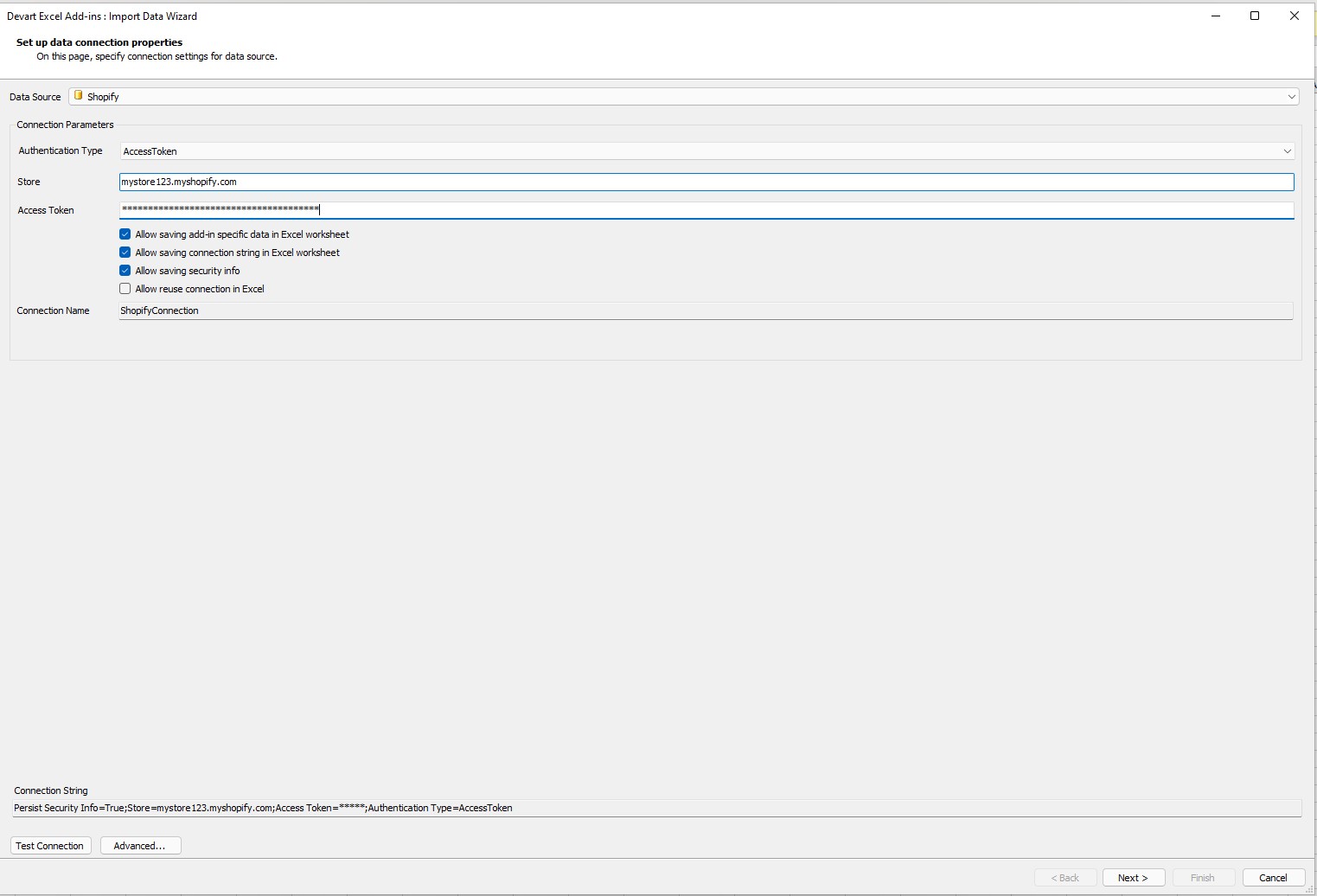
The Shopify connection page: Authentication Type set to AccessToken, a mystore123.myshopify.com store, a masked token, and the resulting connection string.
Pick customers or orders with filters on dates and flags
Excel Add-in for Shopify's Query Builder lists each object's fields, from AcceptsMarketing to every part of the default address. Add a CreatedAt range or a condition such as "accepts marketing is true", sort, and limit the rows. Queries the Shopify API can't answer directly are completed by the add-in's local SQL engine.
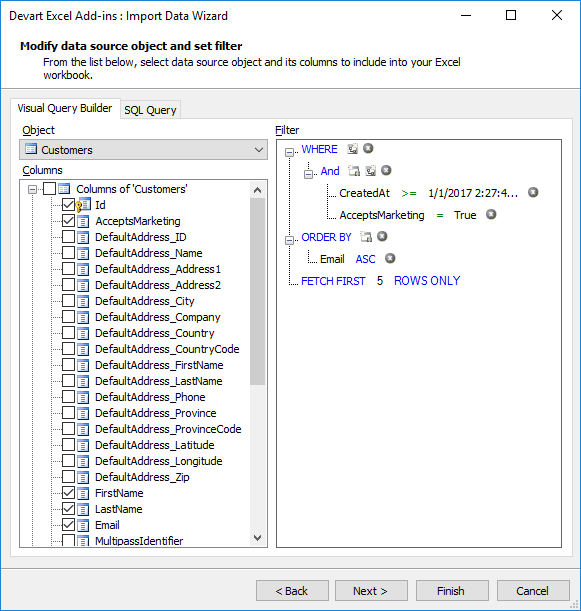
Customers in the Query Builder, filtered to those created after a date who accept marketing, sorted by email, five rows.
Bulk-edit customers and products, then commit
Excel Add-in for Shopify marks each change in Edit Mode: edited cells, changed rows and new rows in different colours, with read-only columns such as Id and OrdersCount greyed out. One Commit writes the whole batch to the store; Rollback abandons it.
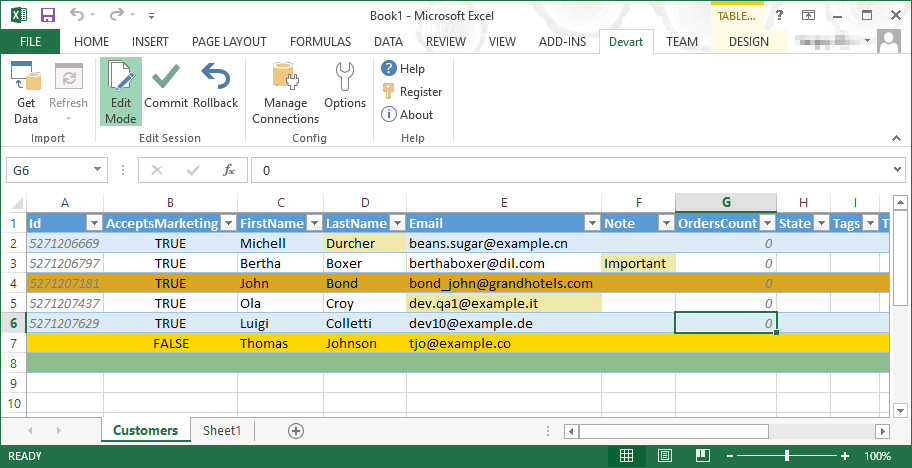
Shopify customers in Edit Mode: a note and an email have been changed, one row is highlighted as modified, and a new customer, Thomas Johnson, is being added.
Shopify's allowed values checked as you type
Excel Add-in for Shopify knows the values each field accepts. Type "important" into a customer's State and the cell shows the three states Shopify allows (Decline, Disabled, Invited); mistype a TRUE/FALSE flag and it's flagged before anything is sent.
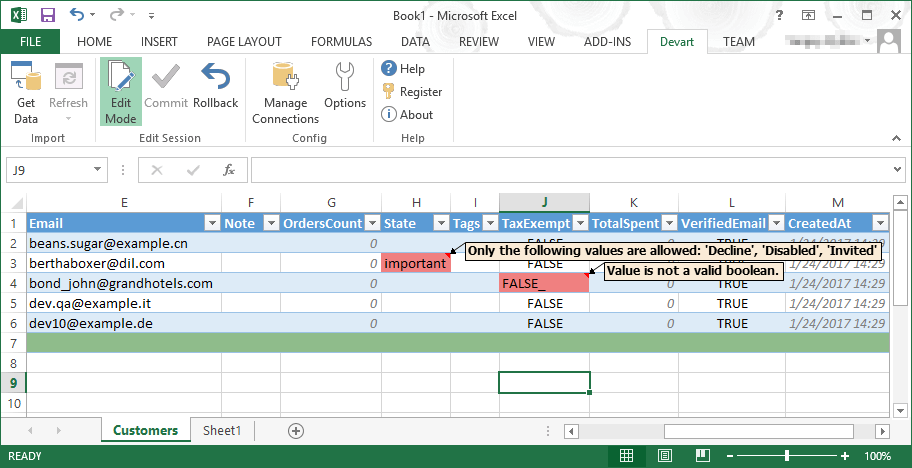
Validation on the Customers sheet: an invalid State lists the allowed values, and "FALSE_" in TaxExempt is rejected as not a valid boolean.
Store finance and stock data for reporting
Excel Add-in for Shopify also reaches objects the product CSV doesn't: PaymentPayouts for reconciling Shopify Payments deposits, GiftCards (added with API 2024-04 support), InventoryLevels for stock per location, and DraftOrders. Loaded into Excel, they feed pivot tables and charts that refresh from the live store.
Benefits
- Targeted changes. Only the rows you load and edit are written, unlike a full catalogue CSV re-import.
- Customer data cleanup in familiar tools. Fix capitalisation, duplicate emails or missing tags with Excel formulas before committing.
- Live reports without an export step. Payouts, orders and inventory refresh in place.
Real-World Uses
- Seasonal price changes: load ProductVariants for one collection's products, apply a percentage in a helper column, paste the new prices, and commit.
- Marketing consent clean-up: filter customers by AcceptsMarketing and creation date, correct tags or notes, and remove test accounts.
- Payout reconciliation: pull PaymentPayouts into a sheet next to your bank export and match deposits.
- Order review: load Orders and OrderDetails for a date range to check discounts, note attributes and line properties in a pivot.
Who It's For, and Who Should Skip It
Good for Shopify merchants and agency staff on Windows who already live in Excel and edit products, variants or customers in batches every week.
Skip it if your store has no existing custom app and you'd rather not sort out Dev Dashboard credentials, if you use a Mac, or if you need a scheduled sync between Shopify and another system. Devart describes its add-ins as interactive tools with no automation, so recurring jobs belong in an integration or a Shopify app built for bulk editing.
Usage Guide
- Install the 76.60 MB package (Devart sign-in required) from a Windows account with admin rights.
- Get a token. If your store has a custom app made in the admin, open it under Settings, Apps and sales channels, Develop apps, and copy the Admin API access token from API credentials. Give the app only the Admin API scopes for the data you'll edit.
- Connect: Devart tab, Get Data, Shopify, AccessToken, enter the store as yourstore.myshopify.com and paste the token, then Test Connection.
- Load: pick an object such as ProductVariants or Customers, tick fields, filter, preview, Finish.
- Edit: click Edit Mode, change cells or add rows, clear any red validation marks, then Commit.
Where it falls short
- Stock edits aren't in the variant table. InventoryQuantity on ProductVariants is read-only, following Shopify's API.
- Shopify's API moves fast. The newest supported API version named in Devart's history is 2024-04, and past releases fixed breakages after Shopify API changes (a buffering error on Products updates, Orders and DraftOrders bugs, an OAuth login fix in January 2025).
- Token setup for new stores. The admin custom-app route in Devart's guide no longer works for apps created after January 1, 2026.
- No scheduled runs. Refresh and Commit are manual; macros can't drive them.
What Users Say
Shopify add-in reviews
Capterra lists Devart Excel Add-In for Shopify with zero user reviews, and GetApp's page has none either, as of November 14, 2026. There's no merchant feedback on this specific add-in yet.
Devart's Excel add-ins in general
For the product line overall, TrustRadius shows a score of about 9.3 out of 10 from around 33 ratings, some of which are really about Devart's other database tools. The Salesforce add-in, the best-reviewed single add-in, holds 4.7 out of 5 from three reviews on G2, where users mention the cost (there's no free version) and say the first setup takes some configuration if API connections are new to you.
Comparisons
Devart's add-in vs Shopify's product and customer CSVs
Shopify's CSV import and export are free and built in, and fine for occasional catalogue loads. Devart's add-in is faster for repeated, partial edits because it writes only what you changed and validates values first, and it reaches objects like payouts and gift cards that the CSVs don't cover.
Single add-in vs Cloud Pack
The $499.95 Excel Add-in Cloud Pack includes Shopify along with BigCommerce, Magento, Mailchimp, HubSpot, Salesforce and 14 more cloud add-ins. A merchant who also wants Mailchimp and QuickBooks Online data in Excel pays $539.85 for three single add-ins, so the pack is already cheaper.
Editions and Pricing
There's just one edition. Buy Now opens Devart's order page with a single license and 12 months of updates; you can extend the update period to two or three years or add priority support there.
| Choice | Price | Details |
|---|
| Excel Add-in for Shopify | $179.95 | Permanent license with a year of updates and support |
| Renewal | $89.95 per year | Costs 20% or 60% more if renewed 3 or 12 months late |
| Cloud Pack | $499.95 | 20 cloud add-ins; $3,599 if bought singly |
| Universal Pack | $599.95 | 26 add-ins, cloud apps and databases |
Buying for a team? Devart takes 5% off five or more licenses, 10% off ten or more and 15% off twenty or more.
FAQs
Can Excel Add-in for Shopify update inventory quantities?
Not through the variant table. Excel Add-in for Shopify keeps InventoryQuantity on ProductVariants read-only, as Shopify's API requires; stock is held in the InventoryLevels object, which the add-in can load.
Will editing in Excel trigger Shopify notifications?
Excel Add-in for Shopify writes through the Admin API, so the store reacts as it would to any API update, including webhooks and apps listening for product or customer changes. Test on a development store or a small batch first.
What if the add-in can't connect to my store?
Devart refunds Excel Add-in for Shopify within 30 days if a technical fault stops it working and its support team can't fix it. Simply changing your mind isn't covered, so get the connection working during the free trial.
Can two staff members share one license?
No. An Excel Add-in for Shopify license is per person, for one computer plus that person's second device. Each additional user needs a license, with volume discounts from five.
Does it run in Excel for Mac or the Excel web app?
No. Excel Add-in for Shopify is a Windows add-in for Excel 2007 to 2024 only.
System Requirements
- Microsoft Excel 2007, 2010, 2013, 2016, 2019, 2021 or 2024 on a Windows PC
- .NET Framework 4.0 or later; Visual Studio 2010 Tools for Office Runtime
- Admin rights to run the installer
- A Shopify store with an Admin API access token (or API key and password)
Conclusion
Excel Add-in for Shopify pays off for a merchant who edits products, variants or customers in bulk often enough to hate the CSV cycle. At $179.95 it turns those edits into a filter, a paste and a Commit, with Shopify's allowed values enforced in the cell, and adds payouts and gift cards for reporting.
The catch is access: new stores can no longer create the admin custom app Devart's guide relies on, and the newest Shopify API version in its history is 2024-04. Use the 30-day trial to confirm it connects to your store before buying.
Download Free TrialBuy Now