SSIS Universal Bundle: Devart's SSIS Components for 54 Databases and Cloud Apps
SSIS Universal Bundle is Devart's package of all its SSIS Data Flow Components, for data engineers and BI developers who build SQL Server Integration Services packages in Visual Studio. One license adds Source, Destination and Lookup components for 11 databases and cloud data warehouses and 43 cloud applications, from Salesforce and Snowflake to QuickBooks Online and Stripe. It costs $499.95 a year for one developer on subscription, or $999.95 for a perpetual license.
SSIS ships with good connectors for SQL Server and flat files, and very little for SaaS apps. If your packages need to pull CRM records, push data into Snowflake or BigQuery, or sync an online store with a warehouse, this bundle fills that gap without a separate connector purchase for every system.
Quick facts
- Version: 5.1.49, released August 17, 2026
- Developer: Devart
- What's inside: Source, Destination and Lookup components for 54 data sources (full list below)
- SSIS versions: SQL Server Integration Services 2012, 2014, 2016, 2017, 2019, 2022 and 2025. SSIS 2008 for the six database components only
- Design tools: Visual Studio SSIS projects, including Visual Studio 2026 (added in version 4.0)
- Download: one 618.60 MB installer
- Price: $499.95 a year for one developer (subscription), $999.95 perpetual. Server and Site licenses available
- Trial: 30 days, fully functional, download needs a free Devart account
- Guarantee: 30-day money-back guarantee
- What we checked: the bundle's source list, version 5.1.49 and the 618.60 MB download on Devart's pages, and the order page on November 13, 2026: SSIS Universal Bundle at $499.95 for the default single-developer, one-year subscription (renewing at $499.95), $999.95 perpetual, $1,249.95 and $2,499.95 for Server subscription and perpetual, and $9,999.95 for a perpetual Site license for 10-100 devices. We didn't install the components or run a package.
Download Free TrialBuy Now
What the Bundle Contains
For every source, the bundle installs three SSIS data flow components: a Source, a Destination and a Lookup, plus a connection manager. Devart's separate Database Bundle and Cloud Bundle are no longer offered on its site; this is now the one bundle.
| Group | Sources included |
|---|
| Databases (6) | SQL Server, Oracle, MySQL (with MariaDB, Percona, Amazon RDS and Aurora), PostgreSQL, SQLite, DB2 |
| Cloud data warehouses (5) | Snowflake, Google BigQuery, Amazon Redshift, Azure Synapse Analytics, Azure SQL Data Warehouse |
| CRM (10) | Salesforce, Dynamics 365, Dynamics CRM, HubSpot, Freshworks CRM, Insightly CRM, Pipedrive, Streak, SugarCRM, Zoho CRM |
| Accounting, ERP and payments (7) | QuickBooks Online, NetSuite, FreshBooks, Zoho Books, Zoho Invoice, Stripe, Zoho People |
| E-commerce and inventory (8) | Shopify, BigCommerce, Magento, Adobe Commerce, ShipStation, Cin7 Core, DEAR Inventory, Zoho Inventory |
| Marketing, ads and analytics (10) | Mailchimp, Marketo, Salesforce Marketing Cloud, ActiveCampaign, EmailOctopus, SendPulse, SurveyMonkey, Google Ads, Google Analytics, Twitter Ads |
| Help desk, projects and collaboration (8) | Zendesk, Freshdesk, Zoho Desk, Jira, Asana, Podio, Slack, WordPress |
Overview
Devart's SSIS components drop into the SSIS Toolbox in Visual Studio like Microsoft's own. You add a Devart connection manager for, say, Salesforce, place a Devart Salesforce Source in a data flow, write a SELECT statement in its editor, and connect it to any SSIS transformation or destination. Going the other way, a Devart Destination writes rows into the cloud app or warehouse, and a Devart Lookup checks incoming rows against it. Everything runs inside your own SSIS server, so the data never passes through a third-party service.
The bundle is updated often, mostly to keep pace with the cloud APIs. Version 4.0 (January 2026) added SSIS 2025, SQL Server 2025, Visual Studio 2026 and Oracle 26ai; 5.0 (June 2026) brought ActiveCampaign custom objects and a batch of cloud API fixes; and 5.1.49 (August 2026) added Stripe API version 2026-01-28, HubSpot OAuth v3 endpoints, BigQuery partition pseudocolumns and Snowflake fixes.
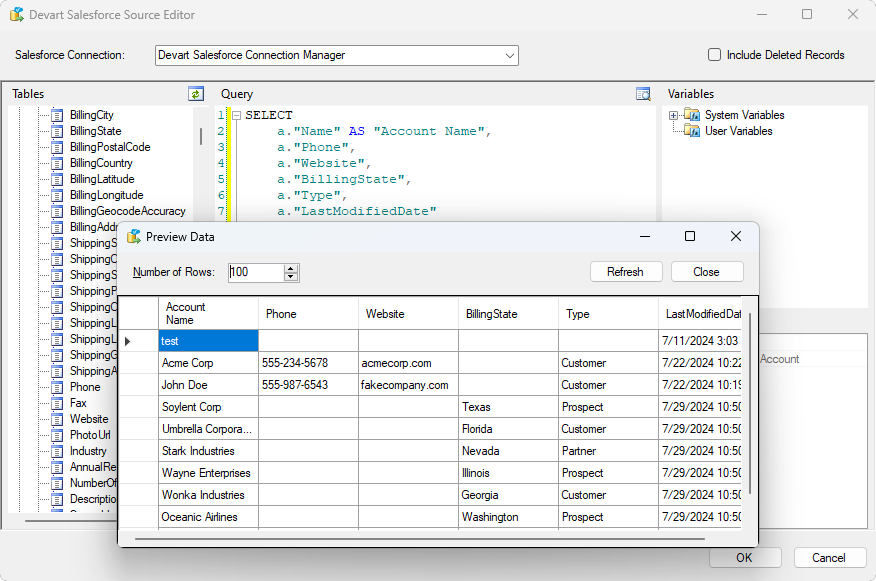
The Devart Salesforce Source Editor (one of the bundle's components): Account fields in the object tree, a SELECT query, SSIS variables, and the Preview Data window showing returned rows.
Features
SQL SELECT against databases and cloud apps alike
SSIS Universal Bundle's Source components take a SQL SELECT statement for every source, including cloud apps such as Salesforce, HubSpot or QuickBooks Online that have no SQL of their own. The editor shows the source's objects and fields, your SSIS variables for parameters, and a data preview, so you can test a query before running the package.
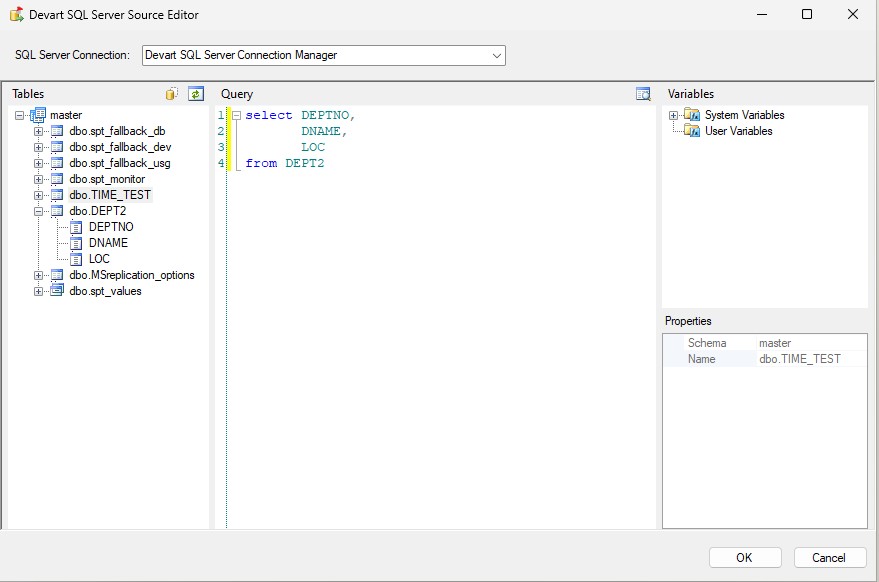
The Devart SQL Server Source Editor from the same bundle, with the database's tables on the left, a query in the middle and SSIS variables on the right.
Fast destinations with per-row error handling
SSIS Universal Bundle's Destination components load data with optimizations for each source: batch sizes, parallel batch processing and, for Salesforce, the Bulk API. They can insert, update or delete records, send failed rows to an error output instead of failing the whole batch, and return the IDs (primary key values) of the records they inserted, so a later step can link child records to them.
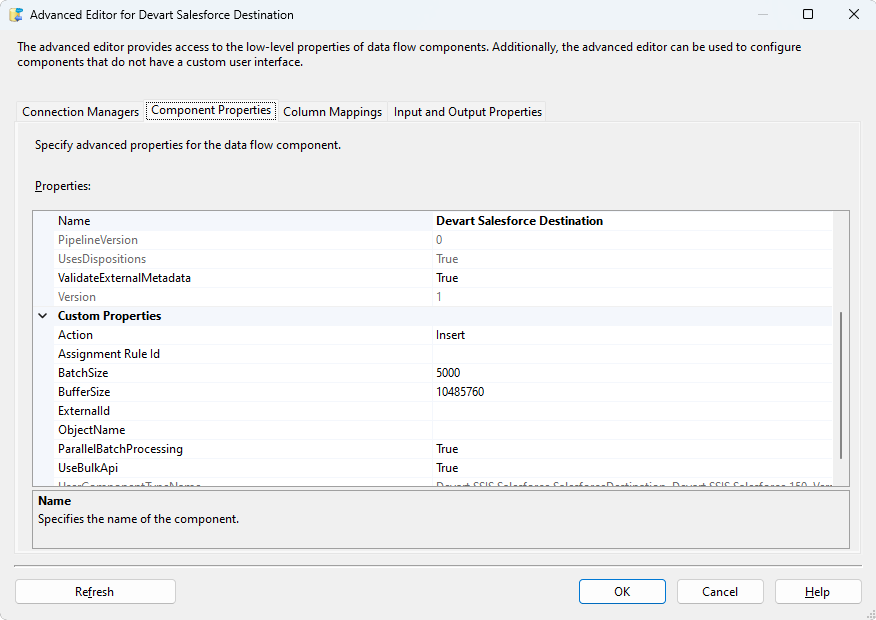
Advanced Editor for the Devart Salesforce Destination: Action set to Insert, BatchSize 5000, ParallelBatchProcessing and UseBulkApi turned on.
Lookups with caching
SSIS Universal Bundle's Lookup components check incoming rows against a database or cloud app with one SELECT for several rows at once, and cache what comes back, so a package doesn't call a rate-limited API once per row. That matters for jobs that match thousands of records against a CRM.
Connections that keep up with the services
SSIS Universal Bundle's connection managers handle each service's sign-in, including OAuth for Dynamics 365 and HubSpot, Zoho data centers in Canada, Japan, Saudi Arabia and the UK, and SSH tunnels with PuTTY PPK3 keys for MySQL, Oracle and PostgreSQL. Devart's release notes show regular updates for API changes, such as new Stripe and NetSuite API versions.
Benefits
- Stay in SSIS. No separate ETL service to buy, learn or secure: the packages, scheduling and logging you already have now reach SaaS apps and cloud warehouses.
- One vendor, one editor style. All 54 sources work the same way, so learning one connector teaches you the rest.
- No per-row or per-volume charges. The license price doesn't change with the number of requests or the amount of data you move.
- Data stays in-house. Packages run on your own servers, which helps in finance, healthcare and legal work where data can't go through a third-party cloud.
Real-World Uses
- CRM to data warehouse. A nightly package copies changed Salesforce or HubSpot records into SQL Server or Snowflake for Power BI reports.
- Finance consolidation. QuickBooks Online invoices, Stripe payments and NetSuite transactions land in one SQL Server schema for month-end reconciliation.
- Database migration. An Oracle or MySQL application's tables move to SQL Server or PostgreSQL through standard SSIS data flows.
- Write-back. Customer scores calculated in the warehouse are pushed back into Dynamics 365 or Zoho CRM with a Destination component, with failed rows logged for review.
Who It's For, and Who Should Skip It
It's for teams that already run SQL Server Integration Services and need several of these sources, especially a mix of cloud apps and warehouses, and consultants who build SSIS packages for clients running different systems.
Skip it if you don't use SSIS: these are SSIS components, not a standalone ETL tool. If you need just one or two sources, a single Devart SSIS component costs less. And if your company is moving to a cloud ETL service such as Azure Data Factory, a bundle tied to SSIS may not fit where you're headed.
Usage Guide
- Install. Sign in with a free Devart account on the download page, close Visual Studio, and run the 618.60 MB installer on the development machine. Install it on the SSIS server too, where packages will run.
- Open an SSIS project. In Visual Studio, open or create an Integration Services project. The Devart components appear in the SSIS Toolbox.
- Add a connection. In Connection Managers, add a Devart connection manager for your source, enter the server or sign in with OAuth, and test it.
- Build the data flow. Drop a Devart Source into a data flow, choose the connection, write or build a SELECT query, and preview the data. Connect it to transformations and a destination.
- Load or look up. Use a Devart Destination to write into a database, warehouse or cloud app (pick the action and batch settings), and route its error output to a log table. Use a Devart Lookup to match rows.
- Deploy and schedule. Deploy the package to your SSIS catalog and run it from SQL Server Agent like any other package.
Before you buy
The default order is a one-year subscription at $499.95 that renews at the same price; when it lapses, the subscription license stops. The perpetual license costs $999.95, keeps working without renewal, includes a year of updates, and renews updates at $499.95 a year. A Developer license is for building packages on development machines; running them on a production SSIS server needs a Server license ($1,249.95 a year or $2,499.95 perpetual) or a Site license. Choose the license, term and premium support on the order page.
Where it falls short
- Cloud APIs keep changing. A large part of each release fixes errors caused by API changes (Dynamics 365 OAuth, HubSpot rate limits, Marketo 404 errors, QuickBooks Online errors), so falling behind on updates can break a package.
- Version combinations can bite. Version 4.0 fixed components that didn't show in Visual Studio for some SSIS and Visual Studio version and TargetServerVersion combinations, and an error when running packages with the 32-bit DTExec.
- Older SSIS is limited. SSIS 2008 works only with the six database components; the cloud and warehouse components need SSIS 2012 or later.
- Big download. The installer is 618.60 MB, because it carries every connector.
- Documentation gaps. Reviewers mention that some parts of the components are thinly documented.
What Users Say
Devart's SSIS components are reviewed as a product line ("SSIS Data Flow Components") rather than as this bundle, and the review counts are small.
Capterra and GetApp
SSIS Data Flow Components averages 4.6 out of 5 from 12 reviews on both Capterra and GetApp, with ease of use at 4.3. Reviewers mostly praise how easy the components are to use and how they handle large data volumes.
SoftwareReview, Gartner Peer Insights and G2
SoftwareReview shows 4.7 out of 5 from 9 ratings, with no written reviews; its page says the vendor hasn't claimed the profile. On Gartner Peer Insights, a review from April 2026 scored the components 4.0, and an older review from March 2023 scored them 3.0 and called them good for basic data integration.
The criticism that comes up is documentation that doesn't cover every part of the data flow components, and a G2 reviewer who reported occasional crashes when opening packages.
In short: good marks for ease of use and throughput, with the complaints about documentation and occasional stability problems rather than missing features. With only a few dozen ratings across all sites, try the trial against your own sources before deciding.
Comparisons
SSIS Universal Bundle vs single Devart SSIS components
Devart sells each SSIS component separately too, and its bundle page says the bundle comes at a discount of about 95% against buying every component one by one. With 54 sources inside, the bundle pays off quickly once you need several connectors, or when you can't predict which systems you'll integrate next year.
SSIS Universal Bundle vs SSIS's built-in connectors
SSIS includes OLE DB, ADO.NET and ODBC sources and destinations that reach SQL Server and, with drivers, other databases, but almost nothing for SaaS apps. The Devart bundle adds native cloud app components with SQL querying, cloud warehouses with batch loading, and Lookup components with caching for each source.
Editions and Pricing
Every license is ordered with the same Buy Now button: you choose the license type, subscription or perpetual, term and support on the order page. Prices on November 13, 2026:
| License | Subscription (1 year) | Perpetual | Who it's for |
|---|
| Developer (the order page's default, labelled Standard at checkout) | $499.95 | $999.95 | One developer building packages |
| Server | $1,249.95 | $2,499.95 | Running packages on one server |
| Site for 10-100 Devices | On the order page | $9,999.95 | Multiple computers in one company |
Two- and three-year terms and premium support are extra options, and volume discounts of 5%, 10% and 15% apply from 5, 10 and 20 licenses.
FAQs
Does SSIS Universal Bundle support SSIS 2025 and Visual Studio 2026?
Yes. SSIS Universal Bundle added SQL Server Integration Services 2025 (v17.0), SQL Server 2025 and Visual Studio 2026 in version 4.0, released January 2026.
Do I need a separate license for the production SSIS server?
Yes, in most setups. SSIS Universal Bundle's Developer license covers building packages; a Server license covers running them on a single server, and a Site license covers many computers in one company.
What happened to the SSIS Database Bundle and Cloud Bundle?
Devart's site now offers only SSIS Universal Bundle: its old Database Bundle and Cloud Bundle pages lead to this bundle, which contains all the database, warehouse and cloud components those two covered.
What's the difference between the subscription and perpetual license?
SSIS Universal Bundle's subscription ($499.95 a year for a developer) has to be renewed to keep using it. The perpetual license ($999.95) keeps working at your version forever and includes the first year of updates; after that, updates are optional at $499.95 a year.
Can SSIS Universal Bundle write data back to Salesforce or other cloud apps?
Yes. SSIS Universal Bundle's Destination components insert, update and delete records in cloud apps as well as databases, and return the IDs of new records. The Salesforce Destination can use Salesforce's Bulk API.
Does data go through Devart's servers?
No. SSIS Universal Bundle's components run inside your SSIS packages on your own servers and connect directly to each database or cloud API.
Can I get a refund for SSIS Universal Bundle?
Yes. Devart gives a 30-day money-back guarantee. Since the 30-day trial includes every component, test the sources you need before buying.
System Requirements
- Microsoft SQL Server Integration Services 2012, 2014, 2016, 2017, 2019, 2022 or 2025 (SSIS 2008 for the DB2, MySQL, Oracle, PostgreSQL, SQL Server and SQLite components only)
- Visual Studio with Integration Services projects for designing packages (Visual Studio 2026 supported)
- Windows
- Databases: SQL Server 2000 to 2025, Oracle 8.0 to 26ai, MySQL 3.23 to 8.4 and MariaDB 5 to 12, PostgreSQL 8.0 to 18, SQLite 3, DB2 for LUW 8.0 and later
- Cloud apps and warehouses: an account with API access for each service
Conclusion
SSIS Universal Bundle is worth it for a team that already runs SQL Server Integration Services and needs more than a couple of cloud apps or warehouses in its packages: 54 sources with the same Source, Destination and Lookup components, for $499.95 a year per developer. The best reason to buy it is getting Salesforce, Snowflake, QuickBooks Online and the rest into SSIS without a separate connector for each. The main reason not to is the cost of keeping it current: production servers need their own license, and cloud connectors need regular updates as the services change their APIs. If you're not on SSIS, or need only one source, look elsewhere. Try the free 30-day trial with the sources you actually use.
Download Free TrialBuy Now