dbForge Source Control for SQL Server: Git, SVN and TFVC for Your Database, Inside SSMS
dbForge Source Control for SQL Server is Devart's SSMS add-in that puts your database schema and lookup-table data under version control, with commit, get latest, undo, conflict resolution and history right in SQL Server Management Studio. It works with Git (GitHub, GitLab, Bitbucket, Azure DevOps), TFVC, Subversion, Mercurial, Perforce and more, and costs $199.95 a year or $399.95 for a perpetual license. It's for SQL Server teams who version their application code but still keep the database in someone's head, or in a folder of hand-numbered ALTER scripts.
Quick facts
- Version: 2026.2.96, released November 9, 2026
- Developer: Devart
- Works in: SSMS 2016, 17, 18, 19, 20, 21 and 22
- Version control systems: Git (with GitHub, GitLab, Bitbucket and Azure DevOps), Azure DevOps Server/TFS and TFVC, Subversion, Mercurial, Perforce, SourceGear Vault, Plastic SCM, or a plain working folder
- Databases: SQL Server 2005 to 2025 (2000 with limited support), SQL Server on Linux, Azure SQL Database and Managed Instance, Azure Synapse, Microsoft Fabric
- Platform: Windows 7 to 11 and Windows Server 2008 to 2025, .NET Framework 4.7.2; Git needs Git for Windows 2.28.0 or later
- Download: installed from the 812.56 MB dbForge SQL Tools installer, where you pick the tools you want
- Price: $199.95 for a 1-year subscription, $399.95 for a perpetual license with a year of updates
- Trial: free trial (the download asks you to sign in with a free Devart account)
- Refund: 30-day money-back guarantee on annual and perpetual licenses; Devart's ordering FAQ is stricter and refunds only when a technical problem its support can't fix stops the product working
- What we checked: version 2026.2.96 and its November 9, 2026 date on Devart's download page and revision history, the 812.56 MB size of the SQL Tools installer it's delivered in, and the order page prices of $199.95 for a year and $399.95 perpetual on November 13, 2026. We didn't link a database to a repository ourselves.
Before you buy
- It's an SSMS add-in only. There's no standalone app and no Visual Studio version; if your team works in Visual Studio database projects (SSDT), you already have source control there.
- One edition, one Buy button. The order page opens on a 1-year subscription at $199.95; the perpetual license and 2- or 3-year terms are options there.
- It versions, it doesn't deploy. Building and deploying from the repository to test and production takes Devart's DevOps Automation or Schema Compare, or your own pipeline.
- Each developer needs a license, since everyone who commits does so from their own SSMS.
Download Free TrialBuy Now
Overview
SSMS has no version control of its own. Source Control fills that gap the way a Git client does for code: you link a database to a repository once, and from then on SSMS shows you which tables, views and procedures you've changed, lets you commit them with a comment, pulls in what your colleagues committed, and flags the objects you both changed. Each object is stored in the repository as a CREATE script, so the repository doubles as readable documentation of the schema.
It's actively maintained alongside Devart's other SQL Server tools. Recent fixes include keeping SYSTEM_VERSIONING on when adding columns to temporal tables (November 2026), duplicated extended properties during synchronization (October 2026), scripts no longer being rearranged within folders (May 2026), and better Azure SQL Database support (November 2025). SSMS 22 support arrived in December 2025.
Features
Source Control Manager: commit, get latest and undo in one window
dbForge Source Control for SQL Server opens a Source Control Manager document for each linked database, split into three lists: Conflicts, Remote changes and Local changes. You tick the objects to commit, type a comment and click Commit; Get Latest applies colleagues' changes to your database; Undo throws away your uncommitted edits. Clicking any object shows its DDL side by side, with the changed lines highlighted.
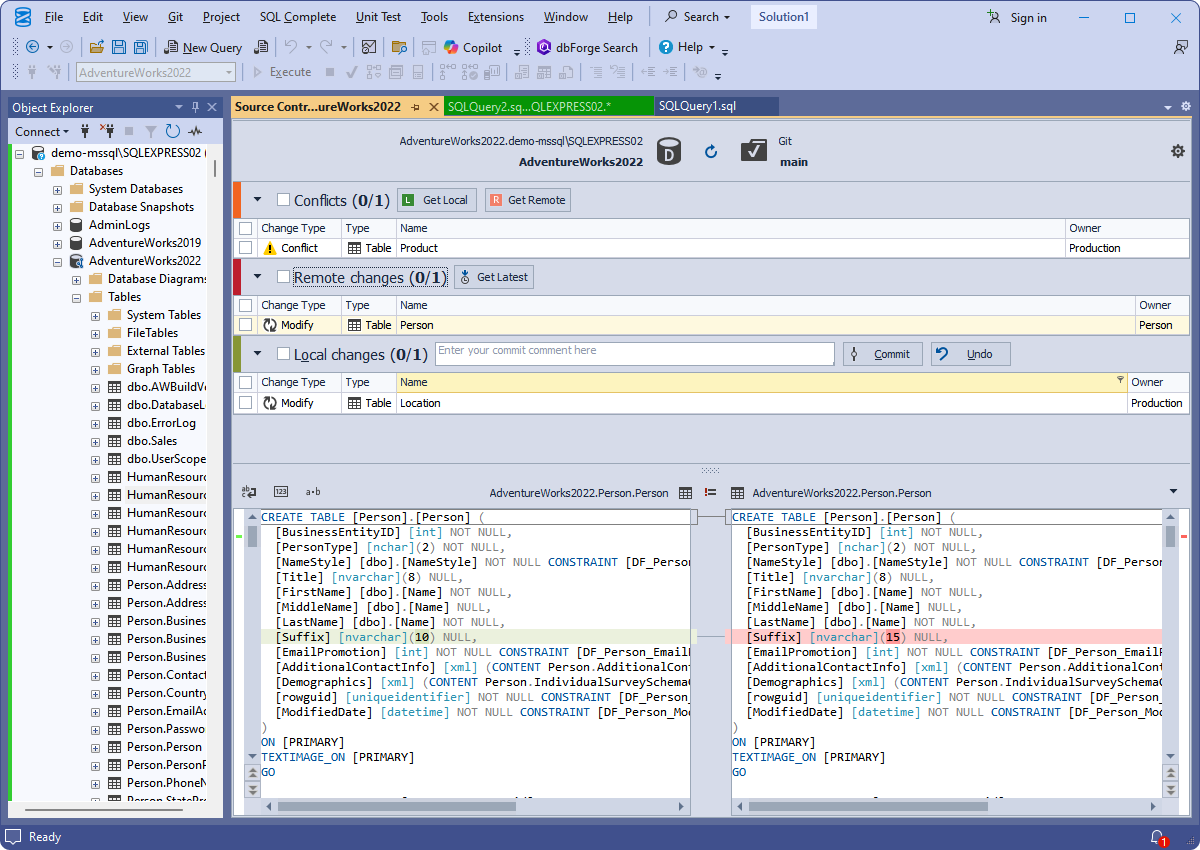
Source Control Manager for AdventureWorks2022 linked to Git (branch main): one conflict, one remote change and one local change, with the Person table's DDL compared below.
Dedicated or shared development model
dbForge Source Control for SQL Server asks how your team works when you link a database. In the dedicated model each developer has their own copy of the database, commits from it and pulls others' changes into it, much like Git for code. In the shared model everyone works on one database, and Source Control records who changed what. The shared model avoids sync work but, as one customer puts it below, lets one developer overwrite another's change.
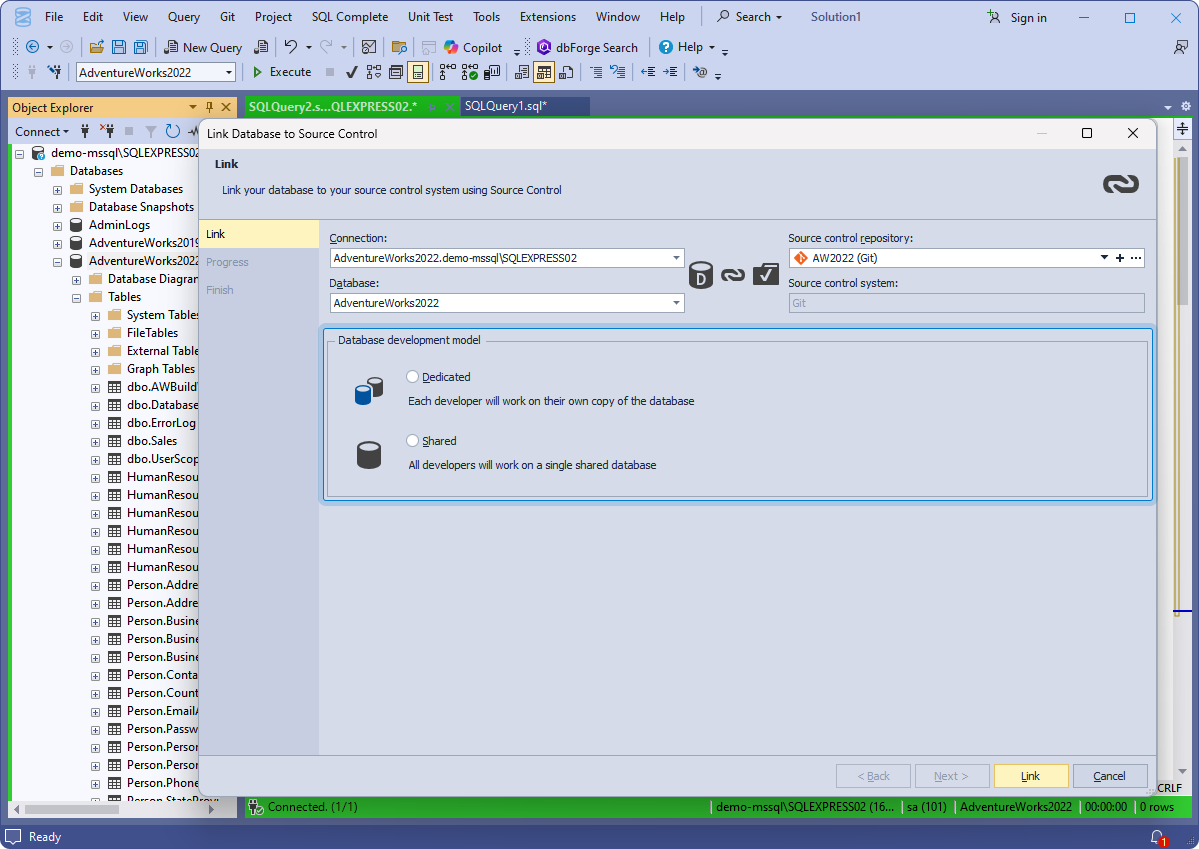
The Link Database to Source Control dialog: the connection and database on the left, a Git repository on the right, and the choice between Dedicated and Shared below.
Conflict resolution you can see
dbForge Source Control for SQL Server lists an object as a conflict when you and a colleague changed it in different ways. The DDL viewer shows your local version against the remote one, and you settle it with Get Local (keep yours and commit it) or Get Remote (take theirs and discard yours).
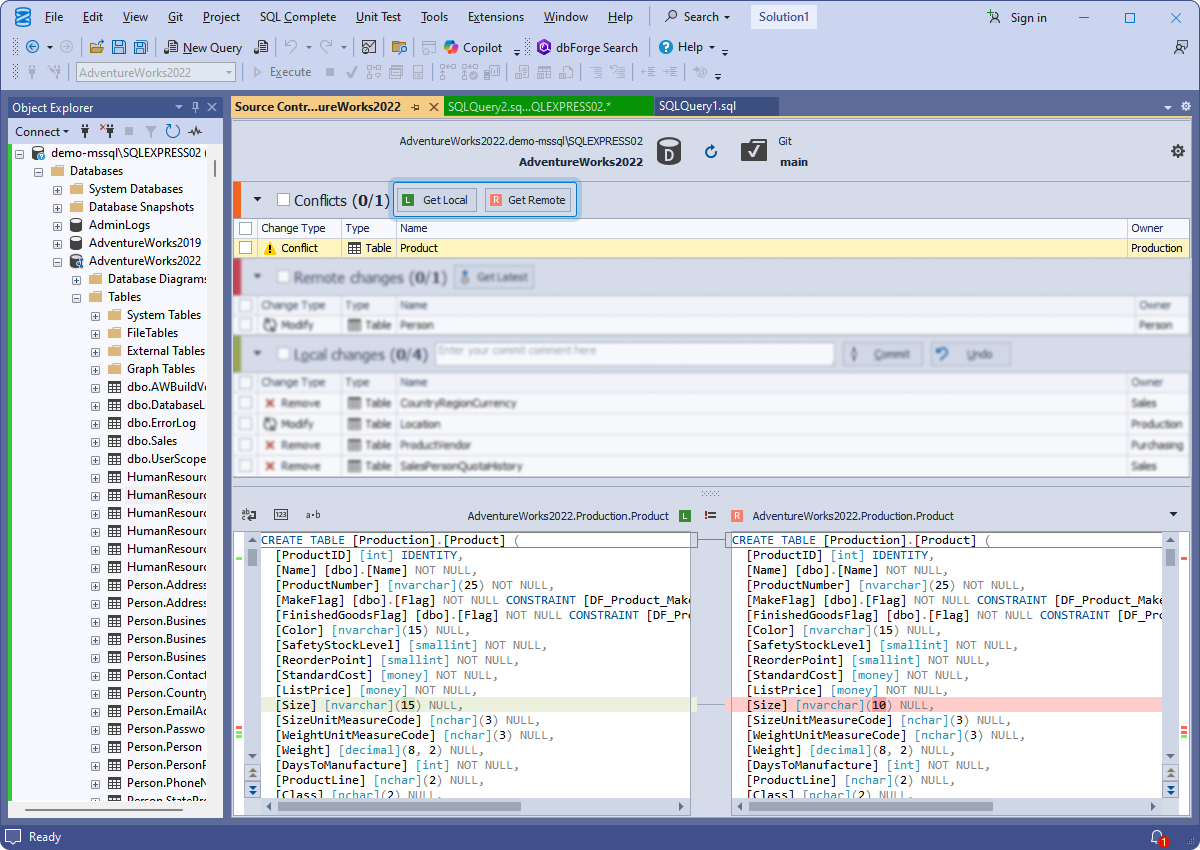
A conflict on the Production.Product table: the local copy defines Size as nvarchar(15), the remote as nvarchar(10), with Get Local and Get Remote buttons highlighted.
Changes history with revision compare
dbForge Source Control for SQL Server's View Changes History shows every commit with its date, author and comment, the objects each one touched, and the DDL differences. Select two revisions with Ctrl and you can compare them directly, which is how you answer "when did this column get shorter, and who did it?"
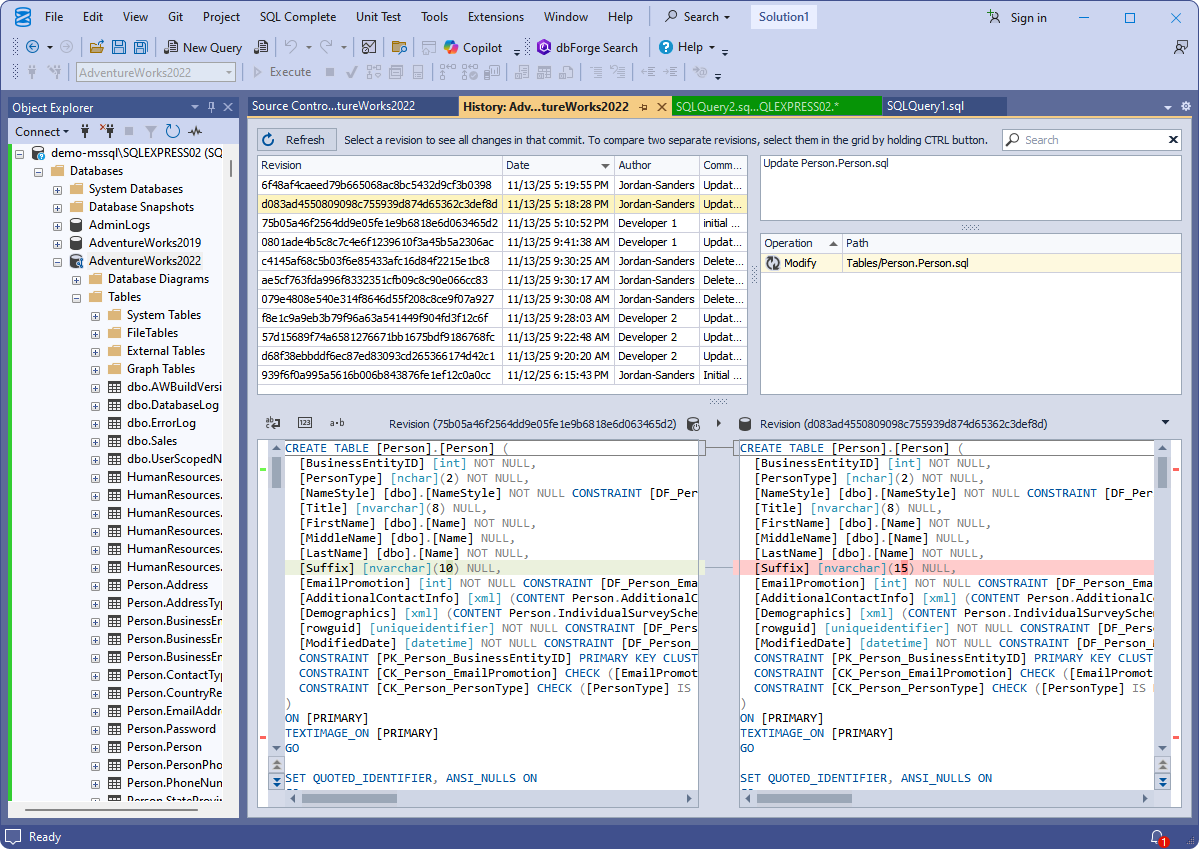
The History document: commits with dates and authors at the top, and two revisions of Person.Person compared below.
Static data, not just schema
dbForge Source Control for SQL Server can also version the rows of tables you link as static data: countries, status codes, configuration and other lookup tables your application can't run without. Their changes are committed, pulled, undone and conflict-checked the same way as schema changes, so a new status code ships with the code that uses it.
Benefits
- The database gets the same history as the code. Every schema change has an author, a date and a reason, which matters for audits and for the 2 a.m. "what changed?" question.
- Mistakes become reversible. Undo throws away an uncommitted mistake, and the history shows exactly what to put back after a bad commit.
- Developers stay in SSMS. No command line or separate client, which is often what decides whether DBAs and SQL developers actually use version control.
Real-World Uses
- A small team sharing one dev database. Link it in shared mode so every change is committed with a comment, and stop guessing who altered a procedure.
- Feature branches for the database. In dedicated mode, each developer works on a local copy and switches Git branches along with the application code.
- Feeding a CI pipeline. Commit schema changes to Azure DevOps or GitHub, and let the build server create a fresh database from the repository for automated tests.
- Audits. Show an auditor the full, dated history of schema changes to a regulated database.
Who It's For, and Who Should Skip It
It's for SQL Server teams that work in SSMS and already use Git, Azure DevOps or SVN for their applications, especially teams of two or more developers touching the same database.
Skip it if you build databases in Visual Studio SSDT projects (they're already files in your repository), if you're a lone developer happy to script changes by hand, or if your databases are MySQL, PostgreSQL or Oracle; Devart's Studios for those have their own source control. If you need schema compare, data compare and test data too, compare the price of the dbForge SQL Tools bundle, which includes Source Control with 14 other tools from $469.95 a year.
Usage Guide
- Install. Download the dbForge SQL Tools installer (you'll sign in with a free Devart account) and select Source Control. For Git, install Git for Windows 2.28.0 or later first.
- Prepare a repository. Clone your Git repository locally, or have your SVN or TFVC path ready.
- Link the database. In SSMS Object Explorer, right-click the database and choose Source Control > Link Database to Source Control. Pick the repository, then Dedicated or Shared.
- Make the first commit. The Source Control Manager lists the database's objects as local changes. Select them, write a comment and commit.
- Work as usual. Change objects in SSMS, then refresh the Source Control Manager to see your changes, commit them, and use Get Latest to pull in others'.
- Add lookup tables. Link a lookup table as static data if its rows should travel with the schema.
Where it falls short
- Shared mode can lose work. With everyone on one database, a colleague's later change to the same object simply replaces yours. Use dedicated mode if that matters.
- Synchronization edge cases. Devart's own revision history shows the hard parts of scripting a live database: duplicated extended properties, temporal-table columns, masked columns and static-data updates have all needed fixes in the past year. Check your database's unusual features during the trial.
- A heavy download for one add-in. It comes in the 812.56 MB SQL Tools installer, even if you install only Source Control.
What Users Say
Customer comments on Devart's page
Source Control has very few public reviews on the big review sites, so most of what's available is on Devart's own page. Read these as the vendor's picks; they're useful mostly for what they say about the two development models.
Konrad B.: "The solution allows us to track changes and check their quality, which clarifies the development process and brings some clarity. Basically, we can roll back the changes at any time. A crucial option I would say, especially if you work in a team." On the models: "In 'shared' mode, the team works with a single database instance. So, no conflicts occur, but at the same time, one developer can erase the changes of other teammates."
Andrey S.: "A handy solution for tracking and checking the quality of database changes. In particular, with Source Control, we can roll back any previously made changes, which is quite crucial for a team."
The theme is consistent: people value the rollback and the change history, and the main caution is the trade-off in shared mode. With so few independent reviews, test it on a copy of your own database during the trial.
Comparisons
dbForge Source Control vs. Redgate SQL Source Control
Both are SSMS add-ins built around the same idea: link a database to a repository, then commit and get latest from inside SSMS, with dedicated and shared models and static data. Redgate's is the better-known product and is often bought within its SQL Toolbelt; Devart's is sold on its own or in the dbForge SQL Tools bundle. Teams choosing between them should trial both on the same database.
dbForge Source Control vs. SSDT database projects
Visual Studio's SQL Server Data Tools keep the schema as files in a project, which you version like any code, and build deployment scripts from them. That's free and powerful but means working in Visual Studio. Source Control is for teams that want to keep working directly against databases in SSMS.
dbForge Source Control vs. scripting changes by hand
Numbered ALTER scripts in a folder cost nothing and work for one person. They break down when several people change the same database, because nothing tells you a script is missing. Source Control compares the database with the repository, so drift shows up as a change.
Editions and Pricing
There's one edition. The order page opens on a 1-year subscription; choose the perpetual license or a longer term there.
| License | Price | What you get |
|---|
| 1-year subscription | $199.95 | All features and updates for one year; stops working if not renewed |
| Perpetual license | $399.95 | Works permanently, with one year of updates and support (extendable) |
| dbForge SQL Tools bundle | from $469.95 a year | Source Control plus 14 more SQL Server tools |
Prices are per user. Devart takes 5% off for 5 to 9 licenses, 10% for 10 to 19 and 15% for 20 or more, and priority support is an extra option at checkout.
FAQs
Does dbForge Source Control work with GitHub and Azure DevOps?
Yes. dbForge Source Control for SQL Server works with Git repositories hosted on GitHub, GitLab, Bitbucket and Azure DevOps, through Git for Windows 2.28.0 or later, and also with Azure DevOps Server's TFVC. It can link commits to GitHub and GitLab issues.
Does dbForge Source Control work with SSMS 21 and 22?
Yes. dbForge Source Control for SQL Server supports SSMS 2016 through 22. Since version 7.0 of Devart's SSMS add-ins, SSMS 2012 and 2014 are no longer supported by new versions.
Can dbForge Source Control version table data?
Yes, for tables you link as static data. dbForge Source Control for SQL Server is meant for lookup and reference tables, not for versioning large transactional tables.
Does dbForge Source Control deploy changes to production?
No. dbForge Source Control for SQL Server records and shares changes. To build a database from the repository or deploy changes to other servers, use Devart's DevOps Automation for SQL Server, dbForge Schema Compare, or your own pipeline.
Can I use dbForge Source Control with Azure SQL Database?
Yes. dbForge Source Control for SQL Server supports Azure SQL Database, Managed Instance and Synapse, with Microsoft Entra multi-factor sign-in.
Can I get a refund on dbForge Source Control?
Yes. Devart refunds dbForge Source Control for SQL Server within 30 days on an annual subscription or a perpetual license.
System Requirements
- Windows 7, 8, 8.1, 10 or 11, or Windows Server 2008, 2012, 2016, 2019, 2022 or 2025
- .NET Framework 4.7.2 or later
- SQL Server Management Studio 2016, 17, 18, 19, 20, 21 or 22
- Git for Windows 2.28.0 or later, if you use Git
- SQL Server 2005 to 2025 (2000 with limited support), SQL Server on Linux, Azure SQL, Azure Synapse, Microsoft Fabric
Conclusion
dbForge Source Control for SQL Server is worth $199.95 a year for a team that works in SSMS and wants its database under the same version control as its code. The one reason to buy it is that it makes committing a schema change as easy as committing code, without leaving SSMS, and that's what gets SQL developers to actually do it. The main reason not to is that it only versions: deployment is a separate tool, and if your team already uses SSDT projects you don't need it. Trial it on a copy of a real database with your real repository, and if you'd also use Schema Compare or Data Generator, buy the SQL Tools bundle instead.
Download Free TrialBuy Now