dbForge Data Pump for SQL Server: Import and Export Wizards Inside SSMS, With Templates and a Command Line
dbForge Data Pump for SQL Server is a $189.95-a-year add-in for SQL Server Management Studio that imports data into SQL Server from 10 formats (Excel, CSV, JSON, XML, Google Sheets, Access and more) and exports tables to 14. It's for DBAs, developers and analysts on Windows who move data in and out of SQL Server often enough that the built-in SSMS wizard has become a chore.
If you've ever rebuilt the same Excel import mapping for the third time in a month, or written a one-off script to dump a table to JSON for another team, this is the problem Data Pump solves: set the job up once in a wizard, save it as a template, and run it again with a click or from a scheduled batch file.
Quick facts
- Version: 2026.2.96, released November 9, 2026
- Developer: Devart
- Runs in: SQL Server Management Studio, SSMS 2016 to SSMS 22, on Windows 7 to 11 and Windows Server 2008 to 2025
- Databases: SQL Server 2000 to 2025, Azure SQL Database and Managed Instance, Azure Synapse dedicated and serverless pools, Microsoft Fabric, Amazon RDS
- Import from: text, XLS, XLSX, Google Sheets, MS Access, XML, JSON, CSV, ODBC, DBF
- Export to: HTML, text, XLS, XLSX, Google Sheets, MS Access, RTF, PDF, JSON, XML, CSV, ODBC, DBF and SQL scripts (14 formats)
- Price: $189.95 for a one-year subscription, Standard edition, one user. A perpetual license is $379.95
- Trial: free for 30 days with all features. Downloading needs a free Devart account
- Guarantee: 30-day money-back guarantee on yearly and perpetual licenses; Devart's ordering FAQ is stricter and refunds only when a technical problem its support can't fix stops the product working
- What we checked: the revision history and download page (version 2026.2.96, the download is the 812.56 MB dbForge SQL Tools installer), Devart's import documentation, and the order page on November 13, 2026: $189.95 for the default Standard edition with a one-year subscription and no premium support, renewing every 12 months. We didn't install it or run an import.
Download Free TrialBuy Now
Overview
Data Pump lives where you already work. After installing, you right-click a database or table in SSMS Object Explorer, point to Data Pump, and choose Import Data or Export Data. A wizard walks you through the source, the destination, format options, column mapping, the import mode, output and error handling, and you can save every one of those choices as a template.
The product has been around since version 1.0 and is updated often: the revision history lists 11 releases in 2026 alone, adding SSMS 22 support in December 2025, SSMS 22.6 in May 2026, sign-in activation in September 2026, and, in November 2026, error messages that point to the exact line and column (or sheet and cell) of a bad value in the source file. Devart also sells it as one of the 15 tools in its dbForge SQL Tools bundle, which is why the trial download is the full SQL Tools installer.
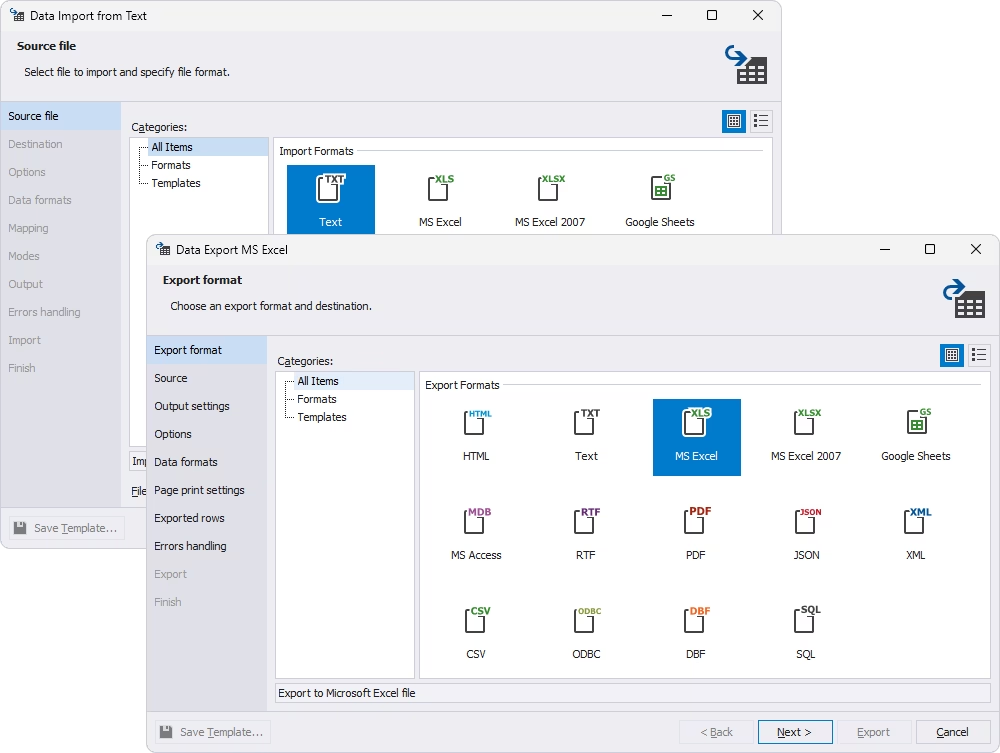
The Data Import wizard (Text, MS Excel, MS Excel 2007, Google Sheets) behind the Data Export wizard, which lists HTML, Text, MS Excel, MS Excel 2007, Google Sheets, MS Access, RTF, PDF, JSON, XML, CSV, ODBC, DBF and SQL.
Features
Import from 10 formats, export to 14
dbForge Data Pump imports text files, XLS, XLSX, Google Sheets, Microsoft Access, XML, JSON, CSV, ODBC sources and DBF files into SQL Server, and exports tables and views to HTML, text, XLS, XLSX, Google Sheets, Access, RTF, PDF, JSON, XML, CSV, ODBC, DBF and SQL insert scripts. For spreadsheets you can pick the sheet and cell range, treat blank cells as NULL and set where the header row is. For Google Sheets you paste the sheet's URL and grant access through your Google account in the browser.
Column mapping with a live preview
dbForge Data Pump creates and maps every column automatically when you import into a new table, and maps same-named columns when you import into an existing one. You map the rest by hand, edit a column's type, length, nullability and default value, and watch the result in a preview grid. Data formats (null strings, separators, booleans, date and time masks) can be set for the whole file or column by column.
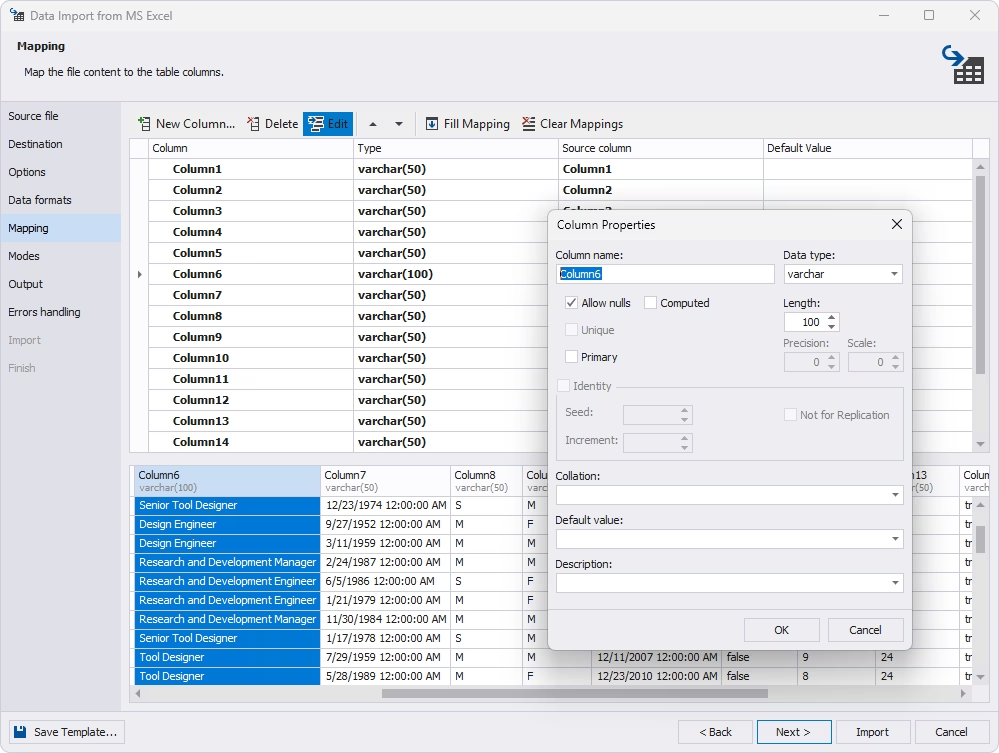
The Mapping page of an Excel import: target columns and types, the Column Properties dialog for one column, and a preview of the incoming rows.
Five import modes and bulk insert
dbForge Data Pump can append new rows, update matching rows, append/update (upsert), delete matching rows, or repopulate a table by clearing it first. The update and delete modes need a key column picked on the Mapping page. Options to run the whole import in a single transaction and to use bulk insert speed things up, and the wizard can import straight into the database or write the import script to a file or the editor for you to review first.
Error handling and logs
dbForge Data Pump lets you choose how an import reacts to a bad row: abort at the first error, prompt you each time, or ignore all errors, and it can write a report to a log file. Since version 2026.2.96 the error message says where the invalid value sits in the source file, by line and column for text files or by sheet and cell for spreadsheets.
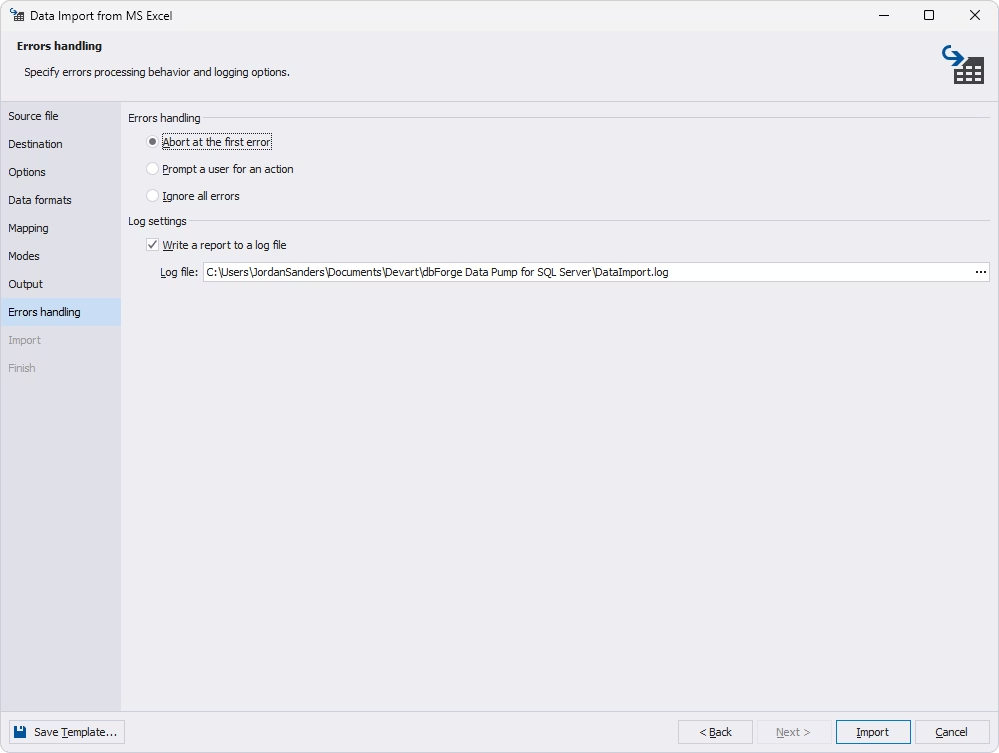
The Errors handling page of the Data Import wizard: Abort at the first error, Prompt a user for an action or Ignore all errors, plus a log file path.
Templates and command-line automation
dbForge Data Pump saves any wizard's settings as a template you can reload later, and its Save Command Line button turns the same settings into a command for datapump.com. Put that in a .bat file and Windows Task Scheduler can run a nightly export to JSON or a weekly CSV import with no one opening SSMS. Devart also documents using it in a DevOps pipeline.
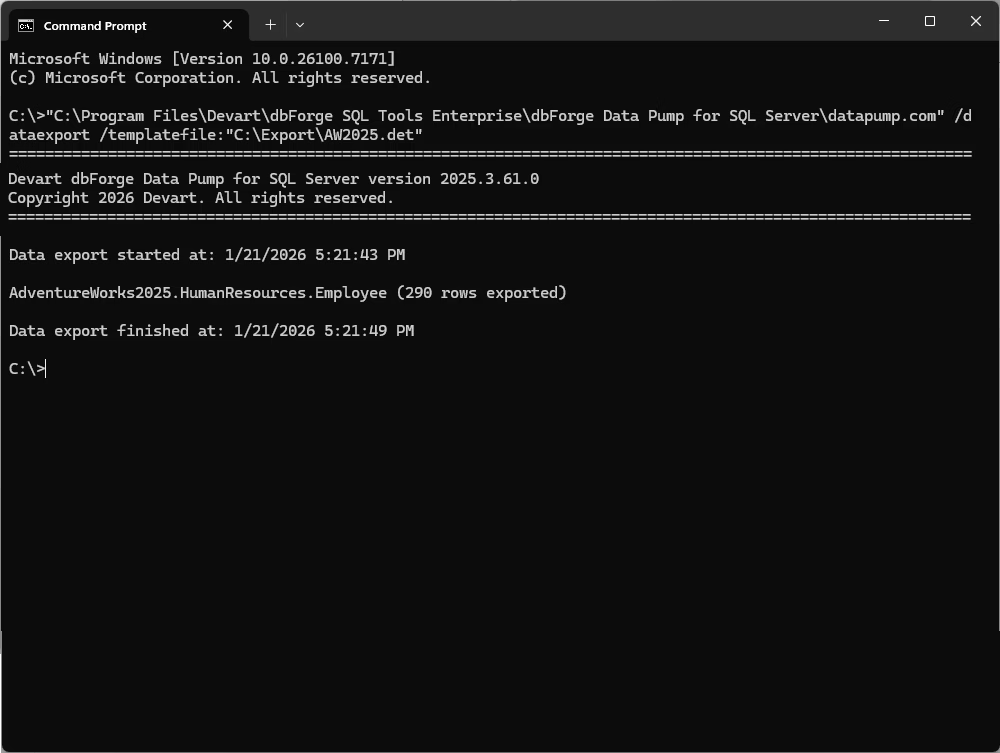
A Command Prompt running datapump.com /dataexport with a saved template: 290 rows of AdventureWorks2025.HumanResources.Employee exported.
Benefits
- Set it up once. A recurring import with tricky mapping and date formats becomes a saved template instead of a half-hour of clicking every time.
- No extra application to learn. It's a right-click menu in the SSMS you already have open, connected to the servers you already registered.
- Formats SSMS doesn't cover well. JSON, XML, PDF, Google Sheets and DBF in and out without writing scripts or installing SSIS.
- Safer imports. Preview, a script you can read before running, single-transaction mode and clear error locations make it less likely that a bad file half-loads a production table.
Real-World Uses
- Monthly price lists from suppliers. An ops team gets an XLSX file every month and upserts it into a products table with append/update mode and a saved template.
- Feeding another team. A nightly .bat file exports an orders view to JSON or CSV for a reporting or web team, scheduled with Task Scheduler.
- Retiring an old Access or dBase app. A developer pulls MDB or DBF tables into SQL Server, mapping columns and types as they go.
- Shared spreadsheets. A business user keeps a reference list in Google Sheets, and a DBA loads it into a lookup table on demand.
Who It's For, and Who Should Skip It
It's for SQL Server DBAs and developers who live in SSMS and move data between files and tables every week, especially when the same jobs repeat and need to run unattended.
Skip it if you import a CSV once a quarter: the free SQL Server Import and Export Wizard and BULK INSERT will do. Skip it too if you build real ETL pipelines with transformations and many sources, where SSIS or a dedicated integration tool fits better, or if you're on a Mac or Linux, since Data Pump is a Windows SSMS add-in. And if you'd use three or more dbForge add-ins, price the dbForge SQL Tools bundle first.
Usage Guide
- Get the trial. Sign in with a free Devart account on the download page and run the dbForge SQL Tools installer. Close SSMS first, and pick Data Pump (and any other tools you want to try) in the installer.
- Open SSMS. Connect to your server, then right-click the target database in Object Explorer and choose Data Pump > Import Data (or a table and Export Data).
- Pick the format and file. Choose the source format, browse to the file (or paste the Google Sheets URL), and load a template if you saved one.
- Choose the destination. Pick the server, database and schema, and a new or existing table.
- Map and set formats. Check the column mapping and preview, mark key columns, and set date and number formats if the file uses unusual ones.
- Pick a mode and run. Choose append, update, append/update, delete or repopulate, set error handling, and click Import. Use Save Template and Save Command Line before you close the wizard if the job will repeat.
Before you buy
The $189.95 price is a subscription: under Devart's terms a subscription license stops working when the period ends unless you renew. The perpetual license ($379.95) keeps working forever and includes a year of updates and support. Both are chosen on the order page, along with two- or three-year terms and priority support. Devart refunds within 30 days for yearly and perpetual licenses.
Where it falls short
- Access imports need Microsoft's driver. Devart's own guide says to install the Microsoft Access Database Engine 2016 Redistributable, both 32-bit and 64-bit, or the import fails with a "drivers not found" error.
- A big download for one tool. The trial comes as the 812.56 MB dbForge SQL Tools installer.
- SSMS only. It doesn't run on its own or in Azure Data Studio, and older SSMS 2012 and 2014 are no longer supported by current versions.
- Update and delete modes need a key. Without a key column selected on the Mapping page, those modes are disabled.
- Not an ETL tool. It maps and converts formats, but there are no multi-step transformations, lookups or joins across sources.
What Users Say
Independent reviews of Data Pump are thin. Capterra, GetApp and Software Advice list it, but with few or no written reviews of their own, and most user comments are short notes on AlternativeTo, all from early 2022.
AlternativeTo comments
"Data Pump offers good performance, a huge number of formats to choose from, and a wizard that helps you fine-tune your import or export to your needs, with convenient mapping, templates and all." (yakax14, April 2022)
"I strongly recommend this tool for its simplicity and reliability. Besides, our workflow is tightly integrated with Google services, and it is very convenient for us to exchange data between SQL databases and Google Sheets." (NelsonJorge, March 2022)
"I'm currently using a few SSMS plugins developed by Devart, and I'm pretty satisfied with all of them. This one is good if you often have to deal with import and export in multiple formats." (ZhimingChen, February 2022)
"Data Pump really stands out due to the sheer number of supported formats. You also get a wizard with rich customization settings, which shouldn't be overlooked." (Marina Costa, February 2022)
From Devart's customer stories
"Easy, repeatable. Just works. We just wanted the easy way to do things. You've provided us with a reliable tool that we depend on daily." (Steve Palmer, Consultant at GoodSoftware.com, LLC, quoted on the Data Pump page about Devart's tools)
The praise is consistent: lots of formats, a wizard with useful settings, and templates for repeat jobs. Treat it with care, though: the comments are short, all positive and bunched within a few months, and nobody describes a large or difficult import. The complaints you'll find are in Devart's own revision history, which lists fixes for JSON parsing, frozen export windows and activation hangs since September 2024.
Comparisons
Data Pump vs the SQL Server Import and Export Wizard
Microsoft's free Import and Export Wizard ships with SQL Server and handles flat files, Excel, Access and other databases through OLE DB and ODBC, and it can save an SSIS package to rerun. dbForge Data Pump adds JSON, XML, PDF, HTML, RTF, DBF and Google Sheets, upsert and delete modes, per-column format masks, reusable templates and a simple command line, all from Object Explorer. If you only ever load CSV or Excel files now and then, Microsoft's wizard is enough.
Data Pump alone vs dbForge SQL Tools vs dbForge Studio
Data Pump costs $189.95 a year on its own. The dbForge SQL Tools bundle starts at $469.95 a year and includes Data Pump plus 14 other tools, such as SQL Complete, Schema Compare, Data Compare and Data Generator. dbForge Studio for SQL Server is a separate IDE with its own import and export features built in. Buy Data Pump alone only if import and export is the one thing you need.
Editions and Pricing
Data Pump has one edition, Standard, with every feature. The Buy Now button opens the order page on a one-year subscription, and you switch to a perpetual license or a longer term there. Prices on November 13, 2026:
| License | Price | What you get |
|---|
| Standard, 1-year subscription (default) | $189.95 | All features and updates for a year; stops working if not renewed |
| Standard, perpetual license | $379.95 | Works permanently, with one year of updates and support |
| dbForge SQL Tools bundle | from $469.95 a year | Data Pump plus 14 more SQL Server tools (sold separately) |
Prices are per user. Devart takes 5% off for 5 to 9 licenses, 10% for 10 to 19 and 15% for 20 or more, and priority support is an extra option on the order page.
FAQs
Does dbForge Data Pump work with SSMS 22?
Yes. dbForge Data Pump added SSMS 22 support in December 2025 and SSMS 22.6 in May 2026, and it supports SSMS 2016 through 22. SSMS 2012 and 2014 work only with older Data Pump versions.
Can dbForge Data Pump import into Azure SQL Database?
Yes. dbForge Data Pump works with any server SSMS connects to through the dbForge tools, including Azure SQL Database, Azure SQL Managed Instance, Azure Synapse pools, Microsoft Fabric and Amazon RDS, with Microsoft Entra ID sign-in and MFA.
Can I schedule exports with dbForge Data Pump without opening SSMS?
Yes. dbForge Data Pump generates a command line from any wizard's settings. Save it in a .bat file and schedule it with Windows Task Scheduler, and the export or import runs on its own.
What happens when my dbForge Data Pump subscription ends?
dbForge Data Pump stops working at the end of a subscription unless you renew. A perpetual license ($379.95 on November 13, 2026) keeps working without renewals, though updates stop after its included support year.
Is there a free version of dbForge Data Pump?
No. dbForge Data Pump is sold in one paid Standard edition. The 30-day trial has every feature, so you can test your real files before buying.
Does dbForge Data Pump run on Mac or Linux?
No. dbForge Data Pump is an add-in for SQL Server Management Studio, which is a Windows application, so it needs Windows 7 to 11 or Windows Server 2008 to 2025.
Can I get a refund for dbForge Data Pump?
Yes. Devart refunds dbForge Data Pump purchases within 30 days for yearly subscriptions and perpetual licenses if you aren't satisfied.
System Requirements
- Windows 7, 8, 8.1, 10 or 11, or Windows Server 2008 to 2025
- .NET Framework 4.7.2 or higher
- SQL Server Management Studio 2016 to 22
- SQL Server 2000 (limited) to 2025, Azure SQL, Azure Synapse, Microsoft Fabric, Amazon RDS
- Microsoft Access Database Engine 2016 Redistributable (32- and 64-bit) for Access imports
- A free Devart account to download the trial
Conclusion
dbForge Data Pump is worth $189.95 a year if you move data between files and SQL Server every week and want those jobs repeatable: saved templates, upsert mode and a schedulable command line turn a recurring chore into a background task, and it covers formats like JSON, Google Sheets and DBF that SSMS handles poorly. The main reason not to buy it is that occasional CSV and Excel loads don't need it, and a heavy ETL workload needs more than it offers. If you'd use other dbForge add-ins too, the SQL Tools bundle is the better buy. Run the 30-day trial on one of your real recurring imports first.
Download Free TrialBuy Now