dbForge Data Generator for SQL Server: Realistic Test Data That Respects Your Foreign Keys
dbForge Data Generator for SQL Server is Devart's Windows tool for filling SQL Server and Azure SQL databases with realistic fake data: names, addresses, emails, phone numbers, credit card numbers and 200+ other kinds, generated so foreign keys and check constraints stay valid. It costs $199.95 a year or $399.95 for a perpetual license, with a 30-day free trial. It's for developers and testers who need a full, believable database to test against without copying production data.
If you've ever tested a new report against a dev database with twelve rows and the customer "asdf asdf", or been told you can't copy production because it's full of personal data, this is the gap it fills.
Quick facts
- Version: 2026.2.96, released November 9, 2026
- Developer: Devart
- Platform: Windows 7 to 11 and Windows Server 2008 to 2025, with .NET Framework 4.7.2; standalone app that also adds a menu to SSMS 2016 to 22
- Databases: SQL Server 2005 to 2025 (2000 with limited support), SQL Server on Linux, Amazon RDS, Azure SQL Database and Managed Instance, Azure Synapse, Microsoft Fabric
- Generators: 200+ meaningful ones and 15+ basic ones, plus your own
- Installer size: 64.28 MB
- Price: $199.95 for a 1-year subscription, $399.95 for a perpetual license with a year of updates
- Trial: 30 days with every feature (the download asks you to sign in with a free Devart account)
- Refund: 30-day money-back guarantee on annual and perpetual licenses; Devart's ordering FAQ is stricter and refunds only when a technical problem its support can't fix stops the product working
- What we checked: version 2026.2.96 and its November 9, 2026 date on Devart's download page and revision history, the 64.28 MB installer size listed there, and the order page prices of $199.95 for a year and $399.95 perpetual on November 13, 2026. We didn't generate data into our own database.
Before you buy
- There's one edition. Every feature, including the command line, is in the one license. The order page opens on a 1-year subscription at $199.95; the perpetual license and 2- or 3-year terms are options there.
- A subscription stops working when it lapses. A perpetual license keeps working and includes a period of updates you can extend.
- SQL Server only. Devart sells separate Data Generators for MySQL and other databases.
- It generates; it doesn't mask. It creates new fake rows. It doesn't copy and anonymize your existing production data.
Download Free TrialBuy Now
Overview
You point Data Generator at a database and it builds a project: a list of every table and column with a generator already picked for each one, based on the column's name, data type, foreign keys and check constraints. A column called Email gets the email generator, PostalCode gets ZIP codes, a foreign key column gets values from its parent table. You adjust what it guessed, watch a live preview of the first 50 rows, and then run it.
The product has been on sale since 2015 and is still updated on the same schedule as Devart's other SQL Server tools. Recent builds added quick data generation for selected tables straight from Database Explorer (September 2026), generation for columns with unsupported data types (May 2026), SSMS 22 support and a fix for Python-based generators (December 2025), and the built-in AI Assistant that all dbForge tools now share.
Features
200+ generators for data that looks real
dbForge Data Generator for SQL Server ships meaningful generators grouped by subject: people (first and last names, emails, job titles, social security numbers), locations (addresses, cities, phone numbers for the USA, Canada, the UK, Germany and Australia), payment (credit card numbers, IBAN, SWIFT-BIC, ABA routing codes, currencies), business, health (drug names and codes, diagnoses), IT (IPv4 and IPv6 addresses, MAC addresses, file paths) and products. Each column's generator has fill settings for uniqueness, the share of NULL and empty values, value ranges and the distribution mode.
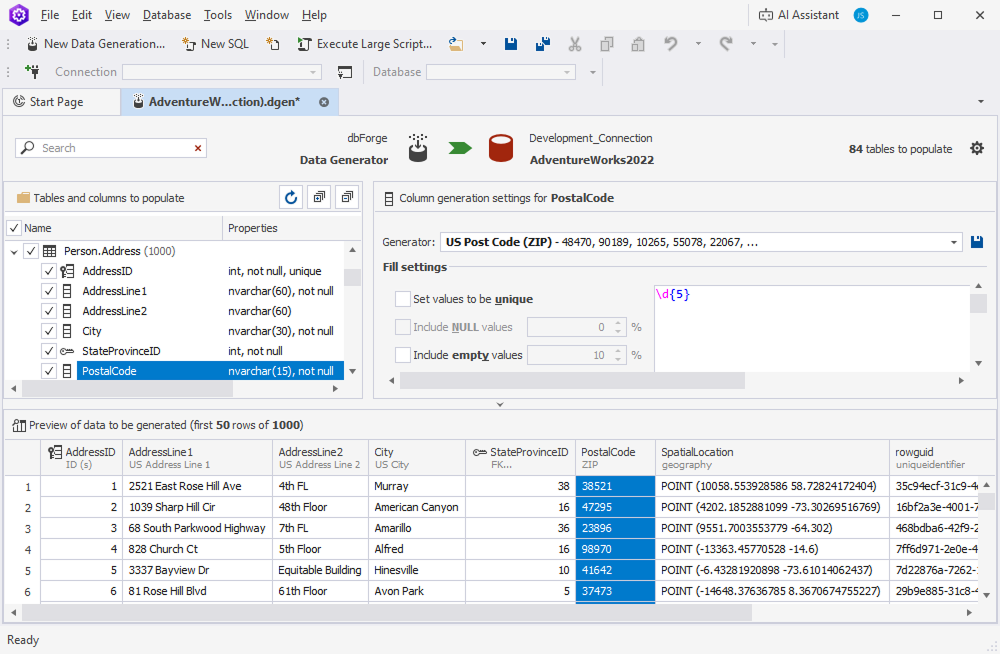
A project for AdventureWorks2022: the PostalCode column uses the US Post Code (ZIP) generator, and the preview shows generated addresses, cities and ZIP codes.
Basic generators for anything the presets don't cover
dbForge Data Generator for SQL Server also has 15+ basic generators for custom rules: Regular Expression (for codes like \d{5}), SQL Query and Table or View (take values from existing data), Weighted List (60% "Active", 30% "Pending", 10% "Closed"), Text File and Files Folder, JSON, Lorem Ipsum, Python scripts, Constant, Datetime and Uniqueidentifier. You can save a tuned generator as your own and share the .xml file with your team.
Foreign keys and check constraints stay valid
dbForge Data Generator for SQL Server assigns a Foreign Key generator to every column with a foreign key, so child rows point at parent rows that exist, and a Check Constraint generator that keeps values inside each constraint's range. That's what makes the result usable: your joins return rows and your inserts don't fail halfway through. You can also choose random-by-seed generation, which produces the same data every run, handy for repeatable tests.
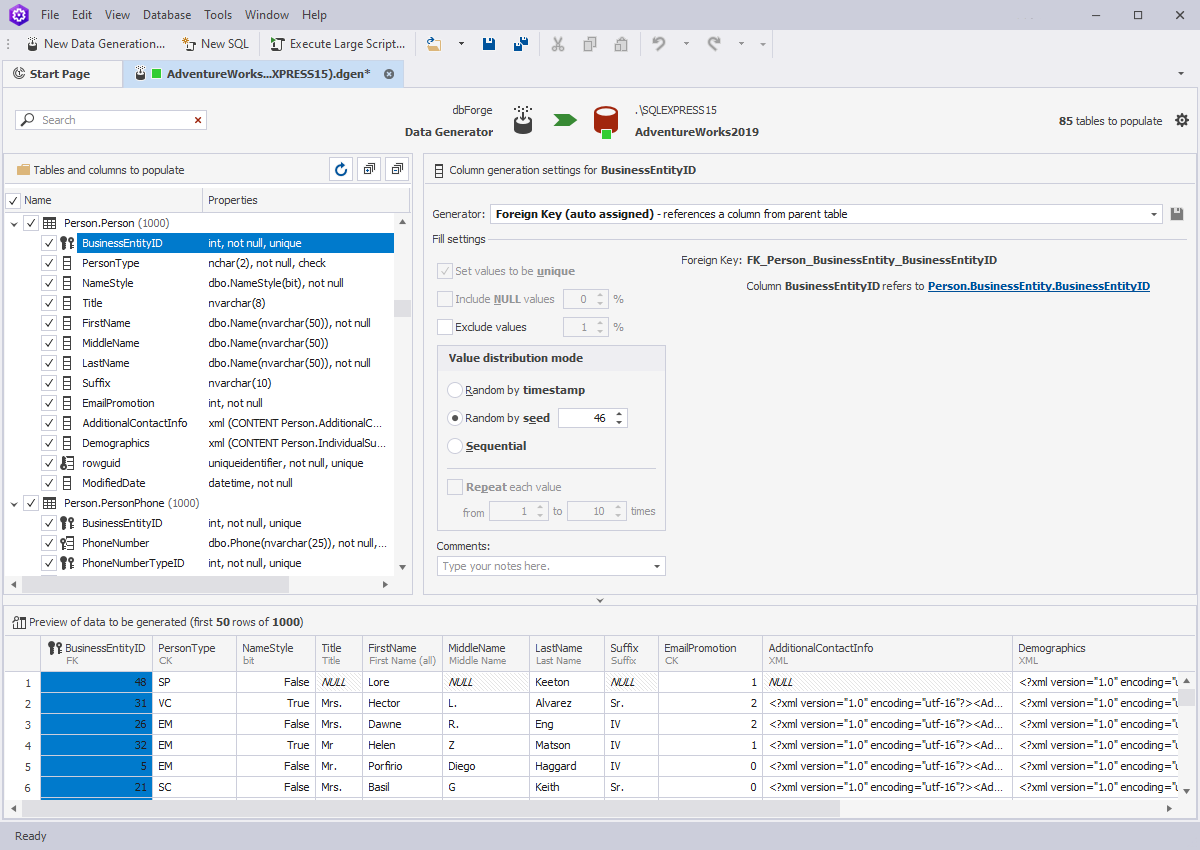
The BusinessEntityID column uses the auto-assigned Foreign Key generator, which reads values from Person.BusinessEntity; distribution is set to random by seed.
Run it, script it or schedule it
dbForge Data Generator for SQL Server's Data Population Wizard gives you three ways to finish: open the generated INSERT script in its editor to review it, save the script to a file, or run it straight against the database. Projects are saved as files, and the wizard can save a command line as a .bat file that you run on demand, from Windows Task Scheduler, or in a CI pipeline to rebuild a test database before each test run.
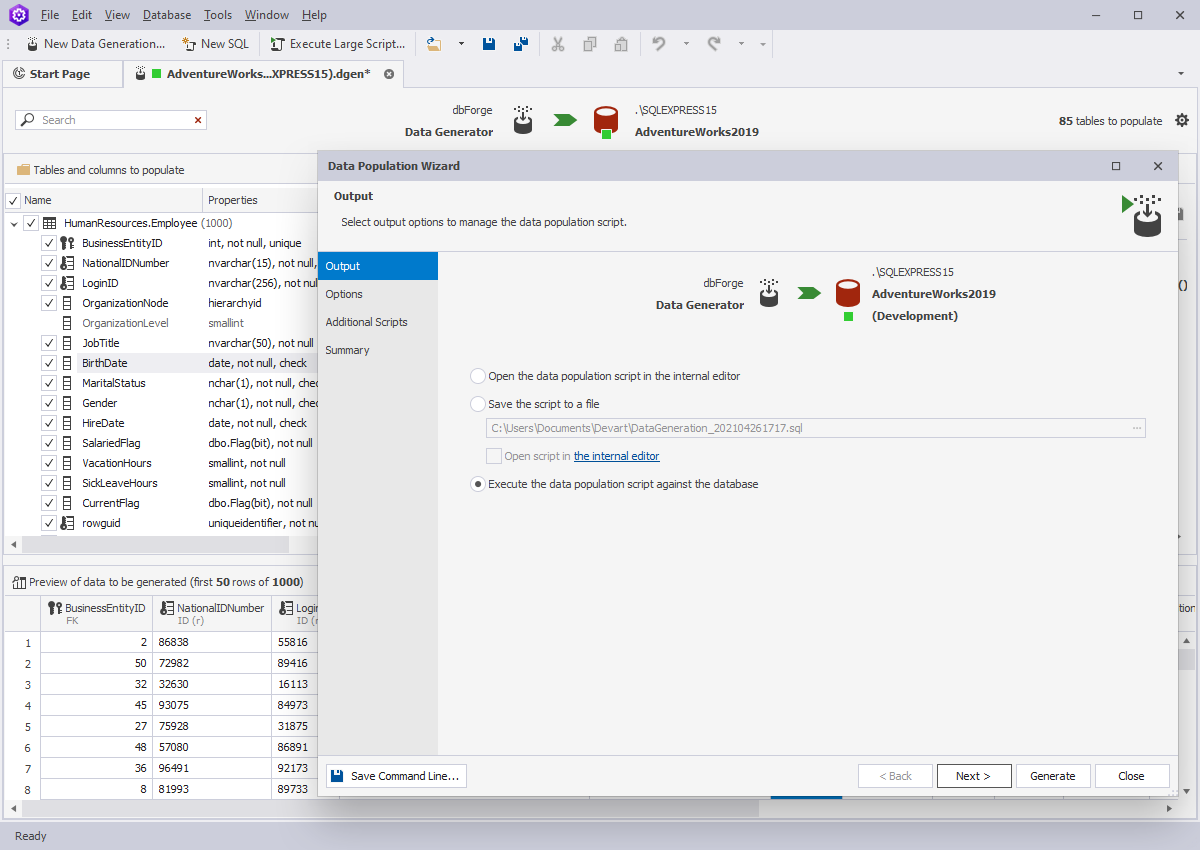
The Data Population Wizard's Output page: open the script in the editor, save it to a file, or execute it against the database, with a Save Command Line button at the bottom.
Works from inside SSMS
dbForge Data Generator for SQL Server adds a Data Generation > New Data Generation command to the database's right-click menu in SSMS Object Explorer, which opens a new project for that database. It handles SQL Server's awkward types too, including GEOGRAPHY, GEOMETRY, HIERARCHYID, DATETIMEOFFSET and XML.
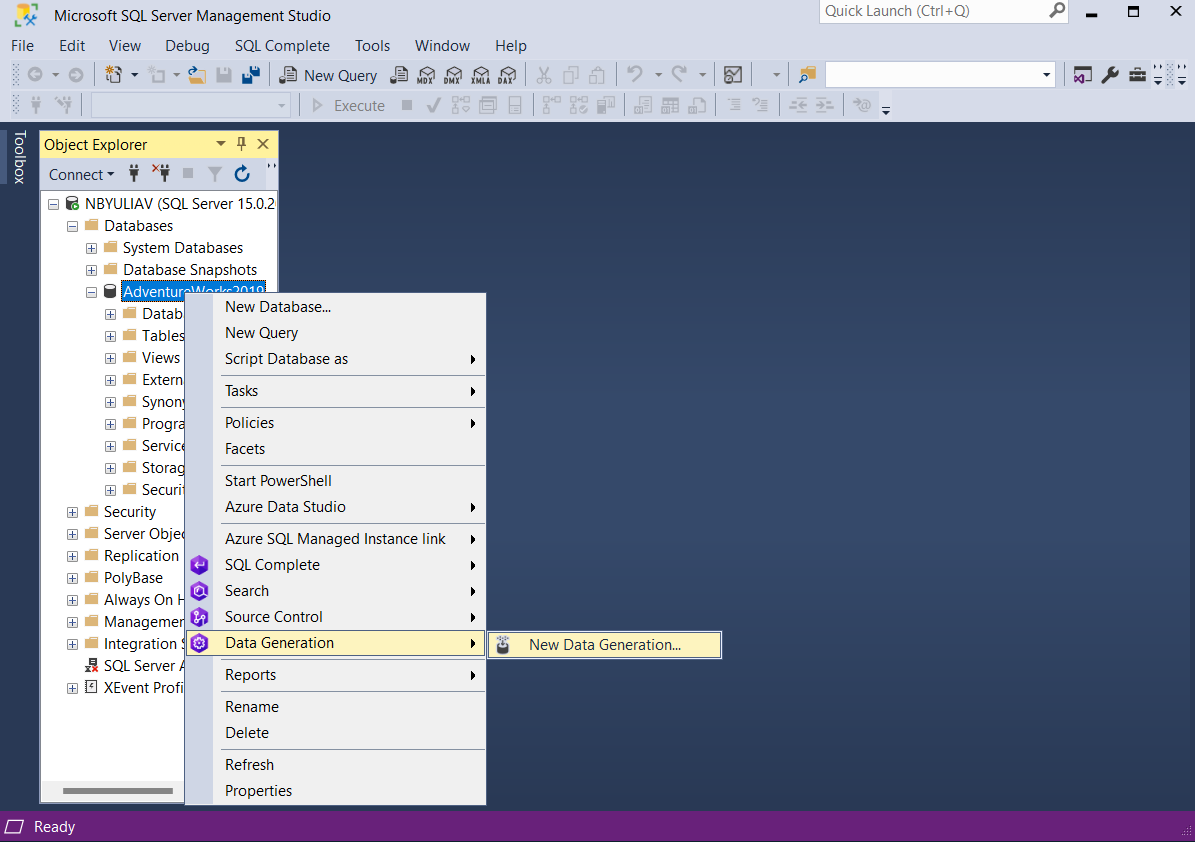
In SSMS, right-clicking the AdventureWorks2019 database shows Data Generation > New Data Generation (an older SSMS version).
Benefits
- Test against volume without touching production. A million believable orders shows you the slow query before your customers do, and no real customer data leaves production.
- Repeatable test databases. Seeded generation and saved projects give every developer, and every CI run, the same data.
- Demos that look like a real system. Sales demos and screenshots with plausible names and addresses instead of "Test1".
Real-World Uses
- Load testing a new feature. Fill the Orders and OrderLines tables with a few million related rows and see how your new report's query plan holds up.
- A fresh database for every CI run. Deploy the schema, run the saved .bat file, then run the integration tests.
- Privacy-safe development. Give contractors a database full of generated people instead of a copy of real customers.
- Research and teaching. Devart's customer story from the University of Ottawa used it to produce test data for a research project that didn't yet have real data.
Who It's For, and Who Should Skip It
It's for SQL Server developers, QA engineers and DBAs who regularly need populated test databases, and teams building CI pipelines around database tests.
Skip it if you need a few dozen rows once (a hand-written INSERT or a free online generator will do), if you need masked copies of production data rather than synthetic data, or if your databases are MySQL or PostgreSQL (Devart has separate products for those). If you also need schema compare, source control and the other SQL Server tools, the dbForge SQL Tools bundle includes Data Generator with 14 other tools from $469.95 a year.
Usage Guide
- Install. Download the installer (you'll sign in with a free Devart account) and run it. The 30-day trial includes every feature.
- Create a project. Choose New Data Generation, pick a connection and database, and set default options such as the number of rows per table.
- Review the guesses. Go through the tables list. For each column, check the generator it picked and its fill settings, and watch the preview.
- Uncheck what to leave alone. Clear the checkbox on lookup tables you've already filled, since by default a table is emptied before new rows go in.
- Populate. Click the populate button to open the Data Population Wizard, choose to review the script, save it, or run it directly, and take a backup first if you run it against a shared database.
- Automate. Save the project and use Save Command Line to get a .bat file for reruns.
Where it falls short
- Setup takes time on a large schema. The automatic generator choice is a starting point. On a database with hundreds of tables you'll spend a while correcting columns whose names don't say what they hold.
- Realism stops at the column. Generated values are plausible one by one, but business rules across tables (an order date after the customer's sign-up date) need SQL Query generators or post-processing.
- The price is for one tool. At $199.95 a year it's steep if you generate data only occasionally; the SQL Tools bundle is better value if you need several Devart tools.
What Users Say
Reviews are few
Data Generator has far fewer public reviews than Devart's best-known tools, and the big review sites hold only a handful. The quote Devart features comes from a customer story it published, so read it as the vendor's pick.
Daniel Amyot, Professor at the University of Ottawa: "dbForge Data Generator for SQL Server unblocked our research project! Indirectly, this will help real data providers understand our objectives and eventually share real data with us."
Without a larger independent body of reviews, the 30-day trial on your own schema is the best test. Pay attention to how many columns it guesses right on your database, since that's where the time goes.
Comparisons
dbForge Data Generator vs. Redgate SQL Data Generator
Both fill SQL Server databases with realistic, foreign-key-aware test data from a GUI and a command line. Redgate's tool is the better-known name and is often bought as part of its SQL Toolbelt. Devart's is sold on its own, includes Python generators and SSMS integration, and is also in the cheaper dbForge SQL Tools bundle. Try both on the same schema if you're choosing for a team.
Data Generator vs. writing your own scripts
A T-SQL loop or a Python script with a fake-data library costs nothing and is fine for one table. Data Generator earns its price when there are dozens of related tables, because it works out the parent-child order and foreign key values for you.
Data Generator vs. dbForge Studio for SQL Server
Devart's dbForge Studio for SQL Server includes a data generator in its higher editions alongside schema compare, data compare and a full IDE. If you'd use those too, the Studio can be better value than buying Data Generator alone.
Editions and Pricing
There's one edition. The order page opens on a 1-year subscription; choose the perpetual license or a longer term there.
| License | Price | What you get |
|---|
| 1-year subscription | $199.95 | All features and updates for one year; stops working if not renewed |
| Perpetual license | $399.95 | Works permanently, with one year of updates and support (extendable) |
| dbForge SQL Tools bundle | from $469.95 a year | Data Generator plus 14 more SQL Server tools |
Prices are per user. Devart takes 5% off for 5 to 9 licenses, 10% for 10 to 19 and 15% for 20 or more, and priority support is an extra option at checkout.
FAQs
Does dbForge Data Generator for SQL Server work with Azure SQL Database?
Yes. dbForge Data Generator for SQL Server works with Azure SQL Database, Azure SQL Managed Instance, Azure Synapse, Amazon RDS for SQL Server and Microsoft Fabric's SQL database, including Microsoft Entra multi-factor sign-in.
Is the dbForge Data Generator trial limited?
No. The dbForge Data Generator for SQL Server trial runs for 30 days with every feature; the only limit is the time.
Can dbForge Data Generator anonymize my production data?
No. dbForge Data Generator for SQL Server creates new synthetic rows; it doesn't mask existing ones. You can, though, use a Table or View or SQL Query generator to draw values such as product codes from data you already have.
Will dbForge Data Generator delete data already in my tables?
dbForge Data Generator for SQL Server can. Its "Truncate data from table before generation" option, which Devart's documentation lists as on by default, deletes every existing row in a table before filling it. Uncheck the tables you want to keep or turn the option off to append instead, and back up a shared database before running.
Can I run dbForge Data Generator in a CI/CD pipeline?
Yes. dbForge Data Generator for SQL Server has a command-line interface: save a project and its command line as a .bat file and call it from your build server or Windows Task Scheduler. Devart's DevOps Automation for SQL Server integrates it with other dbForge tools.
Can I get a refund on dbForge Data Generator?
Yes. Devart refunds dbForge Data Generator for SQL Server within 30 days on an annual subscription or a perpetual license.
System Requirements
- Windows 7, 8, 8.1, 10 or 11, or Windows Server 2008, 2012, 2016, 2019, 2022 or 2025
- .NET Framework 4.7.2 or later
- SQL Server 2005 to 2025 (2000 with limited support), LocalDB, SQL Server on Linux, Amazon RDS, Azure SQL, Azure Synapse, Microsoft Fabric
- Optional: SSMS 2016, 17, 18, 19, 20, 21 or 22 for the Object Explorer integration
Conclusion
dbForge Data Generator for SQL Server is worth it if test data is a recurring job for you or your team. The one reason to buy it is that it fills a whole related schema with believable data in minutes while keeping every foreign key valid, which is the part that makes hand-written scripts painful. The main reason not to is price against occasional use: at $199.95 a year, a developer who needs test data twice a year is better off with a script. Use the 30-day trial on your largest schema, and if you also need other Devart SQL Server tools, price the SQL Tools bundle before buying it alone.
Download Free TrialBuy Now