dbForge Documenter for SQL Server: Database Docs Built from Your Extended Properties
dbForge Documenter for SQL Server is Devart's Windows tool and SSMS add-in that turns a SQL Server database into searchable documentation in HTML, PDF or Markdown, with every table, column, index, constraint, routine and dependency, and the descriptions stored in your MS_Description extended properties. It costs $189.95 a year (or $379.95 perpetual) and fits developers, DBAs and analysts who have to hand over or maintain a data dictionary.
Documentation written in a wiki goes stale with the next migration. Documenter generates it from the database itself, picking up the descriptions your team keeps in extended properties, and a scheduled .bat file can rebuild the docs after every release.
Quick facts
- Version: 2026.2.96, released November 9, 2026
- Developer: Devart
- Platform: Windows 7 to 11 and Windows Server 2008 to 2025, with .NET Framework 4.7.2; add-in for SSMS 17 to 22 and SSMS 2016
- Databases: SQL Server 2005 to 2025 (2000 with limited support), SQL Server on Linux, Azure SQL Database and Managed Instance, Azure Synapse, Amazon RDS, Microsoft Fabric
- Output: HTML, PDF and Markdown, with Bootstrap themes such as Cerulean, Cyborg, Flatly, Journal and Yeti
- Edition: one edition; there's no free Express edition
- Download: 116.81 MB
- Price: $189.95 a year, or $379.95 perpetual with a year of updates
- Trial: 30 days, full functionality (the download asks you to sign in with a free Devart account)
- What we checked: version 2026.2.96 and its November 9, 2026 date on Devart's download page and revision history, the 116.81 MB download size listed there, the SQL Server and SSMS versions in Devart's requirements page, and the order page price of $189.95 for the default 1-year subscription (renewing yearly at the same price) and $379.95 for the perpetual license, on November 13, 2026. We didn't document our own database with it.
Before you buy
- It's priced close to bigger bundles. dbForge SQL Tools, which includes Documenter and 14 other tools, starts at $469.95 a year, and dbForge Studio for SQL Server Enterprise ($549.95 a year) includes database documentation too.
- Descriptions come from extended properties. Documenter shows and edits MS_Description; tables without descriptions still get documented, but only with their structure.
- A subscription stops working when it ends; a perpetual license keeps working after its year of updates.
- Check the refund terms. Devart's order page promises a refund within 30 days if you're not satisfied (on annual subscriptions and perpetual licenses), but its ordering FAQ ties refunds to technical problems its support can't fix, so make up your mind during the trial.
Download Free TrialBuy Now
Overview
You start a new documentation project (from Documenter itself or from Object Explorer in SSMS), select one or more connections, and the server's databases appear in a tree. Tick what you want documented, and each object gets a page with its description, properties (each with an On/Off switch), columns, indexes, constraints, parameters, dependencies and DDL. You can type or change descriptions right there, choose a theme, and generate HTML, PDF or Markdown.
Devart publishes sample documentation of its AdventureWorks2025 database in HTML and PDF. The tool gets regular fixes driven by user tickets: October 2026 added role membership for BUILTIN\Administrators, September 2026 added descriptions for output parameters of stored procedures and fixed MS_Description display for users, roles and schemas, August added a separate Default Constraints section, and June a Constraints group.
Features
Everything about each object, plus its dependencies
dbForge Documenter for SQL Server extracts owners, descriptions, properties, table and view columns, indexes and constraints, routine parameters, creation scripts and object dependencies, and it can show the largest tables and indexes in a database.
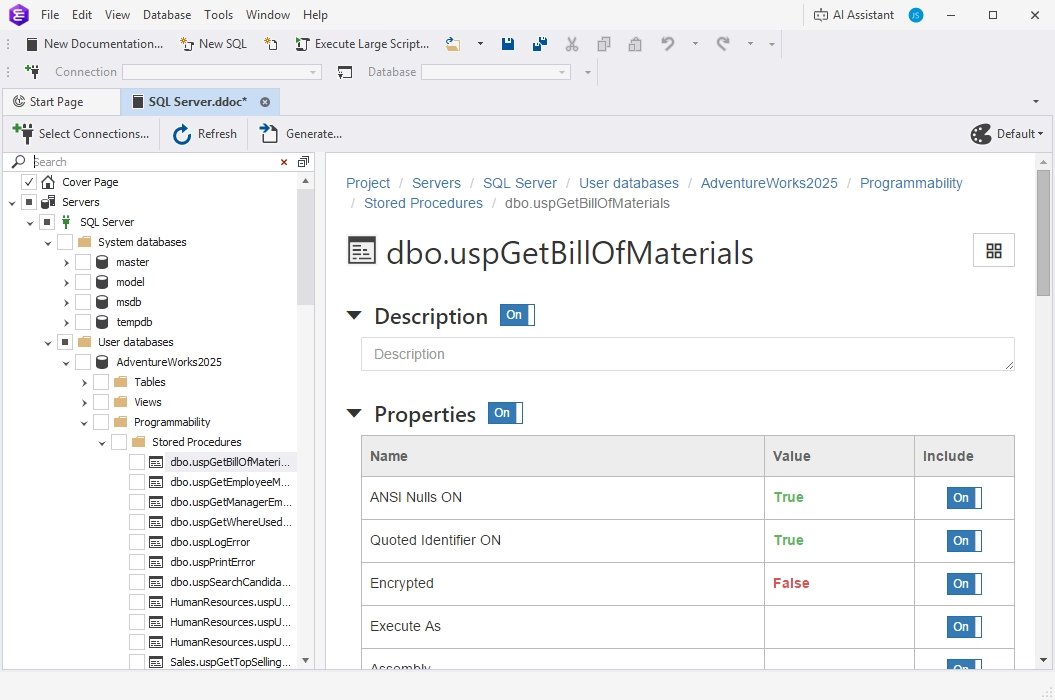
The page for AdventureWorks2025's dbo.uspGetBillOfMaterials procedure: description and properties such as ANSI Nulls ON, Quoted Identifier ON and Encrypted, each with an Include switch.
Self-documenting objects through extended properties
dbForge Documenter for SQL Server reads descriptions from the MS_Description extended property of each object, and lets you add a description where one is missing or overwrite an existing one before generating.
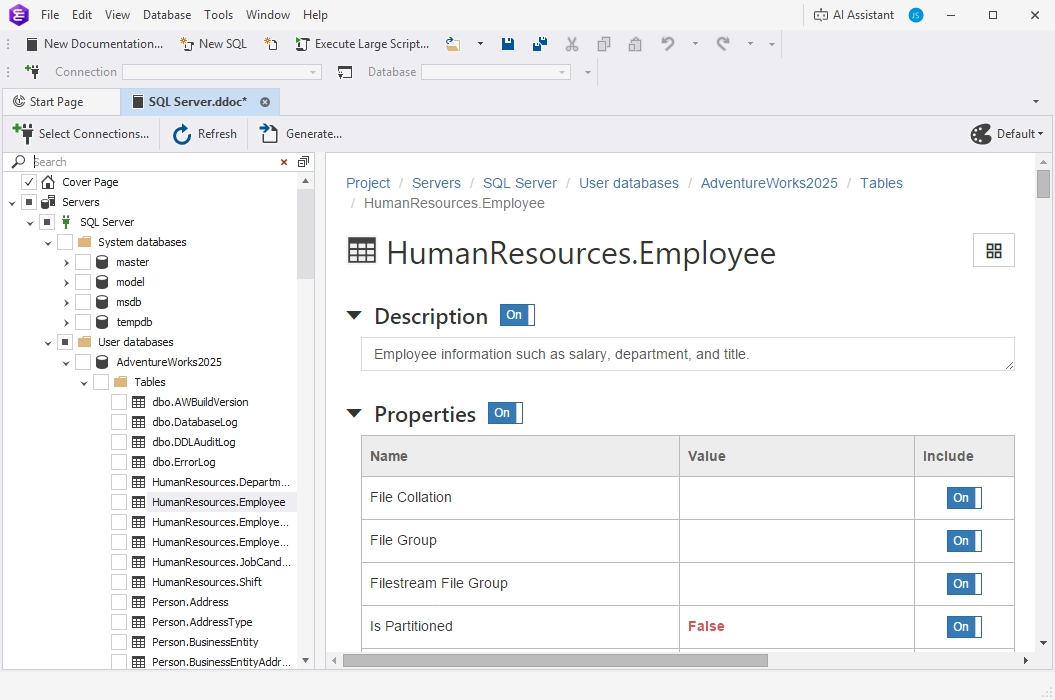
HumanResources.Employee with its description and properties, each property switched on for the output.
Themes, layout and searchable output
dbForge Documenter for SQL Server lets you include or exclude individual objects and properties and switch the style between themes such as Default, Bootstrap, Cerulean, Cyborg, Default Dark, Flatly, Journal, Paper and Yeti. In the generated documentation you find an object as you type, and move around through hyperlinks.
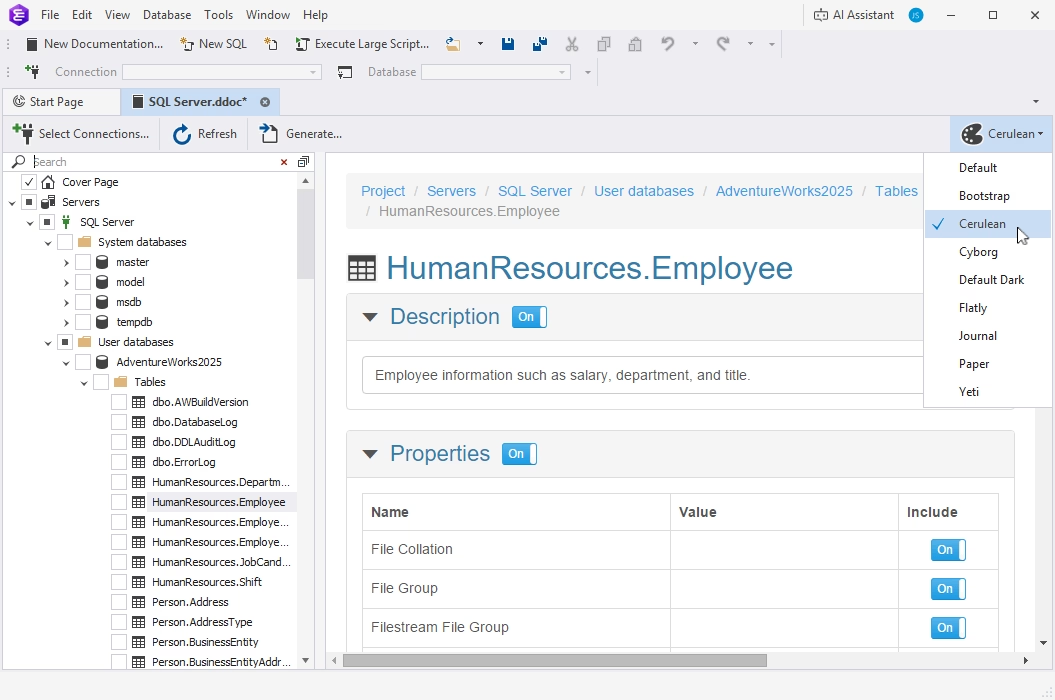
The theme menu, with Cerulean applied to the HumanResources.Employee page.
An AI Assistant for the descriptions nobody wrote
dbForge Documenter for SQL Server includes Devart's AI Assistant, a chat panel that can explain SQL and suggest what a table's description should contain: its purpose, contents, keys and relationships.
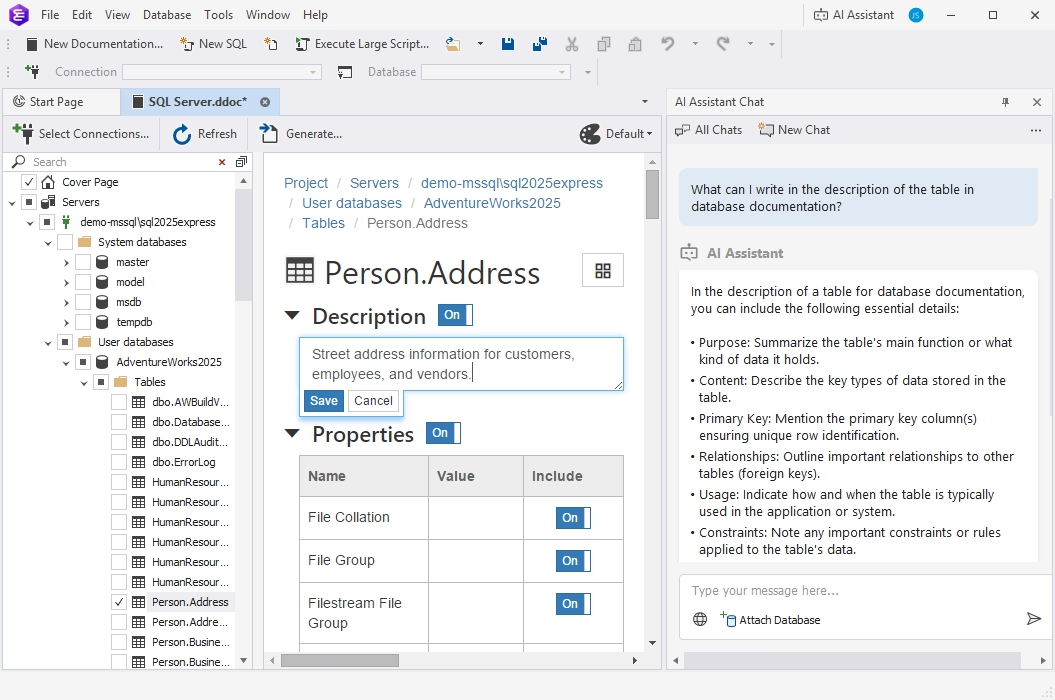
Editing the Person.Address description while the AI Assistant lists what a table description should cover.
Command line, PowerShell and SSMS
dbForge Documenter for SQL Server runs from the command line or PowerShell with all its options, saves them to a .bat file for Windows Task Scheduler, and adds a Documenter menu to SSMS Object Explorer so you can start a new documentation from the database you're looking at.
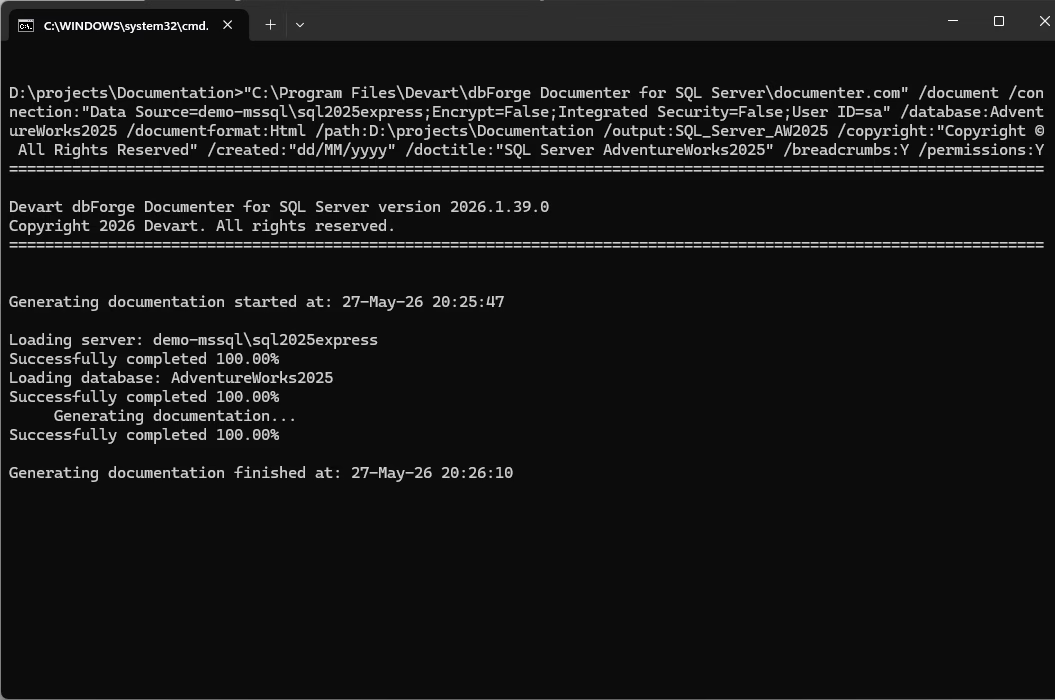
Version 2026.1.39 documenting AdventureWorks2025 to HTML from the command line in under a minute.
Benefits
- Documentation that can't drift far. It's regenerated from the live database whenever you want.
- Descriptions reused, not retyped. Whatever your team already put in MS_Description shows up in the docs automatically.
- Docs in the formats people use: HTML for the intranet, Markdown for Git, PDF for clients and auditors.
Real-World Uses
- A data dictionary on the intranet, rebuilt nightly by a scheduled .bat file.
- Database docs in the repository: Markdown output committed next to the migration scripts.
- Client handover: a PDF of the delivered database with the company logo and copyright.
- Onboarding analysts: a searchable HTML site with every table, column and description.
Who It's For, and Who Should Skip It
Buy it if you own SQL Server databases that other people need to understand, and you want the documentation generated from the database rather than maintained beside it.
Skip it if you'd use several Devart tools (dbForge SQL Tools at $469.95 a year includes it with 14 others), if you're buying dbForge Studio for SQL Server Enterprise anyway, or if you need ER diagrams or data lineage, which it doesn't produce. It's Windows-only.
Usage Guide
- Download and install Documenter for SQL Server from Devart's download page (sign in with a free Devart account); the installer can also add the SSMS integration.
- Create a new documentation project, from Documenter or from SSMS Object Explorer, and select your connections.
- Tick the databases and objects to document in the tree.
- Fill in missing descriptions and switch properties on or off on each object's page; pick a theme.
- Generate HTML, PDF or Markdown, and set the output folder.
- Automate: click Save Command Line to create a .bat file, and schedule it.
Where It Falls Short
- No diagrams or lineage. The output describes objects and dependencies in text and tables.
- Good docs still need good descriptions. Without MS_Description values, the result is a structure listing.
- Standalone price. At $189.95 a year it costs over 40% of the 15-tool SQL Tools bundle.
- Recent fixes show rough edges in less common objects: Devart fixed function result parameters, foreign key descriptions and MS_Description on users, roles and schemas during 2026.
What Users Say
Devart's product page quotes four reviews from G2 and Capterra. They're short and all positive, and there's little else published about the stand-alone Documenter, so read them as a sample rather than a verdict.
Reviews quoted on Devart's page (from Capterra and G2)
Miles G., Chief Idea Officer, Information Technology and Services (Capterra): "I need to document my databases as part of the technical documentation for my web software. dbForge Documenter has made it easy!"
Luca Mauro M., Senior Chief Developer, small business (G2): "Nice tools to write documentation. IT gives the possibility to write a useful documentation for the database to give to the developer and consultant. I can generate the documentation in a different format."
Pawan Y., Software Developer, mid-market (G2): "This is very handy and helpful to use specially when you are working with the large databases."
A verified user in IT services, enterprise (G2): "Simple and power tool for documentation the Db. Easy to use and many format options are there like HTML, PDF to generate documentation."
The common thread is ease of use and the choice of output formats. Nobody quoted mentions a drawback, so the trial is where you'll find out how it handles your own largest databases.
Comparisons
Documenter vs dbForge SQL Tools
dbForge SQL Tools ($469.95 a year and up) includes Documenter plus SQL Complete, Schema Compare, Data Compare, Data Generator, Source Control and nine more tools. If you'd use even two of them, the bundle costs less than buying them one by one.
Documenter vs dbForge Studio for SQL Server
dbForge Studio for SQL Server includes database documentation only in its Enterprise edition ($549.95 a year); Standard and Professional don't. Documenter alone is the cheaper route if you already work in SSMS.
Editions and Pricing
Documenter for SQL Server has a single edition and no free Express version. The order page opens on the 1-year subscription at $189.95; you can switch there to a perpetual license, to 2 or 3 years of support, and add priority support.
| License | Price | What happens later |
|---|
| 1-year subscription | $189.95 | Renews yearly at $189.95; stops working if not renewed |
| Perpetual | $379.95 | Keeps working; includes 1 year of updates and support |
Devart takes 5% off for 5 to 9 licenses, 10% for 10 to 19 and 15% for 20 or more.
FAQs
Does dbForge Documenter for SQL Server work inside SSMS?
Yes. dbForge Documenter for SQL Server adds a Documenter command to SSMS Object Explorer (SSMS 17 to 22 and SSMS 2016), and it also runs as a standalone application.
Can it document Azure SQL Database?
Yes. dbForge Documenter for SQL Server supports Azure SQL Database, Azure SQL Managed Instance, Azure Synapse Analytics and Microsoft Entra ID multi-factor authentication, as well as Amazon RDS and Microsoft Fabric.
Is there a free version of dbForge Documenter?
No. dbForge Documenter for SQL Server has no free Express edition, only the 30-day trial.
What permissions does it need?
dbForge Documenter for SQL Server needs the db_owner role on the database it documents. With fewer rights, Devart warns that generation can fail or produce incomplete results.
Can I run it in a CI pipeline?
Yes. dbForge Documenter for SQL Server runs from the command line or PowerShell, so a build server can regenerate the documentation as one of its steps.
What happens if I let the subscription lapse?
A dbForge Documenter for SQL Server subscription stops working at the end of its term until you renew. Devart charges 20% more to renew 3 or more months after the end, and 60% more after 12 months.
System Requirements
- Windows 7, 8, 8.1, 10 or 11, or Windows Server 2008, 2012, 2016, 2019, 2022 or 2025
- .NET Framework 4.7.2 or later
- SQL Server 2005 to 2025 (2000 limited), Azure SQL, Amazon RDS, Microsoft Fabric
- Optional: SSMS 17 to 22 or SSMS 2016 for the add-in
- About 117 MB for the installer download
Conclusion
dbForge Documenter for SQL Server does its job well: it turns a database and its extended properties into clean, searchable HTML, PDF or Markdown, edits the descriptions in place, and runs on a schedule. It's worth $189.95 a year to a team that only needs documentation. The main reason not to buy it alone is the price next to dbForge SQL Tools, which includes it with 14 other tools for $469.95, so check if you would use any of those first. Try it free for 30 days.
Download Free TrialBuy Now