webcamXP and webcam 7: the Windows webcam server that stopped in 2016
webcamXP, and its sister program webcam 7, turned a Windows PC into a webcam and IP camera server: it showed your cameras on a web page, recorded them, and watched for motion. It came from Moonware Studios, a small developer in Geneva, Switzerland, and it was popular for more than a decade. The last versions, webcamXP 5.9.8.7 and webcam 7 1.5.3.0, came out in June 2016, and nothing has been released since. The developer now tells new users to start with its newer program, Netcam Studio, instead.
If you came here for a download: the vendor's own site, webcamxp.com, still serves the 2016 installers, including the free edition for private use. What you can't do any more is buy a PRO license: the order buttons go to a payment service that no longer answers. This page tells the story, explains what still works and what doesn't, and points you to current software for the same jobs.
Quick facts
- Developer: Moonware Studios (earlier Darkwet Network), Geneva, Switzerland
- First released: by 2002, as a free tool "to set up a webcam site in seconds"
- Last versions: webcamXP 5.9.8.7 and webcam 7 1.5.3.0, both dated June 9, 2016
- Editions: webcamXP Free (private use, up to 2 cameras), webcamXP Private, and the PRO license, which covers both webcamXP PRO and webcam 7 PRO
- Platform: Windows XP, Vista, 7, 8 and 10, plus Server 2003, 2008 and 2012. On Windows 10 webcamXP needs the Media Feature Pack, or you use webcam 7 instead
- Original price: 99 USD for PRO and 49 USD for Private, lifetime licenses with one year of free upgrades
- Status: no new version since 2016; the vendor recommends Netcam Studio to new users, and PRO licenses can no longer be bought
- Official download today: the 2016 installers, still on the vendor's site
- What we checked: on November 22, 2026, webcamxp.com still loaded, with a "© 2003 - 2019" footer. Its download buttons redirected to installers on the vendor's d.netc.am server (18.7 MB for webcamXP Private/PRO, 21.2 MB for webcam 7 PRO, 15.4 MB for webcamXP Free), all last modified on April 30, 2018 and still carrying the 2016 version numbers. The order page's three buttons point to order.shareit.com, which returned "502 Bad Gateway" every time, and the Internet Archive has recorded the same error there since June 2026. We read the vendor's home and download pages as the Internet Archive saved them from 2002 to 2017 to date each release. We didn't install the program.

webcamXP 5's main window, from the vendor's own screenshots page: the live picture of one camera, the other sources on the right, and pan, tilt and zoom controls.
What webcamXP did
webcamXP was built for one job: keep cameras online around the clock on an ordinary Windows PC. Moonware's home page said it was "designed to be online 24/7 while using reasonable resources on your computer". In one program you could:
- Mix many cameras: USB webcams, TV and capture cards, more than 1,500 models of network camera, Windows Media streams and plain video files.
- Put them on the web: a built-in web server showed your cameras as still images, JavaScript MJPEG pages or a Flash player, without setting up any other server software.
- Watch for motion: an optical or sound-based motion detector could record, upload pictures by FTP, post them to a web server or run another program when something happened.
- Record nonstop: a DVR mode recorded continuously and deleted footage older than a set number of hours.
- Control cameras remotely: pan and tilt for the Logitech Orbit, Creative LiveMotion and network cameras, plus a user manager deciding who could see what.
The vendor said it was used by police and army units, museums, hotels, shops and zoos. For home users, it was often the first way to watch the front door from work.
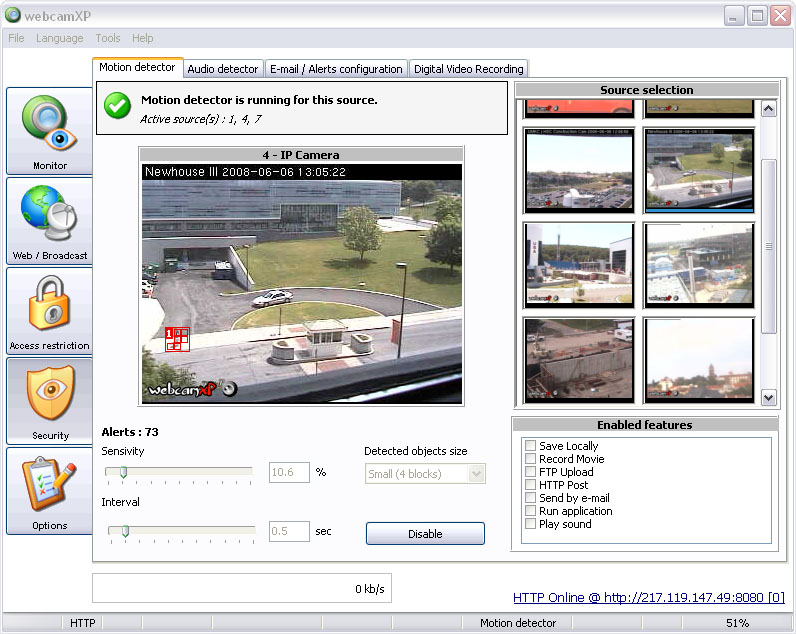
The motion detector tab: sensitivity and interval sliders, and the actions to run on an alert, such as recording, FTP upload or e-mail.
The story, version by version
- 2002: a free webcam server. The earliest saved copy of webcamxp.com, from April 2002, calls it "the ultimate webcam tool", a free program from "darkwet" whose built-in HTTP server let you "start sharing your cam with the world".
- 2004 to 2007: from hobby tool to product. By December 2004 the site offered webcam XP 1.07 and a 2.13 beta, for Windows 98 to Server 2003, sold through RegNow. In January 2007, webcam XP 2007 (version 3.02) promised "up to 100 video sources per computer" and remote pan and tilt.
- 2008 to 2009: webcamXP 5 and webcam 7. webcam XP 2008 added Windows Vista. In late 2009 webcamXP 5 arrived, and a second program, webcam 7, appeared in beta in December 2009. It streamed in Flash Video instead of Windows Media and could take sound from network cameras. The site now said webcamXP was "free for private use".
- 2010 to 2013: steady updates. Versions 5.5 (2010 to 2012) added cameras and, by 2012, Czech and Turkish. One PRO license covered both programs.
- 2014: the successor is announced. In January 2014, with webcamXP 5.7.5 and webcam 7 1.2.5, the home page announced Netcam Studio in beta, "intended to replace webcamXP in the future", and offered PRO buyers from January 2011 to December 2013 a free upgrade to it.
- June 2016: the last release. webcamXP went from 5.9.5 to 5.9.8.5 and then 5.9.8.7, and webcam 7 to 1.5.3.0, both dated June 9, 2016. The Internet Archive shows the same versions on the download page every year since.
- 2016 to today: frozen. The download page now opens with "We recommend new users to start by downloading Netcam Studio rather than webcamXP or webcam 7." The order page still says payments go through "RegNow / MyCommerce", but its buttons lead to a checkout that no longer works.
Should you still use webcamXP or webcam 7?
For a quick test on an old PC, the free edition still installs from the vendor. For anything that faces the internet, we'd move on, for these reasons:
- No security fixes since 2016. webcamXP runs its own web server. A web server that hasn't been updated in ten years is a poor thing to open to the internet, and it's the part that people outside your home can reach.
- Its pages are easy to find. Many of the searches that bring people to this page are typed with "intitle:", the trick people use to find webcamXP and webcam 7 servers whose cameras are open to anyone. If you run one, put a password on every camera in the user manager, or keep it on your home network only.
- Some viewers no longer work. webcam 7's streaming and the Flash viewer depend on Adobe Flash, which browsers stopped running after Adobe ended it at the close of 2020. The JavaScript MJPEG pages and still images still open in a browser.
- Only download from webcamxp.com. Many "webcamXP PRO" files and videos online come with serial numbers or cracks. Those aren't from Moonware and are an easy way to get malware.
- You can't buy PRO now. On November 22, 2026 the order buttons led to a payment page that returned an error, so the PRO features and the trial can't be turned into a license.
What to use instead of webcamXP
The vendor's own answer is Netcam Studio, its 64-bit successor with phone apps, better audio and RTSP support. It's described on netcamstudio.com, but we didn't check whether it can be bought today. These current programs on our site cover the same jobs:
To stream and record your cameras: ManyCam
If you used webcamXP to put a camera on the web, ManyCam takes video from webcams, IP cameras, your phone and your screen, mixes them into one picture with overlays and text, records it, and streams it live to YouTube, Facebook or any RTMP server. It also works as a virtual webcam in Zoom, Teams and Meet. It's updated regularly for Windows 11 and macOS, and a free version with a watermark lets you test your cameras first.
Read our ManyCam review
Motion-triggered surveillance on a Mac: Periscope Pro
The closest match to webcamXP's motion detector, for Mac owners. Periscope Pro records from the Mac's camera, a USB webcam or IP cameras from brands like Axis, Foscam and Hikvision, nonstop or only when it sees movement or hears sound, and can copy clips to Dropbox so you see them on your phone. It's a one-time purchase.
Read our Periscope Pro review
Scheduled webcam recording on Windows: EaseUS RecExperts
If what you used was webcamXP's scheduler, EaseUS RecExperts records your webcam, screen and sound on Windows 7 to 11, with a task scheduler that starts and stops recordings on its own, and auto split for long sessions. It's a recorder, not a camera server: it has no motion detection or web viewer.
Read our EaseUS RecExperts review
For more recording tools, see our guide to the best screen recorder software for Windows. If you just want to see webcamXP in action again, the videos further down this page show it at work with home security cameras and with an Android phone used as an IP camera.
FAQs
Is webcamXP still available?
Partly. webcamxp.com still offers the June 2016 installers of webcamXP Free, webcamXP Private/PRO and webcam 7 PRO, but there has been no new version since 2016, and on November 22, 2026 the order buttons for PRO licenses led to a payment page that no longer works.
What is the difference between webcamXP and webcam 7?
webcamXP streams sound and video in Windows Media format, while webcam 7, added in 2009, streams in Flash Video and can take audio from network cameras. One PRO license covers both, but webcam 7 has no Free or Private edition.
Does webcamXP work on Windows 10 or Windows 11?
The vendor lists Windows 10 support for webcam 7, and says webcamXP on Windows 10 needs the Media Feature Pack. It has never said anything about Windows 11, because the last version came out years before Windows 11, so treat it as untested there.
Is webcamXP free?
webcamXP Free is free for private use with up to 2 cameras. The Private and PRO editions were paid lifetime licenses, 49 USD and 99 USD, and the PRO package installed as a 21-day trial until you entered a serial.
Why do searches with "intitle:webcamXP" show live cameras?
webcamXP and webcam 7 put their own name in the title of the web page they serve, so anyone can search for that title and find servers whose owners left their cameras open. If you run webcamXP, password-protect your cameras in its user manager, or don't expose it to the internet at all.
Is webcamXP safe?
The installers from webcamxp.com are the vendor's own files, but the program hasn't had a security update since 2016 and runs its own web server, so it shouldn't face the internet. "PRO" copies with serials or cracks from other sites aren't from the vendor and can carry malware.
Who made webcamXP?
webcamXP was made by Moonware Studios in Geneva, Switzerland, which began as Darkwet Network. The same team makes Netcam Studio, which it announced in 2014 as webcamXP's replacement.
Can I still use my webcamXP PRO license?
Yes, a license you already own keeps working, because licenses were lifetime. Only the free upgrades and support were limited to one year, and there have been no upgrades since 2016 anyway.
Conclusion
webcamXP was a great little camera server for its time, but it stopped in 2016, and it's no longer something to put on the internet. If you still run it, keep it on your home network or password-protect every camera. For streaming and recording cameras today, ManyCam is the most flexible choice; on a Mac, Periscope Pro gives you motion-triggered recording; and for scheduled webcam recording on Windows, EaseUS RecExperts does the job.