Periscope Pro: Turn a Mac and Its Camera into a Motion-Triggered Security Recorder
Periscope Pro is a $19.99 one-time-purchase Mac app from ZipZapMac that records video from the Mac's built-in camera, a USB webcam or a network IP camera, either nonstop or only when it sees movement or hears sound. It suits someone who wants to keep an eye on a home office, a pet, a server room or a holiday flat with a spare Mac, without paying a monthly cloud-camera fee.
The idea is simple: you leave a Mac running, point a camera at the room, and come back to a short list of dated clips covering only the moments when something happened, instead of eight hours of an empty hallway. If you add Dropbox, those clips show up on your phone while you are away.
Quick facts
- Developer: ZipZapMac (teams in Prague and Novosibirsk)
- Current version: 3.5.3, released May 17, 2023
- Platform: macOS 10.14.6 Mojave or later; MacUpdate lists the build as Intel 64
- Cameras: the Mac's built-in camera, external USB cameras, and IP cameras from dozens of listed brands (Axis, D-Link, Foscam, Hikvision, TP-Link, TRENDnet and many more)
- Recording modes: continuous, motion detection, audio detection, or motion plus audio
- Price: $19.99, a lifetime license with no renewal; the Mac App Store charges the same
- Trial: none currently offered for download
- What we checked: the order page sells Periscope Pro as a lifetime license for $19.99 with no renewal; the Mac App Store record shows version 3.5.3 (5.3 MB, macOS 10.14.6 or later, updated May 17, 2023); the old direct download link on zipzapmac.com returned a server error, so we did not install or run the app; all checked on November 4, 2026
Before you buy
- No trial. ZipZapMac's product page now links only to the Mac App Store, and the download link the company used for the direct version answered with a server error on November 4, 2026. Buy only if the feature list below covers what you need.
- Development has slowed. The latest release, 3.5.3 from May 2023, lists compatibility fixes for macOS 10.14 to 10.15 and a password-panel bug fix. ZipZapMac states nothing about newer macOS versions or Apple silicon, so on a recent Mac you are relying on Apple's Intel compatibility layer (Rosetta 2).
- A camera light will show. When the Mac's own camera records, its green light comes on, even in hidden mode. For discreet monitoring you need a separate USB or IP camera.
Buy Now
Overview
Periscope Pro sits in a small, older niche: Mac apps that make a desktop or laptop act like a DVR for security cameras. The main window is compact, with a large live preview, three tabs underneath for the recording mode, the camera and the microphone, and a single power button that starts watching. A counter on the clips button tells you how many new recordings are waiting.
Everything else lives in two places. Preferences sets the clip resolution and frame rate, the folder where clips go, Dropbox copying, timestamps, start at launch, the hidden "Candid Camera" mode and a password. The Clip Library plays recordings back in a large viewer with a scrolling list of thumbnails sorted by date and time.
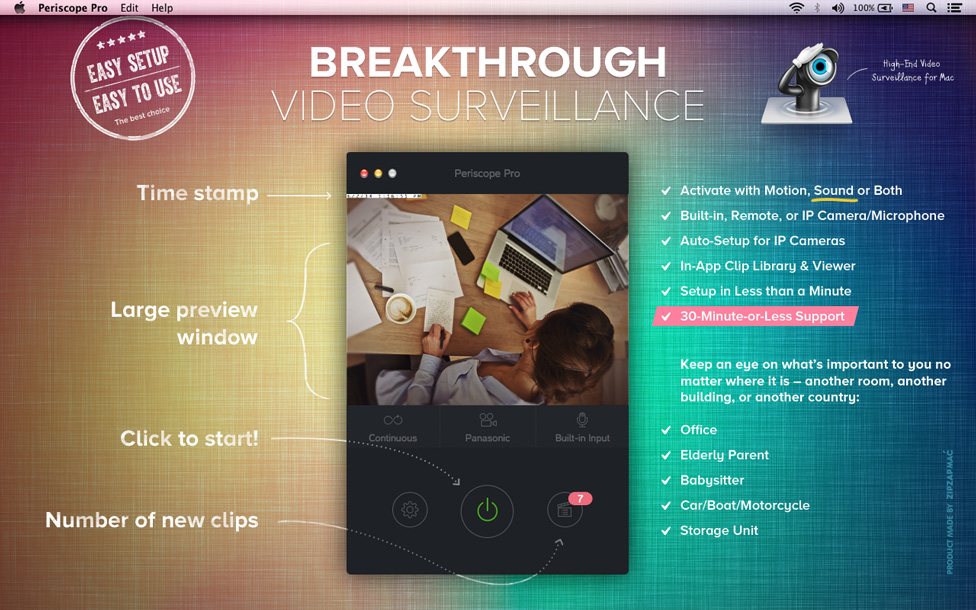
ZipZapMac's annotated screenshot of the main window: a timestamped live preview, the Continuous / camera / microphone tabs, the start button and a badge showing seven new clips.
Features
Recording that starts only when something happens
Periscope Pro can record continuously, or only when motion, sound or both pass a threshold. Two sliders, Motion Detection Threshold and Audio Detection Threshold, sit over the live preview with level meters, so you can wave a hand or talk and watch exactly where the trigger point falls. Set it low to ignore a curtain moving in a draft or a cat walking past; set it high to catch any movement at all.
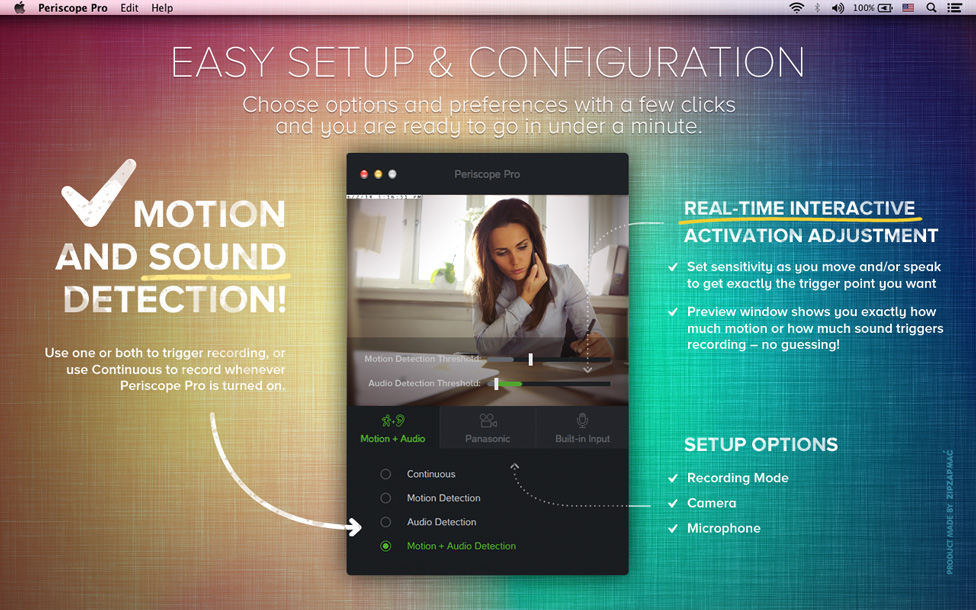
The setup view with motion and audio threshold sliders on the preview and the four recording modes: Continuous, Motion Detection, Audio Detection and Motion + Audio Detection.
IP camera setup with a live preview
Periscope Pro connects to network cameras by address and model: pick the brand from the list and the app fills in the stream path, protocol and port, with a preview so you can see whether the connection works before you save it. A manual mode lets you type the stream URL yourself for cameras it doesn't know. Version 3.1.1 added 20 more camera vendors, about 950 more models, H.264 and RTSP streams (including RTSP over UDP and HTTP) and sound from IP cameras. The same screen can also pull in public IP cameras, such as webcams pointed at harbors or wildlife.
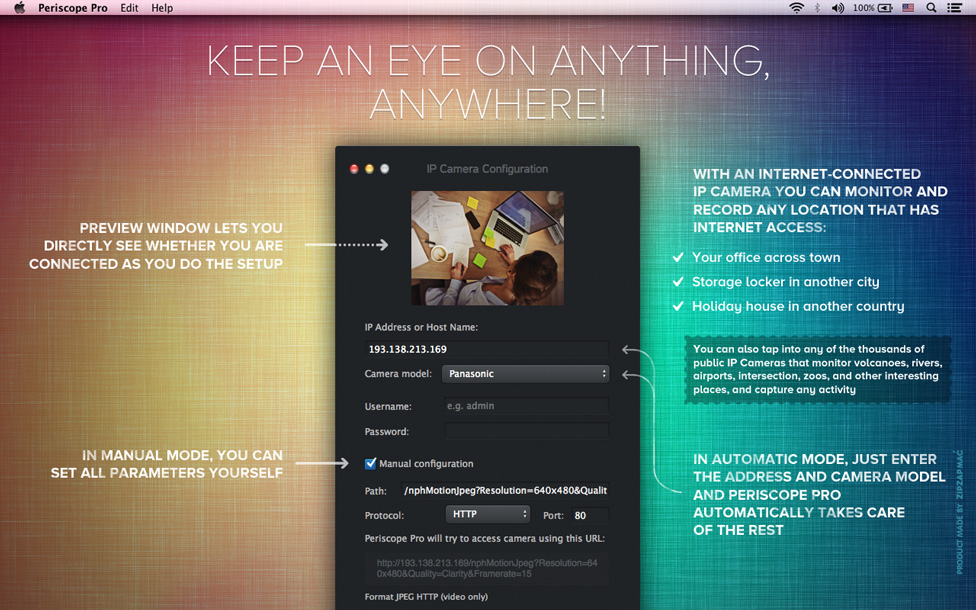
The IP Camera Configuration window: preview, IP address, camera model (Panasonic selected), login fields and the manual path, protocol and port settings.
Clips stored by date, with Dropbox copies
Periscope Pro saves each recording to a folder you choose, on any drive, named by date and time. Clip resolution goes from 320x240 up to 1600x1200 and the frame rate from 1 to 25 frames per second, so you can trade detail for disk space. Tick "Copy Video Clips to Dropbox folder" and every clip also syncs to Dropbox, where you can watch it from a phone, tablet or another computer. A timestamp can be burned into every frame.
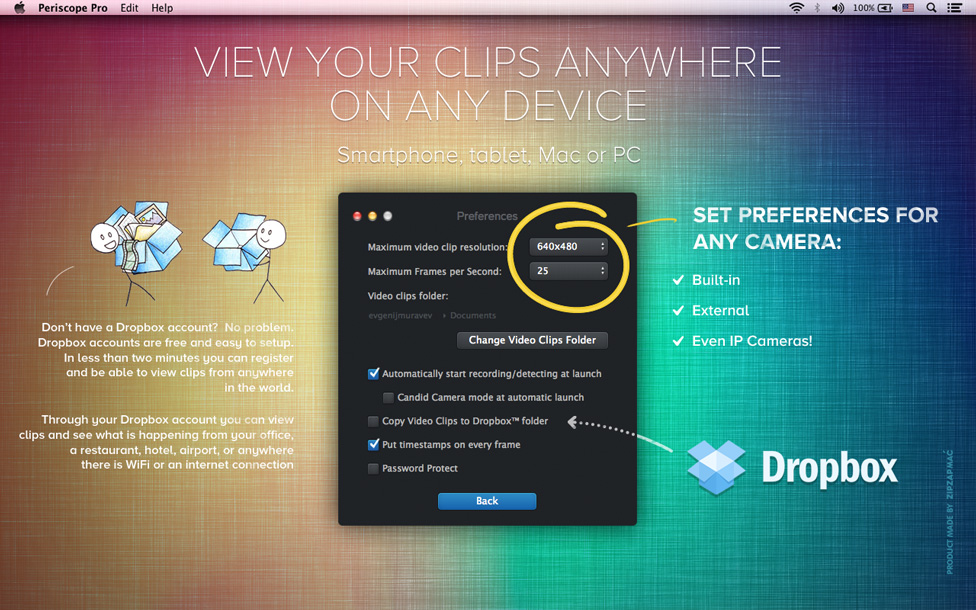
Preferences: maximum clip resolution (640x480 here), 25 frames per second, the clips folder, automatic start, Candid Camera mode, Dropbox copying, timestamps and password protection.
A built-in clip library
Periscope Pro's Clip Library lists recordings as thumbnails with their time, length and size, grouped by day. Click one and it plays in a viewer that can go full screen, with buttons to open the file in Finder or delete it. Because motion and sound triggers keep clips short, a day's activity is usually a handful of entries rather than one huge file.
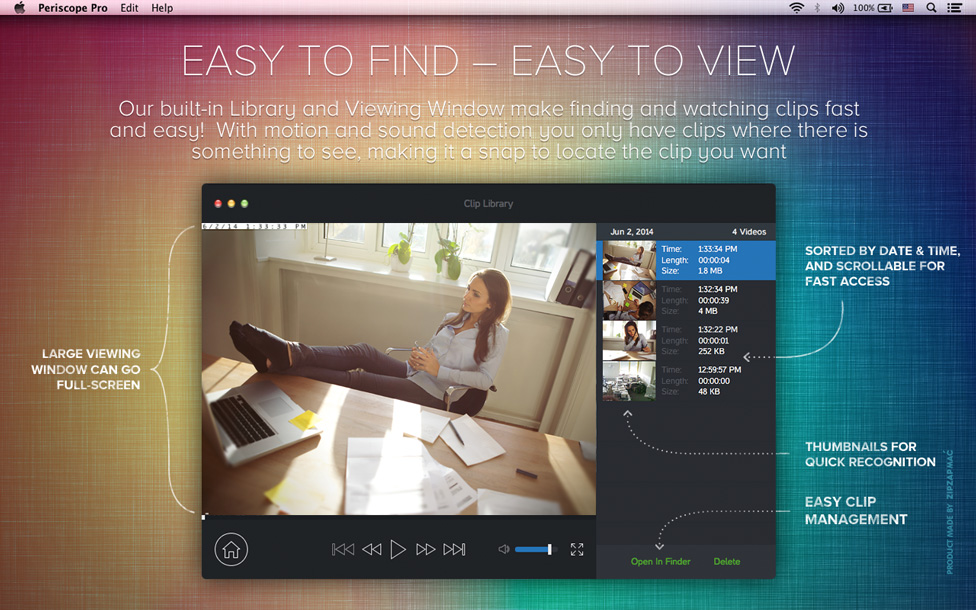
The Clip Library: a large playback window on the left and four clips from one day on the right, each with time, length and file size.
Hidden, password-protected operation
Periscope Pro can start at login or launch, hide itself from the Dock and screen (Candid Camera mode), keep recording while the screen saver runs or the display is off, and ask for a password before anyone changes its settings. That last part matters: someone at the Mac shouldn't be able to switch the recorder off.
Benefits
- No subscription. Many camera makers charge monthly for cloud recording. Periscope Pro is a one-time $19.99, and the storage is your own disk plus Dropbox if you want it.
- Uses hardware you already own. An old MacBook with its built-in camera is enough to start; IP cameras can be added later.
- Less footage to wade through. Motion and sound triggers mean you review the minutes that matter, not the whole day.
- Several kinds of camera in one app. Built-in, USB and IP cameras are set up from the same preferences window.
Real-World Uses
- Who's been at my desk? Leave a work Mac recording on motion while you are at lunch. One user on ZipZapMac's site says it helped catch people using their work computer without permission.
- A school or office server room. An IP camera on the rack and a Mac in the corner give you a dated log of who opened the door.
- Pets and an empty house. Set audio detection to catch the dog barking, and check the clips on your phone through Dropbox.
- A holiday flat or storage unit. Point an internet-connected IP camera at the door and record it from your Mac at home.
Who It's For, and Who Should Skip It
Periscope Pro fits a Mac owner with a spare machine who wants basic, local motion-triggered recording from one camera at a time, for less than the cost of a month or two of some cloud camera plans.
Skip it if you need several cameras recording at once with live alerts, if you only use Windows (there is no Windows version), or if you want software that is updated for every new macOS release. In those cases a dedicated multi-camera Mac recorder, or the app that comes with your camera, is the safer buy. Also skip it if a free trial matters to you, since none is available.
Usage Guide
- Install and launch. Buy the license, install Periscope Pro and open it. Allow camera and microphone access when macOS asks.
- Pick a camera. On the camera tab, choose the built-in camera or a USB one. For an IP camera, open the IP camera setup, enter its address and pick the model; check the preview, then save.
- Choose a mode. Select Continuous, Motion Detection, Audio Detection or Motion + Audio Detection.
- Set the triggers. Move around and talk in front of the camera while you drag the two threshold sliders until only the activity you care about crosses them.
- Set preferences. Choose the clip size, frame rate and clips folder; turn on Dropbox copying, timestamps, start at login and a password if you need them.
- Start watching. Press the power button. Come back later and open the Clip Library to review what was recorded.
Where it falls short
- Stability complaints. On MacUpdate, the most recent low ratings describe crashes ("It never runs for very long without crashing") on version 3.4.1, and others say they could not get help from support.
- Old codebase. The app's design and camera list date from 2014 to 2016, and the only update since 2017 was the 2023 compatibility release.
- The Mac has to stay on. There is no recording on the camera itself and no cloud recorder: if the Mac sleeps, shuts down or loses power, recording stops.
What Users Say
Periscope Pro got warm press reviews when it was new, while the user ratings on MacUpdate are much more mixed. The US Mac App Store page shows no ratings for it at all.
Press reviews
Macworld (Dan Moren, part of Macworld's GemFest 2014 series, when the app sold for $50): "The motion sensor part is what makes Periscope Pro particularly attractive, since it means that it only records at those time when something is actually going on." He also noted the catch with the built-in camera: Candid Camera mode hides the app, "though note, of course, that the green light next to your FaceTime camera will still light up." His conclusion: "Periscope Pro may not be super cheap, but it'll still probably run you less than a professional security system, and it offers plenty of features for that price."
iMore (Peter Cohen, page last updated February 24, 2018) listed as the good points "Simple to set up and use", "Lets you control video quality to optimize file size" and "Supports Dropbox", and as the bad "Nothing appreciable". The bottom line: "Periscope is simple to set up and use and provides a truly seamless experience for anyone who wants to use their Mac to record video when they're away (or even if they're around). At $19.99, it's better value than it has been in the past, too."
MacUpdate users (2.6 out of 5 from 23 ratings)
- Derekcurrie (3 stars, August 24, 2023): "v3.5.3 is the current version. The license for v1 and v2 still works for v3!"
- Iaian7 (1 star, June 26, 2019): "It never runs for very long without crashing. Buggy and unreliable."
- Almcfd (half a star, August 22, 2018): "No service no support Many Time asking for Help any response from them ."
- WiZZardP1 (5 stars, September 18, 2017): "Excellent piece of software."
- Georges-Schell (2 stars, September 16, 2017): "No use of this app…"
Comments on ZipZapMac's product page
- Peter: "I am using Periscope Pro for surveillance of the server room of our school. This works quite fine. Thank you!"
- Gary Orders: "I really LOVE Periscope Pro. It has proved invaluable in catching people who are not authorized attempting to use my work computer and allowed me to put a stop to it! Thanks!"
- Andy: "Im finding this so useful! I use it in my office and im recording strange things! its a good app i can keep an eye on my daughters AND staff, i recommend it to all!"
- Bernd: "I think this is the best fitting software for me i am searching for. I want to use it together with an external cam on a mac. Thank you!"
- Anonymous: "I use the product to monitor while I travel. Thanks!"
The pattern is clear. Reviewers and happy users praise the quick setup, the motion and sound triggers and Dropbox copies. The complaints are about crashes during long sessions and slow or missing support replies, and they come mostly from 2017 to 2019 users of version 3.4.1. The vendor's own page only shows the positive comments, so weigh the MacUpdate ratings accordingly.
Editions and Pricing
| Where you buy | Price | License term | How updates arrive |
|---|
| Order page (Buy Now on this page) | $19.99 | Lifetime, no renewal | From ZipZapMac |
| Mac App Store | $19.99 | One-time purchase | Through the App Store |
There's only one edition. ZipZapMac's 2016 release note warned that the built-in updater may not work for copies bought outside the App Store, and told those buyers to download the new version again from its site.
FAQs
Does Periscope Pro work on Apple silicon Macs?
Periscope Pro is listed on MacUpdate as an Intel 64 app, and ZipZapMac makes no claim about M-series Macs. Intel apps generally run on Apple silicon through Rosetta 2, but this one hasn't been confirmed by the developer, and its latest release notes only mention macOS 10.14 and 10.15.
Can Periscope Pro record from more than one camera at the same time?
Periscope Pro's interface is built around one active camera: you choose the built-in, USB or IP camera on the camera tab, and preferences are kept per camera so you can switch quickly. ZipZapMac doesn't describe simultaneous multi-camera recording, so plan on one camera per running Mac.
Does Periscope Pro send alerts when it detects motion?
Periscope Pro records and stores clips, and copies them to Dropbox if you enable it, but it doesn't advertise push or email alerts. You find out about activity by checking the clip count, the Clip Library or your Dropbox folder.
Is the Periscope Pro license a subscription?
No. Periscope Pro costs $19.99 once at checkout, and the order page shows it as a lifetime license with no renewal. A MacUpdate user also reported that licenses for versions 1 and 2 still worked with version 3.
Can I use Periscope Pro to watch someone without them knowing?
Periscope Pro has a hidden mode, but the Mac's camera light still comes on, and recording people in places they expect privacy is illegal in many countries. Use it on your own property, tell staff or family that cameras are in use where the law requires it, and check local rules before recording audio.
Does Periscope Pro need an internet connection?
Periscope Pro records to your Mac's disk without the internet when you use the built-in or a USB camera. You need a network connection for IP cameras and for Dropbox copies, and the internet for remote cameras or viewing clips away from home.
Is there a Windows or iPhone version of Periscope Pro?
Periscope Pro is Mac only. ZipZapMac's description mentions using an iOS device as an IP camera, and the company has a separate app, Periscope HD, for that purpose.
System Requirements
- macOS 10.14.6 Mojave or later (Intel build; Apple silicon Macs rely on Rosetta 2)
- About 5 MB of disk space for the app, plus space for your clips
- A built-in FaceTime camera, a USB camera or a supported IP camera
- Optional: a Dropbox account for viewing clips on other devices
Conclusion
Periscope Pro is worth $19.99 if you have a spare Intel Mac or an older macOS setup and want simple, local, motion-triggered recording from one camera. The threshold sliders with live meters are a smart touch, IP camera setup really is quick, and there's no monthly fee. The main reason not to buy is its age: there's no trial, the last update came in May 2023, and MacUpdate users report crashes and slow support. If you need several cameras, alerts or guaranteed support for the newest macOS on Apple silicon, pick a current multi-camera recorder instead.
Buy Now