You run a room full of shared PCs, and every hour someone overstays, wanders into the Control Panel, or asks to pay for a printout and a soda in one go. Keeping track of that by hand costs you money and patience. Antamedia Internet Cafe Software is built for exactly this job: it controls sessions, billing and what customers can touch on each computer.
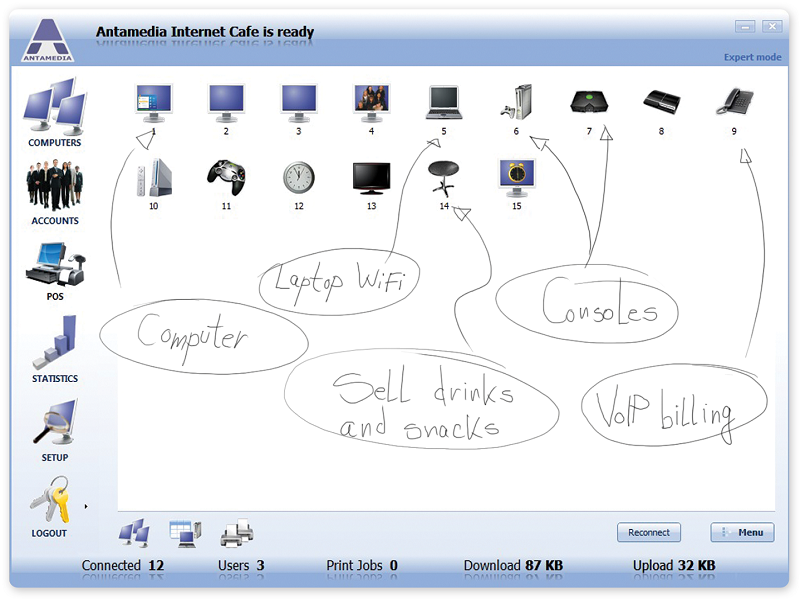
Quick facts
- Vendor: Antamedia
- Type: Windows client/server application for public PCs, self-service devices and WiFi Hotspot users, with POS
- Platform: Windows; the vendor notes full Windows 11 support
- Setup: you install the server component on the main PC that manages the client computers
- Licensing: each license includes a server and a number of client devices, and you add more clients as you grow
- Trial: the vendor offers a free trial
Key features
Charge by the minute, by block, or by time of day
You choose how Play & Pay pricing works: per minute, in time blocks, with longer-use discounts, by time of day, or as free sessions. Group computers into tiers such as standard and VIP, and charge each tier differently.
Prepaid accounts, refills and ticket vouchers
Create price plans that generate accounts, refills and vouchers. You can combine limits on time, allowed program groups, expiry, daily use and data transfer. Customers can log in again with the same account until it expires.
Lock down the client PCs
The security controls block system keys, restrict drives and Control Panel access, and enforce a controlled desktop. Public PCs sit behind a client login screen.
Sell products and services alongside computer time
The built-in point of sale and bills combine session charges with items you sell, so staff close one bill per customer. Printed tickets, accounts, refills and receipts can use multiple templates, and you can print ticket batches with expiry rules based on first use or last login.
Control WiFi customers from the same system
WiFi users authenticate in the browser, so nothing is installed on their devices. You can limit them by time, data transfer, quota and schedule, and set per-account download and upload speed, for example for VIP accounts.
Staff roles and reporting
Assign roles such as Administrator, Location Admin, Marketing Admin and Billing Admin with predefined permissions. This keeps setup, statistics and account management away from the wrong people. Real-time statistics and usage reports help you see what each station earns.
Console, TV and projector control
PCs and consoles count as managed clients. Ads and branding can be customized before or after login.
Who it's for
- Internet and cyber cafe owners who need billing and session control.
- Gaming centers and eSport venues that charge prepaid or postpaid and sell snacks at the counter.
- Schools, universities and libraries that give time-limited access to approved applications.
Pros and cons
Pros
- Covers sessions, billing, POS, vouchers and WiFi users in one product.
- Flexible pricing, including tiers, time-of-day rates and free sessions.
- Staff roles limit who can change settings.
- It is the first Antamedia application and has had a long development history.
- A free trial lets you test it before paying.
Cons
- It is a Windows client/server system, so you need a main PC to run the server component.
- The vendor now recommends its newer Cafe & Kiosk platform for new deployments, and treats Internet Cafe as the original application with a migration path.
- Some features, such as smart power control and bandwidth quotas, are listed under the Standard edition of the newer platform, so check which edition you need.
FAQs
Does it work on Windows 11?
Yes. The vendor lists full Windows 11 support across all editions.
Can it control WiFi users too?
Yes. WiFi customers log in through the browser, and you can bill them or give them a free trial.
Can I sell products as well as computer time?
Yes. The POS and bills features put session charges and items on one checkout, with cash, card, wallet and split payments in the newer platform.
Is there something newer from the same vendor?
Yes. Antamedia Cafe & Kiosk is the evolution of this software, with cloud management and kiosk mode. Existing Internet Cafe users can use it as a migration path.
System requirements
- Windows PC for the server and for each client
- Minimum hardware: 2.5 GHz CPU, 2 GB of RAM and 1 GB of free disk space