Koofr Cloud Storage 1 TB Lifetime: Pay Once for EU-Hosted Storage From a Company Running Since 2013
Koofr is a privacy-focused cloud storage service from Slovenia, with apps for Windows, macOS, Linux, iOS, Android and the web. This deal is Koofr's 1 TB plan for a one-time $199.99, sold on StackSocial and redeemed on a free Koofr account, instead of the yearly subscription Koofr sells on its own site.
If you keep paying a cloud bill every year for photos and documents that barely change, a one-time plan is tempting. Koofr is one of the safer names to buy one from: it has been in business since 2013, it doesn't track you, and it lets you plug Dropbox, Google Drive and OneDrive into the same window. The catch is the usual one with "lifetime" deals, plus slower speeds far from Europe. Both are covered below.
Quick facts
- Maker: Koofr d.o.o., Slovenia, founded in 2013
- What you buy: Koofr Cloud Storage 1 TB plan, lifetime, sold on StackSocial
- Price: $199.99 one-time on StackSocial (Koofr's own 1 TB plan is 10 EUR a month, billed yearly)
- Apps: web, Windows, macOS and Linux desktop app, iOS (version 4.3.1, November 4, 2026), Android (version 4.10.4, November 23, 2026), plus WebDAV and rclone
- Storage location: ISO 27001 certified data centers in Germany; each file is kept in at least three places
- Devices: unlimited
- Free plan: 10 GB, so you can try the apps before you buy
- Refunds: an unredeemed code can be returned for StackSocial store credit within 15 days; once redeemed, the sale is final
- What we checked: the StackSocial deal page showed $199.99, an "Early Black Friday" coupon price of $129.99 with code KOOFR, and 644 buyer reviews averaging 4.8 out of 5; Koofr's own pricing and Black Friday pages; the Windows desktop installer is 97.6 MB; app versions in Google Play and the App Store; all checked on November 24, 2026. We didn't redeem a code or run upload speed tests ourselves.
Before you buy
- "Lifetime" means the life of the service. StackSocial's own explanation: "We're not saying it lasts forever. The 'lifetime' in question is that of the product." The deal page adds that lifetime access is defined by Koofr's terms of service and inactivity policy. Koofr has run for over a decade, which is a better track record than most lifetime-deal sellers, but no one can promise it forever.
- You need a Koofr account first. Create the free account, then redeem the code on it. Each person can redeem only one Koofr lifetime code, so you can't stack two to get 2 TB.
- Redeem within 15 days. The code arrives by email right after purchase. Unredeemed codes can be returned for store credit (not cash) within 15 days; after you redeem, all sales are final.
- Coupon: on November 24, 2026 the deal page showed code KOOFR bringing the price to $129.99 as an early Black Friday offer. Coupon codes can't be combined, and the offer can end at any time.
- Far from Europe, expect slower transfers. The servers are in Germany. Some North American users on Trustpilot call the speeds unusable; Europeans mostly report good speeds.
Download Free TrialBuy Now
Overview
Koofr works like Dropbox or OneDrive: a folder on your computer stays in sync with your online storage, your phone backs up its photos automatically, and everything is reachable from a browser. What sets it apart is the company behind it. Koofr runs no third-party tracking (no Google Analytics, no cookies beyond the login cookie, no ads or marketing emails), stores data in Germany under the GDPR, and lets you connect your existing Dropbox, Google Drive and OneDrive accounts so you can search and move files across all of them from one place.
The StackSocial deal gives you the 1 TB plan with no renewal. On Koofr's own site, the 1 TB plan is sold only as a yearly subscription, and Koofr doesn't auto-renew: when a paid year ends, the account drops to the free 10 GB tier until you pay again.
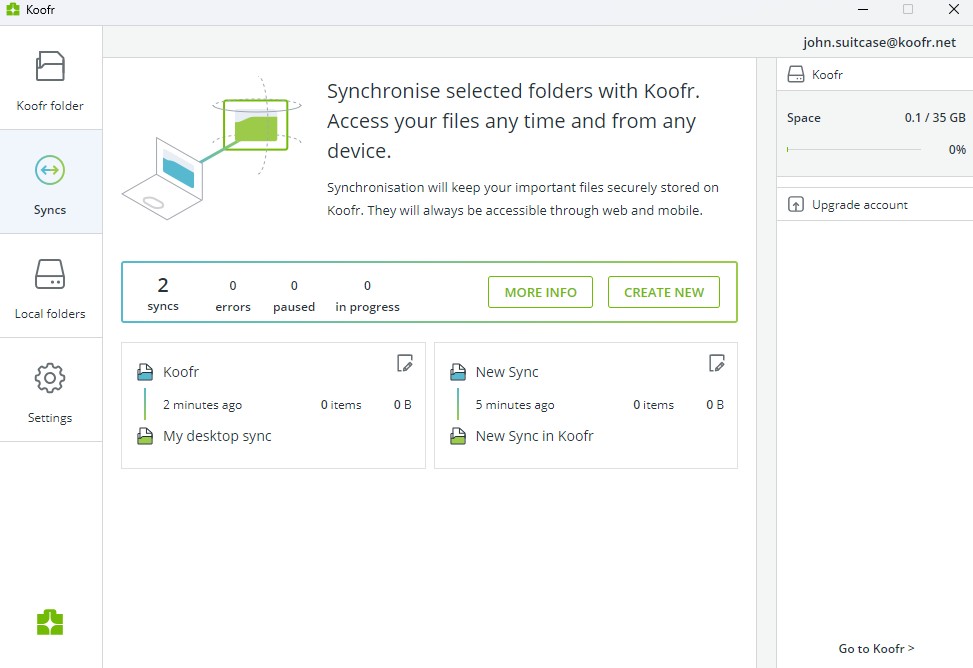
The Koofr desktop app on Windows: the Syncs screen with two active syncs, the Create New button, and the account's used space on the right.
Features
1 TB of storage with no file size limit
Koofr's 1 TB plan stores any file type with no individual file size limit, so disk images, raw video and large archives go up as they are. Deleted files stay recoverable for 30 days and don't count against your space, and file versioning keeps earlier copies of changed files.
Two-way sync and Local Folders on the desktop
The Koofr desktop app for Windows, macOS and Linux syncs any folders you choose in both directions, with no limit on the number of syncs. Its Local Folders feature does the opposite of syncing: it lets you reach files on your computer through Koofr without syncing them to the cloud.
Automatic phone backup
Koofr's iOS, Android and Huawei apps back up your photos and videos automatically. Koofr also works with Meta's official transfer tool, so you can export a copy of all your Facebook or Instagram photos and videos straight into your Koofr storage.
Dropbox, Google Drive and OneDrive in one window
Koofr connects your other cloud accounts and shows them next to your Koofr storage, with one search across all of them. The 1 TB plan allows up to 18 connections (6 per provider). You can copy and move files between services, but Koofr doesn't keep two clouds in sync with each other.
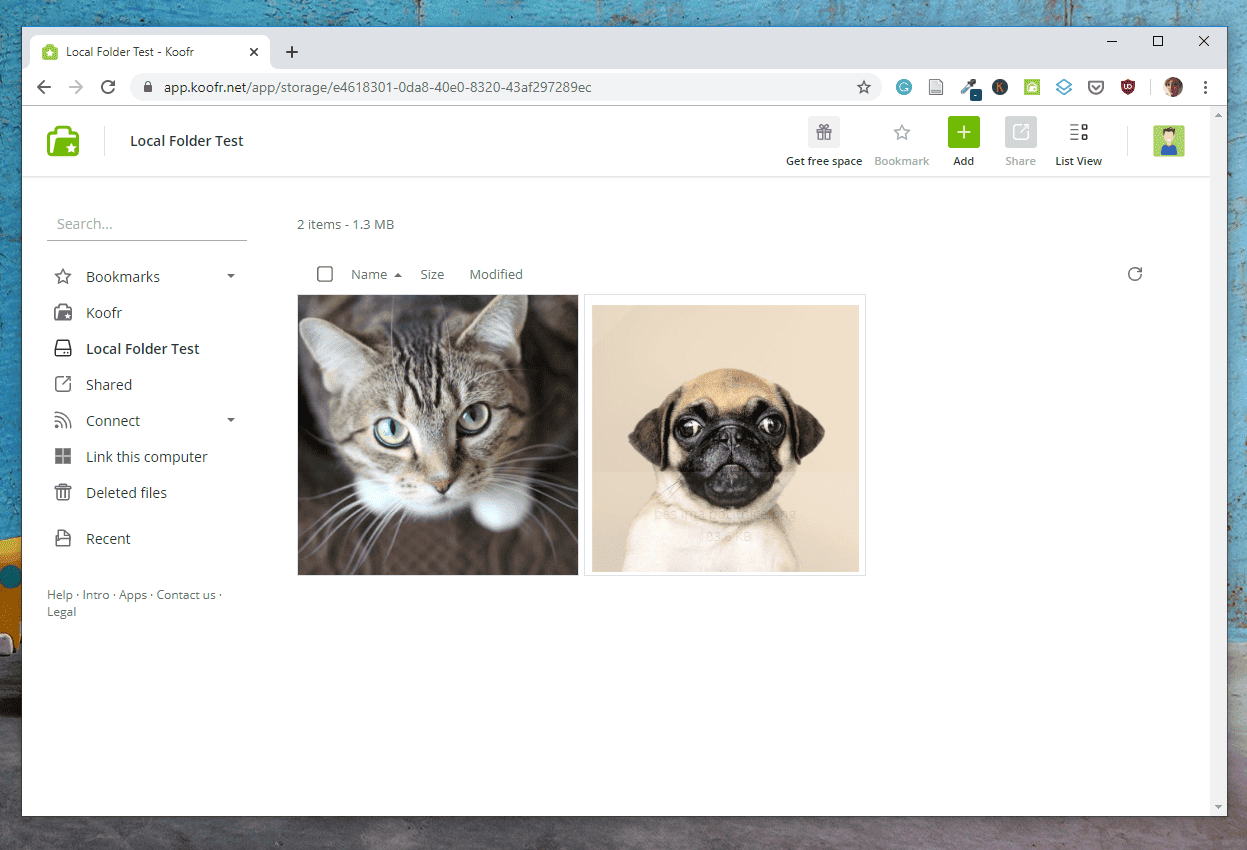
The Koofr web app (an earlier version of its design) showing a folder in gallery view, with Bookmarks, Shared, Connect and Deleted files in the left menu.
Sharing and receive links
Koofr shares files or folders with other Koofr users, with permissions for each person, and with anyone through public links that can be permanent or expire, carry a password, hide the download button or show a QR code. Receive links let people upload files to you without an account. On the 1 TB plan the daily public transfer limit is 1 TB.
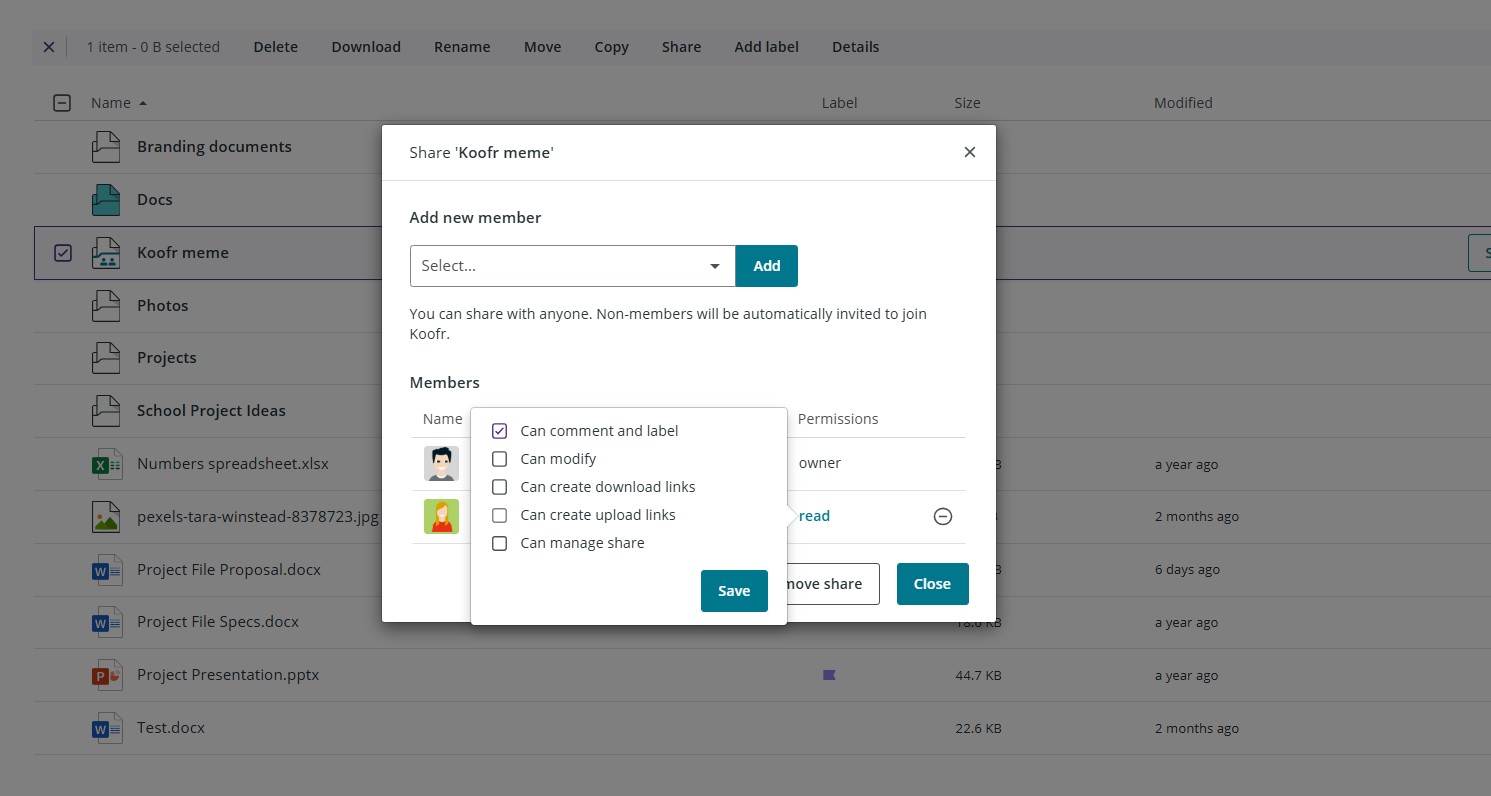
Sharing a folder in the Koofr web app: each member gets their own rights, such as modifying files or creating download and upload links.
Koofr Vault for zero-knowledge encryption
Koofr encrypts files in transit and on its servers, but Koofr holds those keys. For files only you should be able to read, Koofr Vault is an open-source, client-side encrypted app: files are encrypted on your device before upload, inside "Safe Boxes" (5 on the 1 TB plan). Vault has its own web and mobile apps and works with rclone.
WebDAV, rclone and app passwords
Koofr speaks WebDAV, so backup programs, note apps such as Zotero, and file managers can use it as a network drive, and it's a built-in rclone backend. Each app gets its own generated app password, which you can revoke without changing your main login.
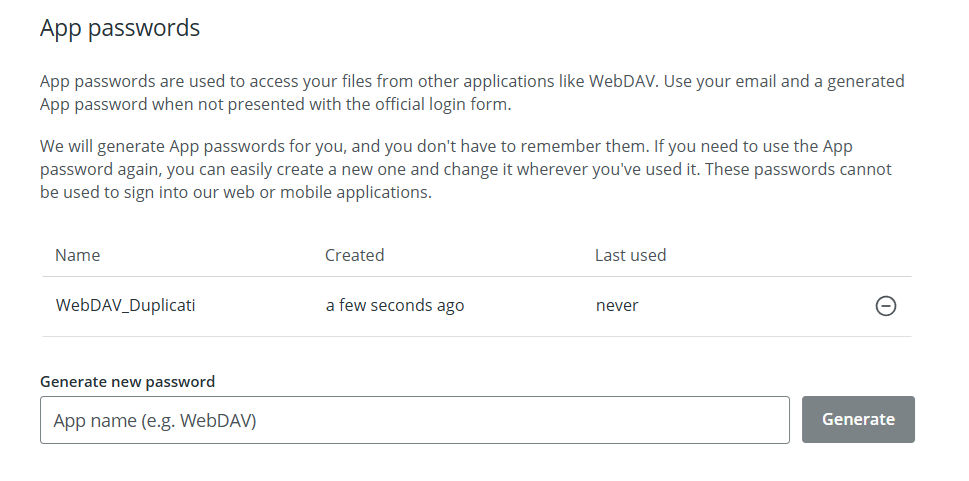
Koofr's App passwords settings, with a password generated for a WebDAV backup tool.
Housekeeping tools and Office for the web
Paid Koofr plans add a duplicate file finder, an empty folder finder, a space usage analysis tool, a PDF tool for merging and splitting, an image editor, labels, and Microsoft Office for the web for creating and editing Word, Excel and PowerPoint files in the browser. Accounts can be protected with a TOTP two-factor app or a passkey.
Benefits
- No yearly bill. At Koofr's own regular price of 10 EUR a month for 1 TB, the one-time price pays for itself in about two years.
- Privacy without effort. No trackers, no ads, EU hosting, and Vault when you need end-to-end encryption.
- One place for scattered files. If you already have a free Google Drive and an old Dropbox, Koofr pulls them into one searchable view.
- Works with your own tools. WebDAV and rclone make it a backup target for software you already use.
Real-World Uses
- Family photo archive: turn on automatic backup on every phone in the house (devices are unlimited) and keep years of pictures in 1 TB without a monthly fee.
- Off-site copy of a NAS or PC backup: point Duplicati, rclone or another WebDAV-capable backup tool at Koofr with an app password.
- Researcher's library: sync Zotero attachments over WebDAV, as one StackSocial buyer does.
- Freelancer handing off files: send large deliverables with expiring, password-protected links, and collect client uploads with a receive link.
Who It's For, and Who Should Skip It
Koofr's 1 TB lifetime plan suits people in Europe, or anywhere with a good route to Germany, who want a simple, private place for photos, documents and backups and hate subscriptions. It's also a good fit if you already juggle several free cloud accounts.
Skip it if you need more than 1 TB (only one code per person, and there's no bigger lifetime tier on sale), if you sync large files that change often (Koofr has no block-level sync, so a changed file is uploaded again in full), or if you're in North America and need fast uploads every day. A team that needs real collaboration features is better served by a business suite such as Microsoft 365 or Google Workspace.
Usage Guide
- Create a free Koofr account at koofr.eu (no credit card needed).
- Buy the deal on StackSocial; the redemption code and instructions arrive by email right away.
- Redeem the code on your Koofr account within 15 days. Your quota rises to 1 TB.
- Install the desktop app (Windows, macOS or Linux), sign in, open Syncs and click Create New to pick a folder to sync. Avoid syncing a whole system drive.
- Install the iOS or Android app and turn on automatic photo backup.
- Optional: connect Dropbox, Google Drive or OneDrive under Connect in the web app, set up Koofr Vault for sensitive files, and turn on two-factor authentication.
Where it falls short
- No block-level sync. Cloudwards found that any change to a file means re-uploading all of it, which hurts with big files edited often.
- Speed depends on where you are. In Cloudwards' 1 GB test from Serbia, the upload averaged 9 minutes and the download 3 minutes, slower than the connection allowed but far from the slowest they tested. Users farther from Germany report much worse.
- Encryption is opt-in. Regular Koofr storage isn't zero-knowledge; only files inside Koofr Vault are.
- A simple desktop app. The desktop client syncs folders but doesn't share files or show your connected clouds; that's done in the web app.
- Support is by message only. There's no phone or live chat; you contact Koofr from inside the app or through its Reddit community.
- Outages happen. On October 4, 2026, Koofr reported a 24-hour DDoS attack that disrupted access for some users; Koofr said no data was affected.
What Users Say
StackSocial buyers (4.8 out of 5 from 644 reviews)
StackSocial shows reviews from verified purchasers of this deal. The most recent ones on November 24, 2026:
"This is a great purchase. It satisfies all my needs for cloud storage, plus the ability to use for WebDAV service with Zotero. A one time purchase always feel much better than a monthly subscription." Heng Yang, Verified Buyer
"Bought it two years ago and service has been rock solid since then. No issues with interface, speed or setup." Rui Marto, Verified Buyer
"Nice and very functional product. Clients for major OS, including mobile. Native integration with clouds and local OS. Everything in one view. Really easy to use. Already upgraded to 2.5Tb and happy. Strongly recommend." Vitalii Tukmakov, Verified Buyer
"Perfect, works exactly as it should :) Nice to have rclone steps outlined too for Vault" Oleg Gut, Verified Buyer
"Nice, only issue was I was charged with a tax amount, even though it was 0 tax in the check out. I have asked for a return for it." Alba Torres Medina, Verified Buyer
Trustpilot (TrustScore 3.9 from 102 reviews)
Koofr's Trustpilot page is more mixed than the deal page, with the low scores mostly about speed outside Europe and connection problems.
"Finally, a fantastic cloud drive with lifetime service hosted in germany, real good functions and unlimited filesize." Ghent, 5 stars, November 2026
"I like Koofr because it's very different from other cloud services which force you into their workflow." Tom, 4 stars, October 2026
"The support I received from the company is outstanding, particularly in this day and age where support is hard to come by." Sheila Schneider, 5 stars
"Not for North American customers. Please put a disclaimer that the speeds are unusable" Sally, 1 star, April 2026
"It is not possible do connect to Koofr via WebDav. No error message. No information." Philippe Drevet, 1 star, April 2026
Cloudwards review (updated July 21, 2026)
Cloudwards' Mauricio Preuss lists ease of use, GDPR compliance, apps on every platform, the Dropbox/Drive/OneDrive integration, sharing, Office integration and zero-knowledge encryption (through Vault) as pros, and no block-level sync and limited support options as cons. His verdict: "Koofr can best be described as a lightweight cloud storage service suitable for sharing small files," and it "doesn't really have any stand-out features that would make us recommend it over Sync, pCloud or Icedrive."
Two reader comments under that review, both from 2022, sum up the split. Ken J.: "Lighting-fast upload/download speeds!" and "Excellent Linux client app, does what it says on the tin." Boswich, who bought a lifetime plan:
"I got a deal on a non-refundable lifetime subscription and have been trying to get the system to work for months now. The first big problem for me is the way they manage syncing. If you're not careful with how you set up sync, you can ruin your synced folders' contents." Boswich also wrote that "upload speeds are much better than Sync.com's."
TechRadar and the app stores
TechRadar's John Faulds (January 2021) concluded: "Koofr is fast, easy to use, and a great choice for those who want access to all their files from one place, but lacks features compared to the competition." His "No zero-knowledge encryption" con predates Koofr Vault, which now covers it.
On November 24, 2026 the Android app was rated 4.1 from 1.22K reviews on Google Play (100K+ downloads) and the iPhone app 3.7 from 31 ratings on the US App Store.
The pattern: people like Koofr's privacy stance, the clean interface, the multi-cloud view, WebDAV and rclone support and the responsive support team, and lifetime buyers from years back say the service has stayed reliable. The complaints are about speed outside Europe, the lack of block-level sync, a sync setup that takes care to get right, and occasional connection problems.
Comparisons
StackSocial lifetime vs. Koofr's own yearly plan
Koofr sells 1 TB for 10 EUR a month including 22% VAT, billed only by the year. During its own Black Friday sale (November 16 to 30, 2026, code BF2026), Koofr's yearly 1 TB plan drops from 99 EUR to 44.26 EUR before VAT for the first year. A year of Koofr's plan buys you a full year of the same service with no lifetime question attached; the StackSocial plan costs about two years of the regular price and only pays off if you stay three years or more and Koofr keeps running.
Koofr vs. Internxt lifetime
Internxt, a Spanish provider, also sells lifetime plans on StackSocial, from 2 TB for $89.97 on November 24, 2026, and encrypts everything end to end by default. Koofr's 1 TB costs more, but it has been around longer, supports WebDAV and rclone, connects your other cloud accounts, and lets you choose when to use encryption. Pick Internxt only for the most space per dollar and default encryption, knowing that its StackSocial plan excludes WebDAV and its reliability record is much rougher; pick Koofr for the more mature, flexible service.
Editions and Pricing
| Plan | Storage | Price | Term | Where |
|---|
| Lifetime 1 TB (this deal) | 1 TB | $199.99 once | Life of the service | StackSocial |
| Free | 10 GB | Free | No time limit | Koofr |
| Briefcase S / M / L | 10 / 25 / 100 GB | 0.50 / 1 / 2 EUR a month | Billed yearly | Koofr |
| Suitcase XL / XL+ / XXL | 250 GB / 500 GB / 1 TB | 4 / 7 / 10 EUR a month | Billed yearly | Koofr |
| Crate XXXL / 5XXL | 2.5 TB / 5 TB (10 TB and up on request) | 20 / 35 EUR a month | Billed yearly | Koofr |
Koofr's prices include 22% VAT and vary with your country's rate. The only Koofr lifetime plan on sale at StackSocial on November 24, 2026 was the 1 TB plan; the earlier 250 GB lifetime deal is no longer sold.
FAQs
Can I add the Koofr lifetime code to an account that already has a paid plan?
The Koofr lifetime code is a promotional upgrade for an existing Koofr account, and the deal page only says the account must exist (a free one is fine) and that each person can redeem one code. If you're on a paid yearly plan now, ask Koofr support how the code combines with your remaining time before you buy.
What happens to my files if Koofr stops honoring the lifetime plan?
Under Koofr's terms, an account whose paid plan ends goes back to the free 10 GB tier; no data is deleted right away, but if the account stays over quota for a long time, Koofr may ask you to remove data or remove it automatically. Keep a second copy of anything irreplaceable, whichever cloud you use.
Can I get a refund on the Koofr StackSocial deal?
Only before you redeem it. StackSocial takes back an unredeemed Koofr code for store credit within 15 days of purchase; once you redeem it, the sale is final. Koofr's own terms also make paid plans non-cancellable, so test the free account first.
Does Koofr have a Linux app?
Yes. Koofr's desktop sync app runs on Linux as well as Windows and macOS, and Linux users can also mount Koofr through WebDAV or rclone.
Is Koofr end-to-end encrypted?
Not by default. Koofr encrypts files in transit and at rest on its servers. For end-to-end (zero-knowledge) encryption, put files in Koofr Vault, which encrypts them on your device before upload.
How many devices can use the Koofr lifetime plan?
Unlimited. The StackSocial deal lists no device limit, and you can sign in to the same Koofr account on as many computers and phones as you like.
Can I use Koofr from the United States?
Yes, Koofr works worldwide, but its servers are in Germany. Some US and Canadian users report slow uploads, so try the free 10 GB plan with your own files before buying.
System Requirements
- A Koofr account (free) to redeem the code
- Desktop app: Windows 7 or later, macOS, Linux
- Mobile: iOS 17 or later, Android, Huawei
- Web: any modern browser
- Other access: WebDAV clients and rclone
Conclusion
Koofr's 1 TB lifetime plan is one of the more sensible lifetime cloud deals: the company has a long track record, a clear privacy policy and real features (WebDAV, rclone, Vault, multi-cloud), and the price equals roughly two years of Koofr's own plan. Buy it if you're in or near Europe, 1 TB is enough, and you're planning to keep the storage for years. Skip it if you need fast uploads from North America or more than 1 TB. Either way, try the free account first, since the sale is final once you redeem.
Download Free TrialBuy Now