Short answer
invideo AI is the best AI video generator for most people who need a finished video rather than a single clip: it writes, generates, narrates and edits on a real multitrack timeline, with Seedance, Kling, Veo and other models behind one credit balance. Starter costs $120 a year per seat.
Pick PixVerse if you want short, eye-catching clips from a prompt or a photo (1 to 15 seconds, up to 1080p on its own V6 model) and the most credits per dollar: Pro is $288 a year for 6,000 credits a month. Pick Wondershare Filmora (or Wondershare Filmora for Mac) if you'd rather own a desktop editor that also does text-to-video and image-to-video: $79.99 once, with 1,000 AI credits included. Both web generators have poor Trustpilot scores, mostly over credits and refunds, so start on the free plan and test what one clip costs before you pay.
At a glance
| invideo AI | PixVerse | Wondershare Filmora |
|---|
| What it is | Browser video editor with AI agents and 200+ generation models | AI clip generator from text, photos and reference images | Desktop video editor with AI text-to-video and image-to-video |
| Runs on | Any browser, iPhone/iPad, Android | Any browser, Android (PixVerse Lite on iPhone) | Windows 7-11 (64-bit) or macOS 10.15+, separate licenses |
| Price of the plan we link | Starter $120/year per seat ($20 monthly) | Pro $288/year ($30 monthly) | $79.99 one-time (Windows or Mac) |
| Cheapest paid plan with AI credits | Starter $120/year, 400 credits a month | Standard $96/year, 1,200 credits a month, up to 720p | Advanced $59.99/year, 1,000 credits a month |
| Free option | ✓ free plan, weekly limit, watermarked | ✓ 60 credits to start + 30 a day, low resolution, watermarked | ✓ free version, watermarked exports |
| Generated clip length | Depends on the model; edits into videos of any length | 1-15 seconds (V6) | 8-15 seconds (text to video); up to 1 minute with Script to Video |
| Edit the result on a timeline | ✓ | Partly (Extend, Modify, Restyle, Canvas) | ✓ |
| Unused credits | Expire monthly | Plan credits expire every 30 days; bought packs don't | Subscription credits expire after 30 days; perpetual credits never |
| Refunds | Within 24 hours, only if no credits used | Only a completely unused plan | 30 days, for set cases such as technical faults, not a change of mind |
| Trustpilot | 1.8 / 5 (1,031 reviews) | 2.1 / 5 (135 reviews) | 4.0 / 5 (15,738 reviews, mostly about the editor) |
How we picked and what we checked
- We looked for tools on this site that actually generate video from text or images, not just enhance or edit it. AI upscalers and tools whose "AI" is captions or noise removal were left out.
- We read every plan, credit allowance and refund rule on each vendor's own pricing, help and terms pages, and the price on the order page for Filmora.
- We took each vendor's own numbers for what a credit buys (invideo's pricing calculator, PixVerse's credit cost on the Create button, Wondershare's credit rules and pack estimates).
- We read the reviews on Trustpilot, the app stores and in the tech press, positive and negative.
What we checked: invideo's pricing page (plan prices, credits and offer end dates), PixVerse's published plan prices and credit rules, Wondershare's Filmora store and AI credit rules, the Filmora price on the order page ($79.99 for Windows and $79.99 for Mac), the invideo App Store version (4.6.1) and the Trustpilot scores, all on November 22, 2026. We didn't buy plans or generate videos ourselves, so the clip counts below are the vendors' own estimates, not our measurements, and we haven't judged the visual quality of the clips.
1. invideo AI: best for finished videos, not just clips
- Price: Starter $20 a month or $120 a year per seat (a 50% annual discount invideo marks as permanent); Plus $60 a month or $720 a year ($360 for the first year until December 1, 2026)
- Platforms: browser on Windows, macOS, ChromeOS and Linux; iPhone/iPad app (version 4.6.1, November 20, 2026) and Android app
- Credits: 400 a month on Starter, 2,000 on Plus; they don't roll over
- Best for: explainers, ads, YouTube videos and social cuts that need narration, music and editing, not just a generated shot
invideo AI (now branded invideo Editor with Agent Two) is the only tool here where the generator and a full editor are one product. You type what you want, and its agent writes the script, generates or finds the shots, adds an AI voice and music, and lays it all out on a multitrack timeline you can take over at any frame. You can also upload your own footage and ask the agent to cut it ("trim the dead air", "make a 60-second vertical clip of the best answer").
For generation, invideo doesn't have its own model: it licenses others and bills them in credits at their API price. The pricing page lists Seedance 2.5 and 2.0, MiniMax, Kling, Google Veo 3.1, Wan and PixVerse for video, Nano Banana Pro, GPT Image and Seedream for images, and ElevenLabs for voices. The catch is that Starter only gets Seedance 2.0 Fast and Mini and the Lite agent; Seedance 2.5 and the Pro and Ultra agents need Plus.

invideo Editor (vendor image): Agent 2's chat on the left reports placing 140 clips in screenplay order and cutting a trailer, with the preview monitor, media bin and a four-video, three-audio-track timeline on the right.
invideo is generous where it doesn't cost them much: the timeline editor, color and audio tools are the same on every plan, free included, and manual edits and exports never use credits. It's tight where it does. invideo's own pricing page says Starter's 400 monthly credits cover about 15 Seedance 2 Fast videos; Plus's 2,000 cover about 52 Seedance 2 videos. A 5-second Seedance 2.5 clip at 720p costs about 56 credits.
What we like
- Prompt to finished, narrated, edited video in one place
- A real multitrack editor on every plan, and editing and exports never cost credits
- Many video, image, voice and music models behind one bill
- Starter's $120 annual price is marked as a permanent discount, so it renews at the same price
Watch out for
- Starter's 400 credits go fast: about 15 short Seedance 2 Fast videos a month
- The better models (Seedance 2.5) and agents need Plus, $720 a year after the first year
- Credits reset monthly with no rollover, even on annual plans
- Refunds only within 24 hours and only if no credits were used; Trustpilot 1.8 out of 5
What users say about invideo AI
invideo rates very differently depending on where you look: 4.5 out of 5 from about 28,000 ratings on the US App Store, but 1.8 out of 5 from 1,031 reviews on Trustpilot on November 22, 2026. The Trustpilot complaints are almost all about credits and refunds.
TechRadar (Krishi Chowdhary, 4.5 stars) calls it "a powerful AI video platform with one of the most capable conversational AI assistants we've tested", with one reason to avoid: "Quite expensive".
Justin (Trustpilot, 1 star, November 3, 2026): "Generation stopped midway, and I received a notification that my credits had finished."
Cyril Crypto (Trustpilot, 5 stars, November 17, 2026): "Their platform is excellent, but their people are what truly set them apart."
Start invideo AI FreeBuy invideo AI
2. PixVerse: best for short clips from a prompt or a photo
- Price: Standard $10 a month or $96 a year; Pro $30 a month or $288 a year; Premium $60 or $576; Ultra $199 or $1,788
- Platforms: browser, Android app, PixVerse Lite on iPhone
- Credits: 1,200 a month on Standard, 6,000 on Pro, plus 60 daily credits on every paid plan
- Best for: social clips, template effects from a photo, ad concepts and storyboards
PixVerse is a pure generator. You type a scene or upload a photo, pick a model, resolution and length, and get a clip back. Its own model, V6, makes clips from 1 to 15 seconds at up to 1080p, with camera direction, optional generated sound and speech, and multi-shot clips that cut between angles. The model picker also offers Seedance, Kling, MiniMax, Wan, Google and other models, so you can try one prompt on several engines in one account.
Beyond text and image to video, PixVerse has a large gallery of one-photo templates (pick an effect, upload a selfie, generate), tools to extend, modify or restyle a clip, Magic Extend to change aspect ratio without cropping, and a node-based Canvas for multi-shot projects. What it doesn't have is a timeline: for a narrated video you'd still take the clips into an editor such as invideo AI or Filmora.
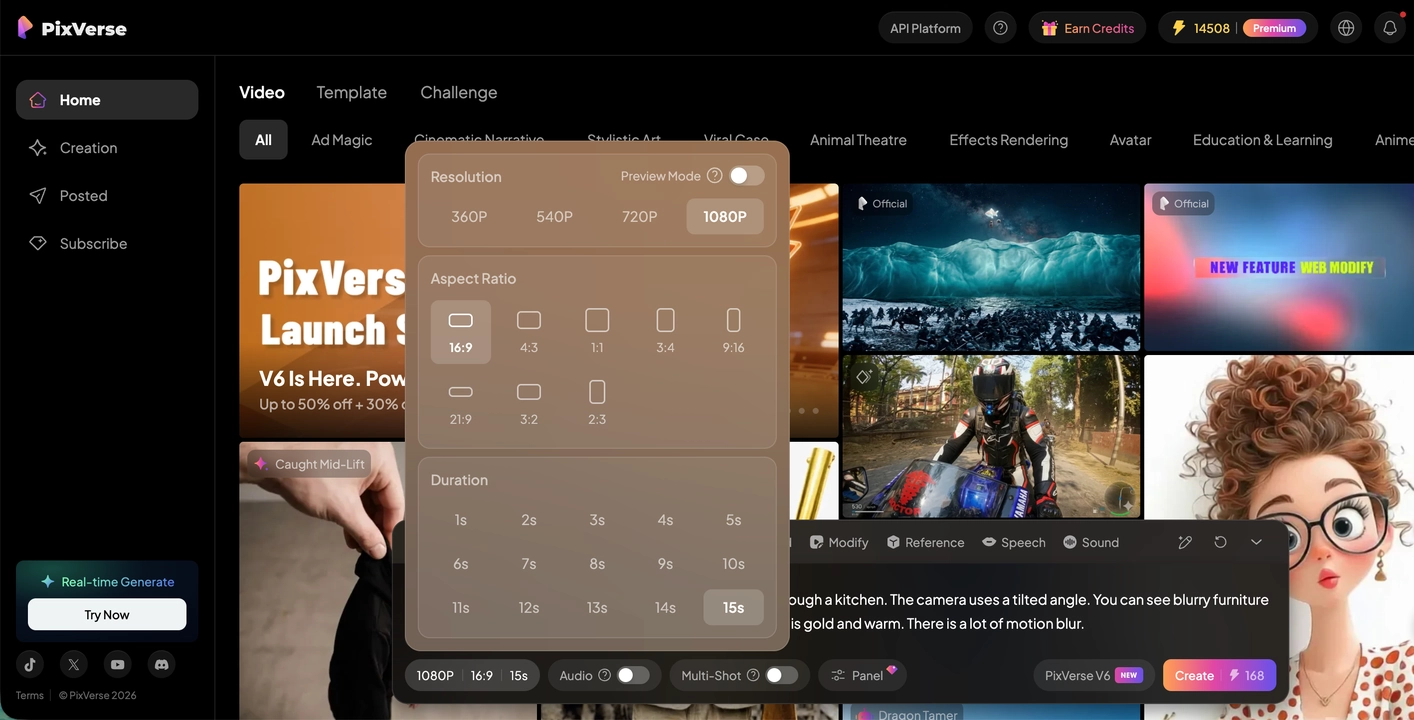
The PixVerse web app: the prompt bar at the bottom with the V6 model selected, the settings panel open (360p to 1080p, nine aspect ratios, 1 to 15 seconds), and the credit cost on the Create button (168 credits for a 15-second 1080p clip here).
PixVerse gives the most credits per dollar of the three, and its free tier is the most useful for testing: 60 credits on sign-up and 30 more every day. At the 168 credits the app shows for a 15-second 1080p V6 clip, Pro's 6,000 monthly credits buy about 35 such clips, fewer once you count retries. Two things to know: Pro and higher list "up to 4K", but V6 itself generates up to 1080p, and Standard is capped at 720p.
What we like
- The most credits for the money: 6,000 a month on Pro, plus 60 a day
- A free tier you can really test with (30 credits every day)
- Many models and one-photo templates in one account
- Vertical, square and widescreen output, plus Magic Extend for reframing
Watch out for
- Short clips only (up to 15 seconds); no timeline for a full video
- Trustpilot 2.1 out of 5: credit costs, content-filter suspensions and billing
- Refunds only for a completely unused plan; credit packs are final
- "Up to 4K" isn't native 4K: V6 tops out at 1080p
What users say about PixVerse
PixVerse's Android app holds 4.4 out of 5 from about 4.6 million Google Play ratings, while its Trustpilot page shows 2.1 out of 5 from 135 reviews, 65% of them one-star. App users like the results; paying web subscribers complain about money.
Muffin Starlin (Trustpilot, 1 star, August 2026): "They changed 60 daily credits to 30 and it is so not worth it."
Dominique Tamereuh (Trustpilot, 1 star, November 2026), "Recently became a full-scale scam, DO NOT YEARLY SUB": "since today you will have your whole account suspended for 3 days!"
Robert McKenna (Trustpilot, 5 stars, September 2026): "they have immediately refunded my US$288 today, after business hours had resumed in Singapore"
Try PixVerse FreeBuy PixVerse
3. Wondershare Filmora: best if you want to own the software
- Price: $79.99 one-time for the Windows or the Mac license on the order page (1,000 AI credits included once); Advanced subscription $59.99 a year for both systems with 1,000 credits a month
- Platforms: Windows 11, 10, 8.1 and 7 (64-bit) or macOS 10.15 and later; a one-time license works on one system only
- Mac order page: it still lists the license as "Wondershare Filmora 14 Perpetual Mac" ($79.99), the same product code Wondershare's Mac store uses for its current Perpetual plan; check the version in the app after activating and contact Wondershare support if it isn't Filmora 16
- AI video models: Seedance 2.0, HappyHorse 1.1 and Tomovie 2.5, with Veo 3.1 and Sora 2 on Wondershare's credit price list
- Best for: people who edit their own videos and want AI clips as one ingredient, without another subscription
Wondershare Filmora is a desktop timeline editor first, and its AI generation sits inside the Stock Media panel. AI Text to Video turns a prompt into an 8 to 15 second clip with sound; AI Image to Video animates a photo, from start and end frames, or from up to three reference images; AI Script to Video builds a video of up to a minute from your script and Filmora's stock library; and AI Idea to Video turns a concept into a storyboard of scenes. Whatever it generates lands on the timeline next to your own footage.
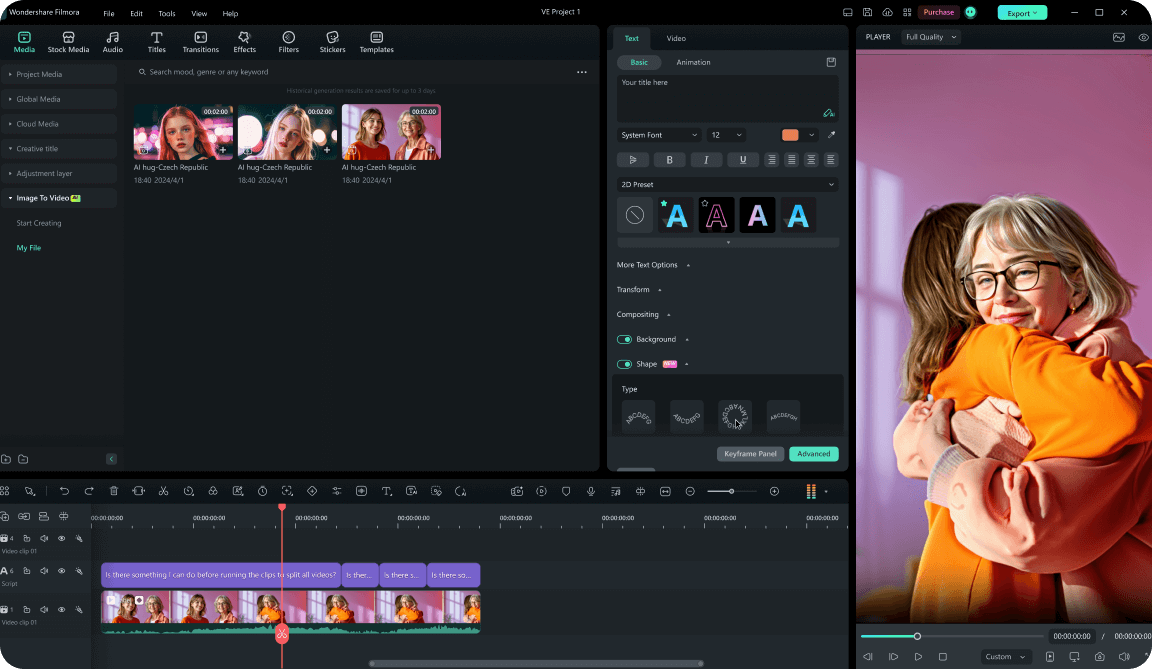
Filmora on Windows (Wondershare's guide image): AI Media > Image To Video in the Stock Media panel, an uploaded image with the prompt "Soaring in the sky", the Standard / Veo 3 Quality model menu, a 1,032-credit balance and a Generate button showing 1,500 credits.
Every generation costs AI credits. Wondershare's credit rules list text to video at 50 to 450 credits a go in Normal Mode 2.0 and 450 for Google Veo 3.1, and image to video at 90 to 360 credits on Standard-2.0. Its own estimate is that 1,500 credits buy about 16 text-to-video generations, so the perpetual license's 1,000 one-time credits cover roughly ten. After that you buy credit packs or move to the Advanced subscription. The difference from the web tools is what you keep when the credits run out: the whole editor, offline, with no watermark.
What we like
- You own it: $79.99 once, and the editor never needs a subscription
- Generated clips go straight onto a full desktop timeline with your own footage
- Credits from the perpetual license never expire
- Trustpilot 4.0 out of 5 from more than 15,000 reviews
Watch out for
- Only about ten text-to-video generations from the included 1,000 credits
- The one-time license covers Filmora 16 updates only, and only Windows or only Mac
- Shorter generated clips (8-15 seconds) and fewer models than the web tools
- Refunds aren't given for a change of mind
What users say about Filmora
Filmora's Trustpilot page showed 4.0 out of 5 from 15,738 reviews on November 22, 2026, though most reviews are about the editor rather than the AI generation.
PCMag (Michael Muchmore, July 31, 2026, 4.0 out of 5): "Wondershare's Filmora video editing software offers a wealth of AI tools, fast rendering speeds, and a clear user experience for a reasonable one-time or annual rate." Its cons include "Some AI features are hard to find".
Daniel Roe Nevado Raiders (Trustpilot, 1 star, October 21, 2026): "In my experience, this supposedly sophisticated AI tool was practically useless for the purpose for which I purchased it."
Karol Lang (Trustpilot, 2 stars, October 2026), "Terrible Performance and Too Many Paid Features": "This program can't handle complex projects longer than 10 minutes."
Download Filmora for WindowsBuy Filmora for WindowsDownload Filmora for MacBuy Filmora for Mac
What a month of credits really buys
PixVerse gives you the most generated video for the money; invideo AI gives you the least raw footage but the most finished video. Credits aren't comparable between vendors (each prices its credits and models differently), so the table below uses each vendor's own estimate of what its credits buy.
| Plan | Price | Credits | What the vendor says they buy |
|---|
| invideo AI Starter | $120/year | 400 a month | About 15 Seedance 2 Fast videos, or 160 Nano Banana Pro images |
| invideo AI Plus | $720/year ($360 first year until December 1, 2026) | 2,000 a month | About 52 Seedance 2 videos |
| PixVerse Standard | $96/year | 1,200 a month + 60 a day | Clips up to 720p; cost per clip shown on the Create button |
| PixVerse Pro | $288/year | 6,000 a month + 60 a day | About 35 15-second 1080p V6 clips (168 credits each) |
| Filmora perpetual | $79.99 once | 1,000, once | About 10 text-to-video generations (Wondershare: 1,500 credits = about 16) |
| Filmora Advanced | $59.99/year | 1,000 a month | About 10 text-to-video generations a month |
Cheapest yearly plan that includes AI video credits (USD)
Wondershare Filmora Advanced (1,000 credits a month)$59.99
PixVerse Standard (1,200 credits a month, up to 720p)$96
invideo AI Starter (400 credits a month)$120
Prices on the vendors' pricing pages on November 22, 2026. The credits buy different amounts of video on each service.
Trustpilot score (out of 5)
Wondershare Filmora (15,738 reviews)4.0
PixVerse (135 reviews)2.1
invideo AI (1,031 reviews)1.8
Trustpilot scores checked November 22, 2026. Filmora's reviews are mostly about the editor, not its AI generation.
Which should you choose?
For most people who want a finished video from an idea, invideo AI is the pick: it's the only one that goes from prompt to a narrated, edited video without another app. If you want lots of short generated clips, PixVerse wins on credits per dollar. If you hate subscriptions, Filmora is the only one you can own.
| Your situation | Pick | Why |
|---|
| Explainer, ad or YouTube video with voice-over | invideo AI | Script, shots, AI voice, music and editing in one place |
| Cutting your own interviews or podcasts into short clips | invideo AI | The agent logs footage and cuts on a real timeline; editing costs no credits |
| Short viral clips or photo effects for TikTok and Reels | PixVerse | Templates, 1-15 second clips, the most credits per dollar |
| Trying several AI models on the same prompt | PixVerse | V6, Seedance, Kling, MiniMax and others in one picker |
| You edit on a desktop and want AI shots now and then | Wondershare Filmora | A one-time editor license with AI clips on the same timeline |
| You edit on a Mac and don't want a subscription | Wondershare Filmora for Mac | $79.99 once; the Windows license doesn't cover macOS |
| Tight budget, mostly AI-generated footage | PixVerse Standard, or start free | $96 a year; test the free daily credits first |
Who should skip each one
- Skip invideo AI if you mainly want to generate a lot of footage on Starter: 400 credits a month is about 15 short videos, and the better models need Plus.
- Skip PixVerse if you need anything longer than 15 seconds, a timeline, or footage you can't afford to have blocked by an automated content filter.
- Skip Filmora if AI generation is the main thing you want: the included credits run out after about ten clips, and the web tools offer more models and longer allowances.
What commonly goes wrong
- Buying a year before testing. The angriest reviews on both web tools come from yearly subscribers whose credits ran out in a few clips. invideo refunds only within 24 hours with no credits used, and PixVerse only a completely unused plan, so test on the free plan and pay monthly first.
- Expecting credits to roll over. invideo AI plan credits reset every month; PixVerse plan credits expire every 30 days; Filmora subscription credits last 30 days. Only bought credit packs (PixVerse, one year on Filmora) and Filmora's perpetual-license credits last longer.
- Paying for retries. AI video rarely gets it right the first time, and every retry costs the full price. Test prompts at low resolution or with draft models, then regenerate the keeper at full quality.
- Taking "4K" literally. PixVerse lists 4K on Pro and higher, but its V6 model generates up to 1080p. For true 4K you'll need an upscaler; our Aiarty Video Enhancer vs Winxvideo AI comparison covers two.
- Content filters. AI generators check prompts and uploads against their content rules. PixVerse reviewers describe multi-day account suspensions after flagged prompts, and real people, logos and brands in a prompt can still infringe someone else's rights even on a paid plan.
- Characters that drift. Every model here can change a face or an outfit between shots. Reference images (PixVerse, Filmora) and storyboards (invideo AI, Filmora Idea to Video) help, but long stories with one consistent character are still hard.
FAQs
What is the best free AI video generator?
PixVerse has the most useful free plan of the three: 60 credits when you sign up and 30 more every day, enough to test prompts at low resolution with a watermark. invideo AI's free plan has a weekly limit and the full editor, and Filmora's free version lets you edit with a watermark. None is free for regular, watermark-free use.
Is invideo AI worth it on the Starter plan?
invideo AI Starter ($120 a year) is worth it if you mostly edit your own footage and generate a few shots a month, since editing and exports never use credits. It isn't enough for AI-heavy projects: invideo estimates its 400 monthly credits at about 15 Seedance 2 Fast videos, and Seedance 2.5 needs Plus.
How long can PixVerse videos be?
PixVerse's V6 model makes clips from 1 to 15 seconds long, at up to 1080p. For a longer video you extend a clip or join several clips, and finish them in an editor.
Can Filmora make AI videos from text?
Yes. Wondershare Filmora's AI Text to Video generates 8 to 15 second clips with sound from a prompt, using models such as Seedance 2.0 and HappyHorse 1.1, and AI Script to Video builds a video of up to a minute from your script and stock footage. Both use AI credits.
Does the $79.99 Filmora license include AI credits?
Yes, Wondershare Filmora's one-time license comes with 1,000 AI credits, once. They never expire, but they don't refill: by Wondershare's own estimate that's about ten text-to-video generations. More credits come from credit packs or the Advanced subscription ($59.99 a year, 1,000 credits a month).
Can I use AI-generated videos commercially?
Generally yes, within each service's terms. invideo AI lets you use and sell what you generate, and PixVerse doesn't claim ownership of your outputs. Neither clears rights to real people, logos, music or source images you didn't own, so check the terms before using clips in client work or ads.
Why are the Trustpilot scores for AI video generators so low?
Most one-star reviews of invideo AI (1.8) and PixVerse (2.1) are about money, not video quality: credits that ran out after a few clips, credit costs that changed, and refunds refused once a credit was spent. Their app store ratings are much higher (4.5 for invideo on the App Store, 4.4 for PixVerse on Google Play).
Do I need a powerful PC for AI video generation?
No for invideo AI and PixVerse: generation runs on their servers, so any current browser works. Wondershare Filmora also generates in the cloud, but the editor itself needs a 64-bit PC or Mac with 8 GB of RAM (16 GB for HD and 4K) and a graphics card with 2 GB of video memory.
Conclusion
invideo AI is our pick for most people, because it's the one that turns an idea into a finished video: generated shots, voice, music and a real editor in one place, from $120 a year. Choose PixVerse when you want many short generated clips for the money, and Wondershare Filmora when you'd rather own your editor and use AI clips now and then. Whichever you pick, start on the free plan, check what one clip costs in credits, and pay monthly until you know how many credits you really use.
Start invideo AI FreeBuy invideo AI