PixVerse: AI Video Clips from a Prompt or a Photo
PixVerse is a browser-based AI video generator that turns text prompts, photos and reference images into short video clips, with a free plan and paid credit plans from $10 a month; the Pro plan costs $288 a year. It's aimed at social media creators, marketers and hobbyists who want eye-catching 5 to 15 second clips without filming or animating anything.
You type a scene ("a fox spirit running through a neon market, camera tracking from behind"), or upload a still, pick a model, resolution and length, and spend credits to generate. What you get back is a short clip you can extend, restyle or edit. What you also get is a credit system that a lot of users find hard to predict, which is the main thing to understand before paying.
Quick facts
- Developer: AIVORA PTE. LTD., Singapore (PixVerse was founded in 2023)
- Platforms: web app in any current browser, plus mobile apps (PixVerse: AI Video Generator on Google Play)
- Own model: PixVerse V6, 1 to 15 second clips up to 1080p, optional generated audio and multi-shot
- Other models in the picker: Seedance, Kling, MiniMax, Wan, FLUX and others, plus image models
- Free plan: 60 starting credits plus 30 daily credits, low resolution
- Paid plans (yearly billing): Standard $96, Pro $288, Premium $576, Ultra $1,788
- Refunds: no partial refunds; credit packs are non-refundable
- What we checked: the plan prices, credit allowances and refund rules published on PixVerse's own pricing and information pages, and the Trustpilot and Google Play ratings, on November 19, 2026. We didn't buy a plan or generate videos, and the subscribe page itself couldn't be loaded without an account.
Before you buy
- Start on the free plan. The daily credits are enough to learn how many credits your kind of clip really costs before you commit to a year.
- Think twice about yearly billing. PixVerse scores 2.1 out of 5 on Trustpilot (134 reviews, 65% one-star), and the most common complaints are credit costs, account suspensions by the content filter, and billing. A monthly plan limits your exposure.
- Credits don't roll over. Monthly plan credits expire at the end of each 30-day cycle; only purchased and bonus credits are kept.
Try PixVerse FreeBuy Now
Overview
PixVerse started in 2023 as a text-to-video site and has grown into a broader AI video platform: the web app for generating and editing clips, a node-based Canvas for multi-step projects, an agent and command-line tool, marketing tools, a separate developer API, and an experimental real-time "world model" (R2). Most people use the web app, and that's what the plans on this page pay for.
The generator has its own model family (V6 is current), but it's also a front end for other companies' models: the model picker lists Seedance, Kling, MiniMax, Wan, FLUX, Google, OpenAI and Grok models, and each costs a different number of credits. That makes PixVerse a convenient place to compare models in one account, and it's also why the cost of a clip varies so much.
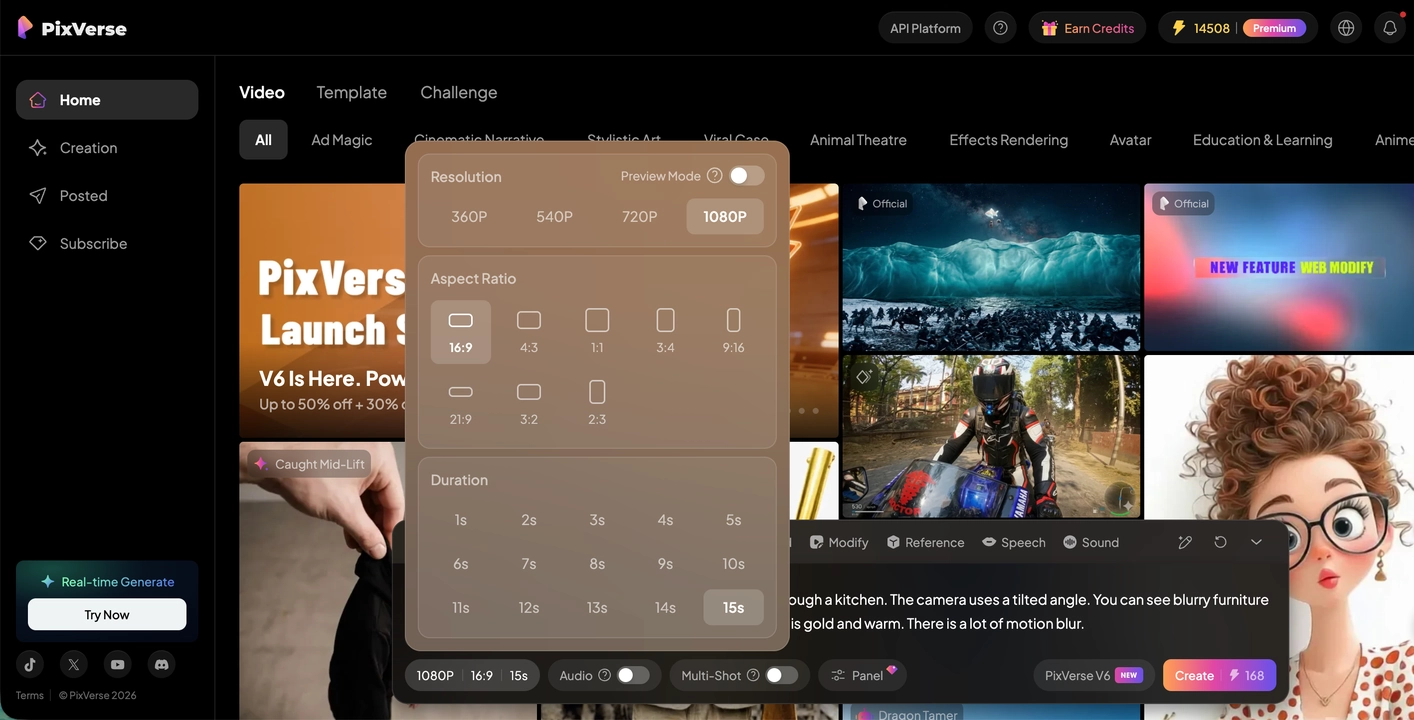
The PixVerse web app: the prompt bar at the bottom with the V6 model selected, the settings panel open (360p to 1080p, nine aspect ratios, 1 to 15 seconds), and the credit cost on the Create button (168 credits for a 15-second 1080p clip here).
Features
Text-to-video and image-to-video with V6
PixVerse V6 generates clips from 1 to 15 seconds long at up to 1080p, from a written prompt, a starting image, or reference images of a character or product. You can direct the camera, add generated sound and speech, and switch on multi-shot for clips that cut between angles. Aspect ratios run from 21:9 widescreen to 9:16 vertical for TikTok and Reels.
Templates and viral effects
PixVerse's template gallery turns a single photo into a ready-made effect clip with no prompt writing: pick a template, upload the image and generate. It's the quickest way to a shareable result, and the home feed shows what each template produces.
Editing tools: modify, extend, restyle, reframe
PixVerse also edits what it generates and what you upload: Modify changes part of a clip, Extend continues it, Restyle changes its look, transitions join two shots, and Magic Extend widens a photo or video to a new aspect ratio by painting in the missing edges. Small "mini apps" cover single jobs such as sound effects, product video remixes and music videos.
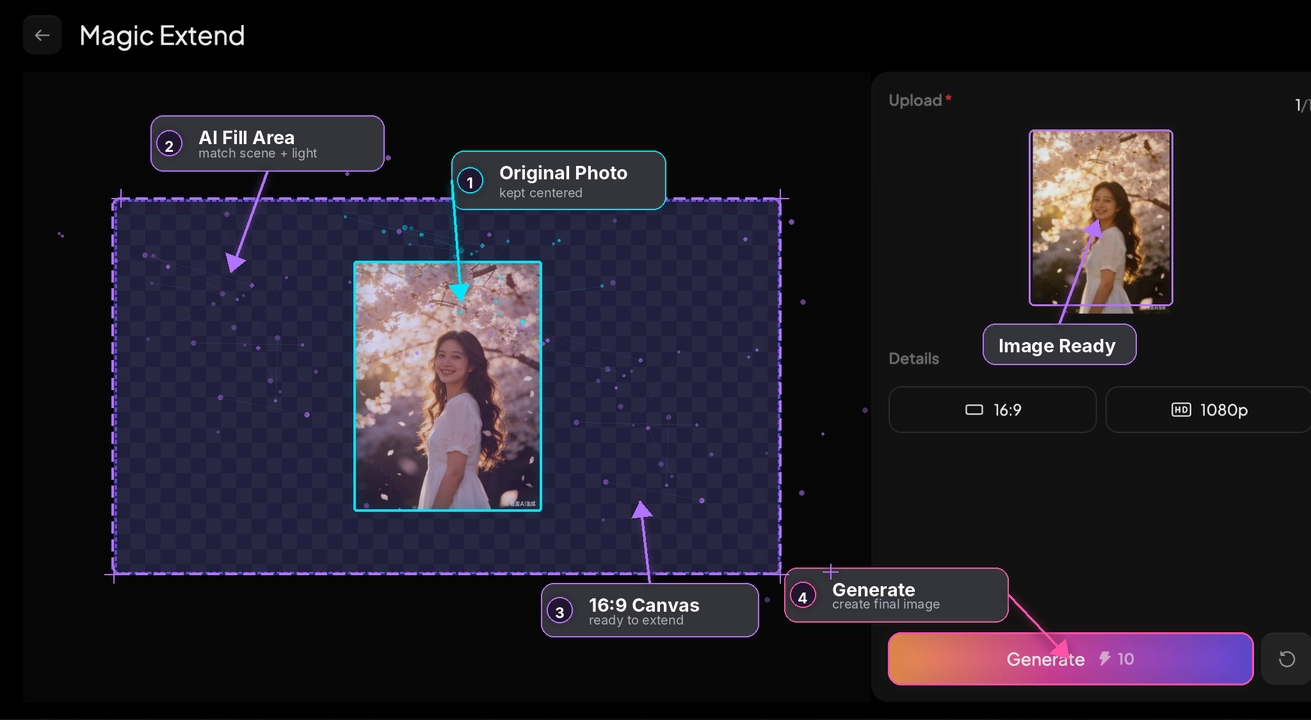
Magic Extend with PixVerse's own annotations: a portrait photo centred on a 16:9 canvas at 1080p, ready to fill in the sides for 10 credits.
Canvas for multi-shot projects
PixVerse Canvas links prompts, reference images, generation tasks and outputs in a node graph, so a project with several scenes keeps the same character and style, and you can rerun one step without starting over. It's meant for ads and short stories rather than single clips.
Team plan and developer API
PixVerse's Team Ultra plan adds shared credits and assets, member roles and central billing. Developers can use the separate API platform, which has its own credits (225 credits to the dollar) and isn't included in any web plan.
Benefits
- Video without a camera or animator. A product photo becomes a moving ad concept, a character sketch becomes a short scene.
- Many models in one account. Trying the same prompt on V6, Seedance and Kling side by side is easier than holding three subscriptions.
- A real free tier. Daily free credits let you judge the output before paying anything.
- Formats for every platform. Vertical, square and widescreen output, plus reframing of existing footage.
Real-World Uses
- Social posts: animate a selfie with a template effect, or generate a short vertical scene for TikTok or Reels.
- Ad and product concepts: turn a catalog photo into several short motion variations to test before paying for a shoot.
- Storyboards and pitches: rough out a scene's camera moves and mood for a client or a film pitch.
- Reformatting: widen a vertical clip to 16:9 for YouTube with Magic Extend instead of adding blurred bars.
Who It's For, and Who Should Skip It
PixVerse fits creators and small marketing teams who make lots of short, attention-grabbing clips and are happy to generate several takes to get a good one.
Skip it if you need long videos, exact brand or product detail in every frame, or footage you can't afford to have blocked by an automated content filter. For explainer and talking-head videos built from stock footage and voice-over, a template-based editor such as invideo AI is the better fit. And if predictable monthly costs matter more than model choice, a tool with a flat clip allowance will frustrate you less.
Usage Guide
- Sign up for a free account at pixverse.ai; the Basic plan starts with 60 credits.
- Open Creation and choose text-to-video, image-to-video or a template.
- Write the prompt literally: what's in the frame, how the camera moves, the lighting and any sound. PixVerse's own tests found V6 responds best to concrete physical detail.
- Set resolution, aspect ratio and length, and check the credit cost on the Create button before you click it.
- Start in preview or low resolution to test a prompt, then regenerate the keeper at 1080p.
- Refine with Extend, Modify or Restyle, then download the clip.
- To upgrade or cancel, use the Subscribe page in the web app. Deleting your account doesn't cancel a subscription.
Where it falls short
- Credit costs are hard to predict. A clip's price depends on model, resolution, length, audio and references; a 15-second 1080p V6 clip costs 168 credits, so Pro's 6,000 monthly credits cover roughly 35 such clips, fewer with retries.
- The free allowance has shrunk. Users report daily free credits dropping from 60 to 30, and the free tier is limited to low resolution.
- Moderation can lock you out. Several Trustpilot reviewers describe multi-day account suspensions after prompts the filter flagged.
- "Up to 4K" isn't native 4K. Paid plans list 4K output, but PixVerse itself notes the V6 model generates up to 1080p.
- Limited refunds. Only a completely unused subscription can be refunded in full; partial refunds aren't offered and credit packs are final.
- Your uploads may train models. The terms allow anonymized use of content for model training unless you use the available opt-out.
What Users Say
PixVerse's reputation splits sharply by where you look. App users rate it well for fun and results; paying web subscribers who write reviews are much harsher, mostly about money rather than video quality.
Google Play: 4.4 out of 5 (about 4.6 million ratings)
The Android app, PixVerse: AI Video Generator, holds a 4.4-star average from about 4.59 million ratings, so the mobile audience is large and mostly happy.
Trustpilot: 2.1 out of 5 (134 reviews)
On Trustpilot, 65% of reviews are one-star and 18% five-star. A sample, positive and negative:
- Robert McKenna, 5 stars (September 2026), "Very positive experience so far": "they have immediately refunded my US$288 today, after business hours had resumed in Singapore"
- Muggy Kuntz, 2 stars (June 2026): "Really good for free generations, However, I feel like the platform scams me out of credits"
- Muffin Starlin, 1 star (August 2026), "It was the best for ai videos": "They changed 60 daily credits to 30 and it is so not worth it."
- Emin Saidi, 1 star (November 2026): "Generation costs alot of expensive tokens"
- Dominique Tamereuh, 1 star (November 2026), "Recently became a full-scale scam, DO NOT YEARLY SUB": "since today you will have your whole account suspended for 3 days!"
- Daniel Morrison, 1 star (August 2026): "Have continued to try to charge a credit card which I had to cancel because they wouldn't stop it"
Independent rankings
Third-party reviews of PixVerse in 2026 generally place it among the stronger generators for short cinematic and social clips, and several cite the Artificial Analysis Video Arena, where PixVerse V6 ranked around fourth for image-to-video in May 2026. The same reviews warn that the real cost only becomes clear once the free credits run out.
The recurring themes: people like the output quality for short clips, the templates and the free daily credits. The complaints are about how fast credits disappear, the cut in free daily credits, content-filter suspensions, and billing that's hard to stop, with yearly subscribers the most upset. One reviewer did get a $288 refund quickly, so support does act on unused plans.
Comparisons
PixVerse vs invideo AI
PixVerse generates the footage itself: every frame comes from an AI model, which suits effects, stylized scenes and concepts. invideo AI builds longer videos (explainers, ads, YouTube videos) from a script, stock footage and AI voice-over, with generative clips as one ingredient. Pick PixVerse for short, striking clips; pick invideo AI for finished videos with narration.
Editions and Pricing
PixVerse prices as published on its own pricing pages (checked November 19, 2026). Every paid plan also gets 60 daily credits.
| Plan |
Monthly billing |
Yearly billing |
Credits per month |
Output |
| Basic | Free | Free | 60 to start, 30 a day | Low resolution |
| Standard | $10 | $96 ($8/mo) | 1,200 | Up to 720p, no watermark |
| Pro | $30 | $288 ($24/mo) | 6,000 | Up to 4K, 30% bonus on credit packs |
| Premium | $60 | $576 ($48/mo) | 15,000 | Up to 4K, 50% bonus on credit packs |
| Ultra | $199 (promotion, $249 reference) | $1,788 ($149/mo) | 25,000 | Up to 4K, 50% bonus on credit packs |
Credit packs cost $5 for 500, $20 for 2,000, $50 for 5,000 and $100 for 10,000 credits, and purchased credits don't expire. Team Ultra is $199 a month or $1,788 a year per seat.
FAQs
Is PixVerse free to use?
Yes, with limits. PixVerse's free Basic plan gives 60 credits when you sign up and 30 more each day, which expire at midnight UTC if unused. It's enough to test prompts, not to produce regularly.
How many videos do PixVerse credits buy?
It depends on the clip. PixVerse charges by model, resolution, length, audio and references; a 15-second 1080p clip on V6 costs 168 credits, while short low-resolution clips and template effects cost far less. Check the number on the Create button before each generation.
Do unused PixVerse credits roll over?
No, not plan credits. PixVerse membership credits refresh every 30 days and unused ones expire. Credits from purchased packs and promotional bonuses don't expire.
Can I get a refund from PixVerse?
Only in a narrow case. PixVerse refunds a subscription in full only if it's completely unused and still valid; it doesn't give partial refunds, and credit packs are non-refundable. Dissatisfaction with results isn't accepted as a reason.
Can I use PixVerse videos commercially?
PixVerse doesn't claim ownership of your outputs, but commercial use depends on its terms and your plan, and a paid plan doesn't clear rights to people, music, logos or source images you didn't own. Check the terms before using clips in ads or client work.
Does PixVerse really make 4K video?
Not natively for every model. PixVerse's Pro and higher plans list output up to 4K, but its own V6 model generates up to 1080p, so 4K involves upscaling or specific models.
Does a PixVerse web plan include API access?
No. PixVerse's API platform has its own credits and billing, separate from the web subscriptions.
How do I cancel a PixVerse subscription?
Cancel it on the Subscribe page in the PixVerse web app. Deleting your account doesn't cancel the subscription, so cancel first.
System Requirements
- A current web browser on Windows, macOS, Linux or ChromeOS
- Or the PixVerse mobile app on Android (iOS has a PixVerse Lite app)
- An internet connection; all generation runs on PixVerse's servers
- A free PixVerse account
Conclusion
PixVerse makes good-looking short AI clips and gives you a long list of models and effects in one place, with a free tier that's genuinely useful for testing. It's worth paying for if you make short social or ad clips often and have tested your credit burn on the free plan first. The Pro plan at $288 a year is the sensible tier for regular 1080p work.
The reason to hesitate is the business side, not the video: a 2.1 Trustpilot score driven by credit costs, content-filter suspensions and billing complaints. Start free, then go monthly, and only switch to yearly billing once you're sure.
Try PixVerse FreeBuy Now