Short answer: if it's your own video, don't download it at all: use the original file you uploaded, because Dailymotion only keeps a compressed copy. For anyone else's video, check its quality menu first, then save it with a free trial. CleverGet Video Downloader gives 3 free downloads and shows every MP4 size before you save. Allavsoft gives about 5 (also for Mac).
Pay only if you need more: Allavsoft is $18 lifetime with the code its Buy button applies, and CleverGet is $71.95 lifetime or $49.95 for a year. Don't pay for "4K" either. In the 400 Dailymotion videos we checked, none went above 1080p, and more than half stopped at standard definition.
Dailymotion to MP4: the options at a glance
| Fact |
Your original file |
CleverGet Video Downloader |
Allavsoft |
| Cost | Free | 3 free downloads, then $71.95 lifetime or $49.95 for 1 year | About 5 free downloads, then $18 lifetime with the code ($59.99 without) |
| Works for | Your own uploads | Any public Dailymotion video | Any public Dailymotion video |
| Quality | ✓ Full original quality | What Dailymotion serves, listed with sizes before you save | What Dailymotion serves, "Best Available" by default |
| MP4 output | Whatever you recorded | ✓ Saves the MP4 stream directly | ✓ Converts to MP4 automatically |
| Platforms | Any | Windows 7-11 (64-bit), macOS 11+ (separate license) | Windows, macOS up to 14 (separate license) |
| Computers per license | - | 1 | 1-3 |
Only download what you have the right to save
Dailymotion's Terms of Use describe the service as streaming and bar downloading its material without written consent from Dailymotion or its licensors. The safe cases are your own uploads and videos whose owner lets you save them. CleverGet's own fair use policy limits it to personal, non-commercial copies of content you've legally obtained, and copyright law where you live applies on top. This guide doesn't cover getting around DRM or other copy protection.
How we checked
- We asked Dailymotion's public API which formats it serves for 400 videos: the 200 trending and the 200 newest on November 28, 2026. That tells you what any downloader can actually save.
- We read Dailymotion's developer documentation for what each format means, and its Terms of Use.
- We read the order page for every license in this article, in US dollars, and each maker's Dailymotion guide, specs and trial limits.
- We read the Trustpilot pages for both makers.
What we checked: on November 28, 2026, the order page showed CleverGet Video Downloader at $79.95 less an $8.00 discount, so $71.95 lifetime, or $49.95 for 1 year. Allavsoft Lifetime showed $59.99, or $18 with the code. CleverGet's Windows installer is version 27.0.0.1 (503 MB). Allavsoft is 3.29.7.9791.
We didn't download other people's Dailymotion videos ourselves, since the terms bar it, so the program steps come from the makers' guides and the program screenshots are theirs. The format counts are our own.
Step 1, free: if it's your video, use the original file
If you uploaded the video, the best MP4 isn't on Dailymotion at all. Dailymotion re-encodes every upload into its own streaming versions, so anything you download from it is a compressed copy of what you sent. Your original file, on your PC, phone or camera card, is always the better copy.
Dailymotion's terms say this plainly: it is "not designed as a video back-up service", and keeping your own files safe is up to you. If you've lost the original, a downloader is the fallback, and it will give you Dailymotion's best version and no better. Dailymotion's own download feature is a paid add-on for business partners, not something a regular account can use.
Step 2, free: check what quality the video really has
Before installing anything, open the video on Dailymotion and look at the quality choices in the player's settings. A downloader can only save one of those versions, so if the menu stops at 380p, no program will get you HD.
This matters more than most guides admit. We asked Dailymotion which formats it serves for 400 videos, and here is the best version each one had:
Best quality available, 400 Dailymotion videos
SD (384p) only217 videos (54%)
Up to HQ (480p)31 videos (8%)
Up to HD 720p128 videos (32%)
Up to Full HD 1080p24 videos (6%)
The 200 trending and 200 newest Dailymotion videos on November 28, 2026, from Dailymotion's public API (one video was in both lists). Only 7 of the 400 had a 60 fps version.
Three things follow from those numbers:
- "Up to 8K" is about the program, not Dailymotion. CleverGet advertises 8K, but not one of the 400 videos went past 1080p.
- Long uploads are usually SD only. Of the 271 videos 50 minutes or longer (mostly full movies and drama series), 170 (63%) had no version above 384p. For shorter videos it was 47 of 129 (36%).
- Newer isn't better. The newest uploads were more often SD-only (64%) than the trending ones (45%).
Step 3, free: save it with a trial download
CleverGet Video Downloader turns a Dailymotion link into an MP4 in six steps, and its trial covers your first 3 downloads. "Dailymotion to MP4" is a slightly misleading phrase here: nothing gets converted, the program saves the MP4 stream Dailymotion already serves.
- Install CleverGet. Use the Download button below. The 503 MB installer covers every CleverGet module.
- Set the output folder. Open the three-dot menu, choose Settings, pick a folder in the "Save Video To" box on the General tab, then click Save.
- Open the video. Paste the Dailymotion link into CleverGet's address bar and press Enter, or click the Dailymotion icon on the home screen and search there.
- Let the video load. CleverGet reads the page and opens a Download panel listing each version by quality, format and file size.
- Pick an MP4 row and click Download. Choose the largest MP4 unless you need a smaller file. It should match the top choice you saw in Step 2.
- Find the file in the Library panel on the right, where you can play it or open its folder.
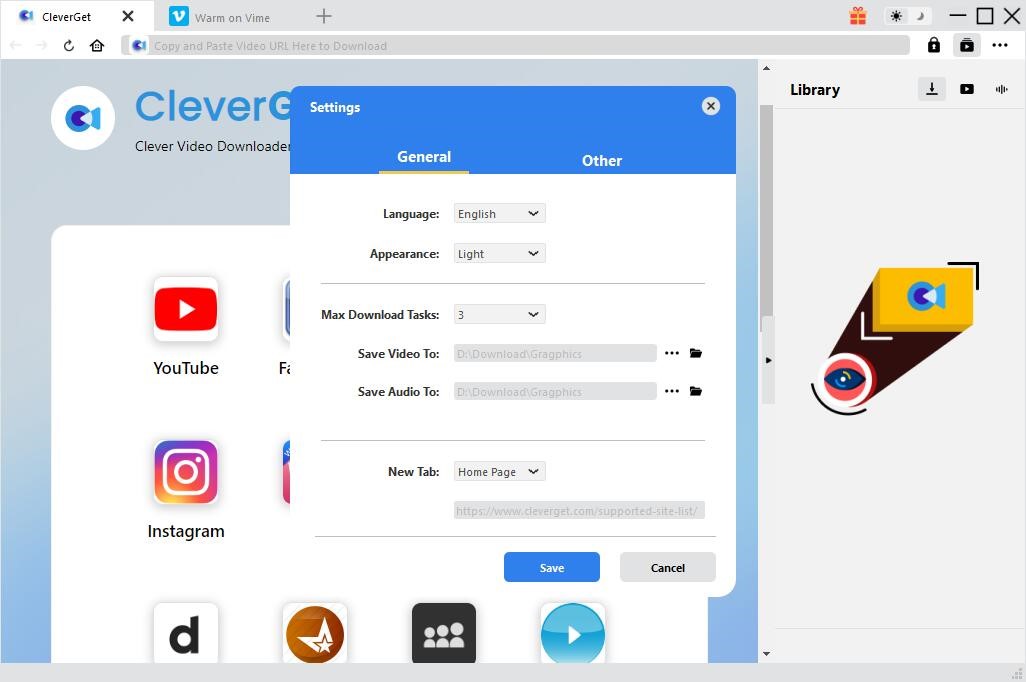
CleverGet's Settings panel: language, maximum download tasks, and the Save Video To and Save Audio To folders. Older interface, from CleverGet's own guide.
In Allavsoft the steps are shorter: paste the link in the "Paste Video URL Here" box, leave Download Quality on Best Available, tick "Automatically Convert to" and choose MPEG4 Video (*.mp4), then click the large download arrow. Its "For Multiple URLs" option takes a list of links.
Spend trial downloads wisely. CleverGet's 3 are 3 in total, not per day. If you only need a handful of videos, the trials of both programs together (about 8 downloads) may be all you ever need.
Step 4, paid: which downloader to buy
Lifetime price for one license (USD)
Allavsoft, with the code$18.00
Allavsoft, without the code$59.99
CleverGet Video Downloader$71.95
Order page prices checked on November 28, 2026. CleverGet also sells 1 year for $49.95.
CleverGet Video Downloader
CleverGet Video Downloader costs $71.95 lifetime at checkout ($79.95 list price) or $49.95 for 1 year, for one computer. It runs on 64-bit Windows 7 to 11 and on macOS 11 or later, Intel and Apple silicon, with a separate Mac license. Best for: seeing exactly which versions and sizes a Dailymotion video has before you save it.
CleverGet Video Downloader works like a browser with a download panel. You see the video play, then choose from what the page really offers. That's why it's our pick for Dailymotion: given how often a video tops out at 384p or 720p, seeing the list first saves guesswork. In CleverGet's own Dailymotion walkthrough, one 6:58 video offered MP4 at 1280 x 720 (109.67 MB) and 848 x 480 (42.67 MB). It also saves YouTube playlists and channels, runs up to 5 downloads at once, and outputs MP4, MKV, WEBM or 3GP.

A Dailymotion video open in CleverGet, with the Library panel at the right showing a 10:44 download at 1920 x 1080, 489.10 MB. Older interface, from CleverGet's own guide.
Where it falls short: 3 trial downloads go fast, and the 503 MB install is heavy for one job, because it carries every CleverGet module. Refunds are narrow: Leawo's policy covers reproducible bugs and hardware problems it can't solve, not a change of mind, so use the trial on your own links before you buy.
What we like
- Lists every version with its file size before you save
- Saves MP4 directly, no conversion step
- Sign-in works inside its built-in browser
- Native Apple silicon support on Mac
Watch out for
- Only 3 trial downloads, in total
- One license covers one computer
- 503 MB install
- Commercial use is forbidden
CleverGet scored 4.7 out of 5 from 67 reviews on Trustpilot on November 6, 2026, across all its modules.
"This is the best video downloader I have encountered so far." Kamlesh Bhatt, Trustpilot
"sometimes updates of the software or the update from the streaming platform can wreak havoc" Satori Agape-Economo, Trustpilot
Download CleverGet Video DownloaderBuy CleverGet Video Downloader
Allavsoft and Allavsoft for Mac
Allavsoft and Allavsoft for Mac cost $18 lifetime with the 70% code the Buy button applies, or $59.99 without it, for 1-3 PCs. Best for: the lowest price, and a plain paste-a-link tool that converts to MP4 for you.
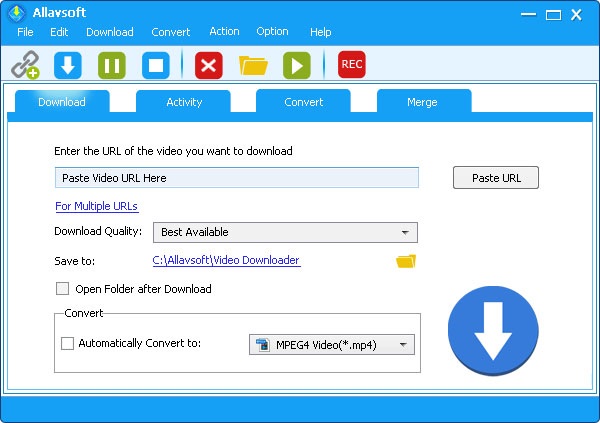
Allavsoft's Download tab: the Paste Video URL Here box, For Multiple URLs, Download Quality set to Best Available, and Automatically Convert to MPEG4 Video (*.mp4).
Allavsoft is the cheapest way to own a Dailymotion downloader, and at $18 it's an easy choice if you'll save more than the trials allow. It names Dailymotion on its homepage, converts to MP4 after each download, and adds a merge tool and a converter. One license covers up to 3 PCs.
Where it falls short: you don't see the available versions before downloading the way you do in CleverGet, its Dailymotion guide was last updated in March 2019, and the Windows installer isn't digitally signed. Allavsoft for Mac lists macOS only up to version 14, and the build we inspected on October 24, 2026 contained only Intel code, so an Apple silicon Mac runs it through Rosetta. The code is a limited offer: without it, the price is $59.99.
What we like
- $18 lifetime with the code
- One license covers 1-3 PCs
- Converts to MP4 automatically
- About 5 trial downloads
Watch out for
- No list of versions before you download
- Windows installer isn't digitally signed
- Intel-only Mac build when we last looked inside
- Sites break until an update arrives
Allavsoft scored 3.9 out of 5 from 317 reviews on Trustpilot on November 6, 2026, with 76% five-star and 11% one-star reviews.
"Definitely worth the paid version." Terry J, Trustpilot
"Sometimes YouTube or Windows changes things" Flyer, Trustpilot
Download AllavsoftBuy Allavsoft
Download Allavsoft for MacBuy Allavsoft for Mac
What about Youku?
Youku is less certain than Dailymotion, so treat any Youku downloader as something to test with a free trial first. CleverGet Video Downloader lists youku.com on its supported-site list but publishes no Youku walkthrough. Allavsoft has a Youku guide, but it dates from December 2016. Youku's own app listing names 1080p as a member benefit, so without a membership expect lower quality, and paid or region-locked shows are out of reach for both programs. Paste your actual Youku link into a trial: if neither program lists a version, neither is worth buying for Youku.
Which should you choose?
| Your situation |
Pick |
Why |
| It's your own upload | Your original file | Free, and better than anything Dailymotion serves |
| A few videos, once | Free trials of both | About 8 downloads between them, no purchase |
| Regular use, lowest price | Allavsoft | $18 lifetime with the code, 1-3 PCs |
| You want to see sizes before saving | CleverGet Video Downloader | Lists every MP4 version and its size |
| Apple silicon Mac | CleverGet Video Downloader (Mac license) | Native Apple silicon support on macOS 11 or later |
Who should skip each one. Skip both if the trials already covered what you need. Skip CleverGet if price comes first, since Allavsoft does the same job for $18. Skip Allavsoft if you need Apple silicon code or prefer signed installers. And skip any paid upgrade if the video's quality menu stops at 384p, because no downloader will improve it.
What commonly goes wrong
- Expecting HD that isn't there. More than half the videos we checked had only an SD (384p) version. Check the player's quality menu first.
- "No downloadable video detected" in CleverGet. The page must play smoothly first. Refresh it, restart CleverGet and update to the latest version, in that order.
- A downloader stops working. Video sites change often, and this is the top complaint for both makers. Fixes usually come in an update, but they aren't guaranteed.
- Using up the trial on easy links. CleverGet's trial is 3 downloads in total, so spend one on your hardest link first.
FAQs
Can I download Dailymotion videos for free?
Yes, a few: CleverGet Video Downloader's trial saves 3 videos and Allavsoft's about 5, both as MP4. If the video is your own upload, your original file is free and better quality than any download.
Does Dailymotion have a download button?
No, not for regular viewers or uploaders. Dailymotion's download feature is a paid add-on for business partners, and its terms describe the service as streaming. Your own uploads are best kept from the original file.
Can I download Dailymotion videos in 4K or 1080p?
Only if the video has that version, and few do. Of 400 Dailymotion videos we checked, none had 1440p or 4K and only 24 (6%) had 1080p. CleverGet Video Downloader lists every version a video has before you save it.
Why does my Dailymotion download look blurry?
Your Dailymotion download is probably the SD (384p) version, which was the best available for more than half the videos we checked. In CleverGet Video Downloader, pick the largest MP4 in the Download panel; in Allavsoft, keep Download Quality on Best Available.
Is it legal to download from Dailymotion?
Downloading your own uploads, or videos the owner lets you save, is the safe case. Dailymotion's Terms of Use otherwise bar downloading without written consent, and copyright law varies by country. CleverGet Video Downloader and Allavsoft are legal software, but each download is your responsibility.
Does CleverGet Video Downloader work on a Mac?
CleverGet Video Downloader runs on macOS 11 or later, on Intel and Apple silicon, but the Mac version needs its own license.
Can CleverGet download Youku videos?
CleverGet Video Downloader lists youku.com as a supported site, but it publishes no Youku walkthrough, so use a trial download on your own Youku link before paying.
Can I use downloaded videos on my own channel?
No, not with CleverGet: its license is for personal use and forbids commercial use. Reposting someone else's video also needs the owner's permission, whichever downloader you used.
Conclusion
Start free: use your original file if the video is yours, check the player's quality menu so you know what to expect, and save a few videos with the trials. CleverGet Video Downloader is the one we'd buy for regular Dailymotion to MP4 use, because it shows every version and its size before saving, at $71.95 lifetime. Choose Allavsoft at $18 if price comes first. And keep to videos you have the right to save.
Download CleverGet Video DownloaderBuy CleverGet Video Downloader