Short answer
The best duplicate file finder for most Windows 10 and 11 users is Cisdem Duplicate Finder for Windows: a one-time $39.99, it finds exact duplicates by content, groups similar photos with on-device AI and suggests the best shot, and cleans OneDrive and Dropbox accounts too.
Power users who need similar-audio and video matching should get Duplicate Cleaner Pro ($54.95). If you won't pay anything, AllDup is genuinely free and very capable, but harder to use. Duplicate Sweeper ($25) is the simplest paid option, and Easy Duplicate Finder covers Google Drive but comes with caveats.
At a glance
|
Price (1 PC) |
Free version or trial |
Similar photos |
Cloud accounts |
Cisdem Duplicate Finder
Best overall |
$39.99 once (lifetime) |
Untimed trial: scans and previews, no one-click delete of all selected |
✓ AI, with best-shot scoring |
✓ OneDrive, Dropbox |
Duplicate Cleaner Pro
Best for power users |
$54.95 once (version 5 updates) |
7-day full trial, basic Free edition for home use |
✓ Adjustable strictness |
✗ |
AllDup
Best free |
Free, also for companies |
Everything is free |
✓ |
✗ |
Duplicate Sweeper
Simplest |
$25 once (lifetime) |
Finds and shows duplicates, removing needs a license |
✗ Exact copies only |
✗ |
Easy Duplicate Finder
Most cloud modes |
$39.95 (1 year of updates) |
Unlimited scans, manage only 10 duplicate groups |
✓ Photos and music, since version 8 |
✓ Google Drive, Dropbox, OneDrive |
How we picked
- We started from the duplicate finders listed on Ivertech and kept the ones still sold or maintained today with a current Windows 10 and 11 version. Several older tools on the site haven't been updated in a decade and were left out.
- We read each vendor's product page, order page, FAQ and version history, and noted what the free version or trial really lets you do.
- We read the price on each order page instead of the headline price. Two of the paid tools show a crossed-out "regular" price, and two only fill in their price from the payment system.
- We looked at the vendors' own screenshots of the current versions and at Trustpilot ratings, including critical reviews.
What we checked: the versions (Cisdem 5.1.0 installer, Duplicate Cleaner Pro 5.28, AllDup 4.5.72, Duplicate Sweeper 1.90 installer, Easy Duplicate Finder 8.3.1.6) and the order-page prices, including Cisdem's $39.99 at checkout, on October 26, 2026. We compared features, prices and free-version limits, and didn't run the five programs on the same test folder.
1. Cisdem Duplicate Finder for Windows: best overall
Cisdem Duplicate Finder for Windows version 5.1.0 runs on Windows 10 and 11 and costs $39.99 once for 1 PC (2 PCs $55.99, 5 PCs $99.99), with a 30-day money-back guarantee.
Best for: photo libraries, OneDrive and Dropbox clean-ups, and anyone who wants safe automatic selection.

Cisdem's home screen: Local File Scan with file-type filters on the left, Cloud File Scan with Add OneDrive Account and Add Dropbox Account on the right, and recent scans below.
Cisdem Duplicate Finder gets the balance right for most people. It matches files by content (a size pre-filter, then XXH3 hashing), so renamed copies are caught, and it covers photos, videos, music, documents, archives and whole folders. Its version 5 AI engine finds similar photos such as burst shots, edits, resized or compressed copies, and the same scene from another angle, then scores them for technical and aesthetic quality and faces so its Smart Selection can suggest which one to keep. The models run on your PC.
The workflow is built for people who aren't duplicate-hunting experts. In every group one file is left unticked automatically, rules let you select by file name, newest, oldest or a folder priority list, and duplicates can go to the Recycle Bin, be deleted permanently or be moved to a folder. It is also the only tool here besides Easy Duplicate Finder that cleans OneDrive and Dropbox accounts online, without downloading everything first.
Where it falls short: music and video are matched only as exact copies, there's no Windows 7 or 8 version, and some long-time users find the redesigned interface harder to navigate. For a detailed head-to-head with the closest rival, see Cisdem Duplicate Finder vs Duplicate Cleaner Pro.
What we like
- AI similar photos with a best-shot pick
- OneDrive and Dropbox cleaned online
- Lifetime license for less than most rivals
- Trial has no time limit
Watch out for
- No similar-audio or similar-video matching
- Windows 10 or later only
- Some users dislike the version 5 redesign
What users say
Cisdem's product page shows 4.9 out of 5 from 282 reviews, and Cisdem has 4.8 out of 5 from 302 reviews on Trustpilot.
Christina, US (Cisdem's site): "I have been loving the duplicate finder program, if has saved me so much time and energy cleaning up my files which were out of control!"
CLM, AU (Cisdem's site): "I purchased Cisdem Duplicate Finder last year and needed to transfer the software license to a new PC. Cisdem Support was second to none with a response and resolution within minutes."
Download Cisdem Duplicate Finder FreeBuy Cisdem Duplicate Finder ($39.99)
2. Duplicate Cleaner Pro: best for power users
Duplicate Cleaner Pro version 5.28 (September 2026) runs on Windows 7 to 11 and costs $54.95 before tax for a perpetual Single User license with all version 5 updates.
Best for: music and video collections, network drives and archives, and people who want every option.
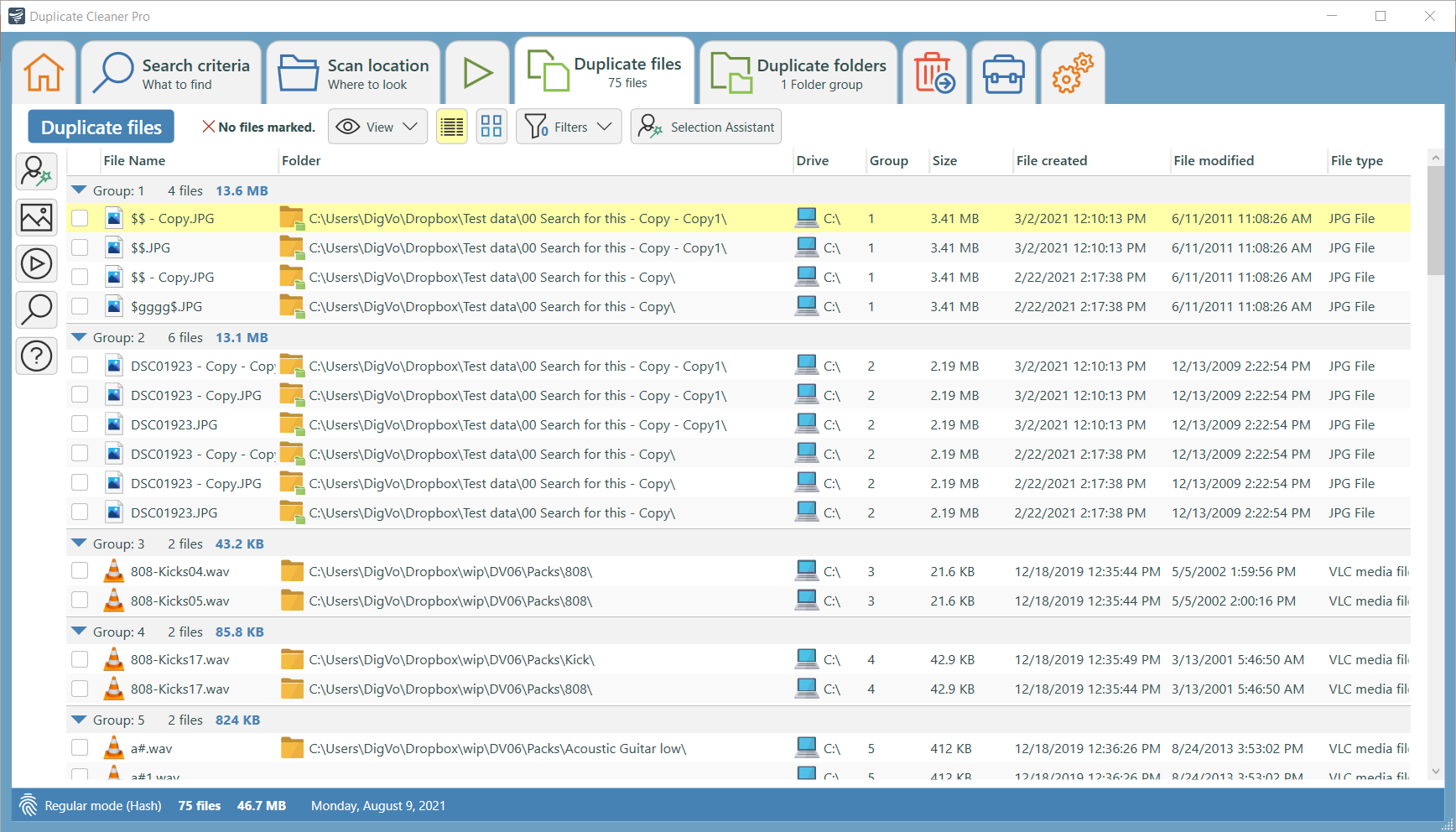
Duplicate Cleaner Pro's Duplicate files tab, with groups of copies, their folders, sizes and dates, and the Selection Assistant button.
Duplicate Cleaner Pro is the most thorough tool in this list. Beyond exact matches, it finds images that were rotated, flipped, retouched or resized, compares music by similar audio or tags across MP3, OGG, WMA, M4A, AAC, FLAC and WAV, and finds duplicate videos by frames or soundtrack. Its Selection Assistant can mark the lowest-quality MP3 or every copy outside a favorite folder, and it can replace duplicates with shortcuts or hard links instead of deleting them. It also searches inside zip files and shows duplicate folder trees.
The cost of all that power is a busier interface, a 7-day trial, and no cloud-account scanning. At $54.95 it's also the priciest paid option here.
What we like
- Similar audio and video-frame matching
- Hard links, shortcuts, zip search
- Runs on Windows 7 and 8 too
Watch out for
- Highest price here
- Learning curve
- No OneDrive or Dropbox account scanning
What users say
DigitalVolcano scores 4.7 out of 5 from 107 reviews on Trustpilot. Toyz (5 stars): "I've used DuplicateCleaner Pro for several years, and LOVE it (first 4, then upgraded to 5)."
On the critical side, one 1-star DigitalVolcano review (it doesn't say which of the company's programs) reads: "I can't use the program because the documentation is so poor."
Download Duplicate Cleaner Pro Trial
3. AllDup: best free duplicate finder
AllDup version 4.5.72 (December 2025) is freeware for private users and companies, for Windows 7 to 11 and Windows Server, as an installer or a portable edition.
Best for: anyone who won't pay, IT staff, and people comfortable with lots of options.
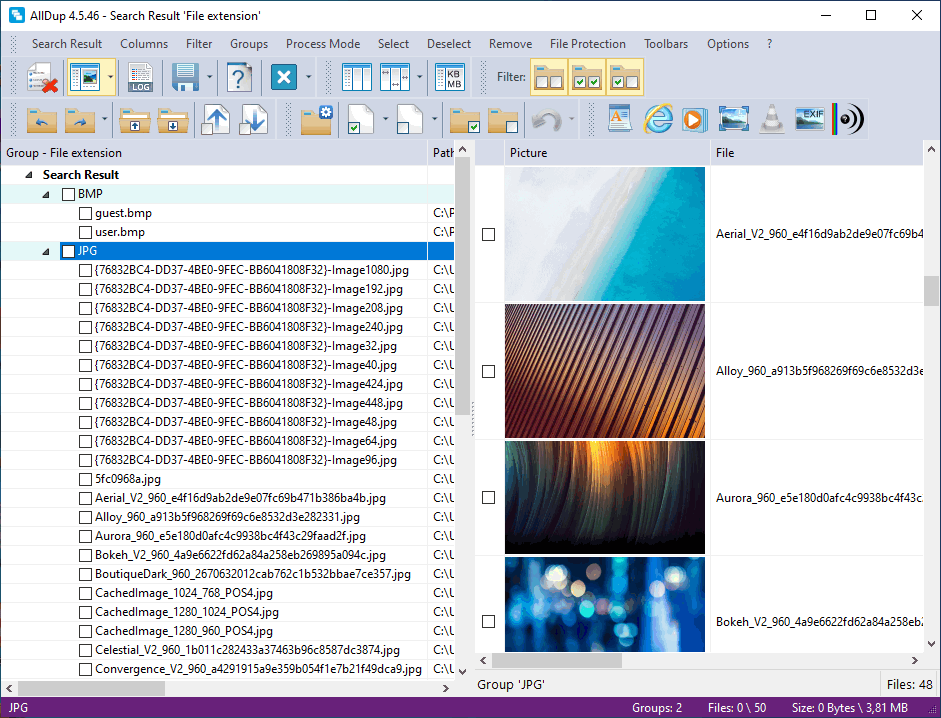
AllDup's search result window: duplicates grouped by file extension on the left, picture previews on the right, and a toolbar of selection and removal commands.
AllDup is the surprise of this list: a free program with more search methods than most paid ones. It finds files with identical or similar content, identical or similar images, similar sound files, and videos or sound files of almost the same duration, as well as matches by name, size, date or attributes. It scans inside ZIP, RAR and 7Z archives and on network paths, saves checksums in a database for faster repeat searches, and can replace duplicates with shortcuts or hard links, move them to a backup folder or the Recycle Bin, or securely delete them.
The catch is usability. AllDup's two toolbars and many tabs look like an old-school utility, there's no guided "keep the best shot" step, and no cloud-account scanning. If you're confident with settings it's excellent value. If you want to be walked through a clean-up, a paid tool will save you time.
What we like
- Completely free, even for business use
- Similar images, audio and video duration search
- Portable edition, archives, network paths
Watch out for
- Crowded, technical interface
- No cloud-account scanning
- No best-shot suggestion for similar photos
Download AllDup (Free)
4. Duplicate Sweeper: simplest paid option
Duplicate Sweeper version 1.90 from Wide Angle Software runs on Windows 7 to 11 and costs $25 once for a lifetime license on 1 PC, with a 30-day guarantee. The Mac version is sold separately.
Best for: a one-off clean-up of exact duplicates on a home PC, at the lowest price.
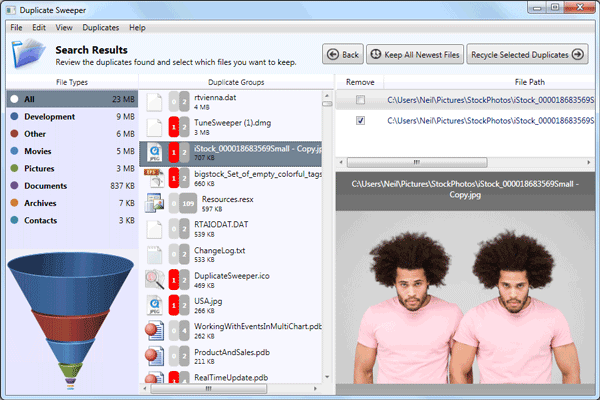
Duplicate Sweeper's Search Results: file types on the left, duplicate groups in the middle, and the paths and a preview of the selected photo on the right, with Keep All Newest Files and Recycle Selected Duplicates buttons.
Duplicate Sweeper keeps things simple: pick folders, scan, review the duplicate groups by file type with a preview, then click Keep All Newest Files or choose copies yourself and send them to the Recycle Bin, so a mistake can be undone. The free download finds and shows every duplicate, which tells you exactly what you'd recover before you pay $25.
It does only exact duplicates, though: no similar-photo grouping, no audio matching and no cloud accounts. Wide Angle Software scores 3.7 out of 5 from 1,636 Trustpilot reviews across all its products, and the one review we found naming Duplicate Sweeper was positive about support.
What we like
- Cheapest paid license, lifetime
- Very easy, Recycle Bin by default
- Free scan shows all duplicates
Watch out for
- Exact duplicates only
- No cloud accounts
- Few selection rules
Download Duplicate Sweeper Free
5. Easy Duplicate Finder: most cloud scan modes, with caveats
Easy Duplicate Finder version 8.3.1.6 (September 2026) runs on Windows and Mac and costs $39.95 for 1 computer with one year of updates (3 computers $49.95).
Best for: people whose duplicates are spread across Google Drive, Dropbox, OneDrive, iTunes and Outlook.
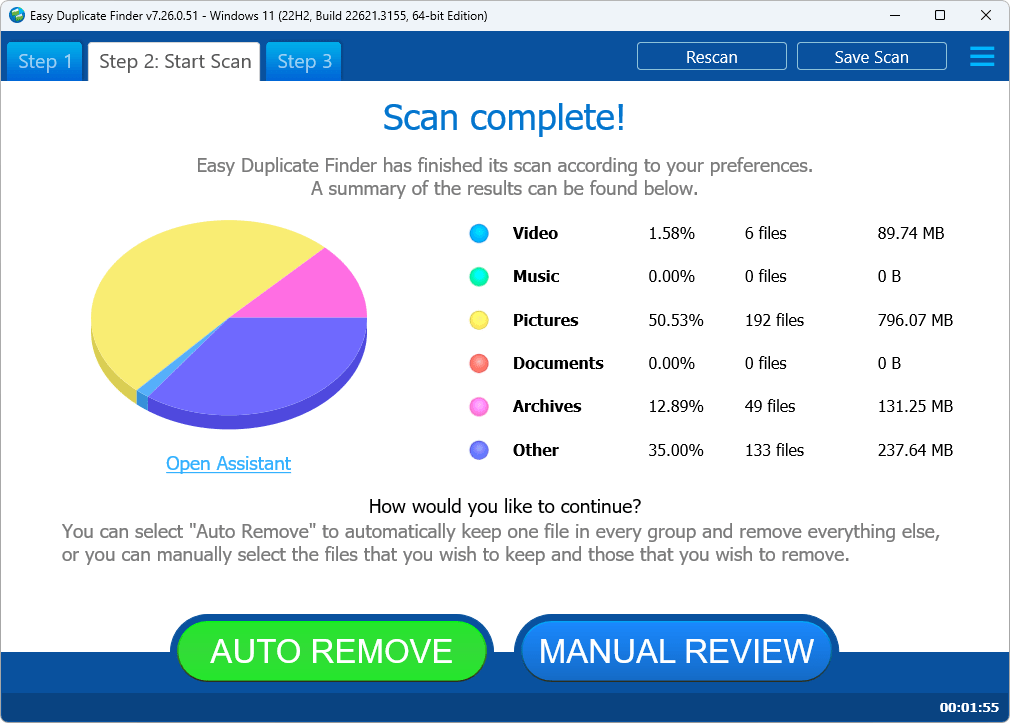
Easy Duplicate Finder 8.0 on Windows 11: the Scan complete summary with a pie chart by file type and the Auto Remove and Manual Review buttons.
Easy Duplicate Finder has the widest set of scan modes here: dedicated modes for Google Drive, Dropbox and OneDrive (compared in the cloud, without downloading files), iTunes, Outlook, a folder comparison mode, and since version 8 a scan engine that finds similar music and photos as well as exact copies. After a scan, Auto Remove keeps one file in each group and removes the rest.
We rank it last for three reasons. The license is for one year of updates (the program keeps working afterwards, but updates and email support stop). The order page pre-offers paid extras such as an extended download period and an internet optimizer, so check your cart before paying. And its FAQ answers Windows Defender flagging the installer by suggesting you disable Windows Defender and install a third-party antivirus, which we wouldn't do. Its Trustpilot score is 1.8 out of 5, from only 16 reviews, including a 1-star "Terrible, I lost many photos." from DaveG.
Trustpilot excerpts in this article were read through a summarizer, so treat the wording as close but not guaranteed exact.
What we like
- Google Drive, Dropbox and OneDrive modes
- iTunes and Outlook scans
- Actively updated (six version 8 releases since June 2026)
Watch out for
- Updates last 1 year only
- Upsells on the order page
- FAQ advice to disable Windows Defender
- Weak Trustpilot score (1.8 from 16 reviews)
Download Easy Duplicate Finder Trial
Prices and ratings compared
Price for 1 PC (USD, before tax)
Duplicate Sweeper (lifetime)$25.00
Easy Duplicate Finder (1 year of updates)$39.95
Cisdem Duplicate Finder (lifetime)$39.99
Duplicate Cleaner Pro (version 5 updates)$54.95
Vendor's Trustpilot score (out of 5)
DigitalVolcano, Duplicate Cleaner (107 reviews)4.7
Wide Angle Software, Duplicate Sweeper (1,636 reviews)3.7
Easy Duplicate Finder (16 reviews)1.8
Order-page prices checked on October 26, 2026. Trustpilot scores are for each vendor as a whole and may cover other products. AllDup has no Trustpilot profile.
Which should you choose?
| Your situation |
Pick |
Why |
| Years of phone and camera photos | Cisdem Duplicate Finder | AI groups similar shots and suggests the best one |
| OneDrive or Dropbox storage running out | Cisdem Duplicate Finder | Cleans the accounts online, lifetime license |
| Duplicates in Google Drive | Easy Duplicate Finder, or sync it and use Cisdem | Only Easy Duplicate Finder has a Google Drive mode on Windows |
| Music library in several formats, video archive | Duplicate Cleaner Pro | Similar audio and video-frame matching |
| No budget at all, or office PCs | AllDup | Free for private and business use |
| One quick clean-up of exact copies | Duplicate Sweeper | $25 lifetime and very simple |
Who should skip each one: skip Cisdem if you need near-duplicate music or video matching or you're on Windows 7 or 8. Skip Duplicate Cleaner Pro if you just want photos and cloud folders cleaned with little effort. Skip AllDup if a dense interface puts you off. Skip Duplicate Sweeper if you have burst shots and edited photos to sort. Skip Easy Duplicate Finder unless you specifically need its Google Drive, iTunes or Outlook modes.
What commonly goes wrong
- Deleting from system folders. Windows and many programs keep identical copies of files on purpose. Scan your own folders and data drives, not C:\Windows or Program Files.
- Permanent deletion in the cloud. Removing duplicates directly from a cloud account can't always be undone from your PC's Recycle Bin. Check the results carefully before you delete online.
- "Similar" isn't "identical". A similar-photo group may hold an edit you want to keep. Look before you accept an automatic pick.
- Space doesn't come back. Files sent to the Recycle Bin still use space until you empty it.
- Hard links confuse later clean-ups. Deleting a hard-linked file doesn't free space, so tools that create them (Duplicate Cleaner Pro, AllDup) are best left to users who know how they work.
FAQs
What is the best duplicate file finder for Windows 11?
Cisdem Duplicate Finder for Windows is the best choice for most Windows 11 users: it finds exact duplicates by content, groups similar photos with AI, cleans OneDrive and Dropbox, and costs $39.99 once. Duplicate Cleaner Pro is better for music and video collections, and AllDup is the best free option.
Does Windows 11 have a built-in duplicate file finder?
No. Windows 11 has no tool that finds duplicate files. File Explorer can sort by name or size, and PowerShell can compare file hashes, but neither groups similar photos or selects copies for you, which is why a tool such as Cisdem Duplicate Finder or AllDup is worth installing.
Is there a completely free duplicate file finder?
Yes. AllDup is freeware for private users and companies, with no feature limits. Duplicate Cleaner also has a Free edition for home use, while Cisdem, Duplicate Sweeper and Easy Duplicate Finder have free versions that scan but limit removal.
Which duplicate finder can find similar photos, not just exact copies?
Cisdem Duplicate Finder, Duplicate Cleaner Pro, AllDup and Easy Duplicate Finder 8 all find similar images. Cisdem goes furthest for photographers, since it also scores each shot so you can keep the best one. Duplicate Sweeper finds exact copies only.
Can a duplicate finder remove duplicates from OneDrive?
Yes. Cisdem Duplicate Finder for Windows connects to OneDrive and Dropbox accounts and removes duplicates online, and Easy Duplicate Finder has OneDrive, Dropbox and Google Drive modes. The other tools only see cloud files that are synced to a folder on your PC.
Is it safe to delete duplicate files?
Yes, if you delete only your own files and keep one copy of each. Cisdem Duplicate Finder and Easy Duplicate Finder always keep one file per group in their automatic selection, and Cisdem, Duplicate Cleaner Pro, AllDup and Duplicate Sweeper can send duplicates to the Recycle Bin so you can restore a mistake.
Which duplicate finders are one-time purchases?
Cisdem Duplicate Finder's lifetime license ($39.99), Duplicate Sweeper ($25) and Duplicate Cleaner Pro ($54.95, version 5 updates) are one-time purchases. Easy Duplicate Finder's $39.95 also keeps working forever, but includes only one year of updates.