At a glance
All four editions are the same program, version 8.9, with the same four tabs (Virtual disk, Backup and Recovery, Disk management, Tools and utilities). The differences are the license and a list of features the free edition leaves out. This table follows Qiling's own edition comparison and the prices on the order page.
| Feature |
Free |
Professional |
Server |
Technician |
| Price at checkout | $0 | $27.30 (regular $39) | $169 | $799 |
| License term | Free | One-time | One-time | 1 year |
| Lifetime free upgrades option | - | $49 | $199 | ✗ |
| Machines per license | Home PCs | 1 | 1 | Unlimited in one company |
| Business use | ✗ | ✓ | ✓ | ✓ |
| Paid service on clients' PCs | ✗ | ✗ | ✗ | ✓ |
| Windows Server | ✗ | ✗ | ✓ | ✓ |
| System, disk and file backup, schedules, incremental and differential | ✓ | ✓ | ✓ | ✓ |
| Image encryption, WinPE rescue media, Pre-OS | ✓ | ✓ | ✓ | ✓ |
| GPT disks and UEFI boot | ✗ (MBR only) | ✓ | ✓ | ✓ |
| Migrate OS to SSD/HD | ✗ | ✓ | ✓ | ✓ |
| Partition move/resize | ✗ | ✓ | ✓ | ✓ |
| Backup to NAS and iSCSI, universal restore | ✗ | ✓ | ✓ | ✓ |
| File sync, file zip, email alerts, pre/post commands | ✗ | ✓ | ✓ | ✓ |
| Secure disk, data wipe, file shredder | ✗ | ✓ | ✓ | ✓ |
| Backup and restore speed | Normal | Faster | Faster | Faster |
| Support priority | Low | Medium | High | Top |
| Refund | - | 14 days, technical reasons | 14 days, technical reasons | ✗ None |
How we compared them
- We read Qiling's edition comparison table in the Disk Master help, which lists every feature per edition, and the product, store, upgrade and refund pages.
- We downloaded the installers and read their file versions: the Free installer (17.5 MB) and the paid trials (31.2 MB) are all version 8.9.0.0, dated November 7, 2026, and digitally signed.
- We opened the order page for every license and noted the price it charges.
- We gathered the editor reviews and visitor ratings on Softpedia, an independent download site whose editors reviewed every edition.
What we checked: on November 26, 2026 the order page charged $27.30 for Professional (the $39 price minus the vendor's 30% code, which the Professional button applies), $49 for Professional with lifetime upgrades, $169 for Server, $199 for Server with lifetime upgrades and $799 for the 1-year Technician license. We compared features, licenses, prices and refund terms. We didn't run a backup, clone or restore with any edition, and this article doesn't compare Disk Master with other vendors' backup tools.
Price of one license (USD, at checkout)
QILING Disk Master Free$0
QILING Disk Master Professional (1 PC, one-time)$27.30
QILING Disk Master Professional + lifetime upgrades$49
QILING Disk Master Server (1 server, one-time)$169
QILING Disk Master Server + lifetime upgrades$199
QILING Disk Master Technician (unlimited, 1 year)$799
Order page prices checked on November 26, 2026. Taxes depend on your country and are added on the order page.
QILING Disk Master Free: real image backups for a home PC
QILING Disk Master Free | Price: $0 | Windows 11, 10, 8.1, 8, 7, Vista and XP | Best for: backing up one home PC whose system disk uses MBR partitioning.
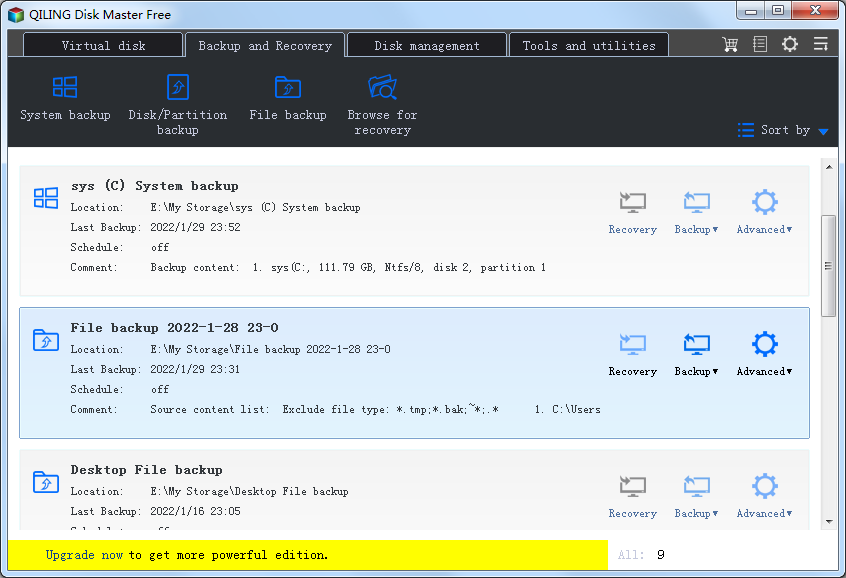
QILING Disk Master Free's Backup and Recovery tab: a system backup and two file backups, each with Recovery, Backup and Advanced buttons, and an "Upgrade now" bar at the bottom.
QILING Disk Master Free is not a stripped-down demo. It makes system, disk/partition and file backups, full, incremental or differential, on a schedule, with compression, splitting, AES encryption and deduplication. It creates WinPE rescue media, adds a Pre-OS entry to the boot menu so you can restore when Windows won't start, clones a disk or partition, fixes boot problems, checks drive health and includes the RAM disk and virtual disk tools. For a typical "image my PC every week to an external drive" job, that is everything you need.
The catch is in two lines of Qiling's edition table. The free edition supports MBR disks only, with no GPT disks and no UEFI boot, and it is not licensed for business use. Almost every PC sold with Windows 10 or 11 boots from a GPT disk in UEFI mode, so on a modern laptop the free edition is often the wrong tool before you even start. It also can't move or resize partitions or run Migrate OS to SSD/HD, which are the two jobs that send most people looking for this kind of program.
What we like
- Scheduled full, incremental and differential images at no cost
- Encrypted images, WinPE rescue media and a Pre-OS restore entry
- Disk and partition clone, Fix Boot and drive health included
- Still runs on Windows XP and Vista
Watch out for
- MBR disks only: no GPT disks or UEFI boot
- No partition resize and no Migrate OS to SSD
- Home use only, lowest support priority, "normal" backup speed
- No NAS or iSCSI backup target
What reviewers say about the free edition
Softpedia's Mircea Dragomir gave the free edition 4.5 out of 5 and wrote that "QILING Disk Master serves its role well and proves to be a helpful utility when it comes to having just a little bit more security." Softpedia visitors rated it 4.6 out of 5 from 78 votes, the best score of the four editions.
Download QILING Disk Master Free
QILING Disk Master Professional: the edition most people should buy
QILING Disk Master Professional | Price: $27.30 at checkout (regular $39), or $49 with lifetime free upgrades, one PC, one-time payment | Windows 11 to XP, 32 and 64-bit | Best for: home and office PCs with GPT/UEFI disks, SSD upgrades and partition fixes.
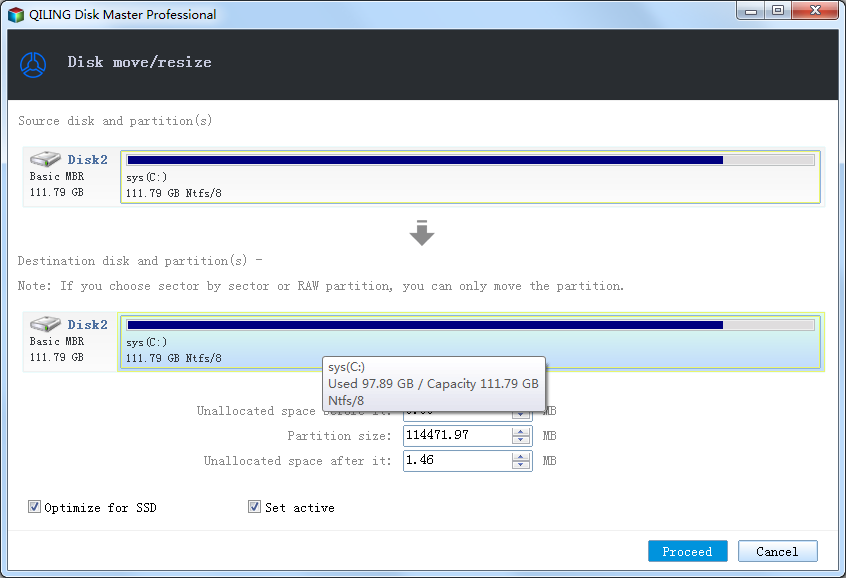
QILING Disk Master Professional's Disk move/resize window: the C: partition with fields for unallocated space before it, partition size and space after it, plus Optimize for SSD and Set active.
QILING Disk Master Professional adds everything the free edition holds back on a desktop PC: GPT and dynamic disks with UEFI boot, Migrate OS to SSD/HD, partition move/resize, backups to NAS and iSCSI targets, universal restore to different hardware, file sync and file zip, email notification and pre/post commands, secure disks, data wipe and the file shredder. Qiling's table also rates its backup and restore speed as "faster" than the free edition's, and the license allows business use.
At $27.30 it is cheap for what it does. The 30% code that brings $39 down to $27.30 is Qiling's own, the Professional buy button on its site applies it too, and it has been on that button since at least December 2025, so it isn't a short sale. Updates within version 8 are free; the next major version is a 50% upgrade unless you pay $49 for the lifetime-upgrades license, which the 30% code doesn't cover. The one firm limit: Professional isn't licensed for Windows Server.
What we like
- Imaging, SSD migration, partition manager and RAM disk in one $27.30 license
- Full GPT/UEFI support, so it fits modern Windows 11 PCs
- No subscription; free 8.x updates
- Business use allowed
Watch out for
- Desktop Windows only, no Windows Server
- One license per PC, with online activation
- Refunds only for technical problems, not a change of mind
- Few independent tests of its restores
What reviewers say about Professional
Softpedia's editor Vladimir Ciobica tested QILING Disk Master Professional and concluded: "By far the best thing about this application is the fact that it provides you with a large collection of features, all while feeling intuitive and totally usable, which is not something very common in the sometimes tangled world of software." He also wrote that "there are not a lot of things QILING Disk Master Professional cannot do." Softpedia visitors rated it 4.3 out of 5 from 53 votes.
On Qiling's own site, a customer named Rick singles out the virtual mode: "The capability of running virtual makes all the difference in the world." That is the vendor's selection, so read it as such.
Download Professional Free TrialBuy QILING Disk Master Professional ($27.30)
QILING Disk Master Server: the same toolkit, licensed for Windows Server
QILING Disk Master Server | Price: $169 at checkout, or $199 with lifetime free upgrades, one server or PC, one-time payment | Windows Server 2003 to 2019, Small Business Server 2003 to 2011 and Windows XP to 11 on Qiling's product page | Best for: a small business with one or two Windows Servers.
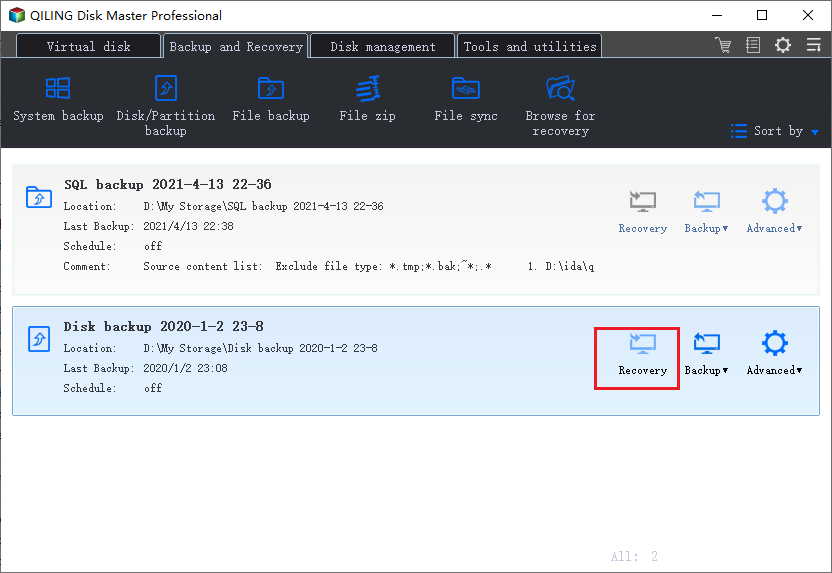
The backup list with an "SQL backup" file job and a disk backup, the Recovery button highlighted. The vendor's screenshot shows the Professional title bar; the Server edition uses the same windows.
QILING Disk Master Server has the same feature list as Professional. What the extra $141.70 buys is the license: Server is the edition that installs and activates on Windows Server operating systems, and it gets "high" support priority instead of "medium". It runs as a Windows service, so scheduled images happen when nobody is logged on, and it uses VSS to copy open files while the server keeps working. Images can go to a NAS or an iSCSI target, and Pre-OS or WinPE media bring back a server that no longer boots.
For one file server in a small office, a one-time $169 is far below what the big server backup suites charge per year. But it is one license per machine, there is no central console for several servers, and there is no host-level backup of Hyper-V or VMware guests: Disk Master images the Windows machine it is installed on.
What we like
- One-time price, no yearly server fee
- Covers legacy Server 2003 and 2008 and Small Business Server
- Hot backups with VSS, service mode, NAS and iSCSI targets
- $199 option with every future major version included
Watch out for
- No central management of several servers
- No host-level VM backup and no cloud target
- Very few independent server-specific reviews
- Email-only support from a small vendor
What reviewers say about Server
Softpedia's Ionut Arghire gave QILING Disk Master Server 4 out of 5, found that "resizing partitions is a simple task when performed from this program, courtesy of an intuitive wizard-like process" and called it "an intuitive tool for all-purpose disk management operations, offering reliable performance, although it could feel rather slow when it comes to processing large disks." Softpedia visitors rated the Server edition 2.1 out of 5, but from only 4 votes.
Download Server Free TrialBuy QILING Disk Master Server ($169)
QILING Disk Master Technician: unlimited machines and client work
QILING Disk Master Technician | Price: $799 for a 1-year license | Unlimited PCs and servers in one company, plus paid technical service for other companies and individuals | Best for: repair shops, consultants and IT admins who image or clone many machines.
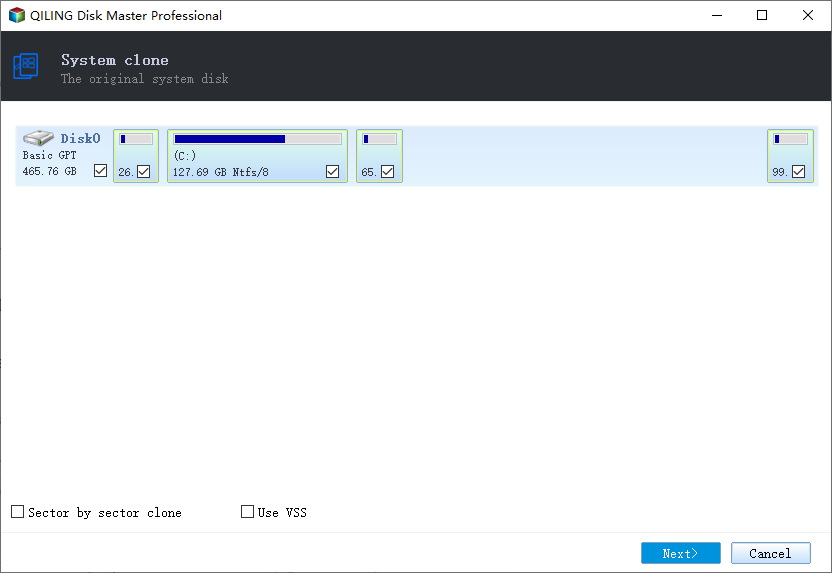
System clone, first step: a 465.76 GB GPT system disk with all four partitions ticked, plus Sector by sector clone and Use VSS options (Professional title bar; Technician uses the same windows).
QILING Disk Master Technician has the same features as Server; the license is what changes. One code registers the program on unlimited PCs and servers inside your company, and Technician is the only edition whose license lets you use it for paid work on other people's machines: moving a customer's Windows to a new SSD, recovering a lost partition, wiping a trade-in drive. It also gets "top" support priority.
Two terms make the $799 a bigger commitment than it looks. It is a 1-year license, and Qiling's pages don't say whether the program keeps working after the year or only stops receiving updates. And Qiling's refund policy excludes Technician licenses entirely, because they can be used on unlimited machines. The 30-day trial is the only way to try it.
What we like
- Unlimited desktops and servers under one code
- Allowed for paid service on clients' computers
- Repair tools a technician uses daily: Fix Boot, partition recovery, Windows password reset, wipe
- Top support priority
Watch out for
- No refunds at all on Technician
- 1-year term with unclear end-of-term behavior
- Each machine still needs its own install and online activation
- No central console
What reviewers say about Technician
Softpedia's Ionut Arghire noted that cloning "can prove highly useful when it comes to moving from a computer to another or to deploying the same system to multiple machines," and concluded that "QILING Disk Master Technician is an easy-to-use, powerful hard disk backup and cloning application, providing users with a variety of tools for keeping their data safe." Softpedia visitors rated it 3.3 out of 5 from 3 votes.
Download Technician Free TrialBuy QILING Disk Master Technician ($799 / year)
Free vs Professional: is the upgrade worth $27.30?
Yes, for most Windows 10 and 11 PCs, because QILING Disk Master Free can't handle GPT disks or UEFI boot, and that is how nearly every recent PC is set up. You can check yours in a minute: open Disk Management, right-click the system disk, choose Properties and look at the Volumes tab. If the partition style says GUID Partition Table (GPT), you need Professional.
Even on an older MBR machine, the free edition stops at three common jobs: moving Windows to a new SSD (Migrate OS to SSD/HD), growing a full C: drive with move/resize, and backing up to a NAS. If you only need a weekly image of an MBR system disk to a USB drive, at home, the free edition does it and there is no reason to pay.
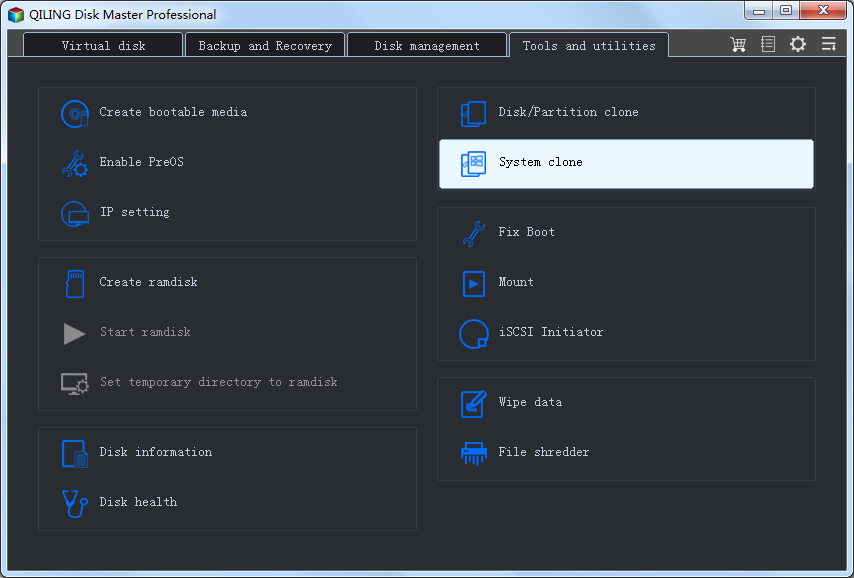
QILING Disk Master Professional's Tools and utilities tab: bootable media, Pre-OS, ramdisk, disk information and health, Disk/Partition clone, System clone, Fix Boot, Mount, iSCSI Initiator, Wipe data and File shredder.
Professional vs Server: pay for the operating system, not features
QILING Disk Master Server costs $141.70 more than Professional and adds no backup feature Professional lacks. Qiling's comparison table lists only two differences: Windows Server support and higher support priority. So the rule is simple: if the machine runs Windows Server, buy Server; if it runs Windows 10 or 11, even as a small office "server", Professional is licensed for business use and does the same work.
Server vs Technician: count your machines
QILING Disk Master Technician pays off from the fifth server. Five Server licenses cost $845, more than one year of Technician at $799. For desktops alone the break-even is much higher: at $27.30 each, 29 Professional licenses ($791.70) still cost less than Technician. The other reason to choose Technician has nothing to do with numbers: if you charge clients for disk work, it is the only edition whose license allows it.
Cost of covering five machines (USD, first year)
5 x QILING Disk Master Professional (desktops)$136.50
1 x QILING Disk Master Technician (any mix)$799
5 x QILING Disk Master Server (servers)$845
From order page prices on November 26, 2026. Professional and Server are one-time payments; Technician is a 1-year license.
Upgrades, refunds and support
QILING Disk Master updates within a major version are free on every paid edition, so a version 8 license gets every 8.x release. Qiling sells the next major version at 50% off, or you can buy Professional ($49) or Server ($199) with lifetime free upgrades. For Professional, the lifetime license costs $21.70 more than the discounted one, about what one half-price upgrade would cost, so it only pays off if you plan to keep the program through two major versions. For Server the lifetime license costs only $30 more, less than one half-price upgrade ($84.50), so it is the better buy for a server you'll keep. Technician has no lifetime option.
Qiling's 14-day refund covers a wrong or duplicate purchase, a missing license key, and a bug support can't fix; it gives 50% back when failing hardware stops the program working. It doesn't refund a change of mind, and Technician licenses are excluded altogether. Support is free email support for the life of the product, with priority rising from Free to Technician.
Softpedia visitor ratings (out of 5)
QILING Disk Master Free (78 votes)4.6
QILING Disk Master Professional (53 votes)4.3
QILING Disk Master Technician (3 votes)3.3
QILING Disk Master Server (4 votes)2.1
The Server and Technician scores rest on 3-4 votes each, too few to mean much. Bars are the score out of 5.
Which should you choose?
| Your situation |
Pick |
Why |
| Older home PC with an MBR disk, weekly image to USB | Free | Scheduled, encrypted images and rescue media at no cost |
| Windows 10 or 11 laptop or desktop (GPT/UEFI) | Professional | Free doesn't support GPT disks or UEFI boot |
| Moving Windows to a new SSD | Professional | Migrate OS to SSD/HD and resizing on the target are paid features |
| Small office PCs used for work | Professional, one per PC | Free is home use only; Professional allows business use |
| One or two Windows Servers | Server ($199 if you'll keep it for years) | The only per-machine license that installs on Windows Server |
| Five or more servers, or a mixed fleet | Technician | $799 a year beats five Server licenses at $845 |
| PC repair shop or freelance IT work | Technician | The only license allowed for paid work on clients' machines |
Who should skip QILING Disk Master
What commonly goes wrong
- Installing the free edition on a GPT/UEFI PC. Its MBR-only limit is the most common reason the free edition "doesn't work" on a new laptop. Check the partition style first.
- Buying Professional for a Windows Server. It won't license there, and a change of mind isn't refunded. The Server trial is the one to test on a server.
- Never testing a restore. A backup you've never restored is a guess. During the 30-day trial, mount an image and restore a few files, and create the WinPE rescue USB before you need it.
- Forgetting the encryption password. An image encrypted with a lost password can't be restored, and the same goes for a secure disk.
- Expecting it to undelete files. Disk Master restores from backups you made earlier. Files deleted before your first backup need a recovery tool such as QILING Deep Data Recovery.
- Buying Technician without a plan for year two. It's a 1-year license with no refund, and Qiling doesn't publish what happens at the end of the term. Ask sales before paying.
FAQs
Is QILING Disk Master Free really free, with no trial limit?
Yes. QILING Disk Master Free has no time limit, but it is licensed for home use only, works with MBR disks only, and leaves out partition resize, Migrate OS to SSD/HD, NAS backup, universal restore and the wipe tools.
Can QILING Disk Master Free clone Windows to an SSD?
Not as a system migration. QILING Disk Master Free can clone a disk or partition, but Migrate OS to SSD/HD and resizing partitions on the target are Professional features, and the free edition can't handle the GPT disks most new SSD setups use.
Is the $27.30 price for QILING Disk Master Professional a limited-time sale?
It doesn't appear to be. The $27.30 comes from Qiling's own 30% code on the $39 license, which the Professional buy button on Qiling's site has applied since at least December 2025. It applies to the 1-PC license only, not to the $49 lifetime-upgrades license.
Can I use QILING Disk Master Professional on Windows Server?
No. QILING Disk Master Professional supports desktop Windows only. For Windows Server you need QILING Disk Master Server, or Technician if you have many machines.
Is QILING Disk Master a subscription?
Only the Technician edition is time-limited. QILING Disk Master Professional and Server are one-time purchases with free updates within the major version; Technician is sold as a 1-year license, and the order page showed no automatic renewal.
Can I upgrade from QILING Disk Master Free to Professional without reinstalling?
Yes. The paid editions are activated with a license code, and the free edition shows an "Upgrade now" link in its window. The 30-day Professional trial can also be activated to the full version directly.
Does QILING Disk Master recover deleted files?
Only from a backup. QILING Disk Master restores files, partitions and whole systems from images it made earlier. For files deleted or formatted without a backup, Qiling sells a separate tool, QILING Deep Data Recovery, at $41.93 at checkout (regular $59.90).
Should I buy the lifetime-upgrades license?
For QILING Disk Master Server, usually yes: $199 instead of $169 is less than one half-price major upgrade ($84.50). For Professional, $49 instead of $27.30 only pays off if you upgrade through two major versions, since each upgrade costs $19.50.
Conclusion
QILING Disk Master Professional is the edition to buy for nearly everyone with a current Windows PC. At $27.30 it adds the three things the free edition can't do on a modern machine, GPT/UEFI support, moving Windows to an SSD and resizing partitions, plus business use. QILING Disk Master Free is a fine no-cost choice only for older MBR home PCs. Server is worth $169 only when the machine runs Windows Server, and Technician's $799 a year makes sense from about five servers or the moment you charge clients for disk work. Whichever you choose, the main reason to be careful is the same: Qiling is a small vendor with few independent tests and refunds only for technical faults, so make a backup and a test restore during the 30-day trial before you pay.
Download Professional Free TrialBuy QILING Disk Master Professional ($27.30)Buy QILING Disk Master Server ($169)