QILING Deep Data Recovery: Get Back Deleted Files From PCs, USB Sticks and SD Cards
QILING Deep Data Recovery is a Windows program that finds and restores deleted or lost files on hard drives, SSDs, USB flash drives, SD cards and external disks, including formatted and RAW drives and deleted partitions. It costs $41.93 for one PC at checkout (regular price $59.90), runs on Windows XP to 11 and Windows Server, and lets you scan and preview what it finds before you pay.
The usual moment is a sinking feeling: a folder deleted with Shift+Delete, a camera card that Windows suddenly wants to format, or an external drive that shows up as RAW. As long as nothing new has been written over the lost files, a recovery tool can often bring them back, and the less you use the drive in the meantime, the better your chances.
Quick facts
- Version: 4.8.2 (installer dated November 7, 2026)
- Developer: QILING Tech Co., Ltd. (idiskhome.com), sold through PayPro Global
- Platforms: Windows 11, 10, 8.1, 8, 7, Vista and XP, and Windows Server 2003 to 2025, 32 and 64-bit
- File systems: FAT, exFAT, NTFS, ext2, ext3 and HFS+
- Price: $41.93 for one PC with the vendor's 30% discount (regular $59.90), a one-time payment
- Trial: scan and preview for free. Qiling's FAQ says the trial recovers up to 2 GB before you register
- What we checked: the installer (13.4 MB, product version 4.8.2, digitally signed) from the vendor's download page, and the order page: $41.93 with the 30% code on November 26, 2026. We didn't run a recovery ourselves.
Before you buy
- Stop using the drive first. Don't install the program, or save recovered files, on the drive you are recovering from: new writes can overwrite what you want back.
- Scan before you pay. If the preview doesn't show your files, the paid version won't find more on that scan.
- Refunds depend on the reason. QILING refunds in full within 14 days only for technical faults it can't fix, wrong or duplicate purchases or a missing key. If your drive has a hardware fault, or the data was already overwritten, it refunds 50%. There is no refund for a change of mind, or once the program has recovered data successfully.
- It can't fix a physically failing drive. Clicking disks and drives that disconnect during the scan need a lab, not software.
Download Free TrialBuy Now ($41.93)
Overview
Deep Data Recovery is QILING's file recovery tool, separate from its Disk Master backup suite. It works in three steps: choose a scan type, choose the drive or location, then browse, preview and recover what it finds. Seven scan types let you match the scan to what happened, from a quick look in the Recycle Bin to a full sector-by-sector deep scan of a whole disk.
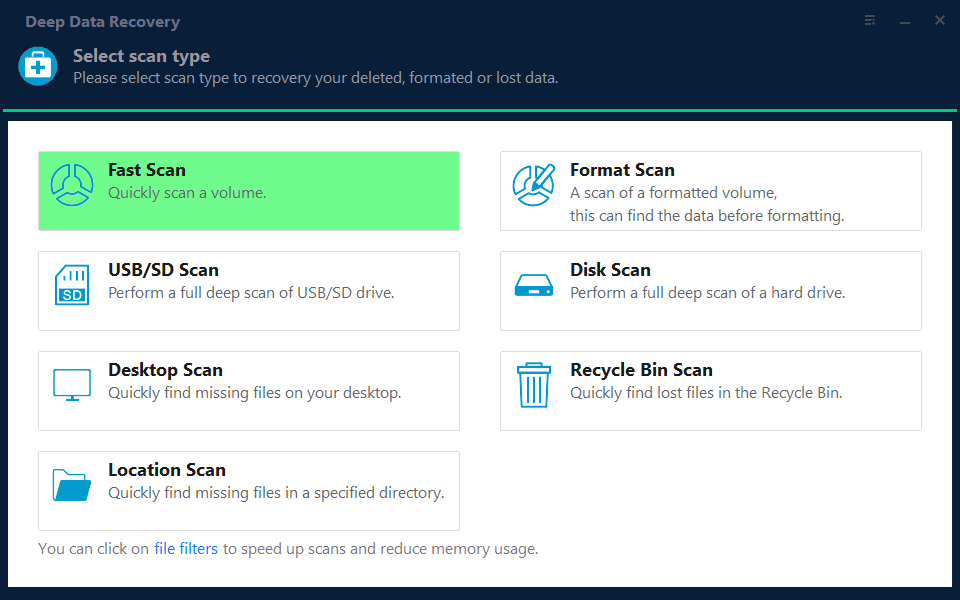
The seven scan types: Fast, Format, USB/SD, Disk, Desktop, Recycle Bin and Location scan, with file filters to speed scans up.
Features
Scans for each kind of data loss
QILING Deep Data Recovery offers a Fast Scan of a volume for recently deleted files, a Format Scan that looks for data from before a format, full deep scans of a USB/SD card or a whole hard disk, and quick Desktop, Recycle Bin and Location scans for a specific folder. File filters narrow a scan to certain file types, which makes it faster and uses less memory.
Formatted, RAW and lost-partition recovery
QILING Deep Data Recovery scans drives that Windows reports as RAW or wants to format, volumes that were formatted by mistake, and disks whose partition was deleted. It handles FAT, exFAT, NTFS, ext2/ext3 and HFS+ file systems, so it can also read Linux partitions and Mac-formatted external drives from Windows.
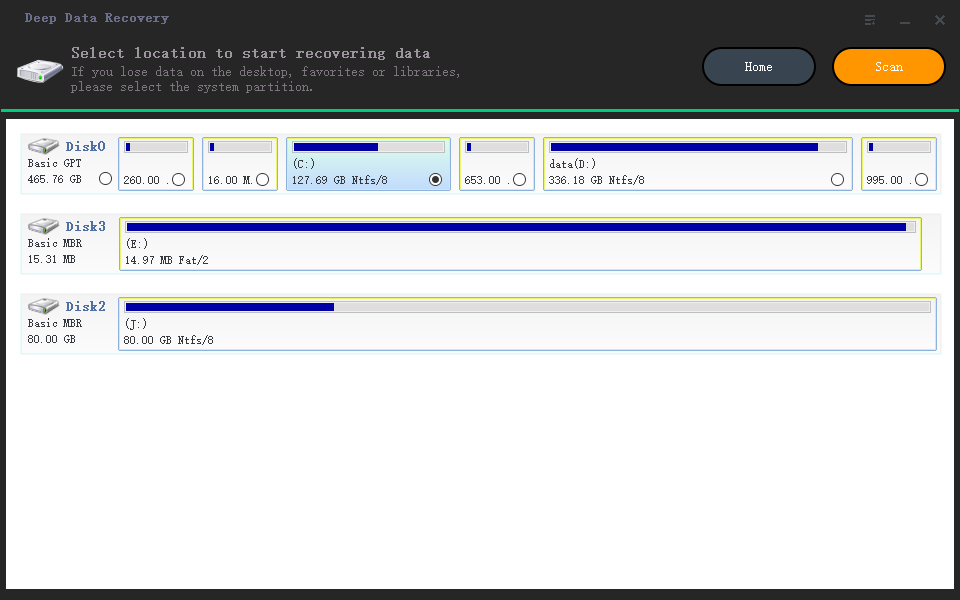
Pick the disk or partition to scan, then press Scan.
Browse and preview before you recover
QILING Deep Data Recovery lists found files by original path, by type or by time, and previews pictures and documents with their size and date, so you can check that a file is intact before you restore it. If a quick scan misses something, a Deep Scan button runs a full sector-by-sector pass from the results screen.
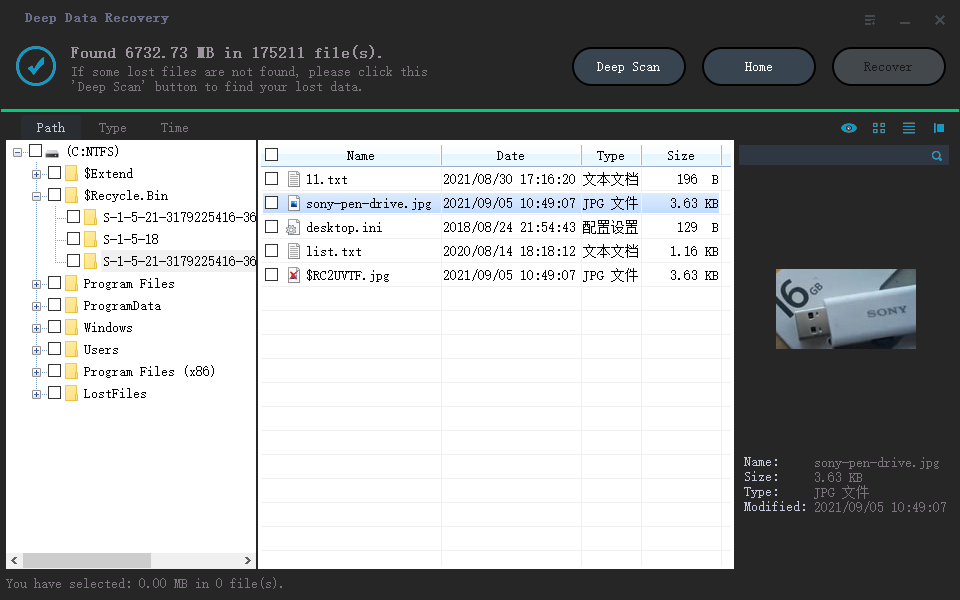
Results after a scan: a folder tree, the file list and a preview pane (shown on a Chinese-language Windows system).
Photo and video repair
QILING Deep Data Recovery can repair damaged or corrupt JPEG/JPG photos and broken MP4 and MOV videos, including footage from Canon, GoPro and DJI cameras, whether they were recovered or are still on your drive.
Benefits
- You see results before you pay. The scan and preview tell you whether the files are recoverable.
- One-time price. $41.93 is a permanent license, where many recovery tools charge monthly or yearly.
- Works on servers and old PCs. Windows Server and Windows XP/Vista are supported along with Windows 11.
- Repairs as well as recovers damaged camera photos and videos.
Real-World Uses
- An emptied Recycle Bin: a Recycle Bin Scan finds files deleted in the last cleanup.
- A camera card that asks to be formatted: run a USB/SD Scan before you let Windows format it, and recover the photos to your PC.
- A USB stick formatted by mistake: a Format Scan looks for the files that were there before.
- A broken GoPro clip: recover the MP4 and run it through the video repair.
Who It's For, and Who Should Skip It
Good fit: Windows users who have just lost files to deletion, formatting or a RAW drive and want an inexpensive tool they can test with a free scan first.
Skip it if you need Mac software (this is Windows only), your drive has a physical fault, the files have already been overwritten, or you want a tool with a long record of independent recovery tests: the big-name recovery programs cost more but have been tested by many reviewers. If you already use QILING Disk Master, restore from your backup first, as that is always more reliable than recovery.
Usage Guide
- Download the installer from the button on this page and install it on a drive other than the one you are recovering from.
- Start Deep Data Recovery and choose a scan type, for example Fast Scan for a recent deletion or USB/SD Scan for a memory card.
- Select the disk or partition and click Scan.
- Browse the results by Path, Type or Time and preview the files you need.
- If something is missing, click Deep Scan for a full sector-by-sector pass.
- Tick the files and click Recover, saving them to a different drive.
Where it falls short
- Little independent testing. Most of what is published about Deep Data Recovery comes from Qiling itself, and there are few independent recovery tests or user reviews.
- Inconsistent vendor information. Qiling's help articles give different free-recovery limits (2 GB in one, 500 MB in another) and older prices, so go by what the program and the order page show.
- Narrow refunds. Recovery depends heavily on the state of the drive, and the refund policy pays only 50% when the drive or the lost data is the problem.
- Windows only. There is no Mac version.
What Users Say
On Qiling's own site
A customer named Dubouchet: "I accidentally deleted a folder off of my desktop. I have found the ones I need by doing a search. Deep data recovery software worked very well. I'm very happy after recovering the deleted files in Windows 10."
Myron, after formatting a USB key that Windows refused to open: "Later, I try Deep data recovery software to get back lost data. Great file recovery tool."
What this means: these are the vendor's own picks, and there is little else to go on. That is why the free scan matters: if the preview shows your files intact, the program has already proven itself on your drive.
Comparisons
Deep Data Recovery vs QILING Disk Master
QILING Disk Master is a backup and disk management suite: its "file recovery" restores files from backups it made earlier, and its partition recovery brings back deleted partitions. Deep Data Recovery is for files you never backed up. If you are reading this after losing files, Deep Data Recovery is the one you need now, and Disk Master is the one that prevents the next time.
Editions and Pricing
| License | Price at checkout | Computers | Term | Buy |
|---|
| Deep Data Recovery, 1 PC | $41.93 (regular $59.90) | 1 | One-time purchase | Buy Now |
Price checked on November 26, 2026, with the vendor's 30% code, which the Buy button applies for you. Taxes depend on your country and are shown on the order page.
FAQs
Is QILING Deep Data Recovery free?
QILING Deep Data Recovery scans and previews for free. Qiling's FAQ says the trial recovers up to 2 GB, and a $41.93 license removes the limit.
Can QILING Deep Data Recovery recover files from a formatted SD card?
Yes. QILING Deep Data Recovery has a Format Scan and a full USB/SD deep scan for formatted memory cards and USB drives, as long as the old data hasn't been overwritten.
Does QILING Deep Data Recovery work on a Mac?
No. QILING Deep Data Recovery runs on Windows only, though it can read Mac-formatted HFS+ drives connected to a Windows PC.
Can it recover files from an SSD?
Often not after some time. SSDs with TRIM erase deleted blocks in the background, so recovery from an SSD works best immediately after the deletion, with QILING Deep Data Recovery or any other tool.
Can QILING Deep Data Recovery fix a drive that shows as RAW?
QILING Deep Data Recovery recovers the files from a RAW drive so you can copy them elsewhere. It doesn't repair the drive's file system; after recovery you can format the drive and copy the files back.
Does QILING Deep Data Recovery run on Windows Server?
Yes. QILING Deep Data Recovery lists Windows Server 2003 to 2025 along with Windows XP to 11.
System Requirements
- Windows 11, 10, 8.1, 8, 7, Vista or XP, or Windows Server 2003 to 2025, 32-bit or 64-bit
- Drives: internal and external hard drives, SSDs, USB flash drives, SD and memory cards, digital cameras
- File systems: FAT, exFAT, NTFS, NTFS5, ext2, ext3, HFS+
- Installer: 13.4 MB
Conclusion
QILING Deep Data Recovery is worth trying the moment you lose files on a Windows PC, USB stick or SD card: the scan and preview are free, and $41.93 for a permanent license is low for this kind of tool. The photo and video repair is a useful extra for camera users.
The reason for caution is that almost nobody outside Qiling has tested it, and refunds are limited. Let the free scan decide: buy only if the preview shows your files intact.
Download Free TrialBuy Now ($41.93)