QILING Fast Cache: Put Your Most-Read Disk Data in RAM or on an SSD
QILING Fast Cache is a Windows disk caching utility that keeps the data your PC reads most often in RAM, and optionally on an SSD, so it doesn't have to come from a slower hard disk each time. The Standard license costs $20.93 for one PC at checkout (regular price $29.90) and runs on Windows XP to 11; a Server license for Windows Server costs $89.90. Both have a 30-day full trial.
It is aimed at a familiar setup: a PC that boots from an SSD but keeps its games, photo library or project files on a big, slow hard disk. Every level load or folder of thumbnails waits on that disk. A block cache in front of it can make repeat reads come from memory instead.
Quick facts
- Version: 3.6 (installer dated November 7, 2026)
- Developer: QILING Tech Co., Ltd. (idiskhome.com), sold through PayPro Global
- Platforms: Standard: Windows 11, 10, 8.1, 8, 7, Vista and XP. Server: also Windows Server 2003 to 2025. 32 and 64-bit
- Cache levels: RAM, plus an optional SSD cache
- Price: Standard $20.93 for one PC with the vendor's 30% discount (regular $29.90), Server $89.90. One-time payments
- Trial: 30 days, fully functional
- What we checked: the Standard trial installer (3.2 MB, file version 3.6.0.0, digitally signed) from the vendor's download page, and the order page for both licenses: $20.93 for Standard with the 30% code and $89.90 for Server on November 26, 2026. We didn't benchmark the cache ourselves.
Before you buy
- It helps slow drives most. If everything on your PC already sits on a fast NVMe SSD, a RAM cache adds little, because Windows already caches recently used files in memory. The gains are on hard disks.
- Cached RAM is RAM your programs can't use. Size the cache so you still have enough free memory for your games and apps.
- Standard or Server: the Server license is the same program licensed for Windows Server. Buy Standard for a desktop or laptop.
- Refunds are for technical problems only. QILING refunds within 14 days for faults it can't fix, wrong or duplicate purchases or a missing key, not for a change of mind. The 30-day trial is the time to decide.
Download Free TrialBuy Standard ($20.93)Buy Server ($89.90)
Overview
QILING Fast Cache works at the block level: it watches which parts of a drive are read, and keeps the most frequently read blocks in a cache. Its caching algorithm weighs both how recently and how often data was read, so a file you open every day stays cached even if you briefly touch something else. The cache settings are kept, so it starts working again after a restart without being set up again.
The program is deliberately small: a 3.2 MB installer, an empty start screen with one Add cache button, a settings dialog and a status table.
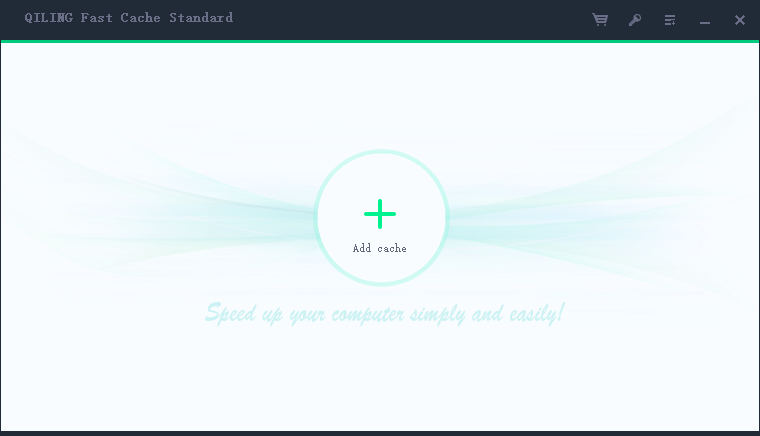
The start screen before any cache is set up: one Add cache button.
Features
RAM cache for any drive letter
QILING Fast Cache lets you pick which drives to cache, set the cache size in megabytes and choose the block size, then caches those drives' most-read data in RAM. You can cache a hard disk, a USB drive or another partition.
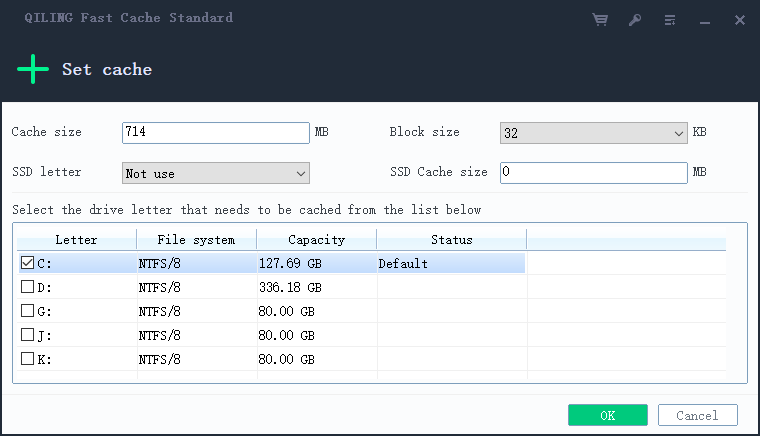
Set cache: cache size, block size, an optional SSD and SSD cache size, and the drive letters to cache.
An SSD as a second cache level
QILING Fast Cache can also use an SSD as cache storage for a slower disk, which helps on PCs with little memory: the RAM cache holds the hottest data and the SSD cache holds more of it. You choose the SSD by drive letter and set how much of it to use.
Live statistics
QILING Fast Cache shows each cache's size, how much data is cached, total reads, the reads served from the cache and the hit rate as a percentage, with Modify and Stop buttons for each cache. The hit rate tells you quickly whether the cache is earning its memory.
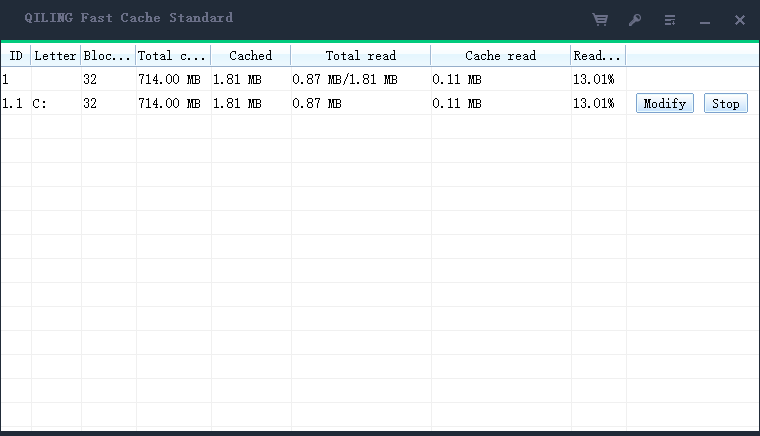
A running cache on C: with its size, cached data, total reads, cache reads and hit rate.
Benefits
- Faster repeat loads from a hard disk, such as game levels, photo libraries and project files.
- Fewer reads on the hard disk, which the vendor says helps the drive last longer.
- Set once. The cache survives restarts.
- Cheap and light. $20.93 one-time, and a 3.2 MB program.
Real-World Uses
- A game library on a 4 TB hard disk: cache that drive in RAM so maps and textures you load often come back faster.
- A PC with 8 GB of RAM and a small SSD: use a modest RAM cache plus part of the SSD as a second level for the hard disk.
- A file or application server that reads the same files all day: the Server license puts them in memory.
Who It's For, and Who Should Skip It
Good fit: Windows users who still keep games, media or work files on a mechanical hard disk and have spare RAM or a spare SSD to put in front of it.
Skip it if all your data is already on NVMe or SATA SSDs, your PC is short on memory, or you want a caching tool with a large user community and published benchmarks: established block-cache tools such as PrimoCache have far more documentation and user reports.
Usage Guide
- Download the Standard trial from the button on this page and install it (3.2 MB).
- Start QILING Fast Cache and click Add cache.
- Set the Cache size in MB and the Block size.
- Optionally choose an SSD letter and SSD Cache size for a second cache level.
- Tick the drive letters to cache and click OK.
- Use the PC normally for a while, then check the read hit rate in the status table and adjust the size with Modify.
Where it falls short
- No independent reviews or benchmarks. There are no published tests of QILING Fast Cache, so the trial is the only way to judge the speed-up on your PC.
- Read caching only, as described. The vendor describes speeding up reads. There is no mention of write caching or deferred writes.
- Thin documentation. Beyond the product page and a few tutorials, there is little help on choosing cache and block sizes.
- Small gains on modern PCs. On an all-SSD system the difference may be hard to notice.
Comparisons
Fast Cache vs a RAM disk
A RAM disk, such as the one in QILING Disk Master, is a separate drive in memory: you decide what goes on it, and its contents are lost at shutdown unless saved. QILING Fast Cache works transparently in front of your existing drives and decides by itself what to keep in memory, so nothing has to be moved and nothing is lost when the PC turns off.
Editions and Pricing
| License | Price at checkout | Systems | Computers | Buy |
|---|
| Fast Cache Standard | $20.93 (regular $29.90) | Windows XP to 11 | 1 | Buy Standard |
| Fast Cache Server | $89.90 | Windows XP to 11 and Windows Server 2003 to 2025 | 1 | Buy Server |
Both are one-time payments checked on November 26, 2026. The vendor's 30% code, which the Standard button applies for you, doesn't cover the Server license. Taxes depend on your country and are shown on the order page.
FAQs
Does QILING Fast Cache work on Windows 11?
Yes. QILING Fast Cache Standard supports Windows 11, 10, 8.1, 8, 7, Vista and XP, in 32-bit and 64-bit versions.
Do I lose data if the PC crashes while QILING Fast Cache is running?
QILING Fast Cache is described as a read cache that speeds up reading frequently accessed data, so your files stay on the drive itself. Keep regular backups regardless, as with any disk utility.
How much RAM should I give QILING Fast Cache?
Leave enough free memory for your programs. Start with a cache of 10-20% of your RAM, watch the read hit rate in QILING Fast Cache's status table, and adjust with Modify.
Can QILING Fast Cache use an SSD to speed up a hard disk?
Yes. QILING Fast Cache can use part of an SSD as a second cache level for a slower drive, in addition to the RAM cache.
What is the difference between QILING Fast Cache Standard and Server?
The program and features are the same. QILING Fast Cache Server is licensed for Windows Server 2003 to 2025, while Standard covers desktop Windows only.
Does the QILING Fast Cache setting survive a restart?
Yes. QILING Fast Cache keeps its cache settings when the computer restarts or is powered off, so the cache starts working again automatically.
System Requirements
- Standard: Windows 11, 10, 8.1, 8, 7, Vista or XP, 32-bit or 64-bit
- Server: also Windows Server 2003 to 2025
- 1 GHz CPU and at least 1 GB RAM, plus the memory you assign to the cache
- Works with IDE, SATA, SSD and M.2 drives, USB drives, memory cards, RAID and NAS
Conclusion
QILING Fast Cache is a cheap, simple way to make a slow hard disk feel faster for the files you use most: $20.93 once, a few clicks to set up, and a hit-rate display that tells you whether it is working. It makes the most sense on PCs that still keep games or media on spinning disks.
On an all-SSD PC, or if you want published benchmarks before buying, skip it. Otherwise, the 30-day trial and the hit rate in the status table will tell you within a week whether it is worth keeping.
Download Free TrialBuy Standard ($20.93)Buy Server ($89.90)