You already know LINQ to SQL, but you need the same code to talk to Oracle, MySQL or PostgreSQL, and Microsoft's tool won't do that. LinqConnect from Devart is built for that situation. It is an ORM whose classes and interfaces are compatible with LINQ to SQL, so you keep what you know and gain more databases and more mapping options.
Quick facts
- Latest version: 5.4.192
- Databases: SQL Server, Oracle, MySQL, PostgreSQL, SQLite
- Price: Standard $149.95, Professional $249.95
- Trial: fully functional, 30 days
- Licenses: Single (one user), Team (up to four users), Site (unlimited developers in one organization)
- Platform: .NET applications, with .NET 10 support and NuGet packages
Key features
Reuse your LINQ to SQL knowledge
The LinqConnect classes interface is compatible with LINQ to SQL, so you don't have to learn a new API before you start.
Build the model your way: Code-First, Model-First or Database-First
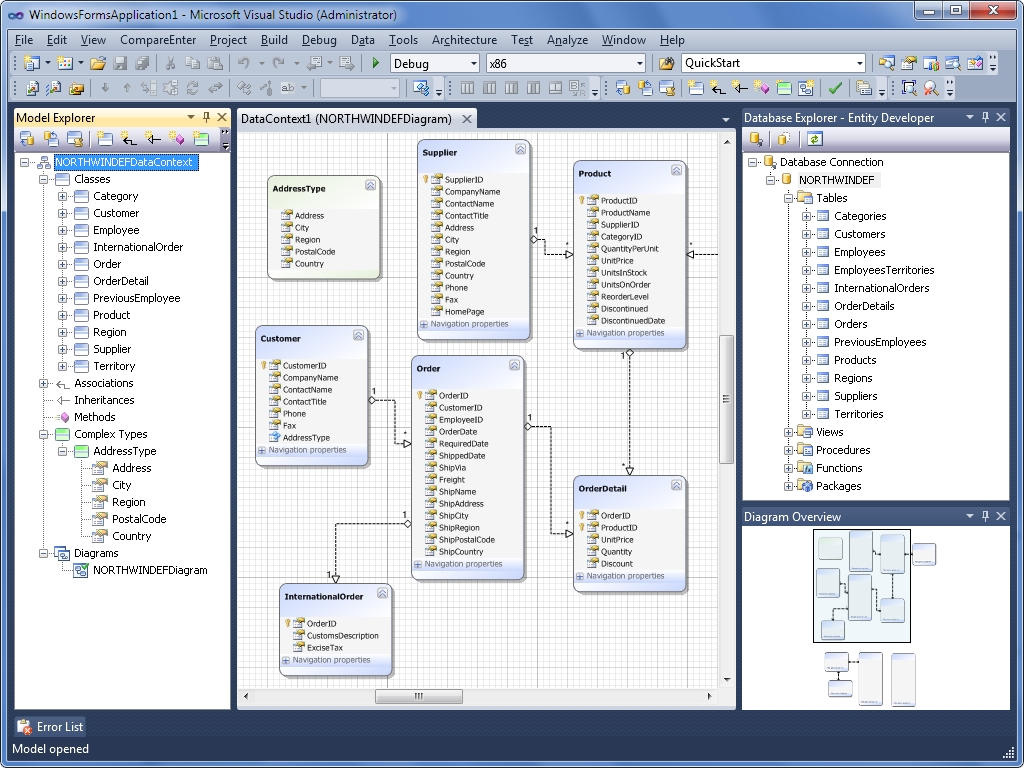
With Model-First, a wizard generates the database from your model and keeps it in sync. With Database-First, you build the model from an existing database and update it as the database changes, and your custom changes are preserved. T4 templates let you customize the generated code in an editor with syntax highlighting and IntelliSense.
Model complex data with fewer entities
Table-per-type inheritance helps with data integrity and removes redundant data. Many-to-many associations cut the number of entities and simplify your queries. Complex types let you pull common scalar properties into one reusable class.
Cut server round trips with batch updates and query caching
Batch updates group several INSERT, UPDATE and DELETE statements into one SQL block, so SubmitChanges makes fewer server calls. A global compiled-query cache avoids recompiling the same LINQ queries across DataContext instances.
See exactly what hits the database
The built-in monitoring tool shows database calls, errors and parameters, and it supports remote monitoring. A Visual Studio debugger visualizer shows the generated SQL for a DataQuery object, with syntax highlighting.
Control loading and error handling
Recursive load options let you tune lazy and eager loading across several levels. The Include operator sets eager loading for a single query without touching DataContext defaults. Extended SubmitChanges error processing handles concurrency conflicts and other database errors such as constraint violations.
Who it's for
It suits .NET developers with LINQ to SQL code or habits who need other databases, or who want more modeling options than LINQ to SQL gives them. If you already own the Professional edition of a dotConnect data provider, LinqConnect is included in that package.
Pros and cons
Pros
- Familiar LINQ to SQL interface, so the learning curve is short.
- Five major databases behind one programming model.
- Batch updates, query caching and a monitoring tool come built in.
- A fully functional 30-day trial lets you test it on your own workload.
Cons
- It is a commercial product, with the Standard edition at $149.95 and Professional at $249.95.
- It is aimed at the LINQ to SQL style of working, so it may not suit you if you want a different ORM model.
- Pricing depends on license type (Single, Team or Site), so a team costs more than one developer.
FAQs
Can I try LinqConnect for free?
Yes. The 30-day trial is fully functional, so you can use all its capabilities in your own projects.
Which databases does it support?
SQL Server, MySQL, Oracle, PostgreSQL and SQLite.
How much does it cost?
The Standard edition is $149.95 and the Professional edition is $249.95.
Do I need to buy it separately if I own dotConnect?
Not if you own the Professional edition of a dotConnect data provider. LinqConnect is included in that package.
Can a whole team use one license?
A Team license covers up to four users. A Site license covers an unlimited number of developers within one organization.
System requirements
LinqConnect is a .NET ORM that works with Visual Studio and supports .NET 10. Earlier releases listed .NET Framework 3.5 Service Pack 1 or higher.