GRBackPro Professional Backup: Zip-Based File Backup for Windows PCs, Paid Once
GRBackPro Professional Backup is a Windows file backup program that copies your folders to another drive, a NAS or a network share, either as plain copies or inside standard zip archives you can open with any zip tool. It runs on Windows XP through Windows 11 and costs $59 once for a single-user license, with no subscription.
If you've ever restored a backup made by a program that no longer installs, you know why the format matters. GRBackPro rebuilds your folder tree on the backup drive and stores files as ordinary zips, so even without the program you can browse the backup in File Explorer and pull out the one spreadsheet you need.
Quick facts
- Developer: GRSoftware, Grugliasco (Turin), Italy, run by Roberto Grassi; on the market since 1997
- Version: 11.3.0, updated October 22, 2026
- Windows: 11, 10, 8.1, 8, 7, Vista and XP; separate 32-bit and 64-bit installers
- Backup types: full, incremental, differential (archive bit), history copies and OnChange real-time backup
- Format: plain copies or Zip/Zip64 archives, optional AES-256 (WinZip-compatible) encryption
- Price: $59 one-time, Single User license (this edition doesn't run on Windows Server)
- Trial: 30-day evaluation; 30-day money-back guarantee
- What we checked: the 64-bit installer from the vendor (product version 11.3.0, 12.6 MB, dated October 22, 2026), the vendor's screenshots of version 11.1, and GRSoftware's buy page on November 4, 2026, which lists the Single User license at USD 59.00, a one-time payment. We didn't run backups or restores ourselves.
Before you buy
- Workstation only. GRSoftware says a Single User license won't work on Windows Server. For a server, you need the Server edition ($199).
- One user, several PCs. The Single User license can go on more than one of your own computers, as long as you're the only person using it.
- Updates follow the major version. The license covers updates within the version you buy (all 11.x releases for version 11), and the product page promises a year of free upgrades; after that, a new major version is a paid upgrade at a discount.
- It backs up files, not a disk image. After a dead hard drive, you reinstall Windows and GRBackPro first, then restore your data.
Download Free Trial
Overview
GRBackPro organizes backups as sessions that hold one or more jobs. A job is a source (a whole drive, a folder or a few files) with its own filters, compression and destination. The left-hand menu takes you through Jobs, Backup, Tasks, Restore, Options, Scheduler and Report, and an "Easy Add Job" button sets up a simple scheduled backup in one dialog. The program is written in C++, and version 11 brought a new, fully customizable interface and support for the latest Windows 11 releases.
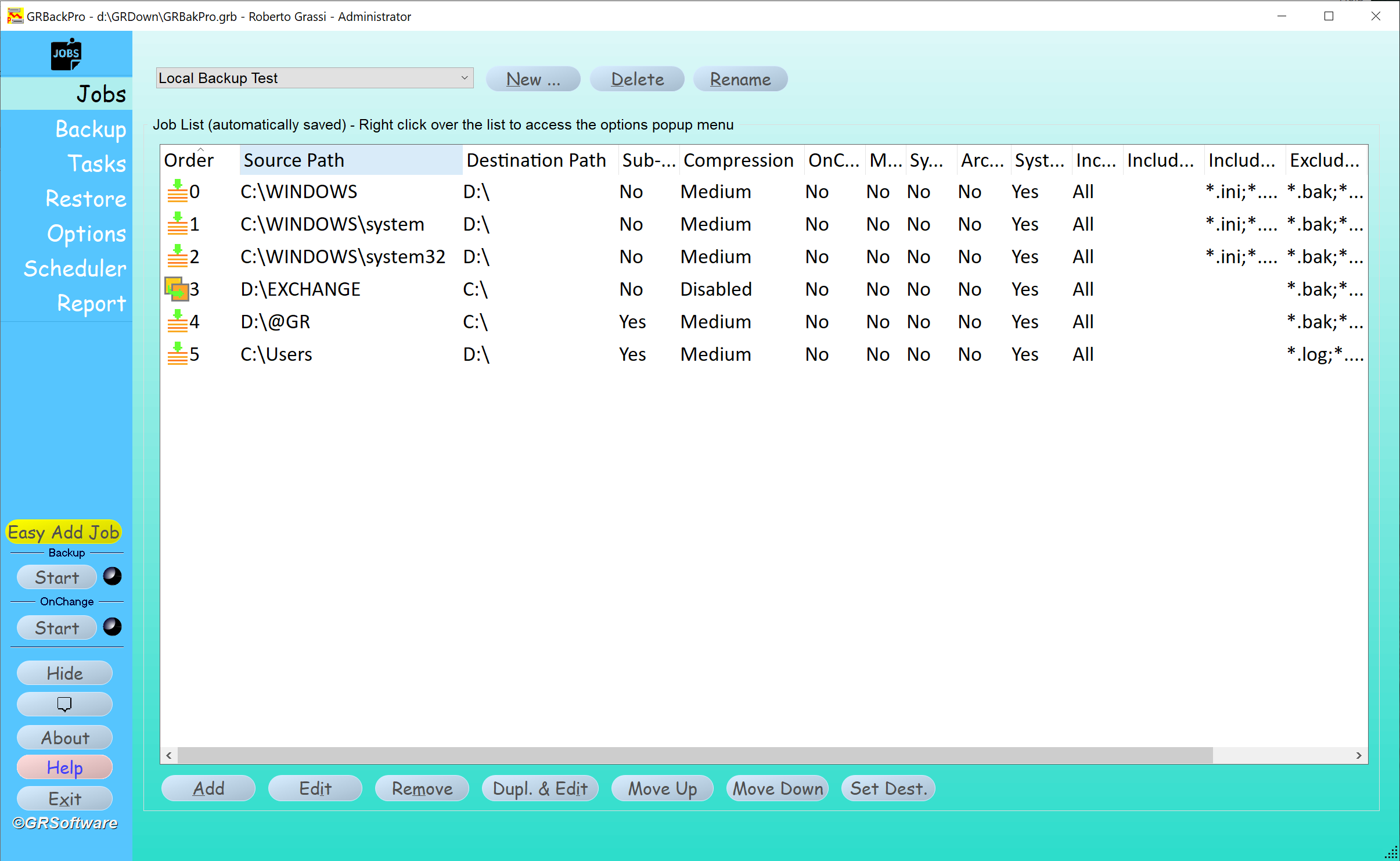
The Jobs panel in GRBackPro 11.1: six jobs in one session, each with its source path, destination drive, sub-folder, compression, OnChange and include/exclude settings, and the Easy Add Job, Start and OnChange buttons on the left.
Features
Backups you can read without the program
GRBackPro stores files either as straight copies or in standard Zip archives (Zip64 for files over 4 GB), and recreates the source folder tree on the destination. You can compress each folder into its own zip or build one big archive, and turn compression off per job for video and other files that are already compressed.
Full, incremental, differential and history modes
GRBackPro's Basic Options panel picks the method for each session: Full (recreate all), Incremental (update) or Archive bit logic (differential). The destination path layout can add the hour, day or other folders so you keep several dated sets, and History mode keeps a set number of earlier copies. You can simulate a backup first to see its size and catch errors, and verify archives after it finishes.
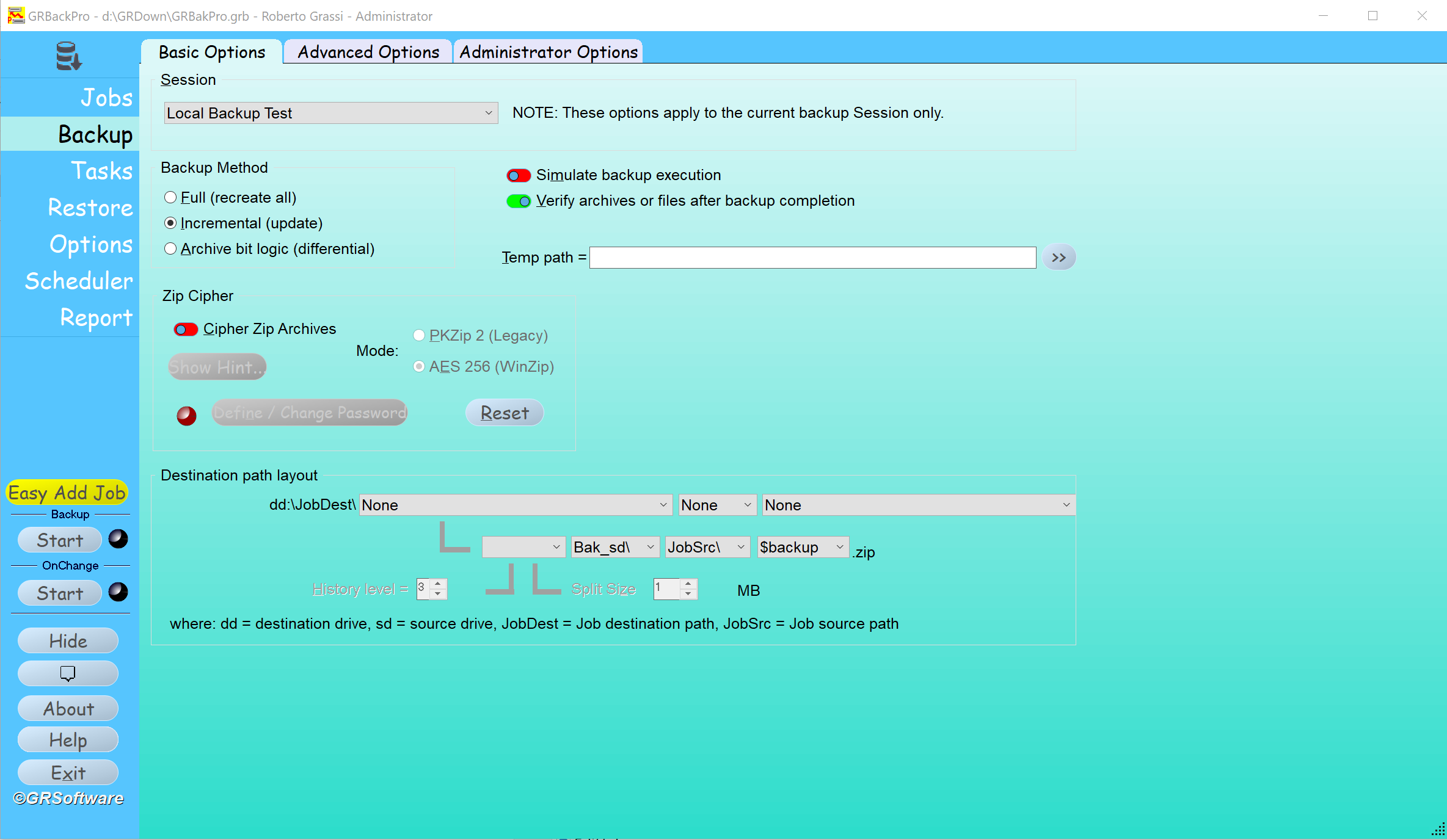
Backup Basic Options: Full, Incremental or Archive bit method, Simulate and Verify switches, the Zip Cipher (PKZip 2 legacy or AES 256 WinZip) and the destination path layout with history level and split size.
OnChange: real-time backup of files as you save them
GRBackPro's OnChange engine (since version 10) watches the job folders and backs up a file a few minutes after you add, change or delete it, so you don't wait for an end-of-day run. Combined with history, it keeps a running copy of your work. The Report panel shows OnChange statistics: jobs waiting, errors, locked files and files created or updated.

The OnChange Statistic tab: two folders waiting to be backed up, and counters for errors, locked files, skipped folders, executed jobs (14 of 14 successful) and files created or updated.
Open files and encryption
GRBackPro uses Windows Volume Shadow Copy to back up files that are open or locked, and can encrypt archives with AES-256 in the WinZip format (or the older PKZip 2 password scheme), so a backup drive that's lost or stolen doesn't give away your data. It also handles Unicode file names and paths up to 1,024 characters, and can back up NTFS security attributes.
A scheduler that wakes the PC
GRBackPro's built-in scheduler runs events daily, weekly, monthly or every N minutes, can wait for conditions such as a network drive being available, runs missed backups, and can wake a sleeping PC a few minutes before the start time. After the backup it can shut down, hibernate or reboot the computer, with a 15-second confirmation in version 11.
Benefits
- No lock-in. Because backups are plain files or zips, you're never stuck if you change programs or lose the license.
- One payment. $59 once, against yearly fees for most consumer backup tools.
- Control. Per-job filters, compression, history and timing let you back up exactly what matters and skip the rest.
Real-World Uses
- Nightly backup to a USB drive: schedule an incremental job at 11 p.m., let GRBackPro wake the PC, and have it shut the computer down when it's done.
- A freelancer's working files: turn on OnChange for the Projects folder so every saved file is copied to the NAS within minutes.
- An encrypted off-site drive: back up Documents into AES-256 zips on a drive you keep at another address.
- Moving to a new drive: back up a data drive, reformat or replace it, and restore the files to the new disk.
Who It's For, and Who Should Skip It
GRBackPro Professional fits Windows users and small offices who want dependable, scheduled file backups to their own drives, like being able to open a backup without special software, and would rather pay once.
Skip it if you want a one-click full-system image for bare-metal recovery (use a disk imaging tool), need cloud storage built in, use a Mac, or want something with a minimal, modern interface; GRBackPro has a lot of options and takes some learning.
Usage Guide
- Download the 64-bit installer (or the 32-bit one for older Windows) from GRSoftware and run it. Some antivirus programs flag the installer; GRSoftware says this is a false positive.
- Click Easy Add Job, pick a source path and a destination path, choose whether to include sub-folders and compress into zips, and tick Schedule the backup with a daily, weekly or monthly time.
- Open Jobs to fine-tune each job: include or exclude file types, skip folders, set compression and turn on OnChange.
- In Backup, choose Full, Incremental or Differential, and switch on Simulate for a dry run the first time.
- Press Start and check the Report panel's log afterwards.
- To recover, open Restore, choose to replace only newer files or overwrite, pick the original or another folder as destination, and press Restore Start. Single Files lets you pick individual files.
Where it falls short
- Lots of options. The most common complaint on review sites is the learning curve; the Easy Add Job dialog helps, but tuning sessions and jobs takes time.
- Big files compress slowly. GRSoftware itself advises turning off compression for files over about 100 MB.
- Multi-disk sets need full backups. If a backup spans several removable disks, the vendor recommends running only full backups.
- Mapped network drives. Running as a service needs separate credentials to reach network shares, and some users report a mapped drive not being ready right after a restart.
- Tape drives only work if Windows shows them as a drive letter.
What Users Say
From GRSoftware's testimonials page
These come from the vendor's own site, so they're the happiest customers, but they're specific about how people use it.
"I have used GRBackPro for a number of years and am now using it for daily and weekly backup to an external hard drive. It is a great piece of backup software. I like the auto power off; I use the options on calls from a Bat file and can start my backup and go to bed. The next morning I can check the log for errors, another facility I like." Dallas Hinton, Ed.D, Network Technician
"I always had a problem with my wife and her computer files. She would delete them, lose them etc. etc. But I haven't had a single problem since I set up a USB 2.0 hard drive and run your program every night on an auto-schedule." Jason Hicks
"I am using it for scheduled backups on a small LAN, disk to disk, and it is perfect for my requirements. It is very flexible in its setup, easy to configure and I especially like the zip format of files, which makes it easy to see what's on my disk on a file-by-file basis." Jonathan Madden
On review sites
GRBackPro has a small number of reviews on Capterra, Software Advice and GetApp, mostly positive. Reviewers praise its reliability over many years, the standard zip files that can be browsed outside the program, its configurability and the price, and several mention quick answers from support. The complaints repeat: it takes time to learn all the options, older versions looked dated, it's awkward to copy a configuration to another PC, setting it up as a service on Windows 10 can be fiddly, and one user found a mapped network drive wasn't connected after a restart, so the backup didn't start until the drive was opened by hand.
Editions and Pricing
| License | Price | Covers |
|---|
| Single User (this listing) | $59 | One person on non-server Windows PCs |
| 5-license pack | $270 | Five users |
| Server | $199 | One Windows Server and up to 5 connected workstations |
| Site | $2,000 | Any computers and servers in one organization |
Prices are from GRSoftware's buy page, where you order directly from the vendor. All editions are the same program; the license decides where it may run.
FAQs
Can GRBackPro Professional back up my Outlook PST file while Outlook is open?
Yes, when the Windows Volume Shadow Copy service is running. GRBackPro has used VSS since version 7 to copy locked files; without VSS, files opened exclusively, like a PST, must be closed or skipped.
Can I restore GRBackPro backups if I lose the program or my job list?
Yes. GRBackPro's backups are normal folders and zip files, so any zip tool can open them. Inside GRBackPro, the Restore panel can also point at a backup folder directly and restore to a folder you choose, even without the original settings file.
Does an update mean reinstalling my GRBackPro license?
No. Installing a new GRBackPro version over the old one keeps your settings and license, within the major version your license covers.
Will GRBackPro back up to a DVD?
GRBackPro writes to CDs and DVDs only through packet-writing software that gives the drive a normal drive letter. Its Split mode is an alternative: it splits the backup into DVD-sized pieces you burn afterwards.
Can I install GRBackPro Professional on Windows Server?
No. GRSoftware states that the Single User license doesn't work on Windows Server; servers need the GRBackPro Server license, or you can upgrade a Single User license to Server for $140.
Why does GRBackPro run a full backup when daylight saving time changes?
At a daylight saving change, the one-hour shift in file times can make GRBackPro treat every file as changed. Turn on "Ignore 1 hour time delay on file compare (NTFS daylight fix)" in the Options panel and GRBackPro ignores that difference.
System Requirements
- Windows 11, 10, 8.1, 8, 7, Vista or XP SP3
- 32-bit (x86) or 64-bit (x64) installer, about 12 to 13 MB
- A destination with a drive letter or UNC path: internal or USB drive, NAS, network share or removable media
- Volume Shadow Copy service for backing up open files
Conclusion
GRBackPro Professional is worth $59 if you want a long-lived, pay-once file backup program whose backups stay readable without it, and you're willing to spend an hour learning its options. It's still updated (version 11.3.0 in October 2026) and covers everything from simple nightly copies to real-time OnChange backup and AES-256 encryption. The reason to pass is if you want a full disk image or a simple, modern app with cloud storage built in. Use the 30-day evaluation to set up one job and run a test restore before you buy.
Download Free Trial