GREmailRobot: Let a POP3 Mailbox Save, Unzip and Forward Your Email Attachments for You
GREmailRobot (GRSoftware Email Robot) is a small Windows tool that checks one or more POP3 mailboxes on a timer and acts on matching messages: it saves or unzips their attachments into folders, saves or forwards the messages, or runs a program. It costs $59 once for a Single User license from GRSoftware and runs on Windows XP through Windows 11 and Windows Server.
Think of a supplier that emails a CSV price file every morning, or a branch office that sends its daily report as a zip. Instead of someone opening the mail and dragging the file to the right share, GREmailRobot picks it up, puts it in the folder, and can kick off the import script that uses it.
Quick facts
- Developer: GRSoftware (Roberto Grassi, Italy), makers of GRBackPro
- Version: 3.5.0, updated February 16, 2023
- Windows: 11, 10, 8.1, 8, 7, Vista, XP and Windows Server 2003 to 2019, x86 and x64
- Mail protocol: POP3 in, SMTP out, with SSL/TLS
- Price: $59 one-time, Single User license, bought directly from GRSoftware
- Trial: 30-day evaluation
- What we checked: the installer from GRSoftware (3.5 MB) and GRSoftware's buy page on November 4, 2026, which lists the Single User license at USD 59.00, a one-time payment. We didn't connect it to a mailbox.
Before you buy
- POP3 only, user name and password. GREmailRobot reads mail over POP3 and lists no IMAP, Microsoft Graph or OAuth sign-in. Microsoft 365 / Exchange Online no longer accepts password-only POP3 sign-ins, so check that your mail provider still allows POP3 with a password (or an app password) before you rely on it. A hosting-company mailbox is usually the easiest fit.
- Slow development. The last release, 3.5.0, came out in February 2023, and the screenshots on the vendor's site date from the Windows 7 era. It works on current Windows, but don't expect new features.
- You buy from GRSoftware. Orders go through GRSoftware's own buy page, priced in US dollars.
Download Free Trial
Overview
GREmailRobot has three tabs. Jobs lists the rules, each with a status, an action, a priority, a comment and a start date. Options holds the POP3 accounts (each can be enabled, disabled and tested), how often to check them, the SMTP account for forwarding and notifications, and the program's priority. Log records every connection, message and action, color-coded. Buttons at the bottom let you check now, stop, or hide the program to the background.
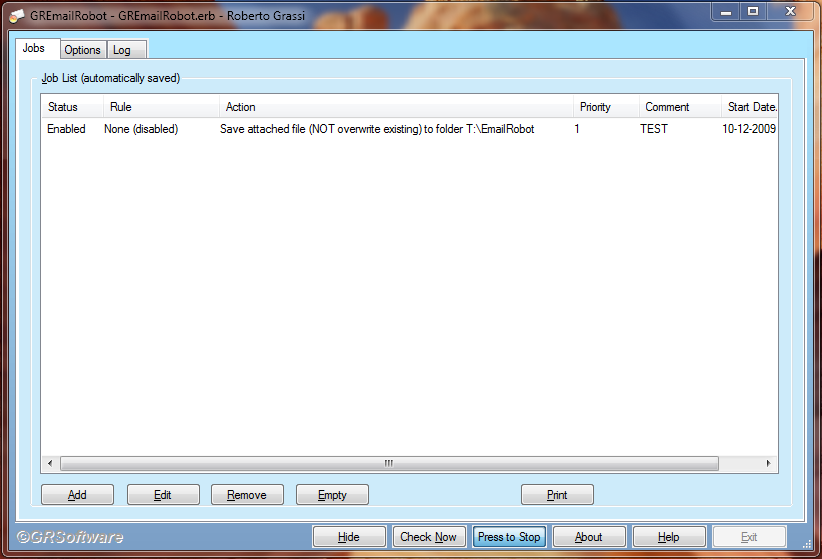
The Jobs tab: one enabled job that saves attached files, without overwriting, to a folder, with Check Now, Press to Stop and Hide buttons (vendor screenshot from an older Windows version).
Features
Rules on two message fields
GREmailRobot's jobs test up to two fields at once, joined by AND: Subject, From, To, Cc, Bcc, body or attachment file name. Each test can be contains, equals, not equal, starts with or ends with (case-sensitive or not), is empty or is not empty, or no check at all to match every message. A job can be limited to messages after a given date, and a priority decides the order jobs run in.
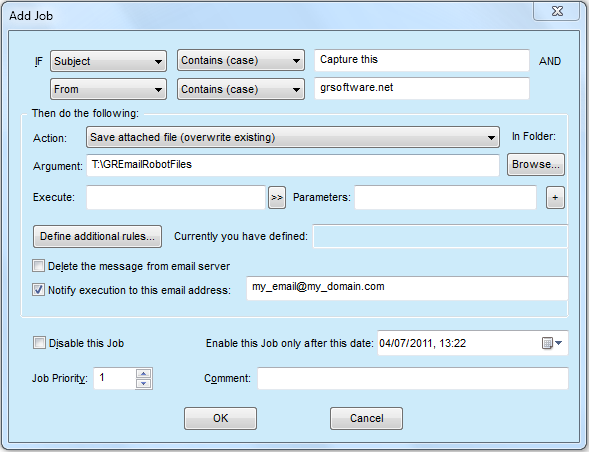
The Add Job dialog: IF Subject contains "Capture this" AND From contains a domain, then save the attached file to a folder, with options to run a program, delete the message from the server and send a notification email.
Actions: save, unzip, forward or run a program
GREmailRobot can save attachments, unzip zipped attachments, save the message body as text or the original message, or forward the message to another address, each with an overwrite or no-overwrite choice. A job can also launch an external program with parts of the message or the saved file names as parameters. If you ask it to unzip a file that isn't a zip, it saves the file as it is.
Smart destination folders and macros
GREmailRobot can rename attachments before saving them, add today's date (or date and time) as a folder name, and build the destination path from the message's subject or body using macros, including adding, deleting or renaming folders (added in 3.4). It creates any folder that doesn't exist yet.
Runs as a service, logs everything
GREmailRobot can be installed as a Windows service on a workstation or server, so it keeps checking mail when nobody is logged on. Each job can email a notification that includes its log lines, and the Log tab can be exported.
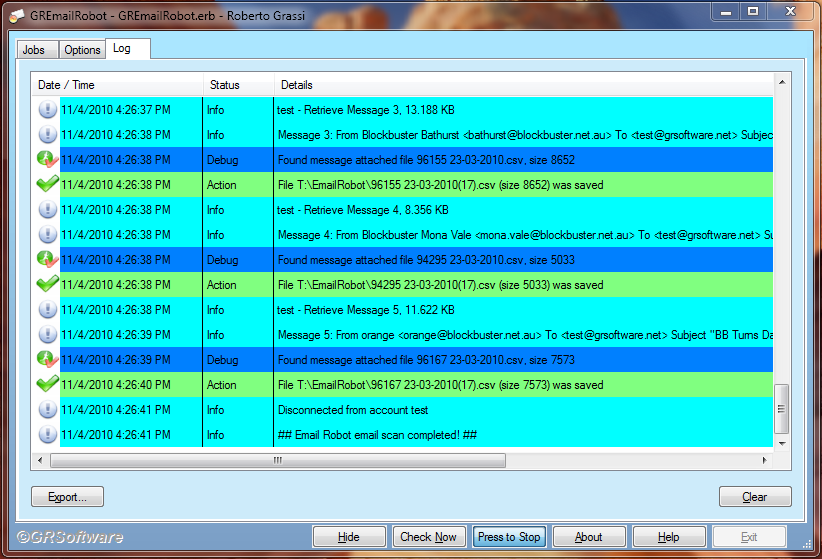
The Log tab during a scan: each message is retrieved, its CSV attachment found and saved to a folder, then "Email Robot email scan completed!".
Real-World Uses
- Daily data feeds: save the CSV that a supplier or store emails each morning into a shared folder dated by day, ready for an import job.
- Remote control by email: a GRSoftware customer used a job on the subject line to run a batch file that switched a snow-melt system on or off through a network relay.
- Archiving: keep a copy of every message from a given sender as an original message file.
- Routing: forward messages whose subject starts with an order number to the person who handles orders.
Who It's For, and Who Should Skip It
GREmailRobot suits small businesses and IT people who receive files by email into a POP3 mailbox and want them filed or processed automatically on a Windows PC or server, for a one-time price.
Skip it if your mail is on Microsoft 365 or another service that needs modern sign-in, you need IMAP folders, or you want a cloud workflow tool; Power Automate, Zapier or a mail client's own rules fit those cases better.
Usage Guide
- Download and run the installer from GRSoftware (choose service mode if it should run with nobody logged on).
- In Options, add a POP3 account with server, port, SSL/TLS and credentials, and press Test. Add the SMTP account for forwarding and notifications.
- Set how many minutes between checks.
- In Jobs, press Add: choose the fields and conditions, the action and the destination folder, and whether to delete the message from the server.
- Press Check Now and read the Log tab to confirm the job matched and the file landed where you wanted.
Where it falls short
- Only two conditions per job, joined by AND; OR logic means a second job.
- POP3 downloads the whole message and doesn't see server folders or flags, so leaving messages on the server needs care to avoid reprocessing.
- No independent reviews we could find; the product page lists download-site awards, not user reviews.
FAQs
Does GREmailRobot work with Gmail?
GREmailRobot can connect to any mailbox that offers POP3 over SSL/TLS with a user name and password. Gmail allows that only with POP enabled in its settings and an app password on an account with 2-Step Verification; test it with the trial first.
Does GREmailRobot support IMAP?
No. GREmailRobot reads mail over POP3 only and sends over SMTP.
Can GREmailRobot run on a Windows Server without anyone logged in?
Yes. GREmailRobot installs as a Windows service on workstations and servers; you give it an account so it has internet access when no user is logged on.
Can GREmailRobot check several mailboxes?
Yes. GREmailRobot keeps a list of POP3 accounts, each of which can be enabled, disabled and tested, and checks them at the interval you set.
Is the GREmailRobot license a subscription?
No. The GREmailRobot Single User license is a one-time $59 purchase with no renewal. GRSoftware's licenses include updates within the major version you buy.
System Requirements
- Windows XP to Windows 11, or Windows Server 2003 to 2019, 32-bit or 64-bit
- A POP3 mailbox (SSL/TLS supported) and an SMTP account for forwarding and notifications
- About 4 MB for the installer
Conclusion
GREmailRobot is worth $59 if you have a POP3 mailbox that receives files on a schedule and want a Windows PC or server to file and process them without anyone touching the mail. Its rules, folder macros and run-a-program action make it more capable than its old look suggests. The reason not to buy it is its age: POP3 with a password only, no IMAP or modern sign-in, and no release since February 2023. Test your mailbox with the 30-day evaluation before you pay.
Download Free Trial