You have years of mail sitting in Windows Live Mail, and you've just bought a Mac. Windows Live Mail keeps messages as separate EML files, and Mac Mail wants MBOX. This converter exists to bridge that gap.
Quick facts
- What it does: converts Windows Live Mail EML files into MBOX, which Mac Mail can read
- Runs on: Windows (the conversion happens on a Windows PC, not on the Mac)
- Price: $49 for the full version
- Trial: a demo converts 10 emails before you buy
Key features
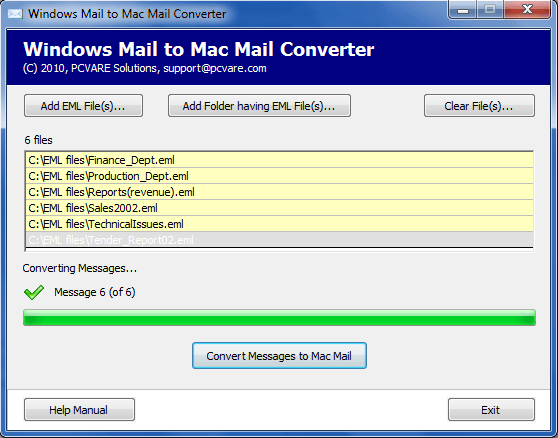
Convert a whole mailbox in one pass
The batch mode takes multiple EML files at once, so you don't have to move messages one at a time.
Keep attachments with their emails
Emails are saved along with their attachment files.
Keep your folder names
The converter keeps the names of your existing email folders, so your mailbox structure looks familiar after the move.
Works with both Windows Mail and Windows Live Mail
The tool handles Windows Live Mail as well as Windows Mail. The results can be opened in the various versions of Mac Mail.
Who it's for
It suits you if you are moving from a Windows PC to a Mac and want your old Windows Live Mail messages in Mac Mail. It also suits you if you have a large archive of EML files and don't want to move them by hand.
Pros and cons
Pros
- Batch conversion of many EML files at once
- Attachments and folder names are kept
- A demo lets you test it before paying
Cons
- It only runs on Windows. You convert there, then copy the MBOX files to your Mac to view them in Mac Mail.
- The demo is limited to 10 emails.
FAQs
Can I run the converter on my Mac?
No. The software supports the Windows platform only. Convert on a Windows PC, then transfer the results to the Mac.
Does it also convert Windows Mail?
Yes. It supports Windows Mail as well as Windows Live Mail.
Can I try it first?
Yes. The demo converts 10 emails. The full version costs $49.
Which Mac Mail versions can open the result?
The vendor says the converted files can be viewed in various versions of Mac Mail.
System requirements
- Pentium II 400 MHz processor
- 64 MB RAM
- 10 MB free disk space
- Windows operating system