Turning a pile of old Access files into Excel sheets
You have a folder of old .mdb files, maybe hundreds of them, and someone needs the data in Excel. Opening each one in Access and exporting table by table would take days. Access Database Converter, which Birdie Software now lists as Birdie Access to Excel Converter, is built for exactly this job: it converts MDB files to .xls in batches.
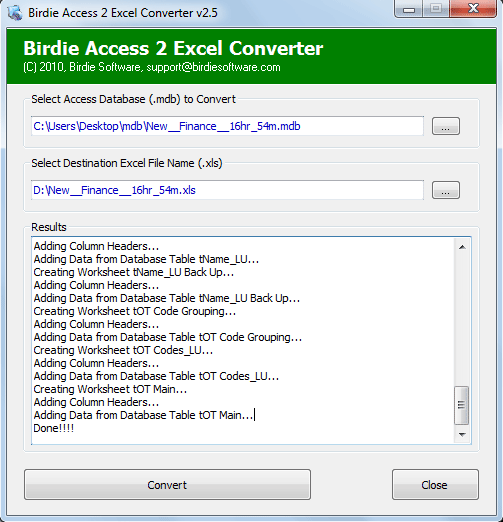
Quick facts
- Version: 2.5
- Platforms: Windows 10, 8.1, 8, 7, Vista and XP
- Price: $49.00
- Program type: Shareware, with a free download to try
- File size: 491 KB
Key features
Convert one file or a whole folder in a single run
You can pick files one by one with Add MDB files and use Ctrl+Click to select several. Or use Add folder having MDB files to take an entire folder at once. For the folder option, the Access files must all be saved in that one folder first.
No size limit on what you convert
Birdie says it tested the tool with 15 GB of MDB files. The program creates a separate XLS file for each Access file, so the results stay easy to sort through.
Records, tables and formatting carried across
The vendor says the converter keeps records, table information, rows, columns and formatting, so the sheet in Excel looks like the original data.
Four simple steps
- Install the software.
- Browse to your .mdb files.
- Select the destination folder.
- Click Convert.
Open the output in any Excel edition
The converted .xls files open in older and newer Excel editions alike. Newer Excel saves its own files as .xlsx but still opens .xls.
Who it's for
It suits you if you have older Access databases in MDB format and need the contents in spreadsheets. That might be an archive clean-up, a handover to a colleague who only uses Excel, or a one-off migration of many files. It is not for you if your databases are in the newer Access format, because the vendor describes support for the MDB format used by older Access versions.
Pros and cons
Pros
- Batch conversion of single files or whole folders
- Very small download at 491 KB
- Light system requirements: Pentium II 400 MHz, 64 MB RAM
- Free download lets you test it before you pay
Cons
- Output is the older .xls format, not .xlsx
- Covers older MDB files only
- Windows only
- The vendor's page says MS Office is required for conversion, but its FAQ says it isn't compulsory, so check with the free download first
What users say
This tool converted my 2000+ Access files at once. (Rick, Florida, on the Birdie Software site)
It proved the best solution for me when i was looking for Access to Excel conversion. (Jonathan, Indonesia, on the Birdie Software site)
FAQs
Can I open the converted files in newer Excel?
Yes. Newer Excel saves its own files as .xlsx, but it opens and displays .xls files.
Does it create one XLS per Access file?
Yes. The software creates a separate XLS file for each file you convert.
Do I need Microsoft Office installed?
The vendor's FAQ says Office is not compulsory for the conversion itself. You do need Excel to view the converted XLS files. Elsewhere the page says MS Office installation is required for conversion, so test it on your machine.
Which Access files does it read?
It reads MDB files from older Access versions.
System requirements
- Processor: Pentium II 400 MHz
- Memory: 64 MB RAM
- Disk space: minimum 30 MB
- Operating system: Windows 10, 8.1, 8, 7, Vista, XP