You have a voice recording with a hum in the background, or a long file that needs one clean section pulled out. You don't want to learn a studio suite just to fix it. WavePad Master's Edition from NCH Software is a sound editor built for that kind of job. You cut, clean and convert audio in one window.
Quick facts
- Platforms: Windows 7 to 11 and macOS 10.5 or above. There are also iPhone, iPad, Android and Kindle apps.
- Trial: the trial is the full program, just not yet activated. A free version for non-commercial use does not expire.
- Licensing: you buy a license online. A registration code arrives by email, and you paste it in under File, Register Software.
- Formats: more than 50 audio formats, including MP3, WAV, WMA, AIF, FLAC, OGG, AAC and M4A.
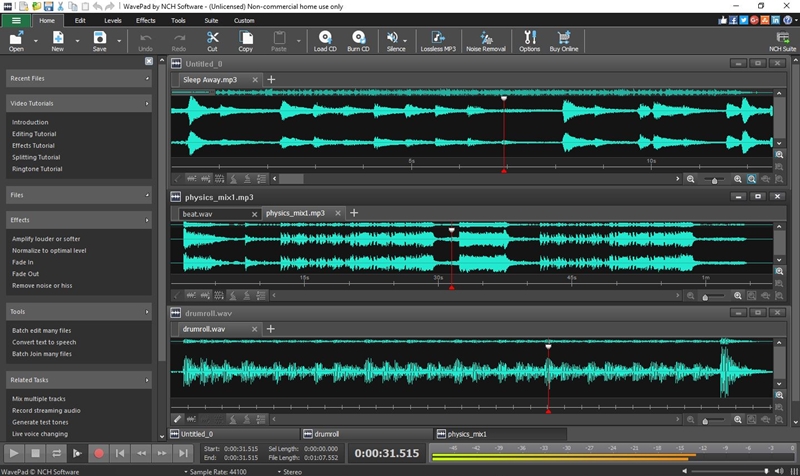
Key features
Cut, trim and rearrange recordings
You get cut, copy, paste, delete, insert, silence and auto-trim, plus compression and pitch shifting. Bookmarks and regions help you find and reassemble parts of long files.
Clean up noisy audio
A Noise Removal Wizard runs noise reduction automatically. It targets clicks, pops, hums and background sounds, and there are tools for reducing reverb and echo. The vendor also lists AI-powered noise removal and audio enhancement.
Apply effects to a whole folder at once
Batch processing applies effects or format conversion to many files as a single function. Effects include amplify, normalize, equalizer, envelope, reverb, echo and reverse.
Reduce or isolate vocals
You can remove vocals from a song or extract them. This is handy for karaoke-style tracks or for pulling a voice out of a mix.
Analyze and extend
Spectral analysis (FFT), beat detection and text-to-speech are included. VST and DirectX plugin support lets you add outside effects. A sound effects library is built in, and the editor works with NCH's MixPad multitrack mixer.
Who it's for
It suits you if you edit podcasts, voiceovers, music clips or ringtones and want one tool for trimming, cleaning and converting. The vendor lists typical uses such as cutting audio for radio or podcasts, restoring files with hiss or hum, and normalizing levels. It also works for home users who just want to fix a recording.
Pros and cons
Pros
- Wide format support, with sample rates from 6 to 192kHz
- Batch processing and noise cleanup in the same program
- A trial that is the full program, and a free non-commercial version
- Runs on Windows, Mac and mobile
Cons
- The free version is for non-commercial use only. Some effects and features are held back for the Master's Edition.
- It edits a single audio file at a time. For multitrack mixing you need the separate MixPad.
- Older Windows versions need the earlier builds NCH lists on separate pages.
FAQs
Is there a free version?
Yes. The free edition is for non-commercial use, does not expire, and has many of the Master's Edition features. You can upgrade later.
How do I activate it after buying?
Your registration code arrives by email. Choose Register Software from the File menu and paste it in.
Can it edit MP3 files?
Yes. It works as a WAV or MP3 editor, and it can split, trim and merge MP3 files.
Does it work on Windows XP or Vista?
The current build is for Windows 7 to 11. The vendor provides separate downloads for Win 98, 2000 and XP/Vista.
System requirements
- Windows 7 to 11
- macOS 10.5 or above