TypingMaster 12 Standard: The Current Version of TypingMaster Pro
TypingMaster 12 Standard is a $19.90 touch typing tutor for Windows 11, 10, 8 and 7 that teaches you to type without looking at the keys, then measures your speed with timed tests and printable certificates. It is the current version of the program many people still know as TypingMaster Pro, and the Standard license is a one-time lifetime license for version 12 on one PC.
If you type with two fingers and keep glancing down, or you need a set WPM for a job or a typing exam, this is the program built for that one problem. It starts at the home row and keeps going until you can hold your speed in a timed test.
In the United States, TypingMaster is sold as TypingMagic
TypingMaster isn't offered in the U.S. There, the same company, Cloud Kayak Labs, sells the program as TypingMagic 12, its U.S. edition, with the same lessons, tests and games. If you're in the United States, see TypingMagic 12 instead.
Quick facts
- Version: 12.01.983 (release notes dated November 13, 2026)
- Developer: Cloud Kayak Labs, Inc. (TypingMaster, "better typing since 1996")
- Platforms: Windows 11, 10, 8 and 7, including Windows on ARM; a Linux version is offered as a Flatpak
- Price: $19.90 one-time for a lifetime version 12 license on 1 device; 1-year ($16.90) and 6-month ($12.90) licenses also exist
- Free trial: every Premium feature for 7 days, no account or credit card; after that a free mode keeps the introductory lessons, typing tests and games
- Courses: 10 languages, including English, Hindi, Spanish, French and German, with a junior course for kids
- Guarantee: 30-day money-back guarantee
- What we checked: the 12.6 MB TypingMaster12Setup.exe installer on typingmaster.com (version 12.01.983 per the download page), the vendor's Standard vs Premium comparison table, and the order page prices of all six TypingMaster 12 licenses: $19.90 for Standard lifetime on November 23, 2026. We didn't complete a full course ourselves.
Before you buy
- "Lifetime" means version 12. The license covers every 12.x update, but not a future version 13. TypingMaster's own FAQ says the same about version 11 owners: their lifetime license doesn't include version 12, though entering a version 11 key in version 12 gets you a discount code.
- Standard has no TypingMeter. The widget that watches your typing in other programs (the old "Satellite") and the custom typing tests are Premium-only. If that's the part you want, you need TypingMaster 12 Premium.
- One PC. Standard activates on 1 device. Uninstalling frees the activation for another PC.
- Optional browser offer. The installer offers the Opera browser; accepting it adds a second free week of Premium, and TypingMaster works the same if you decline.
Download Free TrialBuy Now
Overview
TypingMaster has been around since 1996. TypingMaster Pro 7 came out in 2010, TypingMaster 10 in 2016, TypingMaster 11 in 2022, and version 12 is the current one. The idea hasn't changed: you learn a few new keys at a time, practise them in word, sentence, paragraph and text drills, and the program keeps track of which keys trip you up so it can give you more of those.
Version 12 adds Dark Mode, two new games (Cloud Race and Pipe Master), a Universal Course that works with any keyboard layout, a lowercase-first course for beginners, imported custom keyboard layouts, and, since update 12.01, complete Hindi typing with InScript courses, tests and a Hindi interface.

A home-row lesson in Dark Mode: the sentence to type, the color-coded keyboard, a hand guide showing the finger to use, and your progress bars on the right.
Features
Step-by-step courses that adapt to your speed
TypingMaster 12 teaches the keyboard a few keys at a time, from the home row to numbers and special characters, and adjusts lesson length to how fast and accurately you type. Extra courses cover speed building, the numeric keypad and quick refreshers, and a junior course is aimed at kids. The vendor estimates 3 to 5 hours of training before the new skill is usable, with about 20 minutes a day over two weeks to build steady speed.
A course for any keyboard layout
TypingMaster 12's Universal Touch Typing Course works with regional and custom layouts, not only English QWERTY. QWERTZ, AZERTY, Dvorak, Colemak and Hindi InScript are built in, and you can import Keyman and .KLC layout files or design one that matches your physical keyboard.

The Universal Touch Typing Course: 14 lessons, with lesson 1 (home row, index fingers) split into short exercises of 3 to 8 minutes each.
Review drills built from your mistakes
TypingMaster finds your weak keys and recurring errors during lessons and builds review exercises around them. Custom Review lets you pick the exact keys to practise yourself, including non-English characters.
Timed typing tests and a printable certificate
TypingMaster 12 runs typing tests from 1 to 60 minutes and reports speed in WPM or KPM, gross and net speed, and accuracy, then flags the keys that slowed you down. When you're done you can print a certificate or progress report. Standard comes with a built-in offline library of test texts; importing your own texts is a Premium feature.
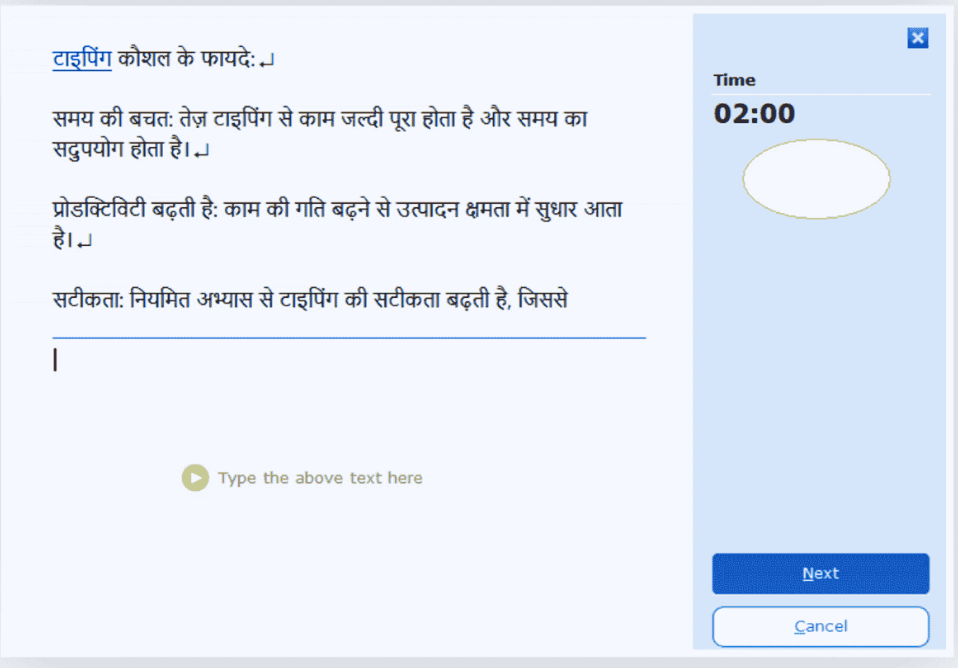
A two-minute typing test using a Hindi text, with the timer on the right.
Six typing games
TypingMaster 12 includes Bubbles, WordTris, Clouds, ABC Speed Race, Pipe Master and Cloud Race, and each can be played with only the keys you've studied so far, so the games stay useful from the first lesson.
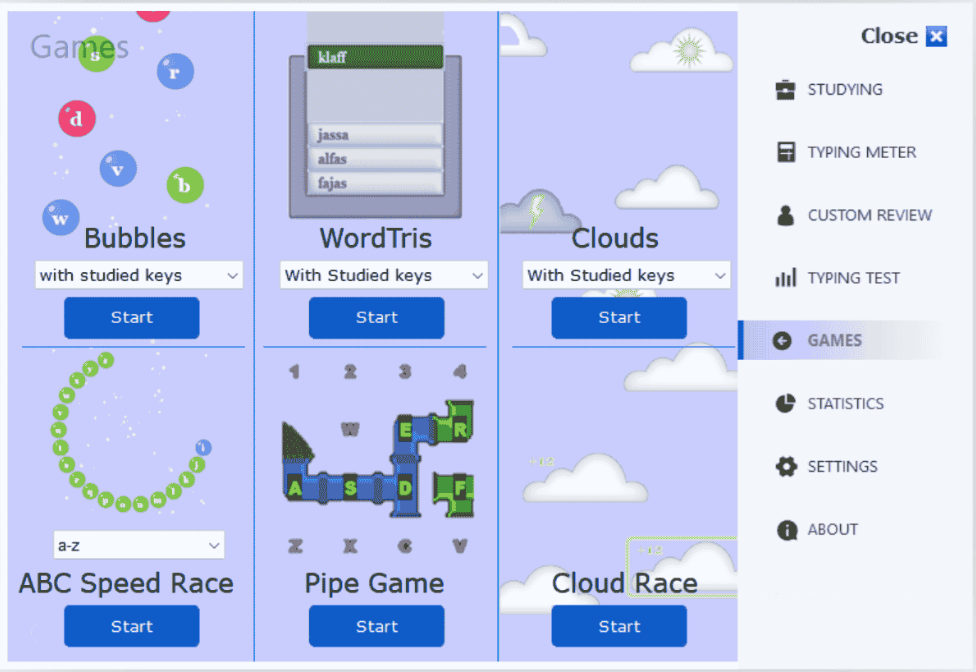
The Games screen: Bubbles, WordTris, Clouds, ABC Speed Race, the pipe game and Cloud Race, each with a "with studied keys" option.
Offline, with progress kept on your PC
TypingMaster 12 needs no account and works without an internet connection. Your progress, statistics and break reminders all stay on your own computer.
Benefits
- You stop looking at the keyboard. The hand guide and finger-by-finger drills fix the habit that caps most self-taught typists at a slow speed.
- Practice goes where it's needed. Review drills target the keys you actually miss, so 20 minutes a day isn't spent on keys you already know.
- You get proof of your speed. A timed test and a printed certificate are what job applications and typing exams ask for.
- You pay once. The lifetime license costs about the same as a few months of a subscription typing site.
Real-World Uses
- Preparing for a typing exam: a candidate for a government or office job practises timed tests at the exam's length and checks net speed and accuracy after each one. Hindi typing tests with exam-style settings were added in 12.01.
- A job that asks for a set WPM: a data entry applicant works through the speed-building course and prints a certificate for the application.
- Switching layouts: someone moving to Colemak or Dvorak uses the Universal Course to relearn touch typing on the new layout.
- A child learning the keyboard: the junior course and the games keep a young learner practising the keys they've covered.
Who it's for, and who should skip it
TypingMaster 12 Standard suits beginners and two-finger typists on Windows who want a structured course and a speed test on one PC, and students preparing for typing exams, especially in Hindi.
Skip it if you use a Mac: there's no macOS version. If you want the program to keep coaching you while you work in Word or your email, Standard won't do that; that's TypingMeter, in Premium. If you need several family PCs covered, Premium's 3-device license costs less than two Standard licenses. Schools managing many students are better served by the vendor's separate school product. And if you only want to practise now and then, the free mode after the trial may be all you need.
Usage Guide
- Download TypingMaster12Setup.exe (12 MB) and run the signed installer. Decline the Opera offer if you don't want it.
- Start TypingMaster and create your user. All Premium features are open for the first 7 days.
- Open Settings and choose your keyboard layout, speed unit (WPM or KPM), Dark Mode and key hint speed.
- Take a typing test first to see where you stand, then start a course from Studying.
- Do one or two short lessons a day. Use Custom Review or a game with "studied keys" when a key keeps slowing you down.
- To activate the full course after the trial, enter the license ID and key from your receipt email in About.
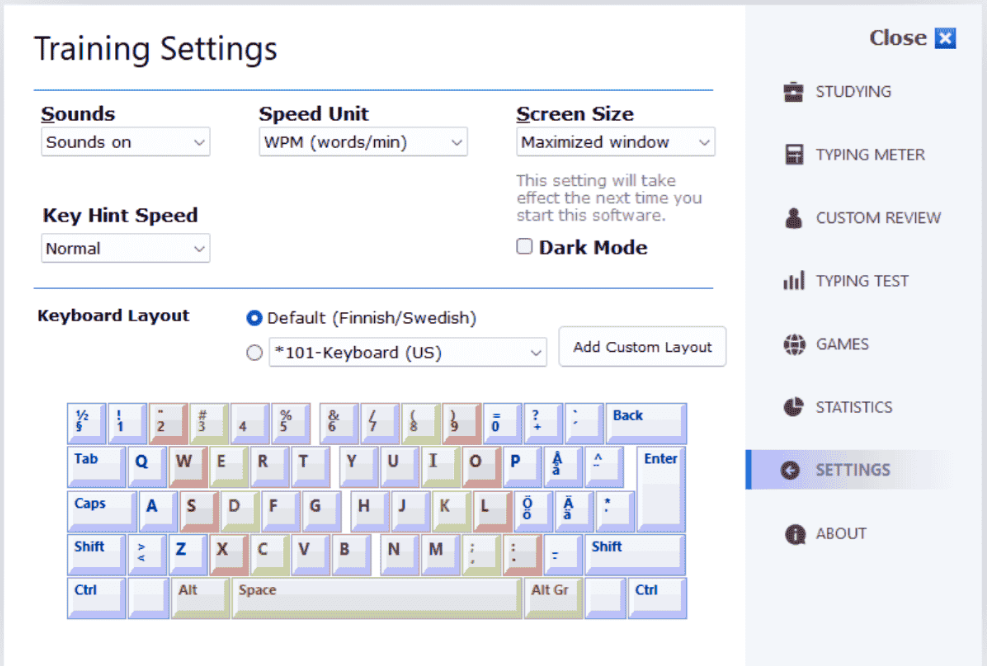
Training Settings: sounds, speed unit, key hint speed, screen size, Dark Mode, the keyboard layout list and the Add Custom Layout button.
Where it falls short
- The first lessons can feel hard. One experienced typist on the Microsoft Store found the very first drill difficult and doubted a true beginner would cope. The lessons get easier once the home row sticks, but expect a slow start.
- Trial confusion. Older Microsoft Store reviews complain that the 7-day trial seemed to end after a day or two, and that a paid license wasn't recognized at first. The support FAQ says the license ID and key must match exactly, so copy and paste both.
- Edition confusion. A 2026 Microsoft Store reviewer paid for the cheaper license and then found some features locked. Check the comparison table: Standard leaves out TypingMeter and custom tests.
- Windows only for the full program. The Linux version leaves out TypingMeter, and there's no Mac version at all.
- Few independent reviews. Most feedback comes from the Microsoft Store and the vendor's own pages; we found no recent hands-on review from a tech magazine.
What Users Say
TypingMaster's Microsoft Store listing is published under its U.S. name, TypingMagic 12, by Cloud Kayak Labs. On November 23, 2026 it averaged 4.4 out of 5 from 2,769 ratings, and the vendor's own pages quote 4.4 stars from 2,731 ratings. The older Typing Master 10 store listing stands at 4.0 from 85 ratings. Trustpilot has only 4 reviews of typingmaster.com (TrustScore 4.0), all about support.
Microsoft Store: what learners like
"it was great experience for me to learn from this app and the order of key drilling for beginners is fantastic and I would recommend it to improve your typing skills." Akshay, 5 stars, November 2022
"That was a great experience with this application. Makes everything easy to learn must try if you want to learn touch typing." Komal, 5 stars, December 2025
"I m student. I m happy to do typing practice with typing master 11. I want to do complete my typing course with it,for this I thankful for typing master." VIVEK, 5 stars, December 2022
"I downloaded this app because I'm going to start app development and will need to code. [...] This program is good for the absolute beginner and professional alike." Roger, 5 stars, June 2017 (Typing Master 10 listing)
"It is really nice experience learning from here. but i have a suggestion that you should provide a certificate to learners after completing the course." Kartik, 5 stars, May 2025. Version 12 does print certificates after typing tests.
Microsoft Store: complaints
"I'm not sure how this would help a true beginner to learn to touch type. The very first lesson was difficult and I've been typing for 30 years at a reasonably decent pace" CRIS, 1 star, "Too difficult", May 2017 (Typing Master 10 listing)
"This looks like a good training program, but the 7 day free trial expired after less than one day." Matthew, 2 stars, August 2020 (Typing Master 10 listing)
"this is good but make it free to make it more good and it is very useful but i cant give money" Cheema, 3 stars, February 2024
"its a good starter but I wish the had a section were I could just type something with out the time like the stories and I wish the had more of them" jeremiah, 3 stars, May 2021 (Typing Master 10 listing)
Trustpilot and AlternativeTo
"the support provided me with clear step-by-step instructions which helped." Todor Tashev, 5 stars, "Issues with License", Trustpilot, January 2026
"They were able to resolve my issue very effectively." BHF, 4 stars, Trustpilot, August 2025
"Great app to learn how to type quickly using keyboard and make it less typo" Lehuga ntaps, 5 stars, AlternativeTo, August 2021 (13 AlternativeTo users like TypingMaster)
The Trustpilot and AlternativeTo text was read through a page summarizer; the Microsoft Store reviews were read directly from the store.
The pattern: learners praise the order of the drills and say their speed went up within weeks, and many are students practising for exams. The complaints are about the program being paid, a hard first lesson for experienced typists, and trial or license activation problems, most of them on the older Typing Master 10 store listing. Support gets good marks from the few Trustpilot reviewers.
Comparisons
TypingMaster 12 Standard vs Premium
Both have the same 11 courses, typing tests, certificates, games and statistics. Premium ($29.90 lifetime) adds the TypingMeter widget, custom typing tests with your own texts or the online test library, and 3 device activations instead of 1. If you'll only ever learn on one PC and don't care about coaching while you work in other programs, Standard is enough.
TypingMaster 12 vs TypingMaster Pro
TypingMaster Pro was the name of versions up to 7. Version 12 is the same program line, rebuilt with new courses, Dark Mode, custom layouts and Hindi support, and it runs on current Windows versions. A license for an older version doesn't activate version 12.
Editions and Pricing
| License |
Price |
Term |
Devices |
| Standard Lifetime | $19.90 | One-time, all version 12 updates | 1 |
| Standard 1-Year | $16.90 | 1 year | 1 |
| Standard 6-Month | $12.90 | 6 months, one payment | 1 |
Prices are the order page prices in USD on November 23, 2026; none of them renews automatically. The lifetime license costs only $3 more than a year, so it's the better buy unless you need typing for a few months only. Each button below orders that license.
Buy Lifetime ($19.90)Buy 1-Year ($16.90)Buy 6-Month ($12.90)
FAQs
What is TypingMaster Pro with Satellite?
TypingMaster Pro with Satellite was the older TypingMaster Pro package that included the Satellite, a helper that ran while you typed in other Windows programs such as Word or your email, spotted the keys and words that gave you trouble, and created exercises for them. TypingMaster 12 does that job with TypingMeter, which also analyses letter pairs and shows heat maps. TypingMeter is included in TypingMaster 12 Premium, not in Standard.
Is TypingMaster free?
TypingMaster 12 is free to download and free to start. For the first 7 days every Premium feature is open, and after that you can keep using it free with all keyboard keys, the introductory lessons and practice drills, typing tests and games. The full course and its practice drills need a license, from $12.90 for 6 months or $19.90 for life.
How much does TypingMaster Pro cost now?
TypingMaster Pro is now sold as TypingMaster 12. Standard costs $19.90 for a lifetime license on one PC and Premium $29.90 for a lifetime family license on up to 3 PCs, with cheaper 1-year and 6-month licenses for both.
Can I use my TypingMaster 10 or 11 license in version 12?
A TypingMaster 10 or 11 license doesn't activate TypingMaster 12, because each lifetime license covers one major version. If you enter your version 11 registration key in version 12, you get a discount code toward the new license.
Does TypingMaster 12 work on a Mac or Linux?
TypingMaster 12 has no Mac version. A Linux version is available as a Flatpak for 64-bit distributions such as Ubuntu, Linux Mint and Fedora, but it leaves out the TypingMeter widget.
Does TypingMaster support Hindi typing?
Yes. TypingMaster 12.01 added Hindi touch typing courses for the InScript layout, Hindi typing tests with exam-style settings and reports, Hindi-compatible games and a Hindi interface. TypingMeter doesn't work with InScript.
Can I move TypingMaster to a new computer?
TypingMaster's activation is freed when you uninstall it, so you can uninstall it on the old PC and activate it on the new one with the license key from your receipt. The support site lets you retrieve a lost license with the email address you ordered with.
Can I get a refund?
TypingMaster offers a full refund on orders placed through its website within 30 days of purchase; you send support your order number.
System Requirements
- Windows 11, 10, 8 or 7, including Windows on ARM devices
- About 12 MB download (signed installer)
- No internet connection or account needed after installation
- Linux: 64-bit distributions via Flatpak (without TypingMeter)
Conclusion
TypingMaster 12 Standard is worth $19.90 if you want to learn touch typing properly on one Windows PC, or need a timed test and certificate for a job or an exam. The reason to buy it is the course itself: short lessons in a sensible order, with drills aimed at the keys you actually miss, and a lifetime license that costs barely more than a year. The reason not to is that the coaching people remember from TypingMaster Pro with Satellite now lives in Premium's TypingMeter, so if that's what you're after, pay the extra $10. Try the free week first; it opens every feature.
Download Free TrialBuy Now