TypingMaster 12 Premium: Touch Typing Course Plus a Coach That Watches Your Real Typing
TypingMaster 12 Premium is a $29.90 Windows touch typing tutor with a lifetime family license for up to 3 PCs. It has the full TypingMaster course, tests and games, and adds TypingMeter, a background widget that measures your typing in other programs and builds drills for your slow keys and letter pairs, plus typing tests made from your own texts.
It's the edition for people who already finished a typing course and still trip over the same keys in real emails and reports, and for families with more than one learner and more than one PC.
In the United States, TypingMaster is sold as TypingMagic
TypingMaster isn't offered in the U.S. The same company, Cloud Kayak Labs, sells the program there as TypingMagic 12, its U.S. edition, where the TypingMeter edition is called TypingMagic Professional. If you're in the United States, see TypingMagic 12 instead.
Quick facts
- Version: 12.01.983 (release notes dated November 13, 2026)
- Developer: Cloud Kayak Labs, Inc., maker of TypingMaster since 1996
- Platforms: Windows 11, 10, 8 and 7, including Windows on ARM (the Linux Flatpak version has no TypingMeter)
- Price: $29.90 one-time for a lifetime version 12 family license; 1-year ($23.90) and 6-month ($17.90) licenses also exist
- Devices: 3 activations; uninstalling on one PC frees its activation
- Premium-only: TypingMeter widget with key-to-key (bigram) analysis, custom typing tests, online test text library
- Free trial: all Premium features for 7 days, no account or credit card
- Guarantee: 30-day money-back guarantee
- What we checked: the vendor's Standard vs Premium comparison table, the 12.6 MB TypingMaster12Setup.exe installer on typingmaster.com (one installer for both editions; the license key decides the edition), and the order page prices of all three Premium licenses: $29.90 for the lifetime license on November 23, 2026. We didn't run TypingMeter for weeks to measure its effect.
Before you buy
- TypingMeter is Windows-only and doesn't do Hindi. It isn't in the Linux version and doesn't work with the Hindi InScript layout, so Hindi learners get little from Premium beyond custom tests and extra devices.
- Lifetime means version 12. All 12.x updates are included; a future major version isn't.
- Use the full installer. The vendor's FAQ says copies of version 11 installed from the Microsoft Store lacked some Pro features, TypingMeter among them, because of the store's silent installation; the installer from the vendor's site has everything.
- Optional browser offer. The installer offers Opera; accepting adds a second free week of Premium, and declining changes nothing else.
Download Free TrialBuy Now
Overview
TypingMaster Premium is the successor of the old TypingMaster Pro "with Satellite" package. The Satellite ran alongside Word or your email program, noticed the keys and words you struggled with, and turned them into exercises. In version 12 that job belongs to TypingMeter, which goes further: it times every pair of keys you type and shows the slow and error-prone pairs on a heat map.
Everything else in TypingMaster 12 is shared with Standard: 11 courses in 10 languages, adaptive lessons, review drills, typing tests from 1 to 60 minutes with certificates, six games, Dark Mode and custom keyboard layouts. Premium is the right choice when you want the program to keep working on your typing after the course ends.
Features
TypingMeter: coaching while you work
TypingMaster 12 Premium's TypingMeter is a small desktop widget that measures your speed, pauses and mistakes while you type in any Windows program. It spots the individual keys and key pairs (bigrams) that make you hesitate, and now and then suggests a short drill built around exactly those patterns. All analysis stays on your PC, and word-based insights, which can add difficult words to your practice, are off unless you turn them on. The widget measures speeds up to 200 WPM.
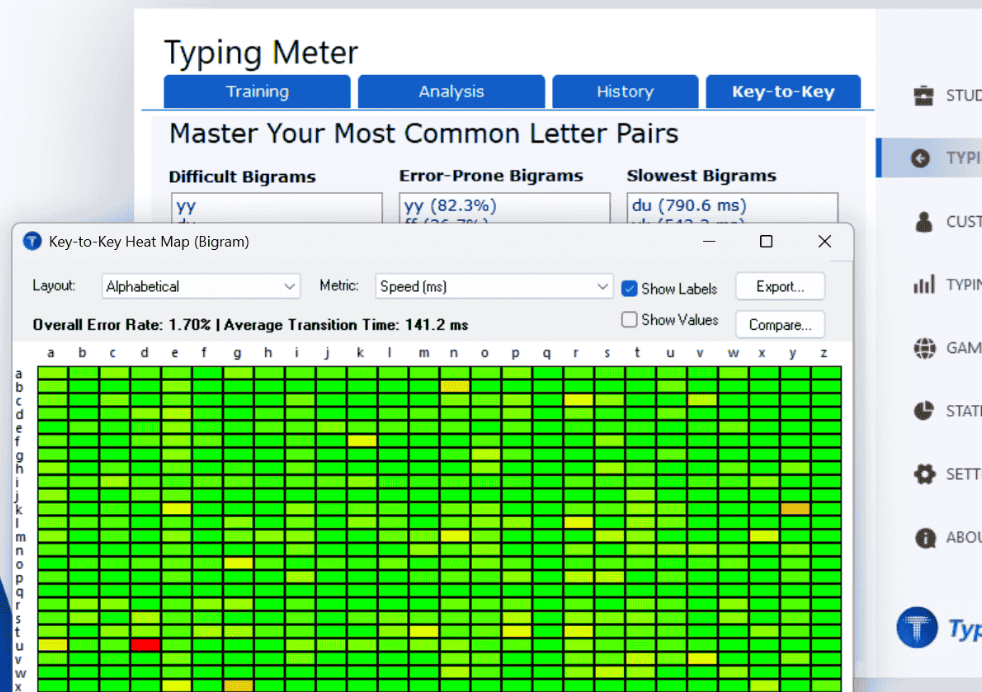
TypingMeter's Key-to-Key page: lists of difficult, error-prone and slowest letter pairs, and a heat map of transition speed for every pair, with the overall error rate and average transition time above it.
Personal exercises from your own data
TypingMaster 12 Premium turns TypingMeter's findings into automatic exercises for your most difficult letter pairs. You can click a pair for a detailed analysis, and export and compare your data across dates or between typing techniques, which is handy if you're switching layouts or retraining a bad habit.
Custom typing tests from any text
TypingMaster 12 Premium lets you build the typing test you need. Import RTF, DOC, HTML or TXT files with Unicode support, paste any text, or download ready-made texts from the online test library by topic, including exam-style texts such as SSC CHSL and SSC CGL with their pass thresholds. You set the duration, pass limits for net speed, gross speed and accuracy, and can resume a test where you left off. Tests can be exported for use on another PC.
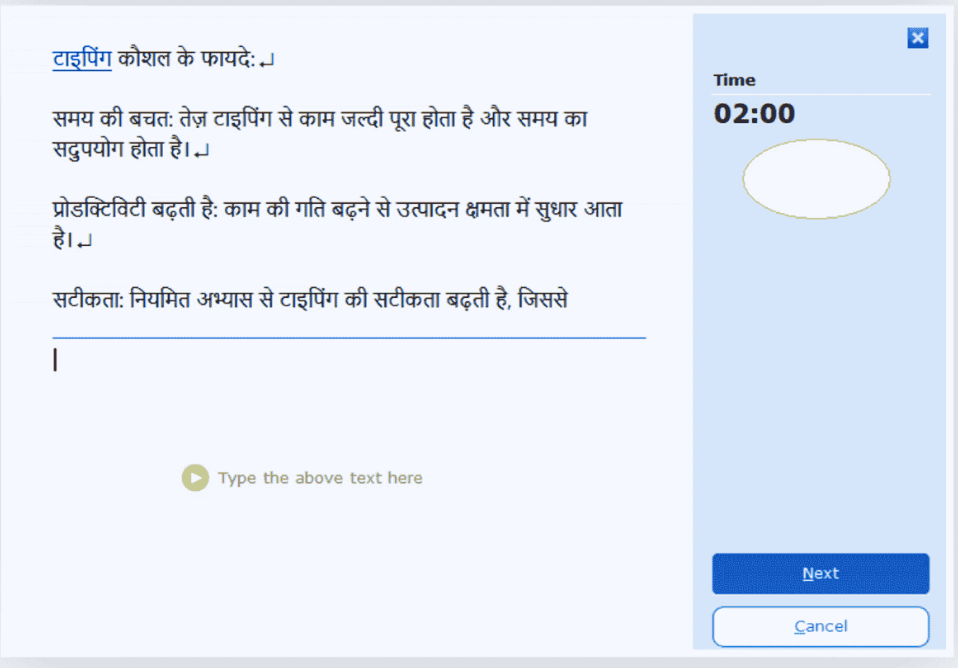
A two-minute typing test with a Hindi text; Premium lets you replace the built-in texts with your own.
The complete TypingMaster course
TypingMaster 12 Premium includes every course: the main touch typing course, a Universal Course for any keyboard layout, a lowercase-first course for beginners, a junior course for kids, and speed-building, numeric keypad and special character courses. Lessons adapt their length to your speed and accuracy.

A home-row drill in Dark Mode with the color-coded keyboard, a finger guide and progress bars.
A family license for 3 PCs
TypingMaster 12 Premium's license activates on up to 3 devices, and each PC keeps its own users and progress. If you retire a PC, uninstalling TypingMaster frees that activation for the replacement.
Benefits
- Your practice follows your real typing. Drills come from what you type every day, not from a generic lesson plan.
- Improvement continues after the course. Most tutors are done when you finish lesson 12; TypingMeter keeps finding new weak spots.
- Exam practice on the real material. Custom tests with pass limits let you rehearse exactly what an exam or employer will ask for.
- One purchase for the household. Three PCs cost $29.90 once, less than two Standard licenses.
Real-World Uses
- An office worker stuck at 40 WPM leaves TypingMeter running for a week, finds that a handful of letter pairs cost the most time, and drills them for 10 minutes a day.
- A candidate for a typing exam downloads exam-style texts from the online library, sets the exam's pass limits and repeats the test until it passes.
- A teacher or parent imports texts from a reading assignment as typing tests, so practice doubles as reading.
- A family with a desktop and two laptops puts one license on all three for the kids and parents.
Who it's for, and who should skip it
TypingMaster 12 Premium is for Windows users who want more than a course: people who type all day and want to keep getting faster, exam candidates who need custom tests, and households with up to 3 PCs.
Skip it if you only learn on one PC and just want the course and a speed test: Standard at $19.90 has the same lessons. Hindi typists and Linux users won't get TypingMeter, so Premium adds less for them. There's no Mac version. Schools should look at the vendor's school product instead of family licenses. And if you're in the United States, TypingMaster isn't sold there; TypingMagic Professional is the U.S. equivalent.
Usage Guide
- Download TypingMaster12Setup.exe from typingmaster.com and run it; the same installer serves both editions.
- Start TypingMaster. Premium features are open for 7 days; after buying, enter your license ID and key under About.
- Pick your keyboard layout and speed unit under Settings, then take a typing test to get a baseline.
- Open Typing Meter and switch the widget on. Work normally for a few days so it can collect data.
- Check the Analysis and Key-to-Key tabs, and accept the drills TypingMeter suggests.
- To add your own tests, go to Typing Test, choose Add, and import a file, paste text or download from the online library.
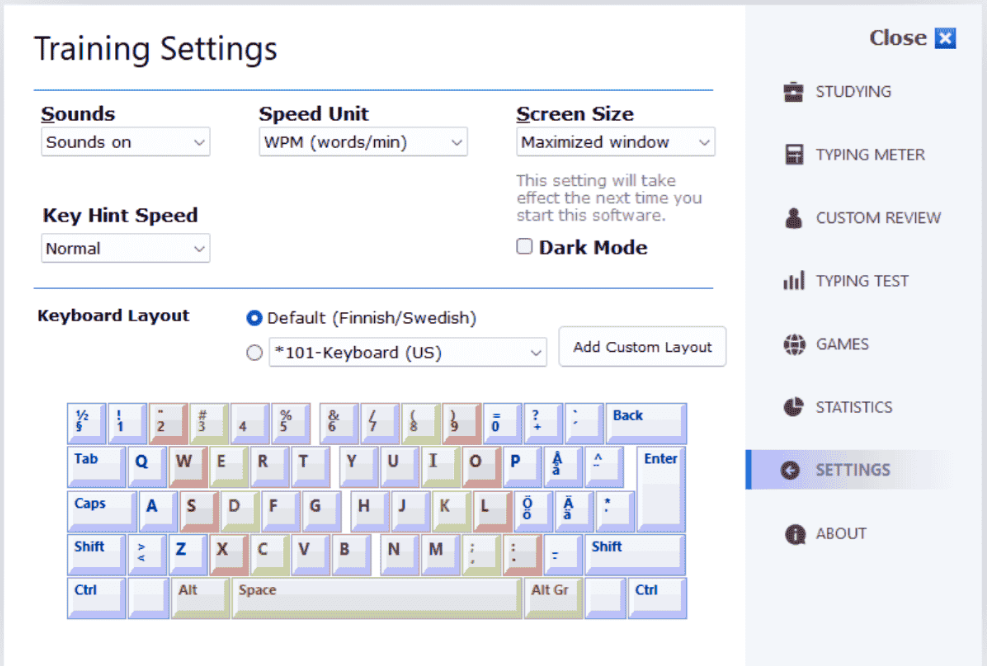
Training Settings, with the main menu on the right: Studying, Typing Meter, Custom Review, Typing Test, Games, Statistics, Settings and About.
Where it falls short
- TypingMeter needs time. It learns from your everyday typing, so it gives little in the first days and works best if you leave it running.
- A background monitor isn't for every PC. On a work computer with strict IT rules, a tool that measures all keystrokes may not be allowed, even though its analysis stays local.
- The course starts hard for some. An experienced typist on the Microsoft Store found the very first drill difficult.
- Edition mix-ups happen. Store reviewers have bought one license and expected the other's features; check the comparison before ordering.
What Users Say
TypingMaster's Microsoft Store listing appears under its U.S. name, TypingMagic 12, from Cloud Kayak Labs: 4.4 out of 5 from 2,769 ratings on November 23, 2026. The older Typing Master 10 listing shows 4.0 from 85 ratings, and Trustpilot has 4 reviews of typingmaster.com with a TrustScore of 4.0. Reviews rarely separate Standard from Premium, so most of what follows is about the program as a whole.
About the Premium features
"That is the reason I like typingmaster, it has custom lessons you can create yourselves." Chihwah Li, 5 stars, Trustpilot, March 2025
"Used app before, it was good. Then asked to pay. Paid $20.00 to have the license for usage, and don't have access to ALL application. Must upgrade to Pro and pay monthly subscription for all access." Geoffrey, 1 star, Microsoft Store (TypingMagic 12), May 2026. He had bought the cheaper edition, which leaves out the coaching widget and custom tests; the full edition is also sold as a one-time license, not only monthly.
Microsoft Store: praise
"This app as help me tremendously in my typing skill. I encourage you'll to try it. Fantastic App" Ahmed Tejan, 5 stars, October 2023
"this application is mind blowing and i use this many times to increase my typing speed and it helps me and also recommend many friends to use this [...]" Awais, 4 stars, June 2024
"I was not able to type efficient but now its different now I am pro" jagruti, 4 stars, November 2022
"I learnt fast typing 9 years ago by using this application. Good to dust off my skills after many years." Ali, 5 stars, March 2017 (Typing Master 10 listing)
Microsoft Store: criticism
"What a racket. I PAID for this product after the free trial was over, but it still says I need to pay in order to "get the app." I did pay!" M, 1 star, January 2018 (Typing Master 10 listing)
"this app is good but why is this not available in hindi? [...] and secondly, 7 days trail ends at only 1 or 2 days." 2 stars, November 2021 (Typing Master 10 listing). Hindi courses arrived in version 12.01.
"The app seems good but i won't use it because of this permission." Silvio, 1 star, "Uses all system resources", March 2017 (Typing Master 10 listing), on the permission the store app asked for.
Support
"the support provided me with clear step-by-step instructions which helped." Todor Tashev, 5 stars, "Issues with License", Trustpilot, January 2026
"great costumer service i bought service since 2022" gurjeet, 5 stars, Trustpilot, July 2025
Trustpilot text was read through a page summarizer; Microsoft Store reviews were read directly from the store.
The pattern: learners credit TypingMaster with real speed gains, and the few who mention Premium's custom lessons like them. Complaints center on licensing, from trial timers and activation trouble on the old store app to buyers who picked the cheaper edition and expected everything. Support replies get good marks.
Comparisons
Premium vs Standard
Standard ($19.90 lifetime, 1 PC) has the same courses, typing tests, certificates, games and statistics. Premium ($29.90 lifetime, 3 PCs) adds TypingMeter, custom typing tests, adding and deleting test texts, and the online test library. For a single learner on one PC who won't use the extras, Standard is enough; for a second PC alone, Premium already pays off.
Premium vs TypingMagic Professional
TypingMagic Professional is the U.S. edition from the same company, with TypingMeter and customizable tests, sold as a lifetime license or monthly. It's the version to buy in the United States, where TypingMaster isn't sold.
Editions and Pricing
| License |
Price |
Term |
Devices |
| Premium Lifetime | $29.90 | One-time, all version 12 updates | Up to 3 |
| Premium 1-Year | $23.90 | 1 year | Up to 3 |
| Premium 6-Month | $17.90 | 6 months, one payment | 1 to 3 |
Order page prices in USD on November 23, 2026; none of them renews automatically. The lifetime license is $6 more than a year, so it's the sensible pick unless you need TypingMaster for a short exam season. Each button below orders that license.
Buy Lifetime ($29.90)Buy 1-Year ($23.90)Buy 6-Month ($17.90)
FAQs
Is TypingMaster 12 Premium the same as TypingMaster Pro?
TypingMaster 12 Premium is the current version of TypingMaster Pro's full package. TypingMaster Pro was the name up to version 7 (2010); the program then became TypingMaster 10 (2016), 11 (2022) and now 12, with Premium as the edition that includes the coaching widget.
What is TypingMaster Pro with Satellite?
TypingMaster Pro with Satellite was the older TypingMaster Pro package whose Satellite tool monitored your typing in other Windows programs and created exercises for the keys and words you struggled with. In TypingMaster 12 that role is filled by TypingMeter, which is included in Premium.
Is TypingMaster free?
TypingMaster 12 is free to download, and all Premium features, TypingMeter included, are free for 7 days. After that a free mode keeps all keyboard keys, the introductory lessons, typing tests and games; TypingMeter and custom tests need a Premium license.
Does TypingMeter send my keystrokes anywhere?
No. TypingMaster says all TypingMeter analysis runs locally on your PC, and the optional word-based insights are off by default and can be switched on or off at any time.
Can I upgrade from Standard to Premium later?
TypingMaster's order page sells Standard and Premium as separate licenses and lists no upgrade price, so plan on buying Premium outright if you think you'll want TypingMeter. The free week lets you try TypingMeter before choosing.
Can three family members use one Premium license?
Yes. TypingMaster 12 Premium's family license activates on up to 3 devices, and each installation can hold several users with their own progress.
Can I get a refund?
TypingMaster refunds orders placed through its website in full within 30 days of purchase; send support your order number.
System Requirements
- Windows 11, 10, 8 or 7, including Windows on ARM devices
- About 12 MB download (signed installer, same for Standard and Premium)
- Works offline; no account needed
- TypingMeter: Windows full installer only (not the Linux version, not the Hindi InScript layout)
Conclusion
TypingMaster 12 Premium is worth $29.90 if you want the old "TypingMaster Pro with Satellite" experience on current Windows: a full touch typing course plus a coach that keeps finding your slow keys in real work. The one reason to buy it over Standard is TypingMeter, with custom tests and 3 PCs as a bonus. The main reason not to is that a single learner on one PC who only wants the course gets the same lessons for $10 less, and Hindi or Linux users can't use TypingMeter at all. Use the 7-day trial to see whether TypingMeter's drills help you before paying.
Download Free TrialBuy Now