AKVIS ArtSuite: Frames, Borders and Artistic Effects for Your Photos
AKVIS ArtSuite is a Windows, macOS and Linux program that puts frames, borders and artistic effects on photos, for anyone making cards, holiday albums or framed prints at home. The Home license costs $39 once, and Home Deluxe, with every effect, costs $49.
Photo editors can draw a border, but they rarely ship a library of ready frames you can tweak in a few clicks. ArtSuite is that library: carved wood, torn paper, page curls, passe-partout mats and hand-painted seasonal frames, plus a set of color and texture effects to use before the frame goes on.
Quick facts
- Version: 21.1
- Developer: AKVIS
- Platforms: Windows 7-11 (32/64-bit), macOS 10.12 to macOS 27 (Intel and M1), Linux 64-bit (standalone only)
- Editions: standalone app, or a plugin for AliveColors, Adobe Photoshop, Photoshop Elements, Corel PaintShop Pro and other editors
- Price: $39 Home (plugin or standalone), $49 Home Deluxe, $72 Business, all one-time
- License: never expires, covers 2 computers
- Trial: 10 days, all features, no registration
- What we checked: the license comparison table, the What's New notes and the screenshots on the vendor site, the 64-bit Windows installer on the download server (70 MB, file dated April 15, 2026), and the price of all four licenses on the order page on November 8, 2026. We didn't install the program or frame our own photos
Before you buy
Pick the edition carefully. The Hand Painted Frames and the themed frame packs only work in the standalone app, so the $39 Home Plugin license can't use them at all. If you want both the plugin and the frame packs, you need Home Deluxe ($49), which covers both editions.
Two effects, Color Stripes and Glitch Art, are Home Deluxe and Business only. Since version 21, Home users can try them with a watermark on the result. The Home licenses are for personal, non-commercial use; for client or paid work you need Business.
Download Free TrialBuy Now
Overview
ArtSuite splits its tools into two menus. Frames are edge treatments: Classic, Pattern, Strokes, Scratches, Page Curl, Squares, Ragged, Spray, Artistic Frame, Frost, Artistic Crop, Passe-Partout, Vignette and Hand Painted Frame. Effects change the picture itself: Black and White, Shift Colors, Channel Mixer, Texture, Glamour, Two Keys, Color Stripes and Glitch Art. Each one comes with presets, and you can save your own.
The window shows Before and After tabs, and a Hints panel explains each slider when you hover over it. Version 21 brought a redesigned, high-resolution texture library, an option to put Classic frames and Passe-Partout mats outside the photo instead of over its edges (standalone only, since it changes the image size), and TGA support. Version 21.1 is a bug-fix and stability release.
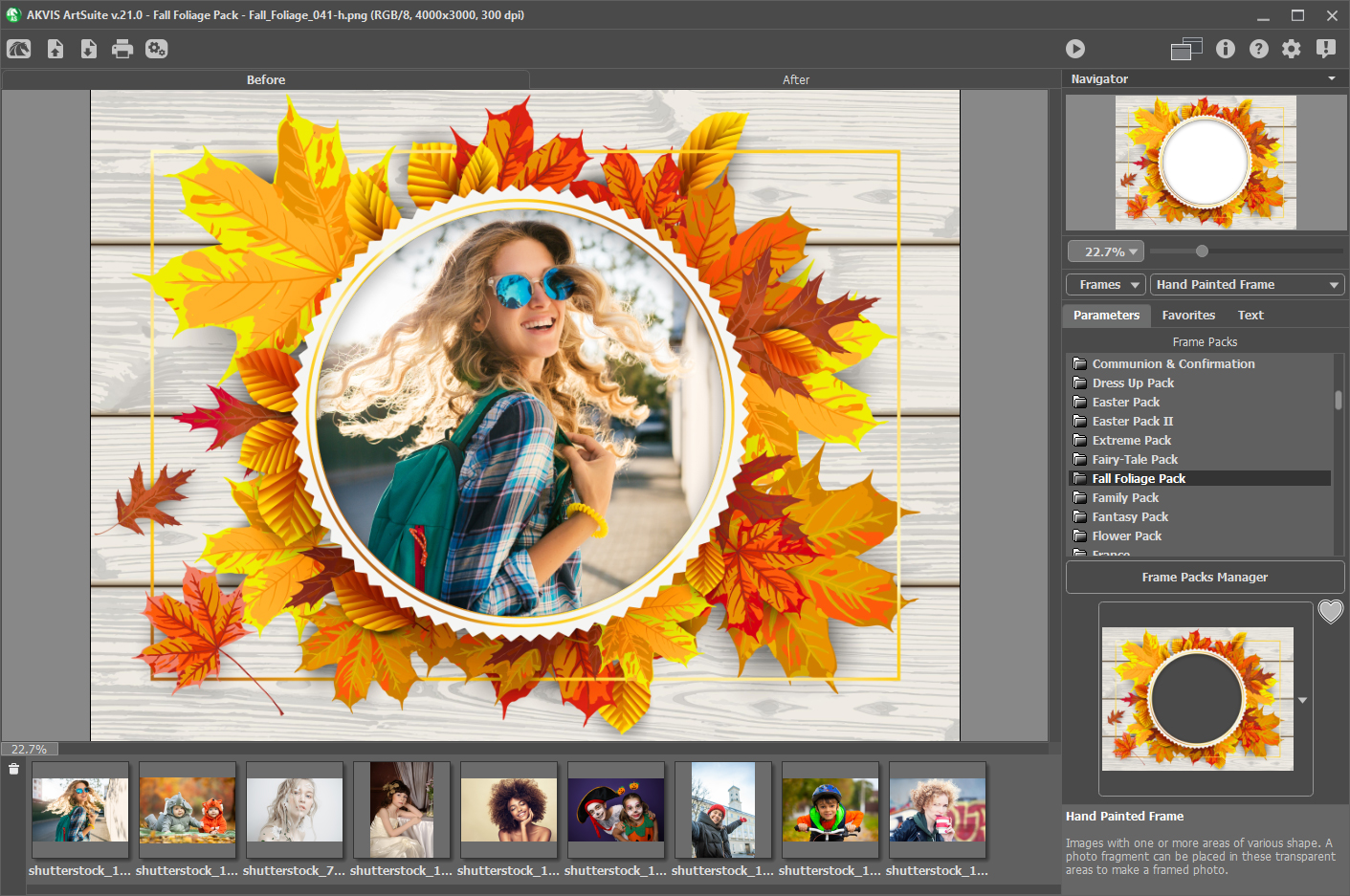
AKVIS ArtSuite 21.0 on Windows with a Hand Painted Frame from the Fall Foliage Pack, the list of installed frame packs on the right and a row of photos below for batch work.
Features
A generator for frames, not just a clip-art folder
AKVIS ArtSuite builds most of its frames from settings, so the same frame type can look very different. A Classic frame takes a texture (carved wood, brick, animals, holidays) and a width; Pattern repeats a small picture such as frogs or stars around the edge; Strokes, Spray, Ragged and Scratches give rough, hand-made borders; Page Curl lifts a corner of the photo. You can also load any image as a sample and turn it into a frame.
Hand Painted Frames and themed frame packs (standalone)
AKVIS ArtSuite's standalone app adds Hand Painted Frames: finished artwork with transparent openings, into which your photo is placed. A few come with the program and a free set can be downloaded. AKVIS also sells themed packs of 50 or 100 frames (weddings, babies, Christmas, seasons, Halloween), listed at $12 to $17 each, with a Frame Packs Manager to install them.

The Strokes frame on the Mac, with settings for frame color, frame width, stroke width, count and length.
Color and texture effects
AKVIS ArtSuite's effects cover the looks people usually want before framing: Black and White with an optional tint such as sepia, Shift Colors to replace one color with another, Channel Mixer, Texture to make a photo look printed on canvas, brick or corrugated paper, a soft Glamour look for portraits, and Two Keys. The vendor also shows a Halftone effect for a retro comic-book look.
Color Stripes and Glitch Art (Deluxe and Business)
AKVIS ArtSuite's two premium effects are aimed at posters and social media. Color Stripes lays tinted diagonal bands across the picture, with control over stripe count, angle, curvature and splitter lines. Glitch Art imitates a broken digital signal with interference, shifted stripes and stretched slices, and a Random Seed button gives a new variation each time.

Color Stripes (marked Deluxe | Business in the menu) with the "AKVIS Twilight Lavender" preset and its stripe, splitter and color settings.
Batch processing and wide file support
AKVIS ArtSuite can apply one frame or effect to a whole folder, which is what makes it practical for a holiday album or a set of event photos. It opens TIFF, JPEG, BMP, PNG, WEBP, TGA, RAW and DNG files, works in RGB, CMYK, Lab and Grayscale at up to 32 bits per channel, and handles PSD files through the plugin.

Glitch Art on the Mac with the "AKVIS Alter Ego" preset and the Stripes and Shifts settings.
Benefits
You get a finished, printable look without learning layer masks or hunting for frame PNGs online. Because the frames are generated from settings, a frame can match the colors of each photo instead of looking pasted on. And because the license never expires and covers two computers, a family can share one purchase between a Windows PC and a Mac.
Real-World Uses
- Greeting cards: put a family photo into a Christmas or birthday hand-painted frame and print it.
- Holiday albums: batch-apply the same vignette or passe-partout mat to a whole trip so the pages match.
- Gallery-style prints: use the outside Classic frame or Passe-Partout option so the frame doesn't cover the edges of the picture.
- Social posts and posters: Glitch Art and Color Stripes give a bold, graphic look to a portrait.
- Old-photo looks: black and white with a sepia tint, a canvas texture and a scratched edge.
Who It's For, and Who Should Skip It
AKVIS ArtSuite suits home users and hobby photographers who decorate photos often, scrapbookers who want themed frames, and Photoshop or AliveColors users who want frames as a filter. For most people the standalone Home license, or Home Deluxe if you also want the plugin, is the right buy.
Skip it if you only want AKVIS's ready-made frame packs: the free AKVIS Frames program applies those without buying ArtSuite. Skip it too if you need professional retouching or painting effects, which AKVIS sells as separate programs, or if your editor already has the border presets you use.
Usage Guide
- Download the installer and run it. On Windows it installs both the standalone app and the plugin; on a Mac they are two separate downloads.
- Open a photo in the standalone app, or start ArtSuite from your editor's filter menu.
- Choose Frames or Effects in the drop-down, then the frame or effect type.
- Pick a preset, then adjust the settings while comparing the Before and After tabs. Hover over a setting to read its hint.
- Press Run to apply it to the full image. Combine several frames and effects by applying them one after another.
- Save, or use Batch Processing to apply your saved preset to a folder. During the trial, try the standalone-only frames and the Deluxe effects so you know which license you need.
Where it falls short
- Free alternatives exist. One Snapfiles user, who owned most AKVIS programs, wrote that ArtSuite is "not one of the better ones" and that "there are freebies that will do just as well".
- The best frames cost extra. The included hand-painted frames are a small set. The polished themed frames in the vendor's examples are mostly paid packs.
- Edition gaps. Hand Painted Frames, frame packs and the outside-frame option are standalone only, the standalone app can't open PSD files, and the Linux version is standalone only.
- Updates after a year cost money. A new version is free for 12 months after purchase; after that it's $19.95.
What Users Say
AKVIS ArtSuite (called Frame Suite in its early versions) has been reviewed since 2007, mostly by photo sites, tech sites and Mac user groups. We found almost no ratings on the large user-review sites, and most reviews cover older versions, so the date is noted with each one.
Photo and tech sites
"AKVIS ArtSuite is a great software for enhancing images with frames and effects. It is easy to use and contains an impressive library of various options." Eva Williams, FixThePhoto, rated 4.5/5. The review lists unlimited effect versions, frame creation and several languages as pros, and the 10-day trial as its only con.
"A lot of fun to use, it packs a large number of effects and a rich pattern library." Dennis Sellers, Apple World Today, September 2019, 4 out of 5 stars. He added: "I especially like the classic frame with the wood carving look."
"All things considered, AKVIS ArtSuite comes with a decent feature pack for helping you personalize postcards, holiday albums, desktop wallpapers or other favorite images using frames and effects." Ana Marculescu, Softpedia, March 2019
Designers and user groups
"This is plugin for anyone who likes frames, borders and special effects. Who doesn't?" Bojan Živković, DesignEasy, November 2013. He called the wooden frames "scary realistic" and named Black and White and Halftone as his favorite effects.
"AKVIS Frame Suite is easy to learn and use. I like that if it doesn't have a frame that you want-you can import your own designs." L. Davenport, Silicon Summit Macintosh User Group, September 2007 (Frame Suite 2.5)
"There are many sources for frames and edge effects, but one of the best places is from good 'ol AKVIS, with their Frame Suite package." Mark Mattson, Computer Users of Erie, Horizons, February 2008
The critical view
"This does have plenty of effects and such but I won't say this is worth the price. There are freebies that will do just as well." gimpguy, Snapfiles user review, September 2012 (version 8.0), 3 of 5 stars. The same reviewer added: "I own most of the AKVIS plugins -slash- stand alone sofware and this is not one of the better ones. Don't judge all of them by this." Snapfiles' own editor rating is also 3 stars. Indezine's Geetesh Bajaj noted in 2011 that the hand-painted frames "can only be used within the AKVIS ArtSuite standalone program, and not the plug-in", which is still true.
The pattern is consistent: reviewers like how easy ArtSuite is, the number of frame types and the realism of the textured frames. The complaints are about value, since simple borders are easy to find for free, and about features split between the plugin and standalone editions.
Comparisons
AKVIS ArtSuite vs AKVIS Frames (free)
AKVIS Frames is a free AKVIS program that only applies the ready-made themed frame packs. ArtSuite applies the same packs in its standalone app, and adds the frame generator (Classic, Pattern, Strokes, Page Curl, Vignette and the rest), the photo effects, presets and batch processing. If you only want a few seasonal frames, buy a pack and use the free program. If you want to design frames or change the photo itself, ArtSuite is the one.
Editions and Pricing
| License | Price at checkout | Edition | Use | What you get |
|---|
| Home Standalone | $39 | Standalone app only | Personal, non-commercial | All frames incl. hand-painted and packs, basic effects, no PSD |
| Home Plugin | $39 | Plugin only | Personal, non-commercial | Generated frames, basic effects, PSD, no frame packs |
| Home Deluxe | $49 | Plugin and standalone | Personal, non-commercial | Adds Color Stripes and Glitch Art |
| Business | $72 | Plugin and standalone | Commercial use allowed | Everything in Deluxe |
Buy Home Standalone ($39)Buy Home Plugin ($39)Buy Home Deluxe ($49)Buy Business ($72)
FAQs
Is AKVIS ArtSuite a subscription?
No. AKVIS ArtSuite is a one-time purchase and the license never expires. Updates are free for 12 months; after that, a newer version costs $19.95, or $49.95 to update all your AKVIS programs at once.
Can I upgrade AKVIS ArtSuite Home to Home Deluxe later?
Yes. AKVIS charges only the difference: $10 from Home to Home Deluxe, $33 from Home to Business, and $23 from Home Deluxe to Business.
Do I have to buy frame packs to use AKVIS ArtSuite?
No. AKVIS ArtSuite's generated frames and effects work on their own, and a few hand-painted frames plus a free frame set are included. The themed packs are optional extras for the standalone app.
Can I use my own picture as a frame in AKVIS ArtSuite?
Yes. AKVIS ArtSuite can load any image as a sample and generate a frame from it, and the vendor has a tutorial on making your own frame in Photoshop and importing it.
Does AKVIS ArtSuite run on Apple Silicon Macs?
Yes. AKVIS ArtSuite supports Intel and M1 Macs on macOS 10.12 Sierra through macOS 27, and still runs on 32-bit Windows 7.
How many computers does an AKVIS ArtSuite license cover?
Every AKVIS ArtSuite license registers on 2 computers, and the two can run different operating systems.
Can I sell framed photos made with AKVIS ArtSuite?
Only with the Business license. AKVIS ArtSuite Home and Home Deluxe are limited to non-commercial personal use.
System Requirements
- Windows: Windows 7-11, 32 or 64-bit. Minimum Pentium IV and 4 GB RAM, recommended Core i5 and 8 GB RAM.
- macOS: 10.12 Sierra to macOS 27, 64-bit. Minimum Intel and 4 GB RAM, recommended Intel or M1 and 8 GB RAM.
- Linux: 64-bit Debian, Ubuntu, Red Hat, CentOS, Fedora or openSUSE, standalone only. Minimum Core i3 and 8 GB RAM, recommended Core i5 and 16 GB RAM.
- Plugin: needs a photo editor that supports plugins.
- Languages: English, German, Russian, French, Spanish, Portuguese, Italian, Japanese.
Conclusion
AKVIS ArtSuite is a well-made, easy frame and border tool, and at $39 to $49 it's one of the cheaper AKVIS programs. It's worth it if you decorate photos regularly for cards, albums or prints, and the standalone app is the edition to get, because that's where the hand-painted frames and frame packs live. The main reason not to buy: if you only need simple borders, your editor or a free tool can probably do it, and for AKVIS's ready-made frames alone the free AKVIS Frames program is enough. Try a few frames on your own photos during the 10-day trial.
Download Free TrialBuy Now