AKVIS Enhancer: Pull Hidden Detail Out of Dark or Hazy Photos
AKVIS Enhancer is a photo correction program for Windows, macOS and Linux that brings out detail in shadows and highlights, fixes dark pictures and sharpens images for print. It suits home users and anyone preparing images for publishing, and the Home license costs $69 once.
A snow scene with a gray sky or a backlit portrait with a dark face often holds more information than you can see. Enhancer strengthens the differences between neighboring pixels to bring it out. The effect ranges from a subtle fix to a heavy, dramatic look.
Quick facts
- Version: 17.8
- Developer: AKVIS
- Platforms: Windows 7-11 (32/64-bit), macOS 10.12 to macOS 27 (64-bit), Linux 64-bit (standalone only)
- Editions: standalone app, or a plugin for AliveColors, Adobe Photoshop, Corel PaintShop Pro and other editors
- Price: $69 Home, $99 Home Deluxe, $170 Business, all one-time
- License: never expires, covers 2 computers
- Trial: 10 days, all features, no registration
- What we checked: the license comparison table on the vendor site, the 64-bit Windows installer on the download server (58 MB, file dated April 15, 2026), and the price of all four licenses on the order page on November 6, 2026. We didn't install the program or correct our own photos
Before you buy
Unlike most AKVIS programs, Enhancer's Home license gives up no correction modes. All three are on every license, so Home is a fair buy here. The difference is the edition: Home covers either the plugin or the standalone app, while Home Deluxe at $99 covers both.
Pick with care. Only the standalone app has the extra Post Processing settings for brightness, contrast, gamma and saturation, and only the plugin opens PSD files. The Home licenses are for personal use, so commercial work needs Business at $170.
Download Free TrialBuy Now
Overview
You open a photo, choose one of three modes, pick a preset, and adjust the sliders. Before and After tabs let you compare, and you can also view the two side by side. Mode by mode, the program covers three kinds of problem: hidden detail, printing sharpness and tone.
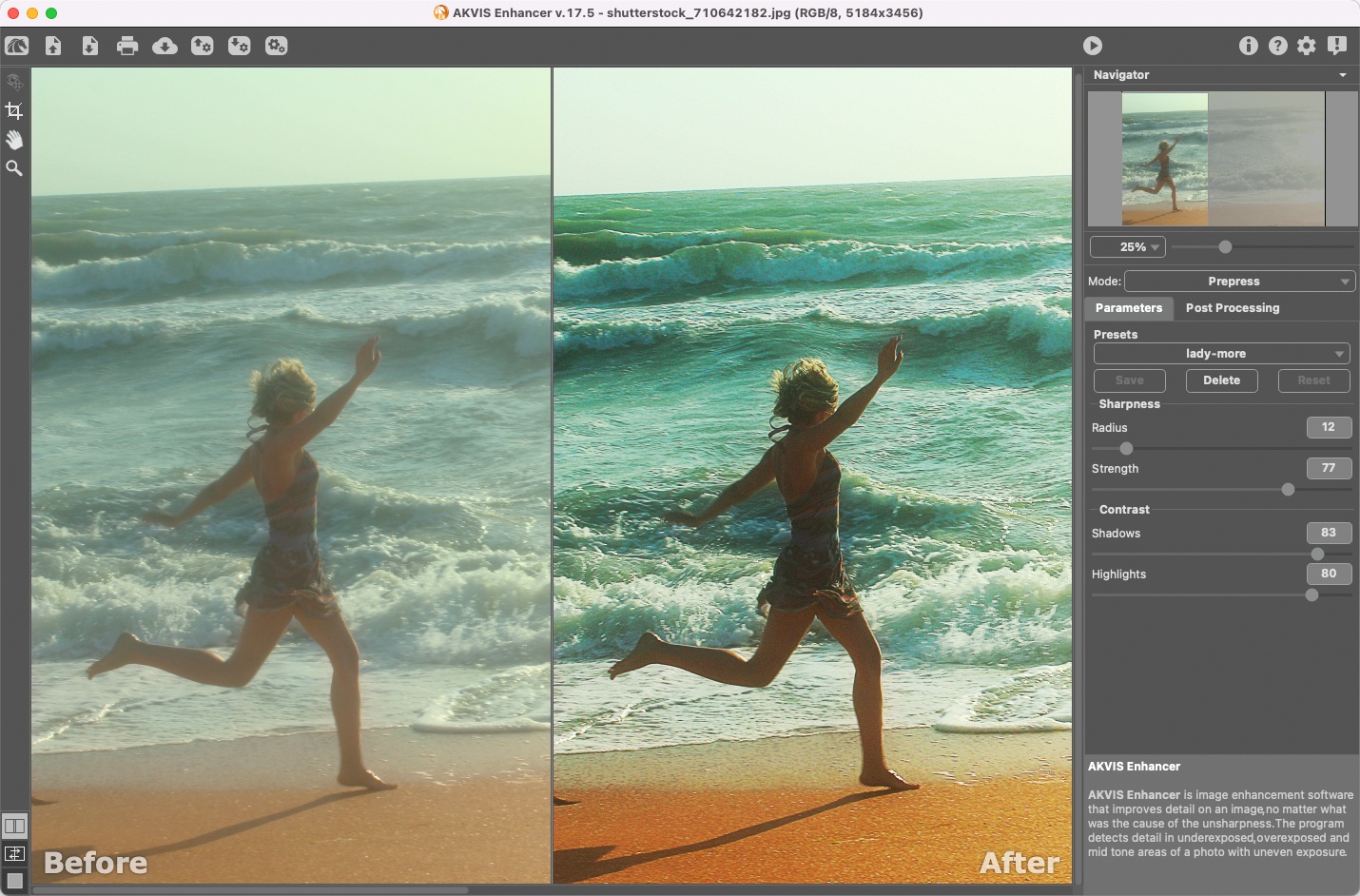
Prepress mode with a Before and After split view. The title bar shows version 17.5, and the current 17.8 keeps this design.
The recent updates are about upkeep rather than new tools. Version 17.5 redesigned the interface, 17.6 added native Apple M1 support, and 17.7 and 17.8 brought RAW and macOS updates and bug fixes.
Features
Improve Detail mode
AKVIS Enhancer strengthens the difference between adjacent pixels of different tones here, which reveals detail in both shadows and highlights. It is the mode for uneven exposure, haze and low light, and the fastest way to fix a dark photo.
Prepress mode
AKVIS Enhancer sharpens edges and raises contrast in this mode, to prepare an image for print or online publishing. It has separate Sharpness and Contrast settings, and AKVIS suggests it even for good photos.
Tone Correction mode
AKVIS Enhancer adjusts brightness in light and dark areas here, across the entire image or for selected colors only.
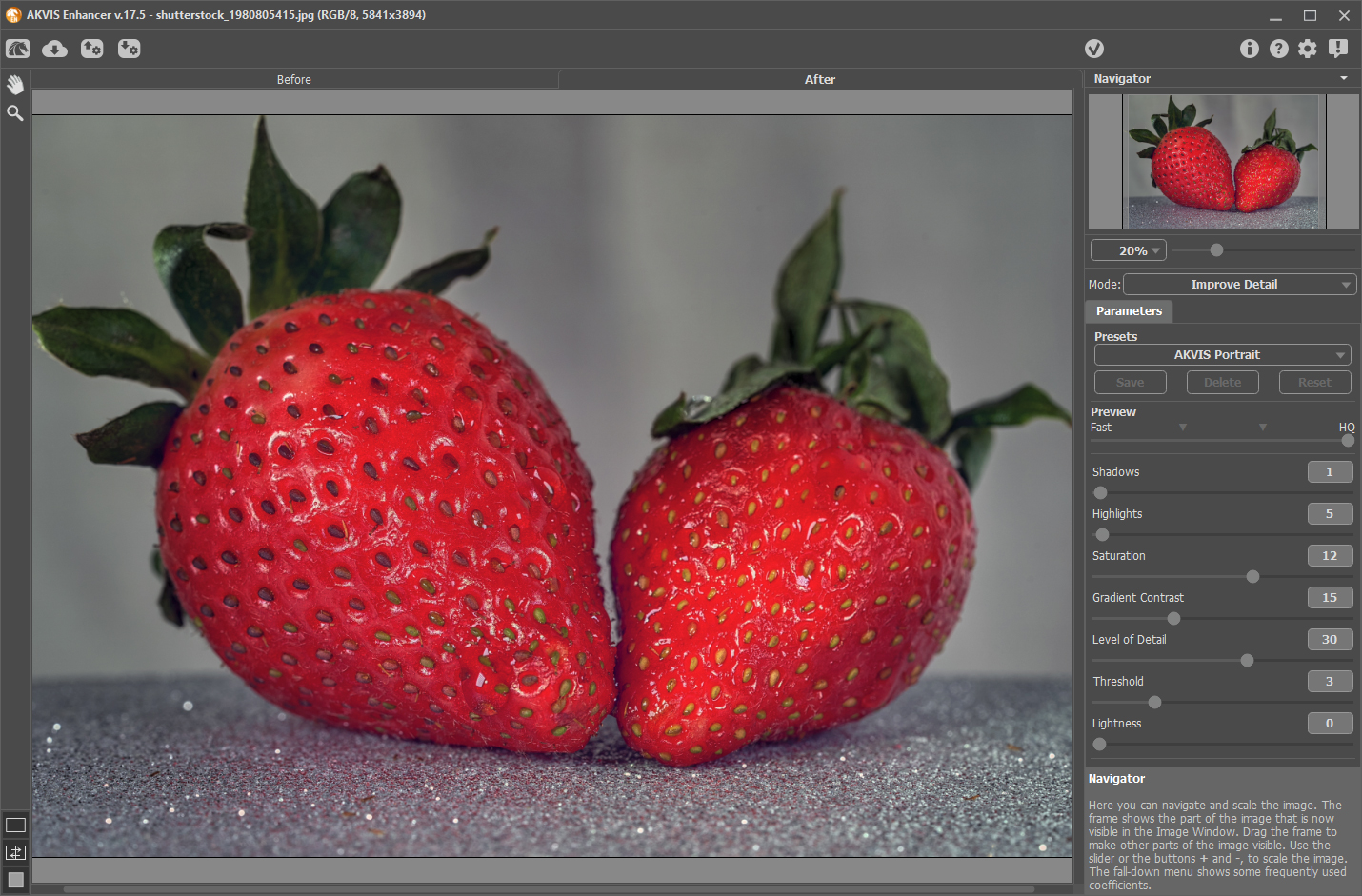
Improve Detail mode on a close-up, with sliders for Shadows, Highlights, Saturation, Gradient Contrast and Level of Detail.
Presets and batch processing
AKVIS Enhancer lets you save your settings as presets and apply them to a folder of images. Batch processing is on every license.
Technical images
AKVIS Enhancer is not only for art photos. AKVIS points to equipment illustrations in technical books and to X-rays, where showing fine detail matters.
Benefits
The gain is rescue. Pictures you would have thrown away, such as a dark indoor shot or a hazy landscape, can become usable, and you can do it in a few moves rather than with layers of masks. Because the three modes can be combined, you can fix the detail first and tune the tone afterwards.
Real-World Uses
- Dark indoor photos: lift a family gathering shot taken without a flash.
- Hazy landscapes: use the Dehaze preset on a distant mountain view.
- Print preparation: sharpen a batch of product images before they go to the printer, on a Business license.
- Technical illustration: bring out detail in a diagram photo or a medical image for a book.
Who It's For, and Who Should Skip It
AKVIS Enhancer suits home users with underexposed photos, and Photoshop users who want a fast detail filter.
Skip it if you already process RAW files in a tool with strong shadow and clarity controls, since you may already have most of this. Skip it too if you want AI upscaling or sharpening of blurry photos: Enhancer is a detail and tone tool, and AKVIS sells Refocus AI and Magnifier AI for those jobs.
Usage Guide
- Download the installer and run it. The Windows setup contains the standalone and the plugin.
- Open a photo in the standalone app, or call the plugin from your editor.
- Choose a mode: Improve Detail, Prepress or Tone Correction.
- Pick a preset, then adjust the sliders and compare Before and After.
- Press Run. In the standalone app, you can fine-tune with the Post Processing settings.
- Save the image, or set up batch processing for a folder.
Where it falls short
- It is easy to overdo. High settings give a heavy, dramatic look, which AKVIS shows off in its own examples, so go lightly on portraits.
- No new correction tools lately. The version notes from 17.5 to 17.8 list interface, compatibility and bug fixes, not new modes.
- Home Plugin versus Home Standalone. Each gives up something: the plugin has no Post Processing settings, and the standalone has no PSD.
What Users Say
Coverage of AKVIS Enhancer is older than for the newer AI programs. We found no negative reviews, but we also found no sizeable set of recent ratings on the big software review sites, so this says more about long-time users than about version 17.8.
Reviewers
"Enhancer is a useful program. I encourage you to try it." Willis Irons, Tucson Computer Society, April 2010
"These components use different algorithms to target specific parameters and one of the great features of the program is that users can apply all three tools to improve results." Mircea Saveanu, Softpedia, March 2019
Users, on the AKVIS testimonials page
"I have used AKVIS software for a long time and still have the Enhancer on my computer... I use it to do graphic art.. LOVE IT" Maurizio Martinoli
"The Enhancer was very useful." Arsen Pankovich, Clinical Professor of Orthopedic Surgery, New York University Medical Center
"But with AKVIS Enhancer, I got immediately good results." Holger Gerlach
People like how fast it gets a result, and several have kept it for years. These are mostly vendor-selected testimonials, so read them as evidence of use, not as independent tests.
Editions and Pricing
| License | Price at checkout | Edition | Use | What you get |
|---|
| Home Standalone | $69 | Standalone app only | Personal, non-commercial | All three modes, Post Processing settings, no PSD |
| Home Plugin | $69 | Plugin only | Personal, non-commercial | All three modes, PSD |
| Home Deluxe | $99 | Plugin and standalone | Personal, non-commercial | Both editions, same modes |
| Business | $170 | Plugin and standalone | Commercial use allowed | Both editions, commercial use |
Buy Home Standalone ($69)Buy Home Plugin ($69)Buy Home Deluxe ($99)Buy Business ($170)
FAQs
Does the AKVIS Enhancer Home license include all three modes?
Yes. AKVIS Enhancer has Improve Detail, Prepress and Tone Correction on every license, including Home.
Is AKVIS Enhancer an AI tool?
AKVIS does not describe AKVIS Enhancer as AI. It uses image processing algorithms based on contrast between pixels, and the AKVIS programs that use neural networks carry "AI" in their names.
Does AKVIS Enhancer support RAW files?
Yes. AKVIS Enhancer opens RAW and DNG files as well as TIFF, JPEG, BMP, PNG and WEBP. PSD works in the plugin only.
Is AKVIS Enhancer a one-time purchase?
Yes, AKVIS Enhancer is a one-time purchase and the license never expires. Updates after your update period cost $19.95 for one year.
Can I run AKVIS Enhancer on two computers?
Yes. Each AKVIS Enhancer license registers on 2 computers, including a mix of operating systems.
Does AKVIS Enhancer run on Apple Silicon?
Yes. AKVIS Enhancer added native Apple M1 support in version 17.6.
System Requirements
- Windows: Windows 7-11, 32 or 64-bit. Minimum Pentium IV and 4 GB RAM, recommended Core i5 and 8 GB RAM.
- macOS: 10.12 Sierra to macOS 27, 64-bit. Minimum Intel and 4 GB RAM, recommended Intel or M1 and 8 GB RAM.
- Linux: 64-bit Debian, Ubuntu, Red Hat, CentOS, Fedora or openSUSE, standalone only. Minimum Core i3 and 8 GB RAM, recommended Core i5 and 16 GB RAM.
- Plugin: needs a photo editor that supports plugins.
Conclusion
AKVIS Enhancer is worth $69 if you regularly fight dark or hazy photos and don't already own strong RAW tools. It is also one of the few AKVIS programs where the Home license is a fair buy. The reason to buy is a quick, focused fix for detail and tone. The main reason not to is that modern editors can do much of this already. Test the trial on your darkest photos.
Download Free TrialBuy Now