Devart SSIS Data Flow Components for SugarCRM: SugarCRM Data in SSIS Packages
Devart SSIS Data Flow Components for SugarCRM add a SugarCRM source, destination and lookup to SQL Server Integration Services 2012 to 2025, from $179.95 a year (Standard or Developer) or $449.95 a year for a Server license. They read contacts, accounts, opportunities, cases and other SugarCRM modules with SQL and write changes back with Sugar's bulk API. They support SugarCRM 7.0 and later, but not the Community edition. They're for SQL Server teams that sync or report on SugarCRM data.
CRM data rarely stays in the CRM. Finance wants opportunities next to invoices, support wants cases next to product data, and someone always asks for a nightly copy in SQL Server. If your company runs SugarCRM and SSIS, these components connect the two without a custom REST integration.
Quick facts
- Version: 5.2.145, released November 19, 2026 (one installer for all Devart SSIS components)
- Developer: Devart
- Works with: SQL Server Integration Services 2012, 2014, 2016, 2017, 2019, 2022 and 2025, in Visual Studio or SSDT
- Platforms: Windows Vista and later, 32-bit and 64-bit, .NET Framework 4.5
- Download: 616.24 MB, free Devart account required
- SugarCRM: version 7.0 or later; Community edition not supported
- Sign-in: SugarCRM host URL, user name and password
- Price: Standard or Developer $179.95 a year or $349.95 perpetual; Server $449.95 or $899.95; Site (10 to 100 devices) $499.95 or $999.95
- Trial: 30 days
- Refunds: Devart's ordering FAQ gives refunds within 30 days when a technical problem stops the product working and support can't fix it
What we checked: version 5.2.145 and the 616.24 MB installer on the download page, the supported SSIS versions on the compatibility page, the SugarCRM connection options in Devart's documentation, the SugarCRM entries in the revision history back to 2017, and the order page, which charged $179.95 and $349.95 for Standard and for Developer, $449.95 and $899.95 for Server, $499.95 and $999.95 for Site (10 to 100 devices) and $2,499.95 and $4,999.95 for Site (100+ devices), 1-year subscription and perpetual, with no discount applied, on November 27, 2026. We didn't run a package against a live SugarCRM account.
Download Free TrialBuy Standard, 1 Year ($179.95)Buy Developer, 1 Year ($179.95)Buy Server, 1 Year ($449.95)
Overview
The Devart Sugar Connection Manager needs the SugarCRM login URL (Host), a user name and password. Optional settings include the SugarCRM Platform value used by Sugar's REST API, a Metadata Cache file to speed up opening large instances, certificate-mismatch overrides for self-hosted servers, a read-only mode and proxy settings.
The three components are Sugar Source, Sugar Destination and Sugar Lookup. The destination has used Sugar's bulk API since 2018. Version 5.0.0 (June 2026) added three report types as objects: RowsAndColumns, Summation and SummationWithDetails, so saved Sugar reports can be read like tables.
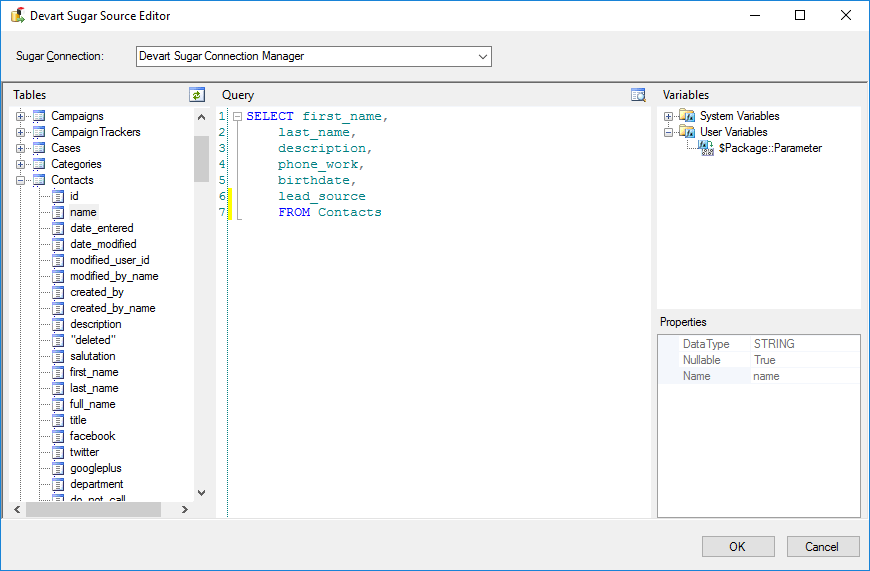
The Devart Sugar Source editor: SugarCRM modules (Campaigns, Cases, Contacts) and their fields on the left, a SELECT of contact names, phone and lead source in the middle.
Features
Sugar Source with SQL
Devart SSIS Data Flow Components for SugarCRM read SugarCRM modules such as Contacts, Accounts, Opportunities, Cases and Campaigns with SQL SELECT statements, with preview and package variables in the editor.
Sugar reports as tables
Devart SSIS Data Flow Components for SugarCRM expose RowsAndColumns, Summation and SummationWithDetails reports as objects since June 2026, so a saved Sugar report can feed a data flow.
Bulk writes
Devart SSIS Data Flow Components for SugarCRM write with INSERT, UPDATE and DELETE, and the Sugar Destination uses SugarCRM's bulk API for speed.
Sugar Lookup
Devart SSIS Data Flow Components for SugarCRM include a lookup that checks several rows per request and caches results.
Self-hosted friendly
Devart SSIS Data Flow Components for SugarCRM can ignore certificate name mismatches or untrusted root certificates, useful for on-premises SugarCRM servers with internal certificates.
Benefits
- CRM data next to finance and support data in SQL Server.
- No custom REST code. A host, user and password instead of OAuth plumbing.
- Long history. SugarCRM support dates to Devart's earliest SSIS releases, with fixes through 2026.
- Two-way sync from the same package.
Real-World Uses
- A finance team loads closed opportunities into SQL Server each night to match them with invoices.
- A support lead copies Cases into a warehouse for SLA trend reporting.
- A data team syncs account records from an ERP into SugarCRM with the bulk destination.
- An analyst feeds a saved Sugar summation report straight into an SSIS package.
Who It's For, and Who Should Skip It
It's for companies on SugarCRM 7.0 or later whose ETL runs on SSIS.
Skip it if you run SugarCRM Community Edition or an old 6.x release, which aren't supported, or if you don't use SSIS. SuiteCRM, the open-source fork of Sugar's Community Edition, isn't listed either. For Excel reporting without SSIS, Devart's Excel Add-in for SugarCRM or ODBC Driver for SugarCRM costs less.
Usage Guide
- Install the components on developer machines and the SSIS server.
- Add a Devart Sugar Connection Manager with Host (your SugarCRM login URL), User Id and Password; set Platform if your instance requires a custom one.
- Add a Devart Sugar Source, pick a module or report, write the SELECT and preview it.
- Map the output to SQL Server, or add a Sugar Destination to write back.
- Deploy and schedule; license Developer for building and Server for the production server.
Before you buy
- Check your edition. SugarCRM 7.0 or later only, and not Community Edition.
- Production needs a Server or Site license.
- Standard is the order page's default and costs the same as Developer.
- Use an API-capable user. The account's permissions decide which modules you see.
Where it falls short
- No Community Edition or SuiteCRM.
- Password sign-in only in the documented options, rather than per-application API keys.
- Learning curve for SSIS newcomers, as reviewers of the line mention.
- Two licenses for most teams.
What Users Say
We found no reviews of the SugarCRM components on their own. The reviews that exist cover Devart's SSIS Data Flow Components as a line, which share one installer, editor design and support team.
Capterra
Capterra rates Devart's SSIS Data Flow Components 4.6 out of 5 from 12 reviews, with ease of use and customer service each at 4.3. Praise centres on ease of use; criticism covers a learning curve for people new to SSIS.
G2
G2 rates Universal SSIS Components by Devart, the bundle that contains every connector, 4.5 out of 5 from 20 reviews. Reviewers like that the components behave like the built-in SSIS ones and handle large data volumes; the drawbacks they mention are the learning curve for beginners and limited usability for non-developers.
SugarCRM fixes run through the shared release record for years: metadata fixes in 2017 and 2020, TLS 1.2 in December 2019, an "autoincrement" type error in 2023, and the report objects in June 2026.
Comparisons
vs. a custom REST integration
SugarCRM's REST API is free to use but needs OAuth, paging and bulk handling written by you. The components package that into SSIS.
vs. Devart ODBC Driver for SugarCRM
The ODBC driver serves Excel, Power BI and other tools, and SSIS through an ODBC source. The SSIS components add a bulk destination, lookup and the Sugar-aware editor.
vs. SSIS Universal Bundle
The bundle includes SugarCRM and 48+ other sources from $499.95 a year.
Editions and Pricing
Devart's ordering page lists three licenses for Devart SSIS Data Flow Components for SugarCRM (Developer, Server and Site for 10 to 100 devices); the order page also offers Standard, which it selects by default, and a Site license for more than 100 devices. Each is sold as a 1-year subscription or a perpetual license. Each button opens the order page with that license and term selected; 2- or 3-year subscriptions and priority support can be chosen there.
| License | 1-year subscription | Perpetual | Covers | Buy |
|---|
| Standard | $179.95 | $349.95 | The license the order page selects by default, same price as Developer | Buy 1 year Buy perpetual |
| Developer | $179.95 | $349.95 | One developer, on one or more workstations, for development and testing | Buy 1 year Buy perpetual |
| Server | $449.95 | $899.95 | Deploying packages on one server, plus one developer's workstations | Buy 1 year Buy perpetual |
| Site (10 to 100 devices) | $499.95 | $999.95 | Unlimited computers in one company, 10 to 100 devices | Buy 1 year Buy perpetual |
| Site (100+ devices) | $2,499.95 | $4,999.95 | More than 100 devices in one company | Buy 1 year Buy perpetual |
All ten prices were read on the order page on November 27, 2026, with no discount applied. A Developer license covers building and testing packages; running them on a production SSIS server takes a Server or Site license.
FAQs
Which SugarCRM versions do Devart SSIS Data Flow Components for SugarCRM support?
Devart SSIS Data Flow Components for SugarCRM support SugarCRM 7.0 or higher, but not SugarCRM Community Edition.
Do Devart SSIS Data Flow Components for SugarCRM work with SuiteCRM?
SuiteCRM isn't among the supported systems. Devart SSIS Data Flow Components for SugarCRM are documented for SugarCRM 7.0 and later.
Which SSIS versions do Devart SSIS Data Flow Components for SugarCRM support?
Devart SSIS Data Flow Components for SugarCRM support SQL Server Integration Services 2012, 2014, 2016, 2017, 2019, 2022 and 2025.
Can Devart SSIS Data Flow Components for SugarCRM read Sugar reports?
Yes. Since version 5.0.0, Devart SSIS Data Flow Components for SugarCRM expose RowsAndColumns, Summation and SummationWithDetails reports as objects.
Do Devart SSIS Data Flow Components for SugarCRM work with a self-hosted SugarCRM?
Yes. Devart SSIS Data Flow Components for SugarCRM connect to any SugarCRM host URL and can ignore certificate mismatches or untrusted certificates on internal servers.
Do I need a Server license for Devart SSIS Data Flow Components for SugarCRM?
Yes, to run packages on a production SSIS server; Developer licenses of Devart SSIS Data Flow Components for SugarCRM cover development and testing.
System Requirements
- Windows Vista or later, 32-bit or 64-bit, with .NET Framework 4.5
- SQL Server Integration Services 2012 to 2025
- Visual Studio or SQL Server Data Tools with Integration Services projects
- SugarCRM 7.0 or later (not Community Edition) and a user account