Devart SSIS Data Flow Components for Slack: Slack as a Source and Destination in SSIS
Devart SSIS Data Flow Components for Slack add a Slack source, destination and lookup to SQL Server Integration Services 2012 to 2025, from $149.95 a year (Standard or Developer) or $379.95 a year for a Server license. You read channels, message history, users and other Slack objects with SQL inside an SSIS data flow, and write rows back to Slack. It's for SQL Server teams that need Slack data in a warehouse, or want packages to post into Slack.
Slack holds a surprising amount of business data: who said what in which channel, which bots posted alerts, how busy support channels are. Getting it into SQL Server usually means a custom script against the Slack Web API and a scheduler to run it. If your ETL already runs on SSIS, these components make Slack one more source and destination in the same packages.
Quick facts
- Version: 5.2.145, released November 19, 2026 (one installer for all Devart SSIS components)
- Developer: Devart
- Works with: SQL Server Integration Services 2012, 2014, 2016, 2017, 2019, 2022 and 2025, in Visual Studio or SSDT
- Platforms: Windows Vista and later, 32-bit and 64-bit, .NET Framework 4.5
- Download: 616.24 MB, free Devart account required
- Sign-in: a browser sign-in to Slack; the OAuth token is generated automatically
- Price: Standard or Developer $149.95 a year or $299.95 perpetual; Server $379.95 or $749.95; Site (10 to 100 devices) $499.95 or $999.95
- Trial: 30 days
- Refunds: Devart's ordering FAQ gives refunds within 30 days when a technical problem stops the product working and support can't fix it
What we checked: version 5.2.145 and the 616.24 MB installer on the download page, the supported SSIS versions on the compatibility page, the Slack connection options in Devart's documentation, the revision history, where Slack support dates from September 2021, and the order page, which charged $149.95 and $299.95 for Standard and for Developer, $379.95 and $749.95 for Server, $499.95 and $999.95 for Site (10 to 100 devices) and $2,499.95 and $4,999.95 for Site (100+ devices), 1-year subscription and perpetual, with no discount applied, on November 27, 2026. We didn't run a package against a live Slack account.
Download Free TrialBuy Standard, 1 Year ($149.95)Buy Developer, 1 Year ($149.95)Buy Server, 1 Year ($379.95)
Overview
After installing, you add a Devart Slack Connection Manager to your SSIS project and click Sign In; Slack's own login page opens in the browser and the token is generated for you. Three components then appear in the SSIS toolbox: Slack Source, Slack Destination and Slack Lookup.
The source editor lists Slack objects such as PublicChannelsHistory with their fields, and you write or drag together a SELECT. Simple statements become Slack API calls; complex ones with grouping or joins are finished locally by a SQL engine you can switch off (Local SQL Engine). Advanced options include Readonly mode, SuppressExtendedRequests to save API calls, a Token Server file or registry key that keeps refreshed tokens between package runs, proxy settings and a source time zone.
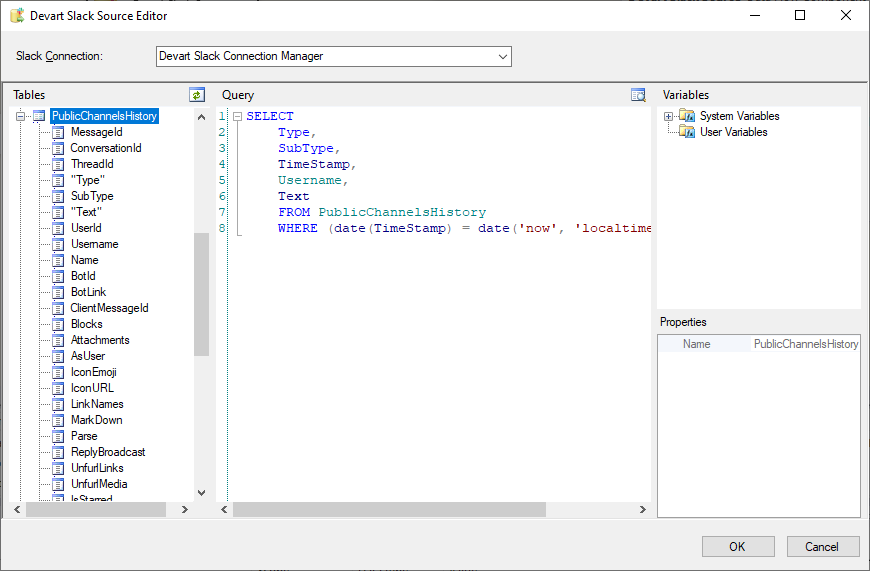
The Devart Slack Source editor: Slack objects and fields on the left, a SELECT of today's messages from PublicChannelsHistory in the middle, package variables on the right.
Features
Slack Source with SQL
Devart SSIS Data Flow Components for Slack read Slack data with SQL SELECT statements, including filters, grouping and ordering, and the editor can preview the rows before you run the package.
Slack Destination
Devart SSIS Data Flow Components for Slack write to Slack with INSERT, UPDATE and DELETE operations from an SSIS data flow.
Slack Lookup
Devart SSIS Data Flow Components for Slack include a lookup that checks several rows per request and caches results to cut round trips to Slack.
Token handling for scheduled runs
Devart SSIS Data Flow Components for Slack can store refreshed OAuth tokens in a Token Server file or registry key, so packages run by SQL Server Agent don't need a fresh sign-in.
Variables in queries
Devart SSIS Data Flow Components for Slack show package system and user variables in the source editor so you can drop them into a query, for example to read only messages since the last run.
Benefits
- One ETL tool. Slack joins the SSIS packages you already maintain, with SQL Server Agent scheduling and logging.
- SQL instead of API code. No pagination loops or rate-limit handling to write.
- Two-way. Packages can post rows into Slack as well as read from it.
- Same tools as other sources. Devart's components for 48+ sources share the editor design.
Real-World Uses
- A support manager loads support-channel message counts into SQL Server every night for a workload report.
- A compliance team archives public channel history into a database it controls.
- A data team syncs Slack users into an HR reporting table to match accounts with employees.
- An ETL package posts a summary row into a Slack channel when a nightly load finishes.
Who It's For, and Who Should Skip It
It's for SQL Server and SSIS teams that need Slack data in their warehouse, or Slack output from their packages, and don't want a separate integration service for one source.
Skip it if you don't use SSIS: Devart's ODBC Driver for Slack or a Python script fits better. Skip it if you only want alerts in Slack, which an incoming webhook does for free. And Slack is one of the less actively developed connectors in the line: the revision history shows no Slack-specific change since support was added in September 2021, so test the objects you need in the trial.
Usage Guide
- Download the installer (free Devart account needed) and run it on the machines with Visual Studio/SSDT and on the SSIS server.
- In your SSIS project, add a Devart Slack Connection Manager and click Sign In to authorize Slack in the browser.
- Set a Token Server path if the package will run unattended.
- Drag a Devart Slack Source into a data flow, pick the connection, and write or build a SELECT; preview the data.
- Map the output to a SQL Server destination (or add a Slack Destination to write back), then run or schedule the package.
- Activate the license before the 30-day trial ends: Developer for building, Server for the production SSIS server.
Before you buy
- Developer licenses don't cover production. Deploying packages to an SSIS server takes a Server ($379.95 a year) or Site license.
- Standard is the order page's default and costs the same as Developer.
- Slack API limits apply, and some message history depends on your Slack plan.
- The installer is large (616 MB) because it holds every Devart SSIS component; your license covers the Slack components only.
Where it falls short
- Little Slack-specific development. No Slack-specific fixes or new objects are listed since September 2021.
- Documentation is a parameter list. The Slack page in Devart's docs covers connection options, not the objects and their limits.
- Learning curve. Reviewers of the line mention it for people new to SSIS.
- Two licenses for most teams. Developer plus Server, or a Site license.
What Users Say
We found no reviews of the Slack components on their own. The reviews that exist cover Devart's SSIS Data Flow Components as a line, which share one installer, editor design and support team.
Capterra
Capterra rates Devart's SSIS Data Flow Components 4.6 out of 5 from 12 reviews, with ease of use and customer service each at 4.3. Praise centres on ease of use; criticism covers a learning curve for people new to SSIS.
G2
G2 rates Universal SSIS Components by Devart, the bundle that contains every connector, 4.5 out of 5 from 20 reviews. Reviewers like that the components behave like the built-in SSIS ones and handle large data volumes; the drawbacks they mention are the learning curve for beginners and limited usability for non-developers.
The shared release record shows regular builds: January, March, June, August and November 2026, with SSIS 2025 support added in January.
Comparisons
vs. a custom script
A script against the Slack Web API is free but needs pagination, rate-limit handling and its own scheduler. The components put Slack inside SSIS with SQL.
vs. Devart ODBC Driver for Slack
The ODBC driver serves Excel, Power BI and any ODBC tool, and SSIS through an ODBC source. The SSIS components add a native destination and lookup and a Slack-aware editor.
vs. SSIS Universal Bundle
At $499.95 a year the bundle includes Slack and 48+ other sources, a better buy if you need three or more.
Editions and Pricing
Devart's ordering page lists three licenses for Devart SSIS Data Flow Components for Slack (Developer, Server and Site for 10 to 100 devices); the order page also offers Standard, which it selects by default, and a Site license for more than 100 devices. Each is sold as a 1-year subscription or a perpetual license. Each button opens the order page with that license and term selected; 2- or 3-year subscriptions and priority support can be chosen there.
| License | 1-year subscription | Perpetual | Covers | Buy |
|---|
| Standard | $149.95 | $299.95 | The license the order page selects by default, same price as Developer | Buy 1 year Buy perpetual |
| Developer | $149.95 | $299.95 | One developer, on one or more workstations, for development and testing | Buy 1 year Buy perpetual |
| Server | $379.95 | $749.95 | Deploying packages on one server, plus one developer's workstations | Buy 1 year Buy perpetual |
| Site (10 to 100 devices) | $499.95 | $999.95 | Unlimited computers in one company, 10 to 100 devices | Buy 1 year Buy perpetual |
| Site (100+ devices) | $2,499.95 | $4,999.95 | More than 100 devices in one company | Buy 1 year Buy perpetual |
All ten prices were read on the order page on November 27, 2026, with no discount applied. A Developer license covers building and testing packages; running them on a production SSIS server takes a Server or Site license.
FAQs
Which SSIS versions do Devart SSIS Data Flow Components for Slack support?
Devart SSIS Data Flow Components for Slack support SQL Server Integration Services 2012, 2014, 2016, 2017, 2019, 2022 and 2025.
How do Devart SSIS Data Flow Components for Slack sign in to Slack?
Devart SSIS Data Flow Components for Slack open Slack's login page in the browser when you click Sign In and generate the OAuth token automatically; no API key needs to be created by hand.
Can Devart SSIS Data Flow Components for Slack run in scheduled packages?
Yes. Devart SSIS Data Flow Components for Slack can keep refreshed tokens in a Token Server file or registry key, so SQL Server Agent jobs run without signing in again.
Can Devart SSIS Data Flow Components for Slack run only simple queries against Slack?
Yes. Devart SSIS Data Flow Components for Slack have a Local SQL Engine option; turn it off and only statements that translate directly into Slack API calls run, so nothing is processed in a local cache.
Do I need a Server license for Devart SSIS Data Flow Components for Slack?
Yes, to run packages on a production SSIS server. A Developer license of Devart SSIS Data Flow Components for Slack covers building and testing on developer workstations.
Is a read-only mode available in Devart SSIS Data Flow Components for Slack?
Yes. Devart SSIS Data Flow Components for Slack have a Readonly connection option that allows only SELECT statements.
System Requirements
- Windows Vista or later, 32-bit or 64-bit, with .NET Framework 4.5
- SQL Server Integration Services 2012 to 2025
- Visual Studio or SQL Server Data Tools with Integration Services projects
- A Slack workspace account
Conclusion
Devart SSIS Data Flow Components for Slack are worth $149.95 a year for development plus $379.95 for a server if your ETL runs on SSIS and Slack data has to land in SQL Server. The one reason to buy them is Slack as a normal SQL source and destination inside packages you already run. The main reasons not to are that Slack is a quietly maintained connector in Devart's line, and that teams outside SSIS are better served by the ODBC driver or a script.
Download Free TrialBuy Standard, 1 Year ($149.95)Buy Developer, 1 Year ($149.95)Buy Server, 1 Year ($379.95)