AKVIS Draw: Turn Photos Into Hand-Drawn Pencil Sketches and Line Art
AKVIS Draw is a photo-to-drawing program for Windows, Mac and Linux that turns a photo into a hand-drawn pencil sketch or line drawing in one click, with presets, stroke controls, an eraser and pencil for touch-ups, and canvas, frame and text decoration. It runs standalone or as a plugin for Photoshop, AliveColors and PaintShop Pro. A Home license is $49 for life on two computers (plugin or standalone, black-and-white sketches); Home Deluxe with color drawings is $69, and Business $89.
Most "pencil sketch" filters in photo editors just trace edges and leave a washed-out gray image. AKVIS Draw builds the picture from pencil strokes and hatching, so the result looks drawn rather than filtered.
Quick facts
- Developer: AKVIS
- Version: 10.1 (version 10.0 added a Presets gallery and new textures)
- Platforms: Windows 7 to 11 (32 and 64-bit), macOS 10.12 Sierra to macOS 27, Linux 64-bit (standalone only)
- Plugin hosts: AliveColors, Adobe Photoshop, Corel PaintShop Pro and other editors that take AKVIS plugins
- Price: Home Plugin or Home Standalone $49, Home Deluxe $69, Business $89, all lifetime licenses for 2 computers
- Trial: 10 days, all features, no registration
- What we checked: the 64-bit Windows installer on November 22, 2026: akvis-draw-setup-x64.exe, 73.5 MB, AKVIS Draw version 10.1.761; and the order page on November 22, 2026: Home Standalone $49.00, Home Plugin $49.00, Home Deluxe $69.00 and Business $89.00. We didn't convert our own photos.
Before you buy
- Color drawings need Home Deluxe or Business. Home licenses make black-and-white sketches only, and also lack Blend Modes and the History Brush.
- Home means one edition: plugin or standalone. Home and Home Deluxe are for non-commercial use; selling the drawings or client work needs Business.
- Draw is the stylized one. AKVIS says its Sketch program gives a photo-realistic pencil drawing, while Draw gives a freer, hand-drawn interpretation. Compare both in their trials if realism matters.
- Lifetime license, paid updates later: newer versions after the update period cost $19.95 for a year of updates.
Download Free TrialBuy Home Standalone ($49)Buy Home Plugin ($49)Buy Home Deluxe ($69)Buy Business ($89)
Overview
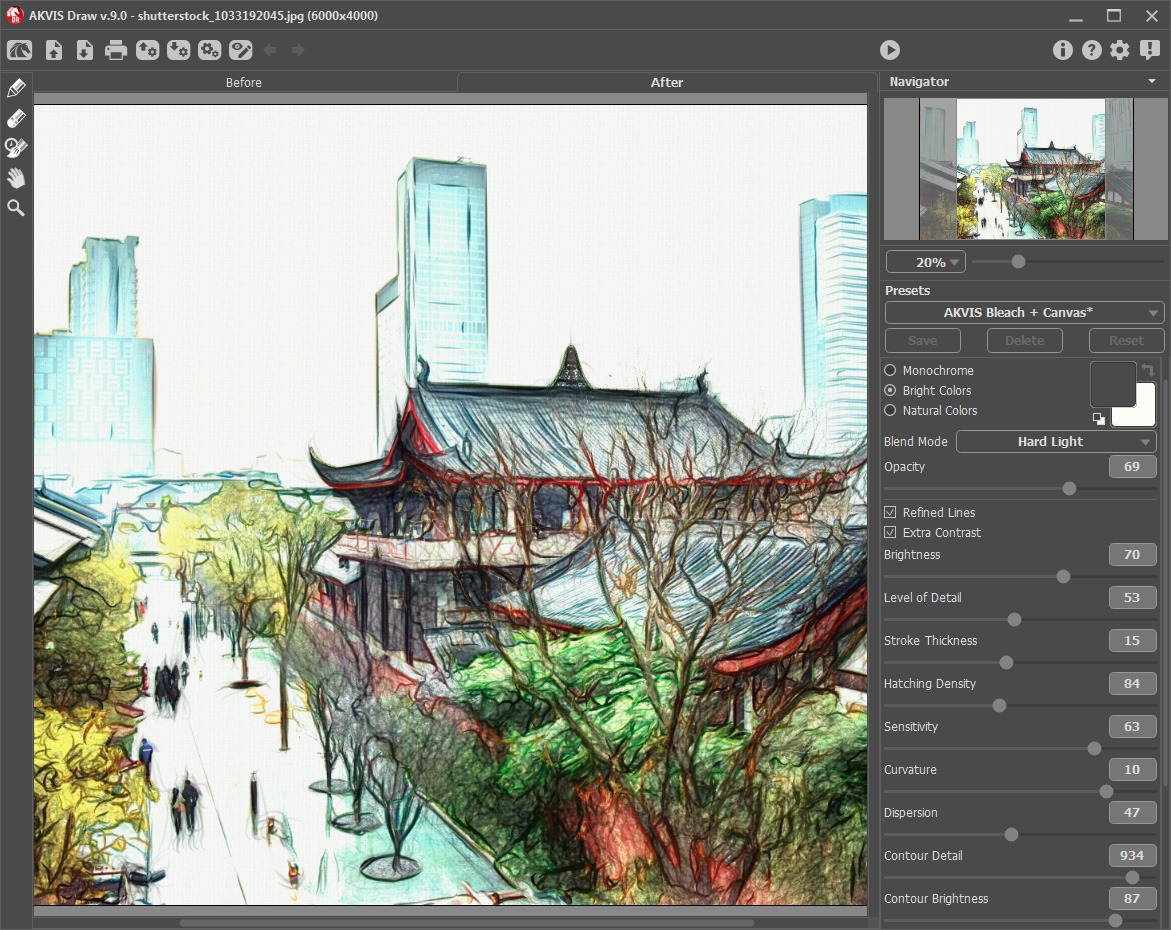
Draw opens with Before and After tabs and two ways to work. Presets shows a gallery of styles rendered on your own photo, such as AKVIS Sketchbook + Canvas or AKVIS Master, so you can pick by eye. Parameters gives the controls: Monochrome, Bright Colors or Natural Colors, Blend Mode and Opacity to let the photo show through, Refined Lines and Extra Contrast, and sliders for brightness, level of detail, stroke thickness, hatching density, sensitivity, curvature, dispersion and contour detail.
The Decoration tab puts the drawing on canvas or paper texture, adds a frame and a signature or text. Effect-area tools limit the drawing to part of the image for a photo-and-sketch mix, and the Eraser and Pencil let you remove stray lines or add strokes by hand.
AKVIS Draw 10.0 on Windows: a portrait as a pencil drawing with the AKVIS Sketchbook + Canvas preset, Natural Colors and the stroke sliders.
Features
One-click pencil drawings
AKVIS Draw converts a photo into a pencil sketch built from strokes and hatching, and the Presets gallery shows each style on your own picture before you choose.
Detailed stroke control
AKVIS Draw has sliders for level of detail, stroke thickness, hatching density, curvature, dispersion and contour detail, so you can go from a loose sketch to a dense study.
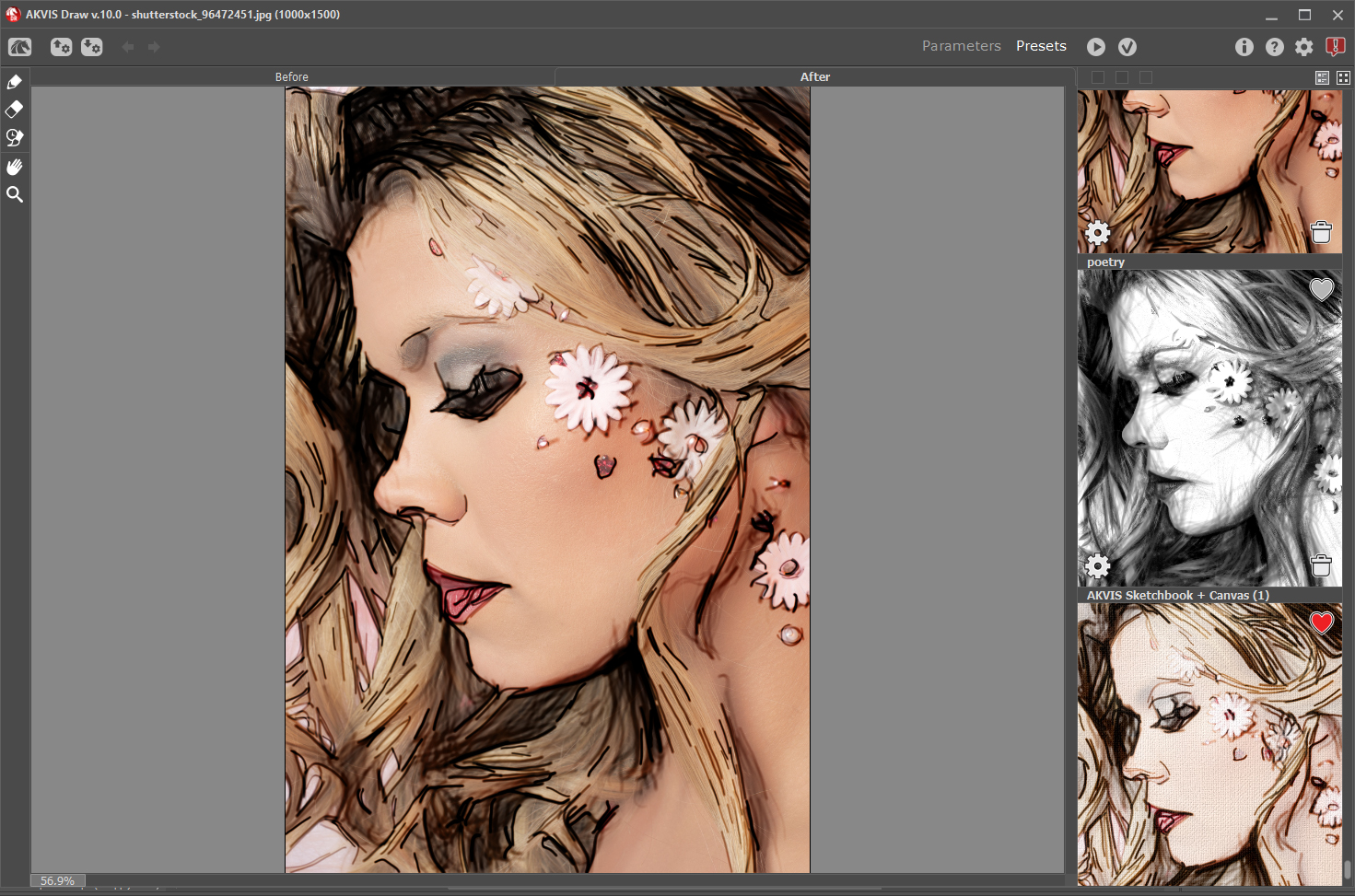
The Presets view: styles such as "poetry" and AKVIS Sketchbook + Canvas previewed on the open photo; the main window shows a color drawing.
Color drawings and blending
AKVIS Draw Home Deluxe and Business add Bright and Natural Colors and Blend Modes that mix the photo back in for a comic or watercolor-pencil look.
Hand touch-ups
AKVIS Draw includes an Eraser and a Pencil to remove extra lines and add finishing strokes, plus effect-area tools to keep part of the photo untouched.

A monochrome line drawing with the AKVIS Master preset on macOS, with Refined Lines on.
Canvas, frames and signature
AKVIS Draw's Decoration tab adds paper or canvas texture, a frame and text, so a drawing is ready to print or post.
Batch processing
AKVIS Draw can turn a folder of photos into drawings with the same settings, in every license.
Benefits
- Looks drawn, not filtered: strokes and hatching instead of edge detection.
- Quick: pick a preset and you have a result; tweak only when you want to.
- A base for other art effects: AKVIS suggests using Draw as one stage before its ArtWork, OilPaint, Pastel or Charcoal programs.
- Pay once for a lifetime license.
Real-World Uses
- A drawn portrait as a gift, printed on canvas texture with a signature.
- Storyboards and sketchbooks from a series of photos via batch processing.
- Line art for coloring pages or as a base layer for digital painting.
- Comic-style images by blending a color drawing with the photo (Deluxe).
Who It's For, and Who Should Skip It
It's for hobbyists, crafters and designers who want convincing pencil and line drawings from photos with a choice of styles and real control, in their editor or on their own.
Skip it if you want a photo-realistic graphite drawing: AKVIS Sketch is the better fit for that. If you need color drawings, Home won't do; buy Deluxe. And for an occasional social post, free sketch filters in phone apps may be enough.
Usage Guide
- Install the trial and open a photo in AKVIS Draw, or start the plugin from your editor.
- Browse the Presets gallery and pick a style.
- Fine-tune in Parameters: color mode, detail, stroke thickness and hatching.
- Clean up with the Eraser and Pencil, then add canvas, a frame or a signature in Decoration.
- Run and save, or use Batch Processing for a folder.
Where it falls short
- Home is black-and-white only; color drawings cost $20 more.
- Results vary with the photo: busy backgrounds turn into busy scribbles unless you limit the effect area or lower the detail.
- Some overlap with AKVIS Sketch, so you may end up wanting both for different looks.
- Recent independent reviews are scarce.
What Users Say
BetaNews
Mike Williams reviewed AKVIS Draw 3.0 for BetaNews in October 2015 and called it "arguably the best of their recent updates, with the color options in particular trampling all over most of the free competition (and many commercial products, too)." He noted that the presets alone gave wall-worthy results: "we didn't spend any time tweaking to get those results – they were generated simply by selecting one of the new presets." His comparison point: the Pencil Sketch in Paint.NET typically gives "a washed-out mono image which doesn't look like any kind of sketch or drawing."
The pattern
BetaNews found the strokes look drawn and the presets good out of the box. That review covers an older version, so judge version 10 with the trial on your own photos, side by side with AKVIS Sketch if you're unsure which style you want.
Comparisons
AKVIS Draw versus AKVIS Sketch
Both turn photos into pencil drawings. AKVIS describes Sketch as producing a photo-realistic pencil drawing, and Draw as a freer, hand-made interpretation with bolder lines and hatching. Draw costs $49 for Home; choose it for line art and illustration, Sketch for realistic portraits.
Editions and Pricing
All four licenses are lifetime licenses for 2 computers, at the prices the order page showed on November 22, 2026. Each Buy button orders that license.
Owners of an older license can buy 1 Year of Updates for $19.95, and Home owners can upgrade to Deluxe or Business by paying the difference.
FAQs
Can AKVIS Draw make color drawings?
Yes, with a Home Deluxe or Business license. AKVIS Draw Home makes black-and-white sketches only.
Does AKVIS Draw work in Photoshop?
Yes. AKVIS Draw installs as a plugin for Photoshop, AliveColors, PaintShop Pro and other compatible editors; a Home license covers either the plugin or the standalone app.
Can I sell prints made with AKVIS Draw?
Only with the Business license. AKVIS Draw Home and Home Deluxe are for non-commercial use.
Is AKVIS Draw a subscription?
No. AKVIS Draw licenses never expire; only later versions after the update period cost $19.95 for a year of updates.
Does AKVIS Draw run on Linux?
Yes, as a standalone app for 64-bit Debian, Ubuntu, Red Hat, CentOS, Fedora and openSUSE. The plugin is Windows and Mac only.
Does AKVIS Draw still support 32-bit Windows?
Yes. AKVIS Draw 10.1 has 32-bit and 64-bit Windows installers for Windows 7 to 11.
System Requirements
- Windows 7 to 11 (32 or 64-bit): Pentium IV and 4 GB RAM minimum; Core i5 and 8 GB recommended
- macOS 10.12 Sierra to macOS 27: Intel and 4 GB RAM minimum; Intel or Apple M1 with 8 GB recommended
- Linux 64-bit (standalone): Core i3 and 8 GB RAM minimum; Core i5 and 16 GB recommended
- Plugin: a photo editor that supports AKVIS plugins