InstaChord 2: Play Full Chords, Strums and Riffs From Single Keys
InstaChord 2 is a $12.90 MIDI chord plugin from W. A. Production for Windows and macOS that turns one key on your MIDI keyboard into a full chord, a guitar-style strum or a picked pattern, in any key and scale, inside DAWs such as FL Studio, Ableton Live, Logic Pro and Cubase. It's for producers and songwriters who know what they want to hear but can't, or don't want to, play complex voicings by hand.
You map up to 24 chords to one zone of the keyboard and strum or pick patterns to another, then perform the progression with one finger per chord while InstaChord handles the voicings, inversions and rhythm.
Quick facts
- Developer: W. A. Production (waproduction.com).
- Version: 2.0.8, updated May 5, 2024 (InstaChord 2 first came out in 2022).
- Type: MIDI processor plugin, VST, VST3, AU and AAX.
- Systems: Windows 10/11 (64-bit) and macOS 10.15 or later (64-bit), with improved Apple Silicon support since version 2.0.6.
- Price: $12.90 in the Black Friday sale that runs to November 30, 2026 (crossed-out list price $89). Original InstaChord owners can upgrade for $4.
- Demo: free, with major chords only. A free W. A. Production account is needed to download it.
- Refunds: none for digitally delivered products, per the store's terms.
- Doesn't work in: Maschine 2 and Reason, which have no MIDI routing for it.
- What we checked: the price, version history, compatibility list and demo limits on the product page on November 18, 2026. We didn't run the plugin in a DAW.
Download Free DemoBuy Now
Overview
InstaChord 2 sits on a MIDI track in front of any instrument: a piano, a guitar library, a pad or a synth. It listens to your keyboard and rewrites what you play. Press the key assigned to chord 3 and you hear, say, an A minor 7 in second inversion; press a "pick" key and you hear just the top three notes of that chord, or a riff you drew yourself. Keys for octave and semitone transpose let you move the whole set while you play.
It's a performance tool first: you still decide the progression and play it in real time, which keeps the feel human. When you're stuck, an AI generation button proposes chord sequences and patterns from the current scale, and a progression generator fills the chord slots for you.
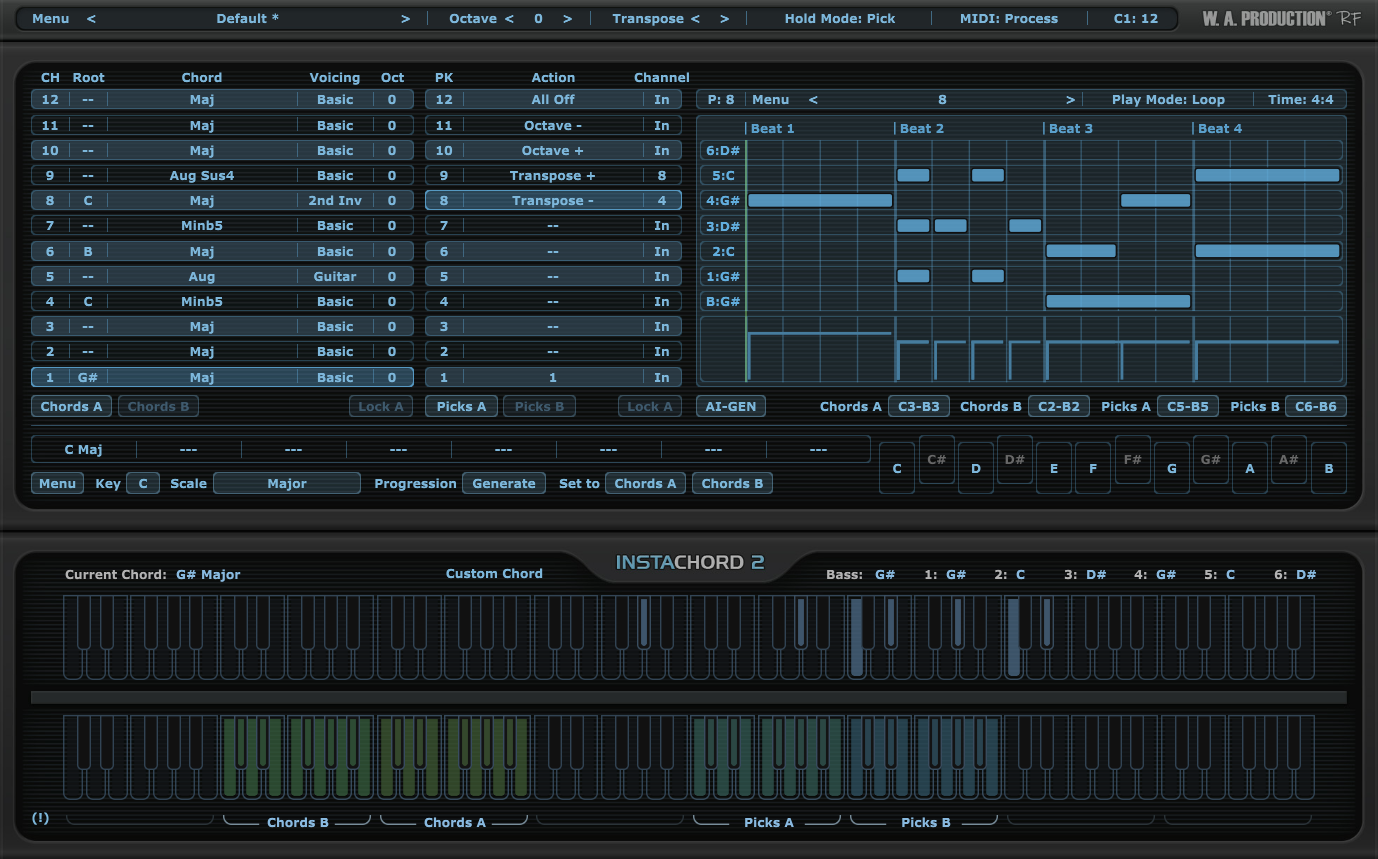
The InstaChord 2 window: the 12 chord slots with root, chord type, voicing and octave on the left, the pick and action keys in the middle, the pattern editor at the top right, and the keyboard map showing the Chords A/B and Picks A/B zones.
Features
More than 60 chord shapes and custom voicings
InstaChord 2 offers over 60 chord shapes with inversions, voicings, augmentations and extensions, and up to 24 chords at once across two banks. You can edit any chord's intervals or play a shape on your MIDI keyboard so InstaChord learns it as a custom chord, then transpose the whole set to another key in a couple of clicks.
A pattern editor for strums, arpeggios and riffs
InstaChord 2's pattern editor works like a small piano roll: you drag notes to build strum programs, arpeggios or picked riffs, with control over time signature, play mode and velocity. Patterns play over whatever chord is held, and you can drag them into the DAW as MIDI.
AI generation for chords and patterns
InstaChord 2 borrows the generator from W. A. Production's InstaComposer: one button creates new chord sequences and patterns from the current scale, which you can then edit like your own. The Progression Generate button fills the chord slots with a progression in the chosen key.
Five hold modes and action keys for live playing
InstaChord 2 has five playback (hold) modes for how notes are held and how chords toggle, so it can behave like a strummed guitar, a held pad or a latched sequence. Action keys in the playback zone transpose by octave or semitone on the fly, and chord and action keys can be locked while you try presets.
Benefits
- Richer chords than your hands can play. Extended chords and smooth inversions come out of one finger.
- Keeps a human feel. Because you trigger the chords and patterns yourself, timing and dynamics stay yours.
- Works with any instrument. It only sends MIDI, so any piano, guitar or synth plugin plays the result.
- Cheap at sale price. $12.90 is less than most single sample packs.
Real-World Uses
- Guitar parts without a guitarist: put InstaChord 2 in front of a guitar library, choose a strum pattern and play the progression one key per chord.
- Neo-soul or lo-fi keys: map four extended chords with smooth voicings and record a take with your own timing.
- Live sets: load a preset of 12 chords, use the action keys to move up an octave for the last chorus.
- Arp lines for EDM: draw a 16th-note pattern in the editor and play it over held chords into a synth.
Who It's For, and Who Should Skip It
InstaChord 2 fits producers with a MIDI keyboard who want to perform chord parts quickly, and beginners who want good-sounding voicings while they learn. Skip it if you use Maschine 2 or Reason (no MIDI routing), if you want the plugin to write whole arrangements for you (InstaComposer 4 does that), or if you need deep harmony guidance, where a dedicated music-theory plugin is the better buy.
Usage Guide
- Create a free account on waproduction.com, download the demo or your purchased installer, and run it.
- Load InstaChord 2 as a MIDI effect or on a MIDI track and route its output to your instrument (FL Studio, Cubase, Studio One, Ableton Live and Pro Tools are tested; Ableton and others may need a routing step).
- Choose the key and scale, then fill the chord slots by hand, from a preset or with Progression: Generate.
- Pick a hold mode and draw or load a pattern in the pattern editor.
- Play the chord keys with one hand and the pick keys with the other, and record the MIDI in your DAW, or drag a pattern straight into the arrangement.
Where it falls short
- Triplets in 4/4 aren't supported in the pattern editor, a limit a buyer asked to have added.
- Not a theory engine. One commenter wanted chords built from given low and high notes, and features like secondary dominants that tools such as FL Studio's Chord Function offer.
- Development has slowed. The last update, 2.0.8, was in May 2024.
- Two hosts are out. Maschine 2 and Reason can't route its MIDI.
What Users Say
Buyer reviews on waproduction.com
InstaChord 2 holds 4.75 out of 5 from 60 votes, with 31 written reviews, on W. A. Production's store (November 18, 2026).
"Instachord 2 feels like a musical journey of discovery, a playful and innovative instrument that lets your creativity flow effortlessly." MRJASPERS, July 21, 2026.
"Fantastic plugins and samples!!! Use it in every session. Thanks!" Bartek Bart, July 16, 2026.
"Pretty good plugin to create chords. Fairly easy to use" An unnamed buyer, November 5, 2026.
"Love it! It's easy, intuitive and fun to create chords and ideas." An unnamed buyer, March 13, 2026.
Comments and requests
"What can I say but wow! Everything you need here to add chord and to make your work more diverse! Purchase the expansion packs and your palette opens even more wider." Jason White, September 16, 2024.
"I love it so much I think one feature would be to make triplets in a 4/4 time signature possible but it's awesome" Paul Hughes, August 14, 2023.
"Tools like Instachord should have better CHORD TOOLS than just a tool that rejiggers MIDI sequences." Brian, July 15, 2024, who still added "LOVE the product, just take it to the NEXT LEVEL for ver. 3."
"I'm not fond of this" Arrie, April 16, 2024.
Elsewhere
Independent coverage is thin. Equipboard's summary of opinions says some find InstaChord 2 useful for MIDI chord generation but would pick a tool like Scaler 2 if they had it, and Dubspot's comparison pages score it 7.4 against Scaler 2's 8.4. The W. A. Production store itself rates 4.7 on Trustpilot from about 7,000 reviews; its 1-star reviews (3%) are mostly about license keys and registration.
The pattern: buyers like how quickly it turns one-finger playing into good-sounding chords and patterns. The criticism is about depth: it's a chord trigger and pattern player, not a full harmony assistant, and power users want more theory features.
Comparisons
InstaChord 2 vs InstaComposer 4
InstaChord 2 is for playing: chords and patterns under your fingers. InstaComposer 4, also from W. A. Production, writes six-track arrangements for you. If you play keys, start with InstaChord 2; if you want ideas generated, InstaComposer 4.
InstaChord 2 vs Scaler 2
Scaler 2 is the tool reviewers most often compare it with, and Dubspot's comparison scores Scaler 2 higher overall (8.4 vs 7.4). InstaChord 2's strengths are its low price and its strum and pick pattern editor. Choose InstaChord 2 if you mainly want a fast performance tool, and a dedicated theory plugin if you want more harmonic guidance.
Editions and Pricing
| Option | Price on November 18, 2026 | What you get |
|---|
| InstaChord 2 | $12.90 (list $89.00) | The plugin with factory presets |
| Upgrade from InstaChord 1 | $4.00 | For owners of the original InstaChord |
| InstaChord 2 & Expansions bundle | $39.90 | The plugin plus W. A. Production's preset expansions |
| Demo | Free (account needed) | Major chords only |
The sale prices run until November 30, 2026. InstaChord 2 is also part of the larger Everything Bundle V4 and Ultimate MIDI Bundle 4.
FAQs
Do my InstaChord 1 presets work in InstaChord 2?
Yes. W. A. Production states that all InstaChord 1 presets are compatible with InstaChord 2.
Does InstaChord 2 work in Logic Pro?
InstaChord 2 works in Logic Pro X and newer as an AU MIDI effect, and is tested in FL Studio, Cubase, Studio One, Ableton Live and Pro Tools on both Mac and Windows.
Does InstaChord 2 make sound by itself?
No. InstaChord 2 is a MIDI processor: it sends notes to an instrument plugin you load after it.
Does InstaChord 2 run natively on Apple Silicon?
InstaChord 2 version 2.0.6 (April 2024) updated the VST3, AAX and AU builds and improved Apple Silicon compatibility, and dropped 32-bit support.
Can I get a refund for InstaChord 2?
No. W. A. Production doesn't refund digital products, so use the free demo to check it works in your DAW.
System Requirements
- Windows 10/11 (64-bit), VST, VST3 or AAX host with MIDI routing
- macOS 10.15 or later (64-bit), VST, VST3, AU (MIDI effect) or AAX host
- Not compatible with Maschine 2 or Reason
Conclusion
At $12.90, InstaChord 2 is an easy buy for anyone with a MIDI keyboard who wants to play rich chords, strums and riffs without the hand technique. Its pattern editor and one-finger performance keep your parts human, and 60 buyers rate it 4.75 out of 5. The reason to skip it is depth: it hasn't been updated since May 2024 and it's no theory assistant, so if you want deeper harmony help, a heavier theory tool fits better. Try the demo in your DAW first, since there are no refunds.
Download Free DemoBuy Now