InstaComposer 4: A MIDI Generator That Sketches Whole Song Sections for You
InstaComposer 4 is a $29.90 MIDI generator plugin from W. A. Production for Windows and macOS that writes melodies, chords, bass lines, arpeggios and drum patterns in the key you choose, across up to six tracks at once, inside FL Studio, Ableton Live, Logic Pro, Cubase, Studio One and other DAWs. It's for producers and songwriters who want a fast source of ideas rather than a blank piano roll.
You press GO, it fills six tracks with a melody, rhythm, bass, pad, chords and drums that fit together, and you keep, regenerate or edit whatever you like before dragging the MIDI into your project. Version 4, released in October 2026, rebuilt the generation engine and added its own sounds, so you can hear ideas without routing every track to a synth first.
Quick facts
- Developer: W. A. Production, a music production store and plugin maker (waproduction.com).
- Version: 4.0.0, released October 2026.
- Formats: VST3, AU and AAX plugin. Windows 8 or later (64-bit), macOS 10.13 or later with Universal and Apple Silicon builds.
- Price: $29.90 in the Black Friday sale that runs to November 30, 2026 (crossed-out list price $129). InstaComposer 3 owners upgrade for $10.
- Demo: free, but only the C major scale works, melody generation stops after a few uses until you reload it, and presets don't save with your project. You need a free W. A. Production account to download it.
- Refunds: none. The store's terms say digitally delivered products can't be returned or refunded, so try the demo first.
- Bonus: every order on waproduction.com includes one free plugin: MTurboDelay, VocalShaper or Put Me On Drums by K-391.
- What we checked: the price, compatibility list and update notes on the product page, and the demo limits and system requirements in the InstaComposer 4 manual (version 4.0.0, dated October 21, 2026), on November 18, 2026. We didn't run the plugin in a DAW.
Download Free DemoBuy Now
Before you buy
- No refunds. Run the demo in your own DAW first. W. A. Production's product page says a working demo on an older OS doesn't guarantee the full version will work.
- The upgrade is for InstaComposer 3 owners only. Owners of version 1 or 2 pay the full price, and one buyer who bought version 1 through another store found the upgrade locked.
- In Logic Pro it's now an instrument. Because version 4 has built-in sounds, Logic loads it as an Audio Instrument, not a MIDI Effect.
- Some hosts need a helper. NI Maschine and Mixcraft need Blue Cat's Patchwork for multi-channel MIDI routing, and Cubase Elements can't route its separate tracks.
Overview
InstaComposer works like a co-writer that never runs out of ideas. You pick a key and scale, choose what each of the six tracks should be (Melody, Ostinato, Chord, Pad, Rhythm, Bass, Arpeggiator or Drums), set how complex or "exotic" the harmony may get, and hit GO. A section plays back straight away. Don't like the melody? Regenerate just that track. Like the chords but not the rhythm? Lock one and roll the other.
W. A. Production is clear that this isn't about handing the song over: the ideas are built from rules and algorithms you can adjust, and each result is a starting point to shape by hand. When a part works, you drag a single track or the whole arrangement into your DAW as MIDI, or send each track out on its own MIDI channel to your own instruments.
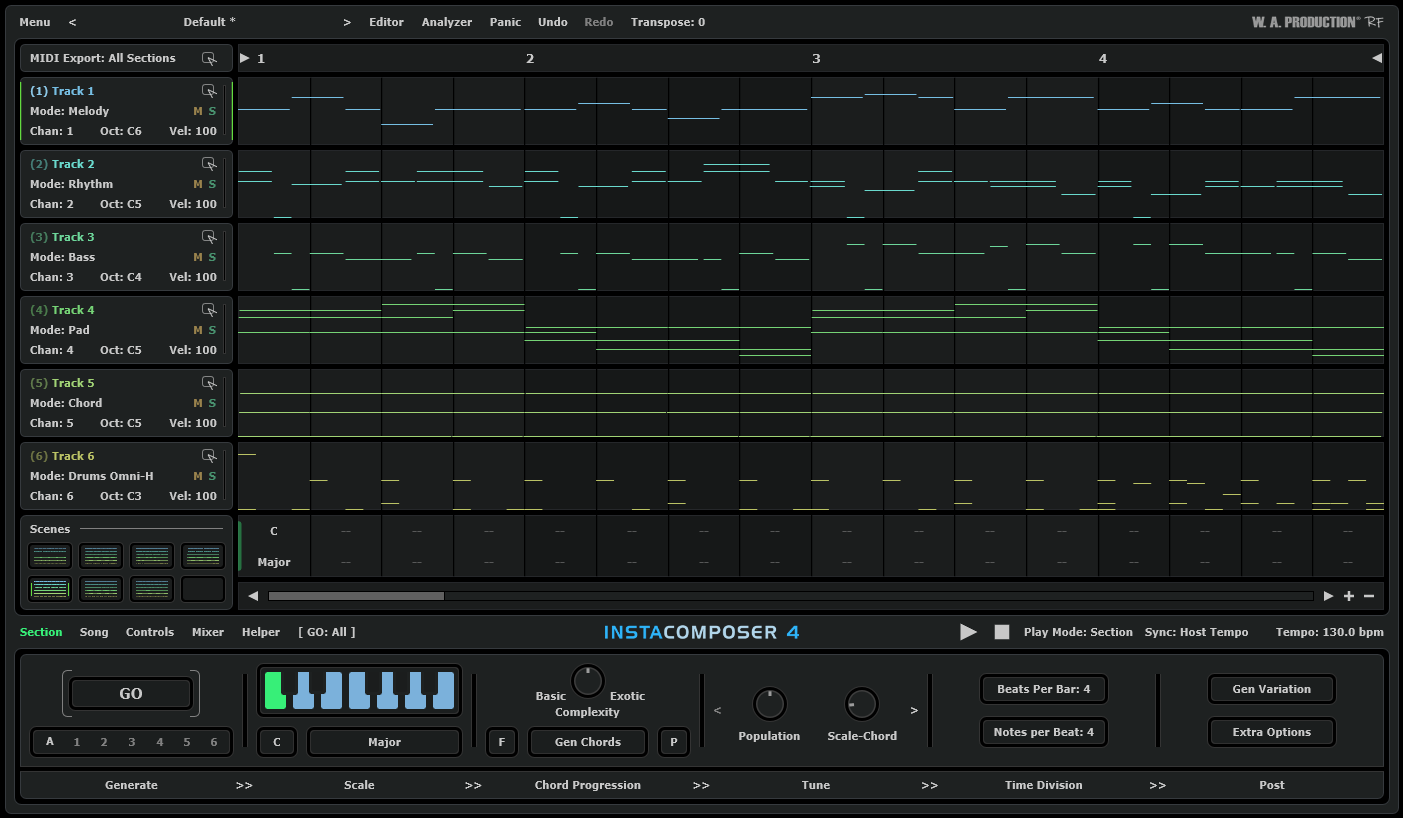
The InstaComposer 4 window: six tracks (Melody, Rhythm, Bass, Pad, Chord and Drums Omni-H) on MIDI channels 1-6, the scene grid at the left, and the Generate, Scale, Chord Progression, Tune, Time Division and Post tabs at the bottom.
Features
MIDI Engine 2.0 writes more musical parts
InstaComposer 4's rebuilt generation engine improves rhythm, timing, phrasing and note choice in every mode. Melody, Ostinato, Chord, Rhythm and Drums were all retuned, common time signatures get their own rhythm pathways, and two new modes, Arpeggiator and Rhythm V2, join them. Chord progressions now follow the scale more closely and full-song generation gives more varied but cohesive arrangements.
One-click songs, six tracks, eight scenes
InstaComposer 4 can generate a complete song structure with intros, verses, choruses, bridges and outros in one click. Each section holds up to six independent tracks and up to eight scenes, so you can build variations of a chorus and switch between them. Timeline playback lets you jump to any beat instead of replaying from the top.
Groove and Foliage controls shape the feel
InstaComposer 4 adds groove controls (Syncopation, Gallop, Density, Burst and Congestion) that push patterns from tight and straight to busy and syncopated. Foliage grows extra notes around the main melody to thicken it, with an amount control so it stays subtle or turns dense. Humanize adds small timing and velocity changes so the MIDI doesn't sound rigidly quantized.
Built-in instruments, SoundFonts and a mixer
InstaComposer 4 now makes its own sound: an acoustic piano and a General MIDI-style set of instruments, plus support for loading your own SoundFont (SF2) files. An integrated mixer balances the tracks and adds reverb and delay. You can still route the MIDI out to your own synths when you want the real sounds.
Chord and scale analysis of your own MIDI
InstaComposer 4 can import existing MIDI, identify its chords, progressions, scales and tonal centre, and suggest alternative harmonic readings. A new "Paste Notes & Adapt To New Chords" option copies notes with their chord context and re-fits them to the chords of another track. The chord progression generator supports slash chords, and the scale list runs from major and minor to harmonic, pentatonic, Spanish and Arabic modes.
W. A. Production's product artwork for InstaComposer 4 "Creative Companion", built around the same plugin window.
Benefits
- Beats writer's block fast. Instead of auditioning chord packs, you get a playable, editable idea in seconds and keep only what sparks something.
- Parts that fit each other. Because all six tracks come from one harmonic plan, the bass, chords and melody already agree, which is the slow part of sketching by hand.
- A theory helper. The analyzer and scale tools show why a progression works, which helps producers who don't read music.
- Cheap compared with the alternatives. At the sale price it costs less than many single sample packs.
Real-World Uses
- Starting a track from nothing: generate a chorus in A minor, keep the chords and bass, regenerate the melody until one hooks you, then drag all three into FL Studio.
- Finding a B section: import your verse MIDI, let the analyzer read its key, and generate a contrasting bridge in the same scale.
- Arpeggios and ostinatos for synths: route the Arpeggiator track to Serum or Vital on its own MIDI channel and tweak the Groove controls for a driving pattern.
- Quick demos for clients: use the built-in piano and GM sounds plus the mixer to play back a rough arrangement without loading any other instruments.
Who It's For, and Who Should Skip It
InstaComposer 4 suits electronic, pop and hip-hop producers who work in a DAW, write mostly in MIDI and want ideas on demand. Beginners get the most from the one-click songs; experienced producers tend to use single tracks as seeds.
Skip it if you want finished, mix-ready songs (it writes notes, not productions), if you play live and need to switch sections from a keyboard (W. A. Production confirms sections can't be triggered by MIDI notes yet), or if you work in a host without MIDI routing. If you only need chords under your fingers while you play, a chord-trigger plugin such as InstaChord 2 is simpler.
Usage Guide
- Create a free account on waproduction.com, download the demo or your purchased installer, and run it. The VST3, AU and AAX files go to the standard plugin folders.
- Load InstaComposer 4 as an instrument in your DAW (in Logic Pro, as an Audio Instrument). Ableton Live, Cubase and a few other hosts need extra routing steps for multi-channel output, explained in W. A. Production's DAW videos.
- Pick the key and scale, then set each track's mode in the track list.
- Press GO to generate the section, or use the Song tab for a full structure. Regenerate single tracks with their own buttons.
- Shape the result with Complexity, Population, Groove and Foliage, or edit notes in the MIDI editor.
- Drag a track or the whole arrangement into your DAW, or use Save as MIDI with Merge to combine tracks into one file.
- After you buy, enter the details W. A. Production sends you to authorize the plugin.
Where it falls short
- The built-in sounds are for sketching. One buyer says they "won't have VST instrument manufacturers losing any sleep". Plan to route parts to your own instruments for finished tracks.
- Drum generation is basic. The same reviewer calls the drum algorithms "still pretty basic", though usable for syncopated funk and rock grooves.
- Old versions aren't downloadable. A commenter on the product page complained that the InstaComposer 2 installer is no longer offered.
- Support replies can be slow. A buyer with an upgrade problem wrote that they had contacted support without an answer before posting publicly.
What Users Say
Buyer reviews on waproduction.com
InstaComposer 4 is new, so only a few buyers have rated it on W. A. Production's own store: 4.75 out of 5 from 4 votes on November 18, 2026, with two written reviews.
"V3 was a big step up in terms of functionality but V4 simply bats the legacy versions out of the park. The timing and musical coherence is much improved and you can even get convincing triplets with this thing." Iain Mcculloch, October 22, 2026, who also wrote: "The 'Groove' editor allows you to sculpt your desired rhythms and musical 'feels' very easily."
"Worthy upgrade. Prefect timing. I like all the new features." An unnamed buyer, October 17, 2026.
Questions and complaints in the product comments
"I purchased version 1 from Plugin Boutique and registered the product on your website, yet the upgrade purchase option for version 4 remains locked." Yuichiro Kimura, October 20, 2026. He later added: "It was written in small print that only customers who purchased v3 are eligible for the upgrade. Got it! I'll buy it!"
"I want to be able to use InstaComposer 2, but the installer isn't available on the website. Do I have to buy future versions just to be able to work? This is a scam." An unnamed commenter, October 17, 2026.
A user named Bill asked whether sections could be played from a MIDI keyboard for live use; W. A. Production replied that "Sections cannot be played/changed at this moment by a MIDI keyboard, unfortunately."
Plugin Boutique and Trustpilot
On Plugin Boutique, InstaComposer 4 showed 4.3 out of 5 from 10 ratings in November 2026. Its review summary (read through a summarizer) says buyers find it easy to use and helpful against writer's block, and like the presets, the music-theory tools and MIDI drag and drop.
W. A. Production as a store holds a 4.7 TrustScore on Trustpilot from about 7,000 reviews, 84% of them five stars. Most praise prices and easy installs. The 1-star reviews (3%) are mostly about licensing and activation, for example "There was no license number that could be found and the plugin was extremely difficult to register" (Kevin, January 2026), plus marketing emails that continued after unsubscribing.
The pattern: people who upgrade from version 3 are clearly happy with the new engine's timing and the Groove and Foliage tools. The complaints are about the store around it: who qualifies for upgrades, old installers disappearing and occasional licensing hiccups, not about the plugin's music.
Comparisons
InstaComposer 4 vs InstaComposer 3
InstaComposer 4 keeps everything version 3 did (six tracks, scenes, one-click songs, analyzer, MIDI export) and loads its presets, but adds MIDI Engine 2.0, the Arpeggiator and Rhythm V2 modes, Groove and Foliage controls, timeline playback and its own instruments and mixer. For a version 3 owner the $10 upgrade is an easy yes.
InstaComposer 4 vs InstaChord 2
InstaComposer 4 writes whole arrangements for you. InstaChord 2 (also W. A. Production) is a performance tool: it puts chords, strums and picks under single keys so you play the progression yourself. Pick InstaComposer for ideas, InstaChord for playing.
Editions and Pricing
| Option | Price on November 18, 2026 | Who it's for |
|---|
| InstaComposer 4 (full) | $29.90 (list $129.00) | New users and owners of version 1 or 2 |
| Upgrade from InstaComposer 3 | $10.00 | Owners of InstaComposer 3 |
| Demo | Free (account needed) | Testing compatibility, C major only |
The sale price runs until November 30, 2026. W. A. Production discounts most of its catalogue most of the time, so the $129 list price is rarely what anyone pays.
FAQs
Does InstaComposer 4 work in FL Studio and Ableton Live?
InstaComposer 4 is fully compatible with FL Studio 12 and newer. Ableton Live 9 and newer work too, but sending each of the six tracks to a separate instrument takes extra routing steps.
Can I use InstaComposer 4 presets from older versions?
InstaComposer 4 loads presets from InstaComposer 1, 2 and 3, so expansion packs you already own keep working.
Is InstaComposer 4 AI?
InstaComposer 4 generates music with procedural rules, algorithms and adjustable parameters. W. A. Production describes it as a creative co-pilot, not a tool that hands your music-making over to AI.
Can I get a refund for InstaComposer 4 if it doesn't work for me?
No. W. A. Production doesn't refund digitally delivered products, including duplicate purchases, which is why the demo exists. Test it in your DAW first.
Does InstaComposer 4 run on Apple Silicon Macs?
Yes. InstaComposer 4 ships Universal and ARM builds for macOS, as well as 64-bit Windows versions.
System Requirements
- Windows 8 or later (64-bit), VST3 or AAX host
- macOS 10.13 or later (Intel or Apple Silicon), VST3, AU or AAX host
- Multi-core 2 GHz CPU, 4 GB RAM, 1920x1080 display
- Tested in FL Studio 12+, Cubase 10+, Studio One 5+, Ableton Live 9+, Logic Pro X+ and Pro Tools 11+
Conclusion
At $29.90, InstaComposer 4 is worth buying if you write music in a DAW and regularly stall on the first idea. The reason to buy is that it hands you six parts that already fit together, with real control over groove and density, and the version 4 engine sounds noticeably more musical according to its first buyers. The reason not to is a store with no refunds and an upgrade path only for version 3 owners, so download the demo, confirm it routes properly in your DAW, and buy before the sale price ends on November 30.
Download Free DemoBuy Now