EaseText Text to Speech Converter for Windows: Offline Text to Speech with Voice Cloning
EaseText Text to Speech Converter is a Windows app that reads text aloud in natural-sounding voices and saves it as MP3, WAV or AAC audio, working offline on your own PC. The Personal Edition is $47.40 for one year on one PC. It suits video makers who need a voice-over, students who want to listen to their notes, and anyone who would rather not paste private text into a web service. It also clones your own voice from about a minute of recorded speech.
Quick facts
- Version: 3.1.2 (installer dated January 17, 2024)
- Developer: EaseText
- Runs on: Windows 11, 10, 8.1, 8 and 7, 64-bit. Mac and Android versions are sold separately
- Price: $47.40 for the Personal Edition (1 PC, one year of use). Family ($83.40, 3 PCs) and Business ($155.40, 10 PCs) list the same features
- Tools: Text to Speech editor, File Converter for batch jobs, Voice Cloning
- Audio output: WAV, MP3, AAC, with the text optionally saved as TXT, PDF, HTML or DOC
- Voices: 1,000+ on the price page, 1,300+ in EaseText's tutorial
- Trial: free download, which EaseText says includes all features
- What we checked: the 70.8 MB installer is version 3.1.2.0, digitally signed by Guangzhou Suyi Trading Co., Ltd., and the order page showed $47.40 for the Personal Edition, $83.40 for Family and $155.40 for Business, each with no renewal set up, on November 17, 2026. We didn't install it or listen to its voices, so we can't rate the voice quality ourselves.
Before you buy
- It's a one-year plan, paid once. EaseText shows the price as "$3.95/month", but it's billed as a single $47.40 charge for 1 year of usage, and the plan page says there's no automatic renewal. Plan to buy again after a year if you still need it.
- Watch the extra item in the cart. EaseText's order page adds a "Registration Backup Service", ticked by default, which keeps a copy of your license key. Untick it if you'll store the key yourself.
- Buy the right platform. The Windows license doesn't register the Mac version. EaseText offers an exchange for a wrong-platform purchase, but refunds are narrow and end after 30 days, so try your own text in the trial first.
- It needs room. The requirements are 4 GB of RAM and 6 GB of disk space, much more than a simple reader app, because the voices and the voice cloning model run locally.
Download Free TrialBuy Personal EditionBuy Family EditionBuy Business Edition
Overview
The app opens on a Home screen with three tiles: Text to Speech, File Converter and Voice Cloning, plus side menus for Projects, Voices and your Account. Text to Speech is the everyday tool: you start a project, pick a voice and speed, paste your text, and play or export it. File Converter is for a pile of documents, and Voice Cloning trains a voice of your own that then appears in the voice list.
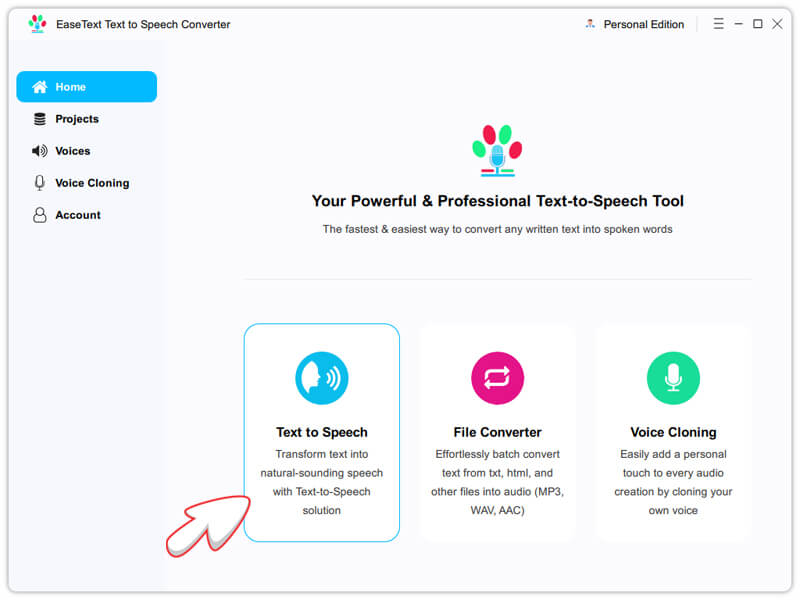
The Home screen with its three tools. The arrow is from EaseText's tutorial.
Features
A segment editor where each line can have its own voice
EaseText Text to Speech Converter splits your text into segments, shown as speech bubbles. Enter splits a segment and Backspace merges two, and each segment can use a different voice, so a dialogue or a narrated video with two speakers is one project rather than several. Play All reads the whole project, and the play button beside a segment converts and plays just that part, which makes fixing one awkward sentence quick.
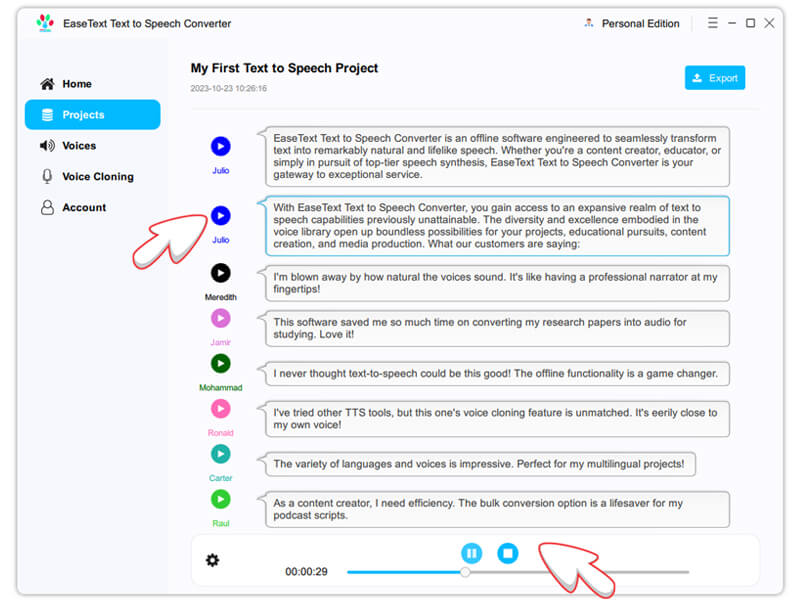
A project where every segment has its own voice (Julio, Meredith, Jamir and others).
Export to MP3, WAV or AAC, with the script alongside
EaseText Text to Speech Converter exports the audio as WAV, MP3 or AAC, either combined into one file or per segment, and can save the text at the same time as TXT, PDF, HTML or DOC, with or without speaker names. The price page lists commercial use, so the audio can go into a video or course you sell.
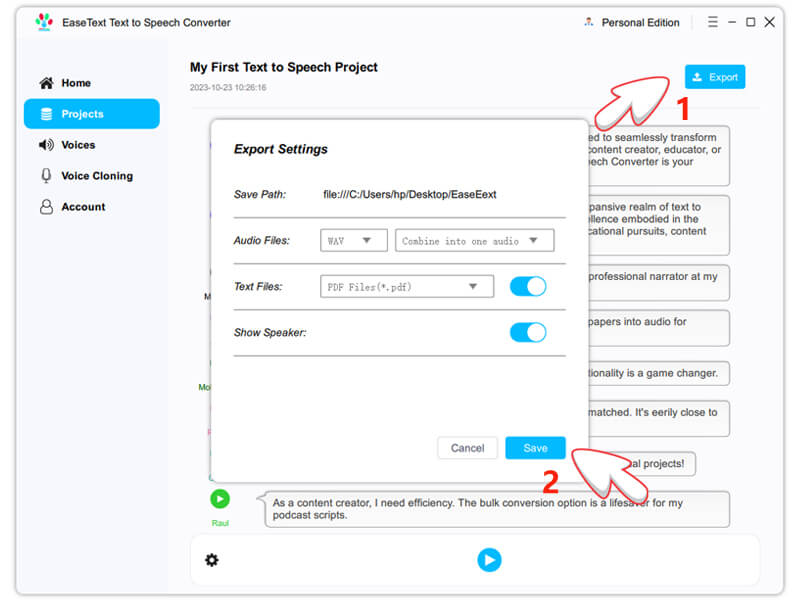
Export Settings: audio format, one combined file, and an optional PDF of the text.
Batch conversion of text files
EaseText Text to Speech Converter's File Converter takes several documents at once, such as TXT, DOC, CSV and HTML files, and turns each into audio. That's the tool for turning a folder of articles or study notes into listening material without pasting each one.
Voice cloning that trains on your own computer
EaseText Text to Speech Converter's Voice Cloning tool shows sentences for you to read into your microphone. EaseText recommends at least 10 sentences, about a minute of speech, in a quiet room. You then train the voice locally: the tutorial recommends at least 2,000 training epochs when starting from an existing model and 4,000 without one, and you can stop and continue the training. Once you generate the voice, it appears in the voice list like any other. Training on your own machine keeps your voice recording private, but expect it to take a while on an ordinary computer.
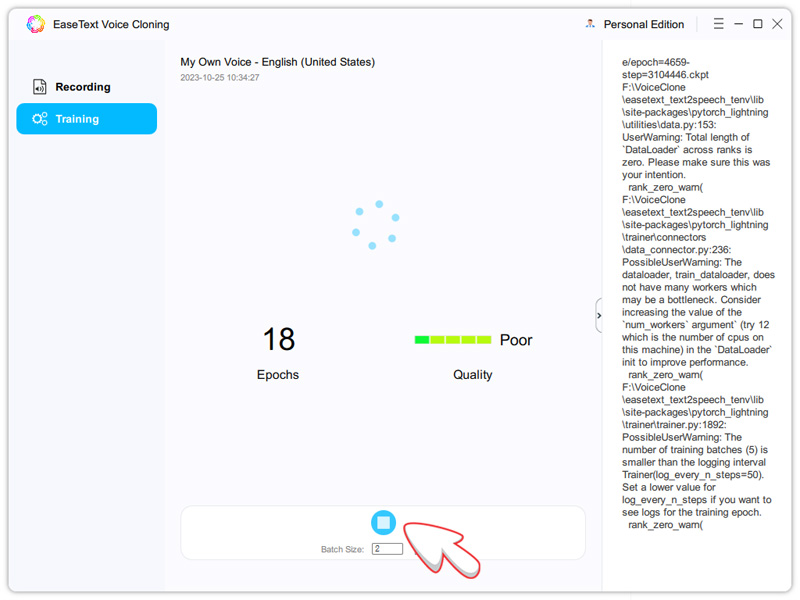
Training a cloned voice: 18 epochs in, the quality meter still reads "Poor".
Benefits
- Private. Text and voice recordings stay on your computer, which matters for unpublished scripts, client documents or your own voice.
- No character meter. The plans list no character limit, unlike online TTS services that charge by the character or minute.
- One flat yearly price. $47.40 covers a year with no renewal to cancel.
Real-World Uses
- YouTube and course voice-overs. Write the script, give the narrator and a second speaker different voices, and export one MP3 to drop under your video.
- Listening to study material. Batch-convert lecture notes or articles to audio and play them on a commute.
- Proofreading by ear. Hearing a report read back catches clumsy sentences that reading misses.
- Announcements and prompts. Produce short spoken messages for a phone menu or a presentation without recording each one.
Who It's For, and Who Should Skip It
It fits Windows users who make voice-overs or listen to a lot of text, want unlimited conversion for a fixed yearly price, and care about keeping content offline.
Skip it if you only want something read aloud now and then: Windows Narrator and the Read Aloud button in Microsoft Edge do that for free. If voice realism is everything, for an audiobook or an advert, the leading cloud voice services sound more natural, at a monthly cost and with your text uploaded. And if your computer is short on memory or disk space, the 4 GB RAM and 6 GB disk requirement rules it out.
Usage Guide
- Download and install the trial, then launch EaseText Text to Speech Converter. Click Later at the registration window to keep using the trial.
- Open Voices and download the voices you want. EaseText notes that some voices need to be installed before you can pick them.
- On Home, click Text to Speech, name the project, choose a voice and speed, and click OK.
- Type or paste your text. Press Enter to split a segment or Backspace to merge, and change the voice of any segment.
- Click Play All to hear the result, or play a single segment to check it.
- Click Export, choose WAV, MP3 or AAC, whether to combine the audio into one file and whether to save the text too, then click Save.
- After buying, enter the license code from your email in the installed trial to turn it into the full version.
Where it falls short
- Little independent testing. We found no hands-on review that judges the voices, and no user reviews on SourceForge, Slashdot or TrustRadius, so you're relying on the trial and EaseText's own claims.
- Vendor numbers don't agree. EaseText's pages give 24, 30 or "120+" languages and 1,000 or 1,300 voices. Check that your language and accent are in the voice list before you buy.
- Updates have been quiet. The current installer dates from January 2024 and EaseText publishes no version history.
- Cloning takes time and patience. Thousands of training epochs on a home computer is slow, and EaseText's own screenshot shows a "Poor" quality reading early in training.
What Users Say
There's very little independent feedback on this product, so we'll say what exists and nothing more.
FixThePhoto: 4.5 out of 5 for EaseText's tools
Eva Williams and Kate Debela review EaseText's whole lineup and rate it 4.5 out of 5. Their hands-on comments are about transcription, not speech, but they list the Text to Speech Converter's plans: "The Personal Edition comes at a monthly cost of $3.95." Their cons for the lineup are "Sometimes inaccurate results" and "Manual corrections required."
Review sites with no reviews yet
SourceForge, Slashdot and TrustRadius all list EaseText Text to Speech Converter, and none had a single user review when we looked on November 17, 2026.
On EaseText's own page
The vendor shows short testimonials, which are favorable by nature, and a review count you can't read anywhere:
"I've tried several TTS tools, but this one is by far the best. The speed, quality, and customization options are top-notch." David, Content Writer
"Great value for the price! Compared it to other TTS solutions, EaseText stands out with its features and affordability." Emily, Student
The bottom line on feedback: no one independent has published a verdict on the voices. The free trial is the only reliable test, so run your own script through it.
Comparisons
EaseText vs online voice services
Cloud TTS services run on the provider's servers, so you upload your text, and most charge monthly with a character or minute allowance. EaseText runs locally with no character limit for a flat $47.40 a year. The top cloud services are built for the most lifelike voices; EaseText wins on privacy and predictable cost.
EaseText vs the free voices already on your PC
Windows Narrator and Edge's Read Aloud read text for free, but they don't give you a project editor, one voice per segment, batch conversion of files, export to MP3 or voice cloning. If you only listen and never export, the free option is enough.
Editions and Pricing
All three Windows editions list the same features: no character limit, the full voice library, unlimited voice clones and commercial use. They differ only in how many PCs they cover. Each is one year of use with no automatic renewal, and each button below orders that edition.
| Edition | Listed price | Charged at checkout | Covers | Buy |
|---|
| Personal | $3.95 a month | $47.40 | 1 PC | Buy Personal |
| Family | $6.95 a month | $83.40 | 3 PCs | Buy Family |
| Business | $12.95 a month | $155.40 | 10 PCs | Buy Business |
The Mac and Android versions are priced the same and sold separately.
FAQs
Does EaseText Text to Speech Converter work without an internet connection?
EaseText Text to Speech Converter converts text to speech offline on your PC, so nothing is uploaded. You may need a connection once to download the voices you want to use.
Can I use EaseText Text to Speech Converter audio in YouTube videos?
EaseText Text to Speech Converter's plans list commercial use, so the audio you export can go into videos, courses and other work you publish.
What happens after a year with EaseText Text to Speech Converter?
EaseText Text to Speech Converter is sold as an annual plan with 1 year of usage and no automatic renewal. Nothing is charged again; to keep using it after the year, you buy a new plan.
Does the Windows license of EaseText Text to Speech Converter work on Mac?
EaseText Text to Speech Converter is licensed per platform: the Windows license only registers the Windows app. EaseText's support page says the Windows and Mac versions use different license codes.
Is there a character limit in EaseText Text to Speech Converter?
EaseText Text to Speech Converter's plans state no character limit for all three editions.
Will EaseText refund me if the voices don't suit me?
EaseText Text to Speech Converter is sold on a try-before-you-buy basis: the refund policy doesn't cover a purchase that turns out not to meet your needs when you didn't try the trial, and no refund is given after 30 days. Wrong or duplicate purchases and serious bugs are covered.
System Requirements
- Windows 11, 10, 8.1, 8 or 7
- 64-bit, 1 GHz processor
- 4 GB RAM, 8 GB recommended
- 6 GB or more of free disk space
Conclusion
EaseText Text to Speech Converter is worth $47.40 a year if you regularly turn scripts or documents into audio and want that to happen offline with no character meter. The reason to buy it is the combination of a per-segment voice editor, batch file conversion and private voice cloning at a low flat price. The main reason not to is uncertainty: there are almost no independent reviews of its voices, and the software hasn't had a public update since January 2024. Try your own script in the free trial first. If you only need text read to you occasionally, the free voices built into Windows will do.
Download Free TrialBuy Personal EditionBuy Family EditionBuy Business Edition