EaseText Audio to Text Converter for Windows: Offline Transcription on Your Own PC
EaseText Audio to Text Converter is a $35.40 Windows app that turns recordings and videos into editable text on your own PC, without uploading anything. It's for students, writers and small offices with interviews, lectures or meetings to transcribe, who would rather keep those files off a web service. Expect a rough first draft that you'll correct, not a finished transcript.
Quick facts
- Version: 3.1.8 (installer dated February 8, 2024)
- Developer: EaseText
- Runs on: Windows 11, 10, 8.1, 8 and 7. Mac and Android versions are sold separately
- Price: $35.40 for the Personal Edition, 1 PC
- Input: MP3, AAC, WMA, OGG, MP4, AVI, WMV, RM, RMVB, MKV, MOV, 3GP, FLV
- Output: TXT, DOC, HTML, PDF
- Languages: 24, by the vendor's count
- Trial: free download
- What we checked: the 84.6 MB installer's file version is 3.1.8.0, and the order page showed $35.40 with no discount and no renewal set up on November 5, 2026. We didn't run a transcription, so we can't give our own accuracy figure.
Before you buy
- Check what the license term means. EaseText's price page calls this an Annual Plan with 1-year access and also promises lifetime free updates. The order itself is a single $35.40 charge with no automatic renewal. EaseText doesn't explain what happens after a year, so ask support@easetext.com if that matters to you.
- Test your own audio first. Refunds aren't automatic. EaseText's policy covers cases such as a wrong or duplicate purchase and serious bugs its support team confirms, and it leans on trying the software before buying.
- It hasn't been updated in a while. The current Windows installer dates from February 2024.
Download Free TrialBuy Now
Overview
EaseText opens on a plain screen with three choices: Record, Convert and Transcribe. Each job becomes a project with its own name, save location and language. The result arrives as a chat-style list of speech bubbles, split by speaker and stamped with times, which you can then correct and export.
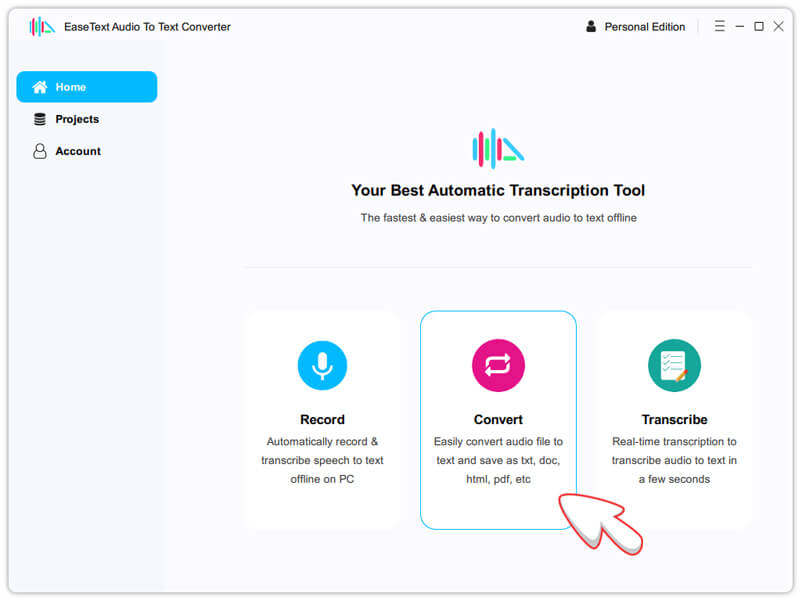
The Home screen: Record, Convert and Transcribe. The arrow is from EaseText's tutorial.
Features
Transcription that stays on your PC
EaseText Audio to Text Converter does the conversion locally, so your audio doesn't go to a web server and you can work without a network. That matters for a confidential interview or a client meeting, and it's the main reason to pick this over an online service.
Batch conversion of audio and video files
EaseText Audio to Text Converter accepts several files in one go through the Convert button, including video such as MP4, MKV and MOV. You set the project name, save location and language first, and the language setting offers accuracy levels. A single file shows its text as it's being converted.
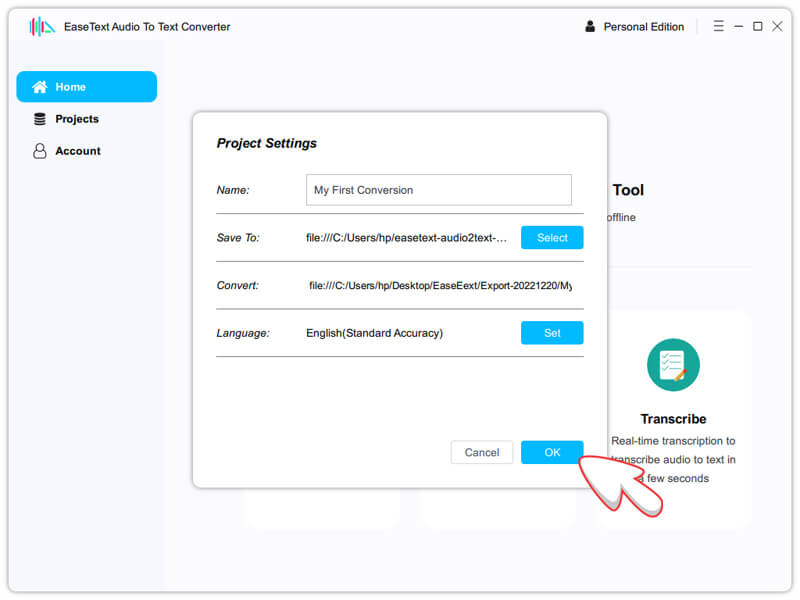
Project Settings, with the language set to English (Standard Accuracy).
Live recording and real-time transcription
EaseText Audio to Text Converter can record speech and transcribe it as it happens, which the vendor pitches for meeting notes and for following online videos with live captions.
An editor with speakers, timestamps and notes
EaseText Audio to Text Converter labels speakers and adds timestamps, and you can click a speaker icon to hear the audio at that point, which makes correcting much quicker. You can also add highlights, comments and images, then export to TXT, PDF, HTML or DOC, choosing whether speakers, timestamps and highlights come along.
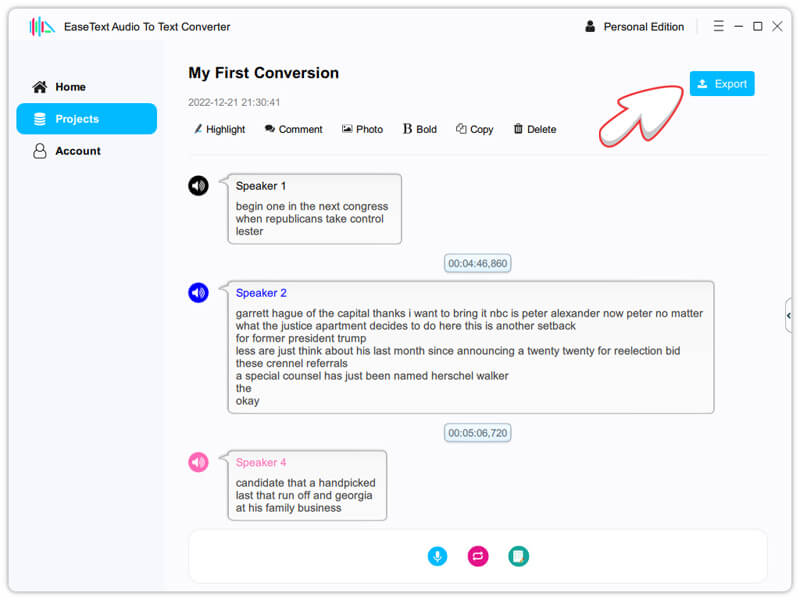
A finished transcript in EaseText's own tutorial. Note the missing punctuation and capitals, and misheard words such as "justice apartment".
Benefits
- Privacy. Nothing has to leave your computer.
- No per-minute charge. The plan page lists no transcription time limit, unlike services that bill by the minute.
- Quick to correct. Timestamps and click-to-hear audio spare you from hunting through the recording.
Real-World Uses
- Journalists and researchers. Get a searchable draft of an interview without sending it to a cloud service.
- Students. Turn recorded lectures into notes you can search and highlight.
- Video creators. Pull the spoken words out of an MP4 as a starting point for captions or a blog post.
- Small offices. Batch-convert a week of recorded meetings overnight, then tidy the ones that matter.
Who It's For, and Who Should Skip It
It fits people with clear recordings and a privacy reason to work offline, who don't mind editing the result.
Skip it if you need a publish-ready transcript with punctuation and little cleanup: a modern cloud transcription service or a human transcriber will serve you better. If you're comfortable with technical tools, the free, open-source Whisper also transcribes offline. And if the audio is noisy or heavily accented, test it before spending anything.
Usage Guide
- Download and run the installer, then launch the app. When the registration window appears, click Later to use the trial.
- On Home, click Convert and add one or more audio or video files.
- In Project Settings, set the name, location and language, then click OK.
- Wait while it converts. The time depends on the size of the file.
- Correct the text, using the speaker icon to replay any doubtful line.
- Click Export, choose TXT, PDF, HTML or DOC, pick what to include and click Save.
- After buying, enter your license code in the installed trial to turn it into the full version.
Where it falls short
- Accuracy needs checking. EaseText's own tutorial screenshots show text with no punctuation or capitals and misheard words, and independent reviewers list manual correction as a drawback. One buyer says it produced nothing readable (see below).
- The trial's limits are unclear. EaseText says the trial includes all features, while Softpedia says free users can't copy or export their text.
- No published version history. You can't see what's changed or when, and the site's copyright line stops at 2025.
- No refund for a change of mind. The policy lists narrow situations, and one reviewer complains of being refused.
What Users Say
Coverage is thin and split. We found one independent review with a rating, one positive review from a site that earns a commission on sales, one very negative buyer, and testimonials on the vendor's own page. We found no lab-style accuracy test.
FixThePhoto: 4.5 out of 5
Eva Williams and Kate Debela praise its handling of poor audio: "EaseText recognizes audio recordings well, even if their quality is subpar and they contain extraneous noises." Their cons list reads "Sometimes inaccurate results" and "Manual corrections required."
Their verdict: "If you frequently transcribe multilingual chats or recordings, EaseText is a terrific tool to speed up the process." EaseText's homepage links to this review.
MyElearningWorld
Scott Winstead (June 4, 2025) writes that it "does a surprisingly effective job at accurately transcribing audio into text", while noting "it's not always perfect" and that "Some text formatting intervention is required to get your transcript laid out in your preferred manner." The site says it earns a commission on purchases.
SourceForge and Slashdot: 1.0 out of 5 from 1 review
The single review, from an operations manager who used it for less than 6 months, is the harshest we found:
"Waste of time and money, not worth the effort i put into it." And: "Nothing good to say.... doesn't covert to legible sentences." And: "Didn't work and they won't refund my money back even after updating language to "High accuracy"" Brent B., June 13, 2023
On EaseText's own page
The vendor shows short testimonials, which are by their nature favorable, and a count of 63,518 reviews that you can't read anywhere.
"Thanks to the best speech to text software. It saved me hours of writing." Brett, Writer
The pattern: people who treat it as a fast first draft are satisfied. The person who expected clean sentences wasn't. Your recording quality and your tolerance for editing decide which camp you're in.
Comparisons
EaseText vs online transcription services
Cloud services such as Otter.ai run on the provider's servers, which means uploading your audio, and they usually sell minutes or monthly plans. EaseText keeps the files on your PC with no time limit listed. The trade-off is that it's your computer doing the work and you depend on an app that hasn't been updated since early 2024.
EaseText vs Whisper
OpenAI's Whisper is free, open-source and runs offline, but basic use means command-line tools or a third-party front end. EaseText costs $35.40 and gives you a normal Windows app with an editor, speaker labels and export.
Editions and Pricing
All editions list the same features, with no transcription time limit. EaseText shows these as monthly prices on annual plans. The Buy Now button here opens the Personal Edition, which is $2.95 a month multiplied by 12.
| Edition | Listed price | Yearly total | Windows PCs |
|---|
| Personal | $2.95 a month | $35.40 | 1 |
| Family | $4.95 a month | $59.40 | 3 |
| Business | $9.95 a month | $119.40 | 10 |
Mac and Android plans carry the same listed prices and are separate purchases.
FAQs
Does EaseText Audio to Text Converter work without internet?
EaseText Audio to Text Converter works offline, and the conversion runs locally on your computer even without a network, according to the vendor. FixThePhoto's review says the same.
Does EaseText Audio to Text Converter charge every month?
EaseText Audio to Text Converter's Windows Personal Edition is a single $35.40 charge at checkout. On November 5, 2026 the order showed no automatic renewal, though the "$2.95 a month" label on the vendor's site suggests otherwise.
Can EaseText Audio to Text Converter transcribe a YouTube video?
EaseText Audio to Text Converter handles video files you already have, such as MP4, and its Transcribe option can follow audio live as it plays. It doesn't list downloading from a YouTube link.
Does the Windows license of EaseText cover my Mac too?
EaseText Audio to Text Converter is sold per platform, so the Windows Personal Edition covers 1 Windows PC. A Mac needs its own plan.
Are updates free for EaseText Audio to Text Converter?
EaseText Audio to Text Converter's plans list lifetime free updates, and the support page says your original license code stays valid for normal updates.
System Requirements
- Windows 11, 10, 8.1, 8 or 7
- 1 GHz processor, 32-bit or 64-bit
- 1 GB RAM, 2 GB recommended
- 500 MB or more of free disk space
Conclusion
EaseText Audio to Text Converter is worth $35.40 if privacy is your priority and your recordings are clear, because it gives you a simple Windows app that keeps files on your PC and a quick way to correct the text. The reason to buy it is offline batch transcription with a usable editor at a small price. The main reason not to is uncertainty: reviews split on accuracy, the software dates from early 2024, and the refund terms are narrow. Run a real recording through the trial first. If you need clean, punctuated text with little editing, look elsewhere.
Download Free TrialBuy Now