Glarysoft File Recovery Pro: Simple Undelete for Windows, if the Free 2 GB Isn't Enough
Glarysoft File Recovery Pro is a Windows recovery tool that brings back deleted, formatted or corrupted files from hard drives, SSDs, USB sticks and SD cards, for $49.95 a year on one PC at checkout. It's for ordinary users who've just lost something and want a two-step scan and restore.
Before you pay, know that the free edition restores up to 2 GB. For a handful of deleted documents or photos, that's all you need. Pro earns its price when you have more to recover, or when files were lost to formatting, corruption or a virus.
Quick facts
- Developer: Glarysoft, also known for Glary Utilities
- Version: 1.30.0.30, updated January 19, 2026
- Platform: Windows only
- File systems: FAT, NTFS and NTFS + EFS
- Price: $49.95 a year for one PC at checkout
- Renewal: this plan renews automatically, and you can cancel at any time
- Free edition: recovers up to 2 GB, and the Advanced scan is preview only
- Guarantee: 30 days on the yearly plan, with exclusions such as a simple change of mind
- What we checked: the free installer is 12 MB, and Glarysoft File Recovery Pro Annually was $49.95 before tax on the order page on November 6, 2026, with the Lifetime plan at $99.95. We didn't run a recovery ourselves, and the screenshots here show the free edition.
Before you buy
Scan with the free edition first. It's the same two-step process, and the preview tells you whether your files can come back. If they're under 2 GB, you may not need to buy anything.
Stop writing to the drive. Glarysoft's advice is to stop saving or deleting files to reduce the chance of overwriting. Install the program on a different drive, and save recovered files somewhere else.
This plan renews. You probably only need recovery once, so cancel the renewal after you've finished, or look at the one-week plan described under Editions and Pricing.
Download Free TrialBuy Now
Overview
You start by picking a drive or partition. The program shows each volume on the PC, including any lost partition it can see. Click Scan and it runs a quick scan and then an advanced one, with files appearing as they're found. When it finishes, you can browse by folder or file type, preview what you've found, tick what you want and click Recover.
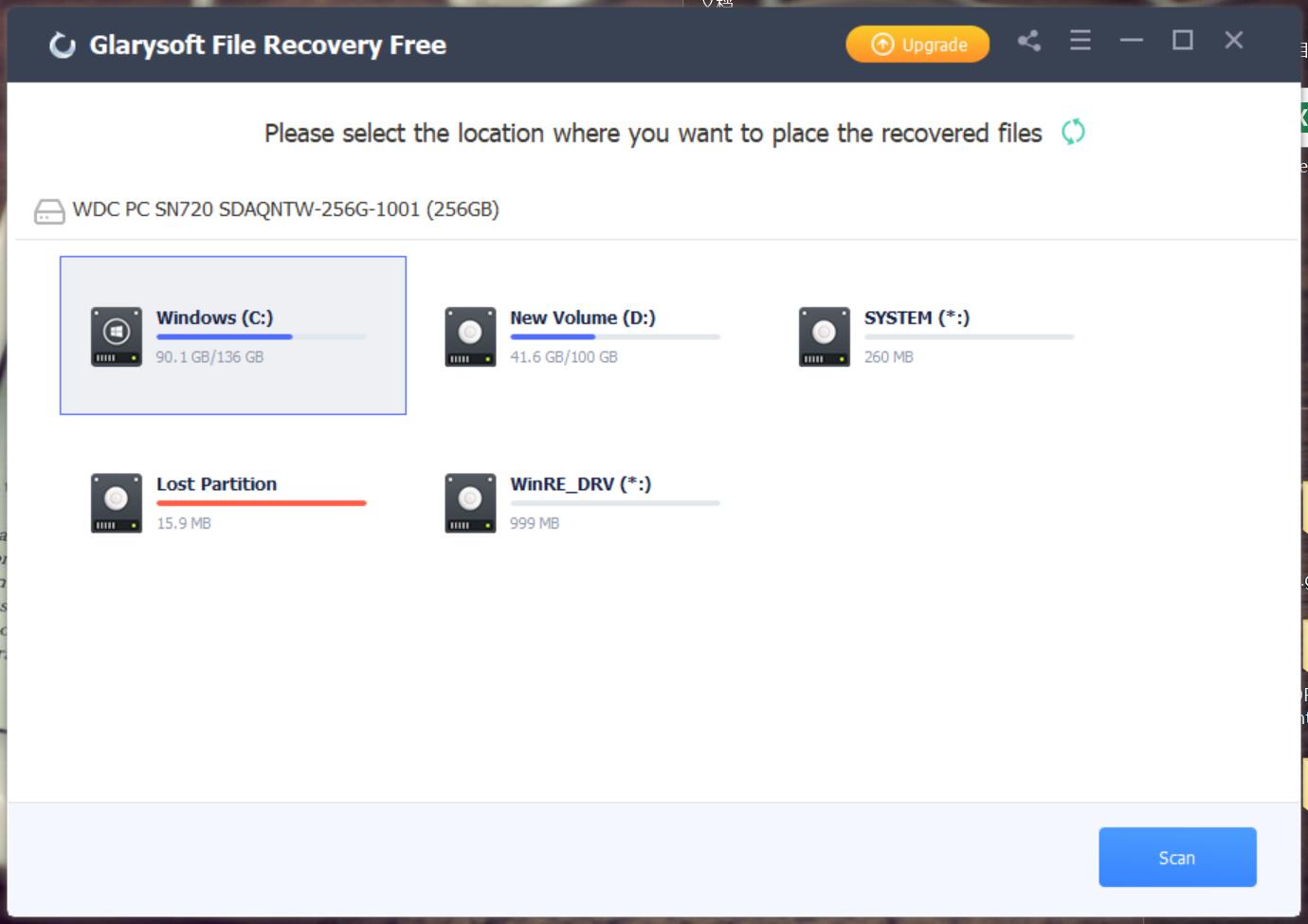
Choosing where to scan. This is the Free edition's window.
Features
Glarysoft File Recovery Pro restores what Delete and Shift+Delete removed
Glarysoft File Recovery Pro recovers files emptied from the Recycle Bin, or removed with Shift+Delete, along with those lost in crashes. Glarysoft's page lists documents, pictures, videos and emails among the file types.
Glarysoft File Recovery Pro goes after formatted and damaged files
Glarysoft File Recovery Pro handles files damaged by formatting, corruption or viruses, which Glarysoft's comparison table marks as unavailable in the free edition. That's the strongest reason to pay. It can also restore compressed, fragmented and user-encrypted files on NTFS.
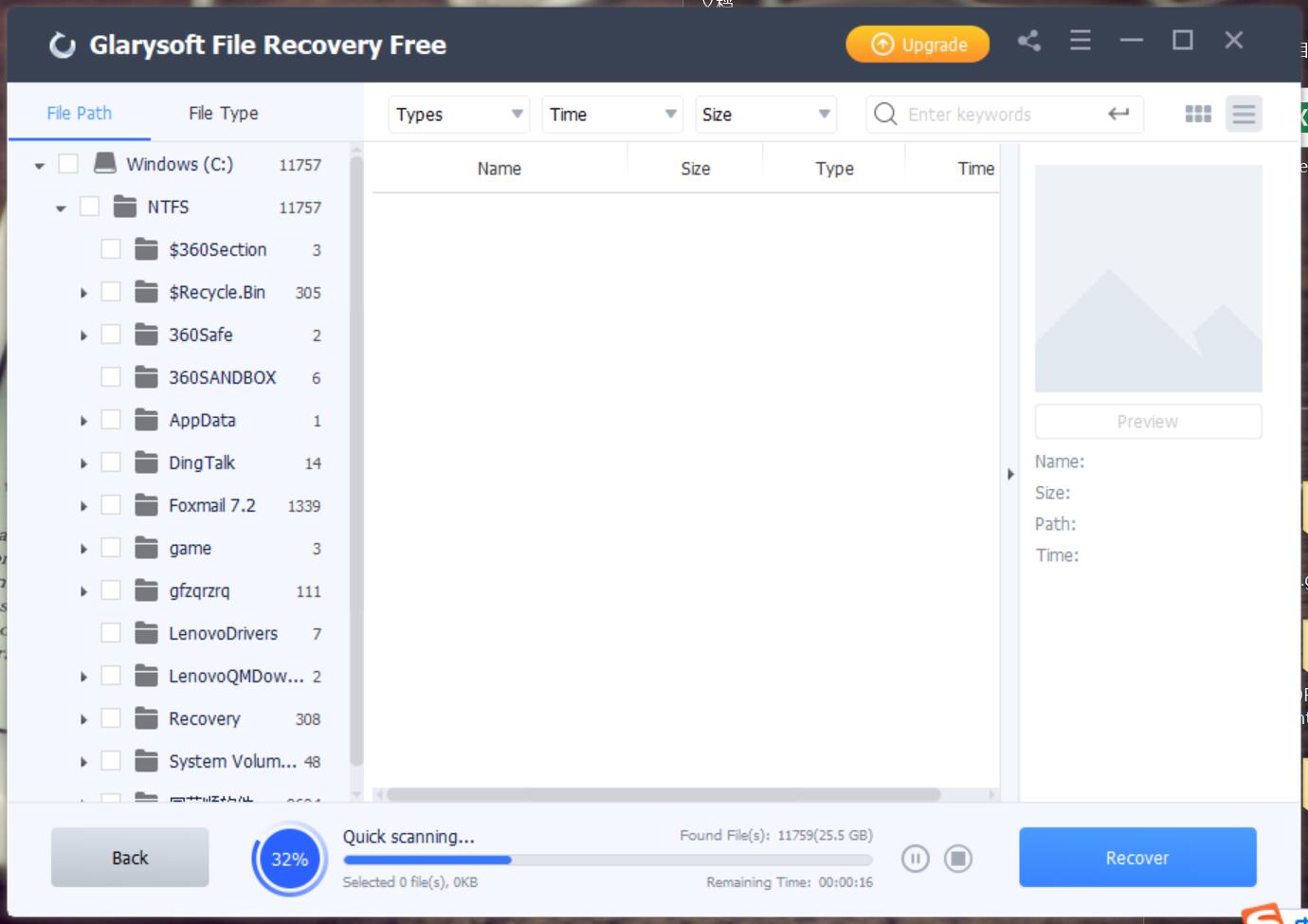
A quick scan under way, with found folders filling the tree on the left.
Glarysoft File Recovery Pro helps you find one file in thousands
Glarysoft File Recovery Pro sorts results by name, size, type and date. You can switch between the file path and file type views, and type a name into the search box. A scan of a whole drive can return an awful lot of files, so the filters matter.
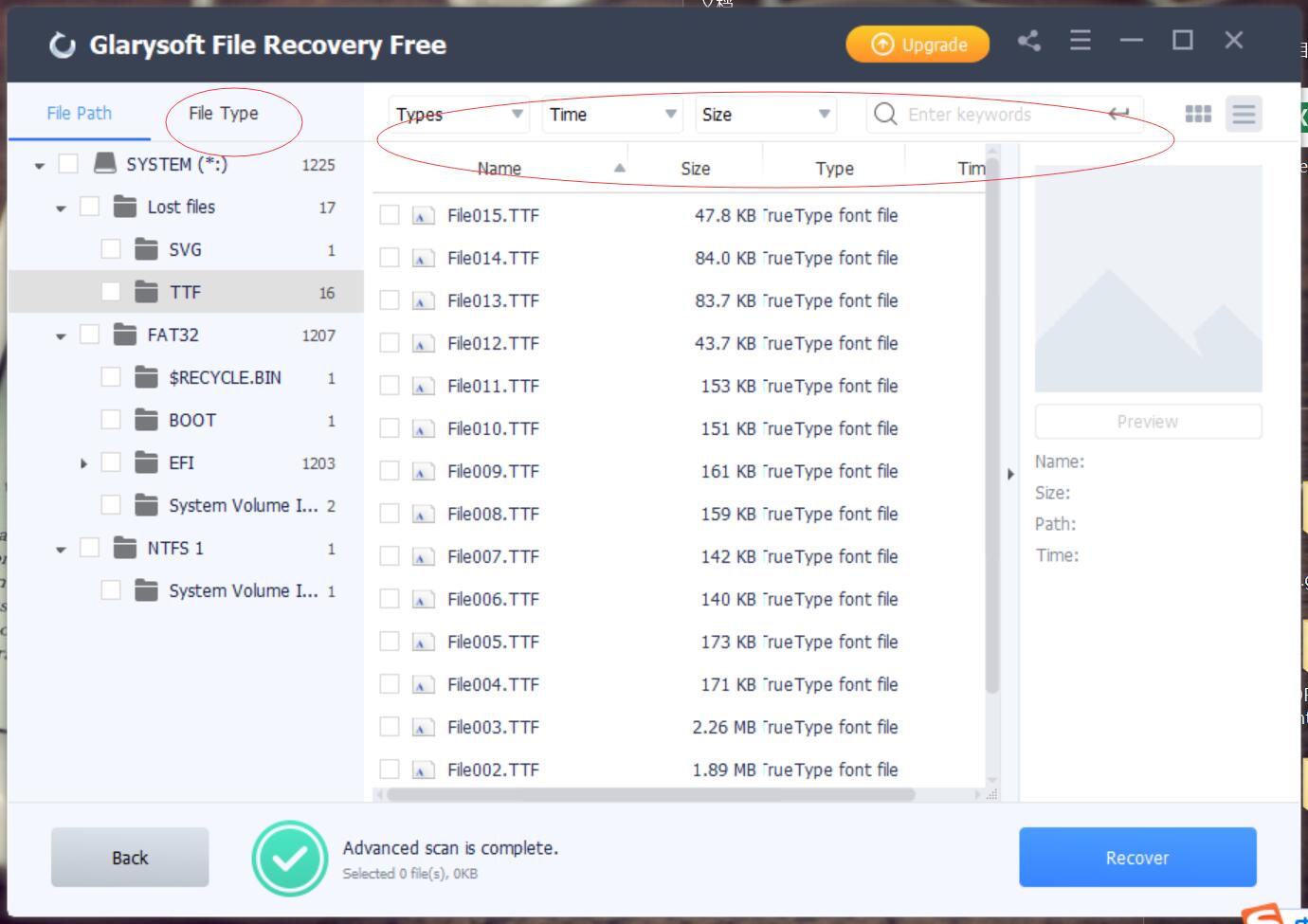
The File Type view, with type, time and size filters along the top.
Glarysoft File Recovery Pro previews before saving
Glarysoft File Recovery Pro shows a preview pane with the file's name, size, path and time, so you can check that it's the right file before recovering it. Pro also lets you save from the Advanced scan, which only previews in the free edition.
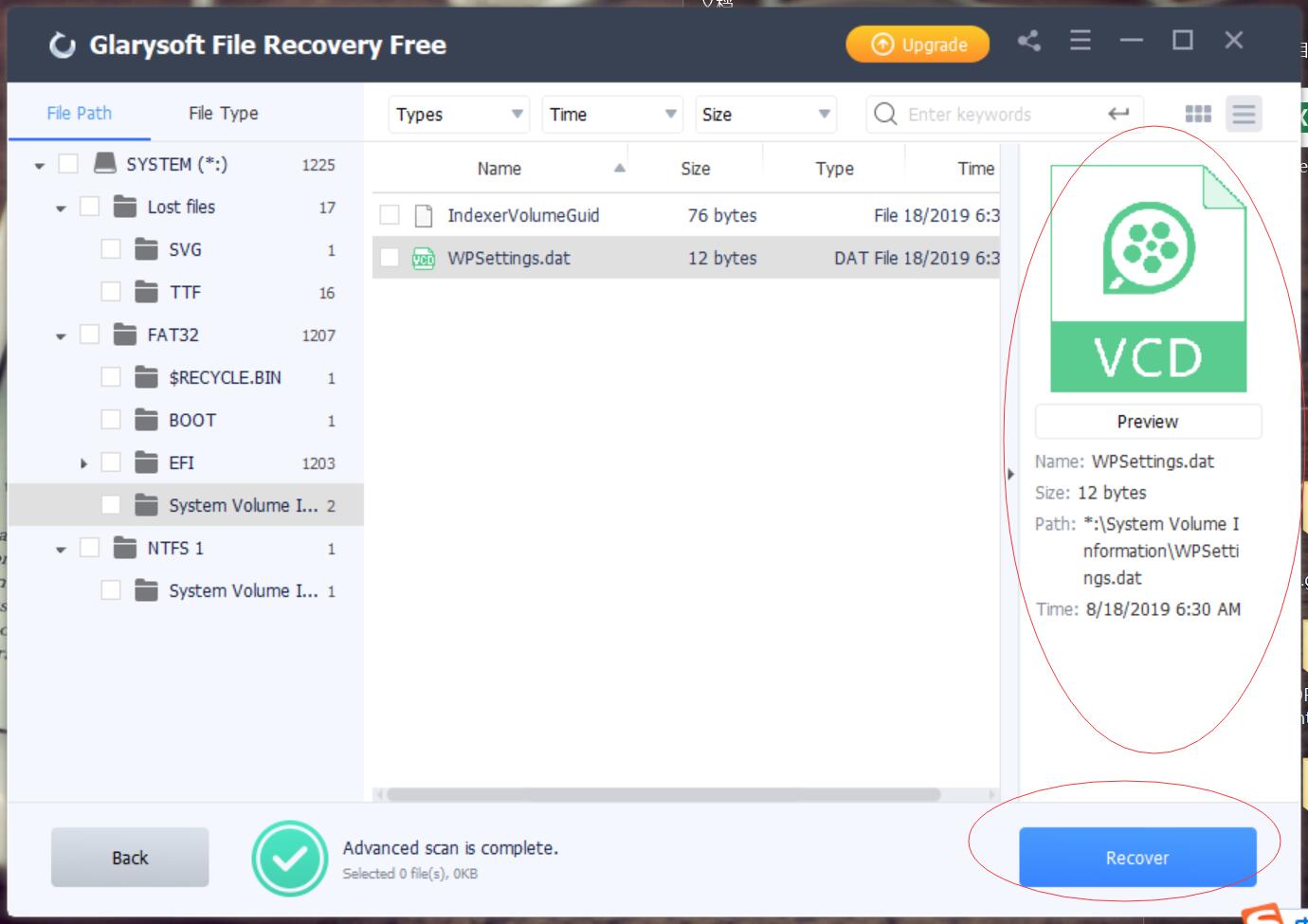
The preview pane on the right, with the Recover button below it.
Benefits
- Quick to learn. It's two steps, with no choices about recovery modes to get wrong.
- No 2 GB cap. A big video folder or photo library can come back in one job.
- Email support. Prompt online support is a Pro-only feature in Glarysoft's comparison.
Real-World Uses
- A formatted SD card: connect it, scan it and restore the holiday photos to your PC.
- A folder wiped with Shift+Delete: search by name so you don't have to look through everything.
- A USB stick after a virus scare: use Pro to look for files that the infection damaged or removed.
- A lost partition: select it on the first screen if it shows up, then scan and recover.
Who it's for, and who should skip it
Buy it if the free scan shows your files and you need more than 2 GB, or your loss came from formatting or corruption. Skip it if you're on a Mac, since it's Windows only. Skip it if the drive is clicking or failing physically, too: stop using it and go to a recovery lab, because scanning can make things worse. Anyone with an exFAT, RAID or Linux disk should look at a specialist tool such as R-Studio, because Glarysoft lists only FAT and NTFS. And for simple undeletes, the free Recuva is worth trying first.
Usage Guide
- Install the program on a drive other than the one you're recovering from.
- Select the drive or partition on the main screen. Connect an external drive or card first so that it's listed.
- Click Scan and wait. You can pause or stop at any time.
- Filter the results by type, size or date, or use the search box.
- Preview a file, then tick what you want and click Recover.
- Choose a save location on a different drive, so you don't overwrite anything.
Where it falls short
- Limited control. Top10PCSoftware found that you can't choose between Quick and Deep scan modes, and it mentions that users have reported occasional crashes.
- Slow deep scans. That review's verdict on speed: "we won't say that the speed is the best but it is still a competitive performance."
- Pricey for one job. Paying $49.95 a year is a lot when most people recover files once, and Glarysoft sells this as a yearly renewal.
- Thin documentation. Glarysoft doesn't publish a clear system requirements list or a list of supported Windows versions on the product page.
- Old screenshots. Glarysoft's help pictures show the Free edition at an early version, so the current window may differ a little.
What Users Say
There isn't much written about this product, and the longest "review" you'll find comes from a competitor selling its own recovery tool, so we've left it out. Here's what we could read elsewhere, and it's a small sample.
Top10PCSoftware (undated review)
This review scores Interface 85%, Features 80%, Updates 80%, Pricing 75%, Speed 75% and Customer Support 75%. On speed: "The Quick Scan took almost a minute to scan approximately 150 GB worth of files." On the free edition: "The free version lets you scan and recover files, but puts a restraint on the number of files you can restore."
Filepuma (download site)
The listing shows a user rating of 3 out of 5 from 7 votes, and it calls the program "a reliable and easy-to-use software tool."
Customer comments on Glarysoft's site
These are selected by the vendor, and they're about the free edition. Merry Ana wrote in June 2020: "It is really free and full version that helps me recover all the deleted photos. I am really grateful." Bob wrote: "This free file recovery software is really a free software. It sure can recover files from my computer."
Trustpilot (Glarysoft as a company)
Glarysoft scored 3.5 out of 5 from 30 reviews on November 6, 2026, with 54% five-star and 37% one-star. None of the reviews we read mention File Recovery. Yonah Greene, five stars, February 2025: "Glarysoft is the only one I can fully recommend to anyone." Chris John, one star, February 2026: "One of the most annoying upselling pieces of software I've ever had the misfortune to buy." Tony Iezzi, one star, December 2023: "Glarysoft offer no support."
The themes: people who try it say that it's easy and it found their files. The sample is small and much of it is about the free edition, and the complaints at company level are about upselling and support, so buy with your eyes open.
Comparisons
Glarysoft File Recovery Pro vs Free
Both scan, preview and restore permanently deleted files. Free stops at 2 GB, previews the Advanced scan only, and has no recovery of files damaged by formatting, corruption or viruses. Pro removes those limits and adds online support.
Glarysoft File Recovery Pro vs Recuva
Recuva is a long-established free undelete tool for Windows, and Glarysoft even lists it among its own alternatives. It's the natural thing to try first if your files were deleted recently and the free 2 GB here isn't enough. Glarysoft's interface is the more modern of the two.
Editions and Pricing
| Edition | Price | Term | Covers |
|---|
| Free | $0 | No expiry | Up to 2 GB recovered |
| Pro yearly (this listing) | $49.95 at checkout | Renews yearly, one year of updates | 1 PC, 30-day guarantee |
| Pro one week | $19.95 | 7 days, no renewal | 1 PC, 7-day guarantee if data isn't recovered |
| Pro lifetime | $99.95 | One payment, three years of updates | 2 PCs, 90-day guarantee |
FAQs
Is Glarysoft File Recovery free?
Glarysoft File Recovery has a free edition that recovers up to 2 GB. Pro removes that cap and adds recovery of files damaged by formatting, corruption or viruses.
Can Glarysoft File Recovery Pro recover files from an SD card?
Yes, Glarysoft File Recovery Pro scans SD cards, USB sticks and external drives connected to your PC, including camera memory cards.
Does Glarysoft File Recovery Pro work on a Mac?
No, Glarysoft File Recovery Pro is Windows software, and Glarysoft doesn't list a Mac version.
Can Glarysoft File Recovery Pro read exFAT or Linux drives?
Glarysoft lists only FAT, NTFS and NTFS + EFS for Glarysoft File Recovery Pro, so check any other file system with the free scan before paying.
How many PCs does Glarysoft File Recovery Pro cover?
The yearly Glarysoft File Recovery Pro plan covers one PC. Glarysoft's lifetime plan covers two, and its Technician plans are for professionals.
Will Glarysoft File Recovery Pro get back everything?
No, Glarysoft File Recovery Pro can't bring back data that has already been overwritten. Glarysoft says that the result depends on when the file was deleted and on what happened to the drive afterwards.
Can I get a refund on Glarysoft File Recovery Pro?
Glarysoft offers 30 days on the Glarysoft File Recovery Pro yearly plan, and it looks at technical problems case by case. Its refund policy says it generally won't refund a simple change of mind.
System Requirements
- A Windows PC
- FAT, NTFS or NTFS + EFS volumes to scan
- A second drive or a separate folder for the recovered files
- 12 MB for the download
Conclusion
Fine for occasional users, but use the free edition first. Glarysoft File Recovery Pro is about as simple as recovery software gets, and it's worth paying for if you're past the 2 GB cap or you've lost files to formatting or corruption. The one reason to buy it is getting a damaged or larger set of files back without learning anything new. The main reason not to is the price: $49.95 a year is steep for a tool most people need once, and independent testing is scarce. Run the free scan, then decide.
Download Free TrialBuy Now