Glary Utilities Pro: 20+ PC Maintenance Tools With Automatic Care
Glary Utilities Pro is a $39.95-a-year Windows maintenance suite for up to three PCs, with more than 20 tools for cleaning junk, fixing Registry errors, managing startup and protecting privacy. It suits people who want routine PC care to run on a schedule rather than by hand.
There's also a free edition with most of the same tools, so the real question is whether automation, a deeper scan and support are worth $39.95 a year to you. For many home users they aren't, and this page explains who they are worth it for.
Quick facts
- Version: 6.49, released October 19, 2026
- Developer: Glarysoft
- Platform: Windows 11, 10, 8.1, 8, 7, Vista and XP, 32-bit and 64-bit
- Price: $39.95 a year for up to 3 PCs, renewing yearly
- Trial: 30 days of Pro, plus a free edition
- Guarantee: 90 days, for the cases listed in Glarysoft's refund policy; a change of mind isn't one of them
What we checked: installer gupsetup.exe (27 MB, digitally signed by Glarysoft Ltd, dated October 19, 2026), and the order page, which showed $39.95 with renewal every 12 months, on November 6, 2026. We didn't run a scan, so we can't say how much it finds or whether a PC gets faster.
Download Free TrialBuy Now
Before you buy
- Try the 30-day trial or the free edition first. Glarysoft's refund policy says it generally won't refund a customer who "suddenly changes his mind after purchase".
- This is a subscription. Note your renewal date, since several Trustpilot complaints are about repeat charges.
- Cleaning junk and Registry entries rarely makes a PC noticeably faster, so a slow PC is unlikely to become a fast one.
Overview
Glary Utilities has been around for many years, and the vendor claims 200 million users. Version 6 is still updated regularly. The layout is simple: a status screen, a 1-Click Maintenance tab, and an Advanced Tools area sorted by job. TechRadar called it "all business", and that's fair. It has no gauges pretending to do something clever.
Features
1-Click Maintenance fixes the common problems in one pass
Glary Utilities Pro scans for Registry errors, broken shortcuts, spyware, disk errors, usage tracks and temporary files with one button. You can open the results to see what it plans to change before you press Repair Problems.
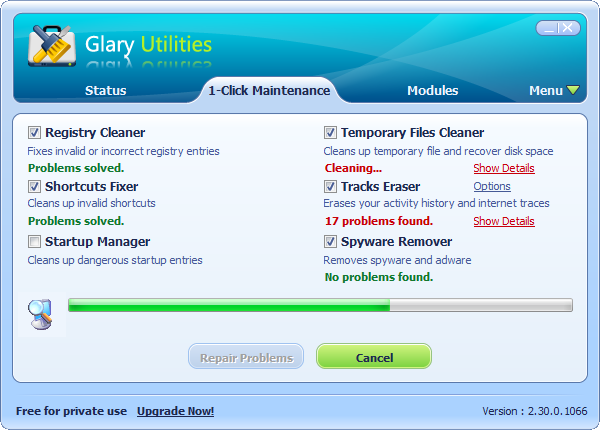
The 1-Click Maintenance tab. Glarysoft's screenshots show the old version 2.30, so version 6 looks different.
Automatic Care runs it on a schedule
Glary Utilities Pro can run maintenance by itself at a set time and erase usage traces such as browsing history at shutdown. This is the main thing Pro adds, and it is why the subscription exists.
Deep Clean finds what the free scan skips
Glary Utilities Pro adds an enhanced scan of the system and Registry for junk the standard scan leaves. TechRadar confirmed this option can't be turned on without Pro.
A startup manager that shows the cost of each item
Glary Utilities' Startup Manager breaks down startup programs, scheduled tasks, plugins and services, and TechRadar found it lists how many seconds each item adds to boot time.
Disk tools for finding lost space
Glary Utilities includes Disk Cleanup, a Disk Space Analyzer that sorts folders by size, and a Duplicate Finder. Disk Repair detects and fixes disk corruption.
Privacy, files and updates
Glary Utilities can wipe browser traces, shred files so they can't be recovered, restore accidentally deleted files, and check installed programs for new versions.
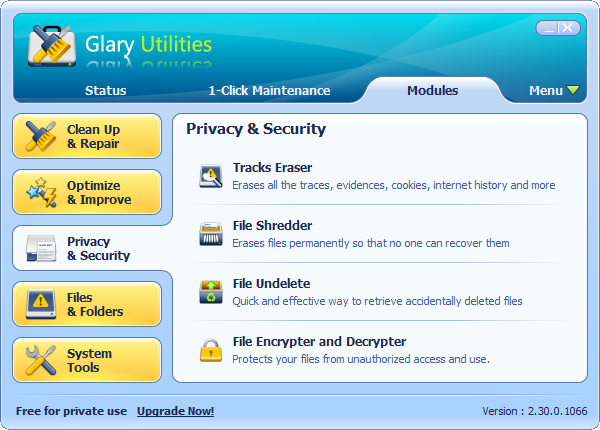
The Privacy and Security group, again from the old version 2.30.
Benefits
- One program instead of ten. Fewer small tools to install and keep updated.
- Maintenance you won't forget. Pro's schedule does the job on PCs nobody looks after.
- Three PCs on one plan. The license covers a small household.
- Support included. Official technical support is for paying users.
Real-World Uses
- Setting up a parent's PC so temporary files and traces are cleared without them doing anything.
- Finding which startup items add the most seconds to a slow boot.
- Finding what is filling a nearly full laptop SSD, then removing duplicates.
- Getting back a file that was deleted and emptied from the Recycle Bin.
Who It's For, and Who Should Skip It
Glary Utilities Pro fits people who look after two or three PCs and want hands-off cleaning, plus anyone who wants support they can email.
Skip Pro if you are happy to press 1-Click Maintenance yourself once a month, because the free edition does that, for private use. Skip it too if you want a PC speed fix: if your PC is slow because of old hardware or a nearly full drive, a cleaner won't cure it. Anyone wary of Registry cleaning can leave that box unticked or use a tool that focuses only on junk files.
Usage Guide
- Run the installer and start the program. Enter your license code if you bought Pro.
- Open 1-Click Maintenance and untick anything you don't want touched.
- Click Scan for Issues, then read the details before you click Repair Problems.
- In Pro, open the settings and set the time for automatic maintenance.
- Use the startup tool to disable items you don't need.
Where it falls short
- Offers and upsells. Trustpilot users complain about being pushed to upgrade, and a Capterra reviewer mentioned bundled software during setup, so read each screen.
- Billing complaints. Several 1-star Trustpilot reviews are about repeat charges and hard-to-reach support.
- Dated look. TechRadar listed a "somewhat dated interface" among its reasons to avoid it.
- Windows only. There's no Mac version.
- Screenshots lag behind. The vendor's picture gallery still shows a version from 2010, so you can't judge the current look from them. The trial is the better guide.
What Users Say
Trustpilot: 3.5 out of 5 from 30 reviews
Reviews are split: 54% are 5-star and 37% are 1-star, and only 8 came in the past 12 months. Trustpilot notes the company hasn't replied to negative reviews. Text below was read through a summarizer.
- Simon, 5 stars, January 18, 2026: "It is the first thing I install on a new laptop."
- Brian Fysh, 5 stars, August 27, 2025: "Runs very well and easy to use."
- Yonah Greene, 5 stars, February 26, 2025: "Glarysoft is the only one I can fully recommend to anyone."
- Terrell Kelley, 5 stars, August 9, 2022: "My computer now runs like a new computer!"
- George Wenger, 3 stars, August 11, 2022: "not all the utilities they offer actually work correctly"
- Chris John, 1 star, February 25, 2026: "yet every time it wants an upgrade."
- Nathan N, 1 star, March 18, 2023: "they have been secretly charging my card since 2019."
- Tony Iezzi, 1 star, December 28, 2023: "Glarysoft offer no support."
- Jamie Chamberlain, 1 star, September 19, 2021: "it destroyed my PC which means i had to Reinstall windows on it"
TechRadar: a useful suite with a dated look
Richard Sutherland's review (October 30, 2020, when Pro cost less) says: "As an entire suite of useful tools, Glary Utilities is a system maintenance software that you'll return to time and again, and it deserves a spot on any office PC."
On Pro, it says: "The free version of Glary Utilities includes most of the features of the Pro version". In its test, the file cleaner found over a gigabyte of temporary files, and the update tool identified 23 applications that could be updated. Glarysoft answered its support questions within 12 hours.
Capterra and GetApp: about 4.6 out of 5 from 16 reviews
The sample is small. Search listings show reviewers calling it very user friendly and understandable even by a new user, while one was slightly disappointed by bundled software during installation. We could only read short excerpts, since the review pages block direct access.
On the vendor's site
- Tom Ackley: "I've used your software for, literally, decades. It is the most reliable thorough PC maintenance set of utilities in my maintenance tool kit."
- Ossy Stomp Marlies: "Great software many tools are free plus it has 1 click maintenance."
The pattern: long-time users value the range of tools and stick with them for years. Complaints center on upgrade prompts, subscription charges and slow answers from support. A few reviewers blame it for damage, which is a good reason to keep a restore point before cleaning.
Comparisons
Glary Utilities Pro vs Glary Utilities Free
Free has most of the tools and 1-Click Maintenance, for private use. Pro adds the deeper scan, automatic scheduled care, shutdown cleaning, automatic update checks and support. If you will run it by hand, Free is enough.
Glary Utilities Pro vs Advanced SystemCare Pro
Both are yearly all-in-one PC care suites with a free edition. Advanced SystemCare looks more modern and leans on dashboards and real-time monitors. Glary Utilities is plainer and gives you direct access to individual tools, which suits people who like to see what they're running.
Editions and Pricing
| Edition | Price | License | What it adds |
|---|
| Glary Utilities Free | Free | Private use | Most tools and 1-Click Maintenance |
| Glary Utilities Pro | $39.95 a year | Up to 3 PCs | Deep scan, Automatic Care, shutdown cleaning, automatic updates, support |
| Glary Utilities Pro Technician | $169 a year | For service providers | Pro for people who service other people's PCs |
FAQs
Is Glary Utilities Pro a subscription?
Yes. Glary Utilities Pro renews every 12 months at the order page, and the $39.95 covers one year for up to three PCs.
Does Glary Utilities Pro work on Windows 11?
Yes. Glary Utilities runs on Windows 11, 10, 8.1, 8, 7, XP and Vista, in 32-bit and 64-bit versions.
What happens when my Glary Utilities Pro license expires?
Glary Utilities Pro needs a current subscription for Pro features, and the free edition's tools are what remain for private use. Check the renewal terms in your order email.
Can I get a refund on Glary Utilities Pro?
Glary Utilities Pro has a 90-day guarantee, but only for the accepted cases in the refund policy, such as buying the wrong product. It generally excludes a change of mind or not reading the description, so use the trial first.
Can I use the free Glary Utilities at work?
The free Glary Utilities is licensed for private use. TechRadar describes it as free for non-commercial use, so a business should buy a paid edition.
Is there a portable Glary Utilities?
Yes. Glarysoft's downloads page lists a free portable version with no installer, alongside the standard edition.
Is Glary Utilities Pro available for Mac?
No. Glary Utilities Pro is for Windows only.
System Requirements
- Windows 11, 10, 8.1, 8, 7, Vista or XP
- 32-bit or 64-bit
- 27 MB download
Conclusion
Verdict: Glary Utilities Pro is worth $39.95 a year if you want automatic care on two or three PCs and would otherwise never run maintenance. If you don't mind clicking a button yourself, the free edition covers most of it.
The one reason to buy is the schedule, which makes upkeep happen on a PC nobody looks after. The main reason not to is that you'd be paying yearly for automation of tools you can already use free. Start with the 30-day trial, because the refund policy won't cover second thoughts.
Download Free TrialBuy Now