Software Update Pro: Glarysoft's Automatic Program Updater for Windows
Software Update Pro is a $29.95-a-year Windows tool from Glarysoft that finds outdated programs and installs new versions for you, in a batch, from Glarysoft's own software library. It fits people who keep many desktop programs and want to stop updating them one at a time.
It has one problem to weigh up front: the program itself hasn't had a new version since the end of 2023. It may still do the job, because the update list lives in Glarysoft's library, but try the free edition or trial before paying.
Quick facts
- Version: 6.64.0.64, dated December 14, 2023 on the vendor's page
- Developer: Glarysoft
- Platform: Windows 11, 10, 8, 7, Vista, XP and 2000, 32-bit and 64-bit
- Price: $29.95 a year, renewing yearly
- Trial: trial download, plus a free edition
What we checked: trial installer susetupPro.exe (10.5 MB, digitally signed by Glarysoft Ltd, file dated January 31, 2024), and the order page, which showed $29.95 with renewal every 12 months, on November 6, 2026. We didn't run a scan, so we can't say how current its library is.
Download Free TrialBuy Now
Overview
Software Update comes in Free and Pro editions. Free tells you what is out of date and handles programs one at a time. Pro adds batch and automatic upgrades, plus remote management of other PCs on your network. The same updater also sits inside Glary Utilities, which matters if you already own that suite.
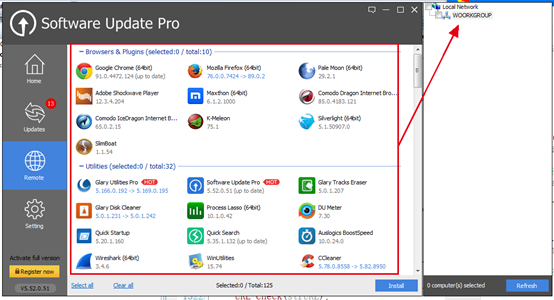
The Software Update Pro window on the Remote tab, marked up by the vendor. Picture shows an older version, 5.52.
Features
Finds out-of-date programs and updates them in a batch
Software Update Pro scans the PC, shows which programs have new versions, and upgrades them together. The free edition upgrades one at a time, so batch work is the main reason to pay.
A checked library instead of hunting for downloads
Software Update Pro installs from Glarysoft's software library. The vendor says its team scans each new version before listing it, so you aren't searching download sites for an installer.
One-click upgrades with little interaction
Software Update Pro detects when a program needs upgrading and prompts you, and one click launches the installer without further input, according to the vendor.
Remote Manager for a small office
Software Update Pro includes a Remote Manager. Install it on other PCs on the same LAN, and you can manage software installs and updates on those machines from one PC.
Beta control and alerts
Software Update lets you turn beta software scanning on or off, and it sends notifications when updates are available.
Benefits
- Fewer security holes. Old programs are a common way in, and this keeps them moving.
- Time saved. One batch replaces a dozen separate update prompts.
- Less risk from download sites. Installers come from one library.
Real-World Uses
- Catching up a PC that hasn't had its browser, PDF reader and media tools updated in a long time.
- Updating a small office's LAN PCs from one desk through Remote Manager.
- Setting up a new PC where you want to check everything is current in one pass.
Who It's For, and Who Should Skip It
Software Update Pro fits a home user or very small office with lots of traditional desktop programs and no interest in checking them individually.
Skip it if you already pay for Glary Utilities Pro, which includes software updating. Skip it if you're comfortable with Windows' built-in winget tool, which updates many programs free from the command line. A larger business should use real patch management software instead.
Usage Guide
- Run the installer and start the program.
- Let the first scan finish, then open Updates.
- Tick the programs you want to update and start the upgrade.
- Switch beta scanning off in Setting if you only want stable releases.
- For other PCs, install it on each one and manage them from the Remote tab.
Where it falls short
- No new version since 2023. The vendor's page and the installer both date from then, which is a concern for a tool whose whole job is staying current.
- The price is unclear. The product page still shows $14.97 a year, while Glarysoft's store and the order page charge $29.95.
- Library limits. It can only update what Glarysoft has added to its library, so a niche program may not appear.
- Thin independent coverage. We found very few recent reviews of the Pro edition.
- Windows only. There's no Mac version.
What Users Say
Independent reviews
Reviews of this specific product are scarce, and most sites cover the free edition. A software-updater roundup on ThinkMobiles liked its one-click updates, 32-bit and 64-bit detection and adware warnings, but pointed out that most features are in Pro only. FileHippo's review of the free edition noted that it has no option for automatic background updates, which is what Pro exists to add.
TechRadar tested the same updater inside Glary Utilities in 2020 and found it identified 23 applications on its test computer that could be updated.
On the vendor's site
Patricia: "I like Software Update. Never go to search and check for updates anymore. Software Update is really friendly to tell me whether there is a new version and give me the link to download. It saves me a lot of time."
Glarysoft on Trustpilot
The company scores 3.5 out of 5 from 30 reviews across all its products. About 37% are 1-star, many about repeat charges and support, so note your renewal date. None we saw were specifically about Software Update Pro.
Comparisons
Software Update Pro vs Software Update Free
Free scans and updates single programs. Pro adds batch and automatic upgrades and Remote Manager. If you update a few programs a month, Free is enough.
Software Update Pro vs IObit Software Updater Pro
Both are yearly updaters with a free edition. IObit Software Updater Pro costs less and its version is newer, while Glarysoft adds remote management across a LAN. For one PC, the IObit tool is the easier pick.
Editions and Pricing
| Edition | Price | What it adds |
|---|
| Software Update Free | Free | Scan, plus upgrades one program at a time |
| Software Update Pro | $29.95 a year | Batch and automatic upgrades, Remote Manager |
| Software Update Technician | $119 a year | For service providers |
FAQs
Is Software Update Pro still maintained?
Software Update Pro is still sold, but its last listed version is 6.64.0.64 from December 2023. Test the free edition to see whether its library knows the current versions of your programs before paying.
Does Software Update Pro work on Windows 11?
Yes. The vendor lists Windows 11, 10, 8, 7, XP, Vista and 2000, in 32-bit and 64-bit versions.
Do I need Software Update Pro if I have Glary Utilities Pro?
No. Glary Utilities Pro already checks installed programs for new versions, so most owners won't need both. Software Update Pro's extra is Remote Manager.
Does Software Update Pro update Windows itself or drivers?
No. Software Update Pro covers installed applications. Windows Update handles the system, and drivers need a separate tool.
Is the Software Update Pro subscription refundable?
Software Update Pro is listed under Glarysoft's 90-day guarantee policy, but it generally excludes a change of mind. The product page also mentions 30 days. Use the free edition first.
Is there a Mac version of Software Update Pro?
No. Software Update Pro is for Windows only.
System Requirements
- Windows 11, 10, 8, 7, Vista, XP or 2000
- 32-bit or 64-bit
- 10.5 MB download
- An internet connection for the software library
Conclusion
Verdict: Software Update Pro is a reasonable idea at an unconvincing price. At $29.95 a year, with no new version since 2023, it's hard to recommend over the free edition unless you specifically want batch updates or LAN management.
The one reason to buy is Remote Manager for a handful of office PCs. The main reason not to is that a paid updater should be the most current program on your PC, and this one isn't. Try the free edition, check that it spots your real updates, and only then decide.
Download Free TrialBuy Now