Redmine Agile Plugin: Scrum and Kanban Boards, Sprints and Agile Charts Inside Your Own Redmine
The Redmine Agile plugin from RedmineUP adds drag-and-drop Scrum and Kanban boards, a sprint and backlog planner, story points and 11 Agile charts to a self-hosted Redmine 5.0 to 7.0. The PRO version costs $499 for one production server, with lifetime use and 12 months of updates, and a free Light edition covers the basic board.
Redmine is a dependable issue tracker, but out of the box your team plans sprints in a long issue list and argues about status in meetings. This plugin puts the same issues on a board you can see at a glance, without moving your work into another tool.
Quick facts
- What it is: a plugin for Redmine, not a standalone program
- Developer: RedmineUP (Nideni LLC)
- Version: 1.7.0, released September 2, 2026
- Runs on: Redmine 5.0 to 7.0 with Ruby 3.1 to 4.0, on Linux, macOS or Windows servers
- Databases: SQLite, MySQL, PostgreSQL or SQL Server
- Price: $499 PRO single-server, $1,099 PRO multi-server, Light edition free
- License: lifetime use, 12 months of updates and technical support included, optional renewal
- Try it: a 30-day free trial of the full version, an online demo, or the free Light edition
- Languages: 10, including English, German, Spanish, French, Polish, Portuguese (Brazil), Russian, Chinese, Chinese (Taiwan) and Korean
What we checked: the order page listed the Redmine Agile plugin single-server license at $499.00 on October 13, 2026, with the multi-server option at $1,099.00 and a renewal of $349.30 for the next 12 months. The same day, redmine.org listed version 1.7.0, released September 2, 2026, compatible with Redmine 5.0 through 7.0, with 141 user ratings averaging 4.7 out of 5.
Before you buy
The Redmine Agile plugin needs your own Redmine server and someone who can install a Redmine plugin from the command line. It doesn't run on its own, and it isn't a desktop app. Current releases need Redmine 5.0 or later: version 1.6.13 (January 2026) was the last release that listed Redmine 4.x support. Updates and support last 12 months. The plugin keeps working afterwards, but you'll want updates whenever you upgrade Redmine, and version 1.7.0 also fixed an SQL injection vulnerability.
Buy Now
Overview
The Redmine Agile plugin has been listed on redmine.org since March 2014. It turns Redmine issues into cards on an Agile board, keeps them in sync with Redmine's own statuses, trackers and permissions, and adds the planning layer Scrum teams expect: sprints with start and end dates, a backlog, story points and charts that show whether a sprint will land. It suits Scrum, Kanban and mixed methods such as Scrumban or Kanplan. RedmineUP says over 150,000 companies in 120 countries use its plugins, themes and services, and the plugin had six releases between March 2025 and September 2026.
Features
A drag-and-drop board that respects your workflow
The Redmine Agile plugin shows your issues as cards in status columns. Drag a card to change its status, comment on it, tick its checklist items and create new issues straight from the board. The board is workflow aware, so a user can't drop a card into a status their role isn't allowed to set. Cards can show tags and images, a live search highlights matching cards, and since version 1.6.7 the board updates asynchronously, so a teammate's changes appear without a reload.
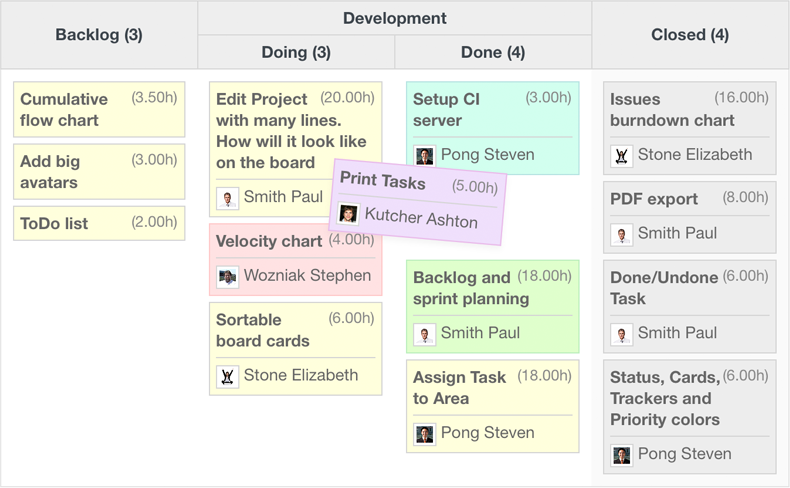
An Agile board with Backlog, a Development column split into Doing and Done, and Closed. Each card shows its estimate and assignee, and one is being dragged between columns.
Sprints and a backlog planner (PRO)
The Redmine Agile plugin PRO adds Agile sprints, separate from Redmine versions: a sprint has start and end dates, while a version can stay a higher-level release. The Backlog tab shows the backlog and your sprints side by side, so you plan by dragging issues from one to the other. A Scrum board can then show only the selected sprint, and its charts follow that sprint.
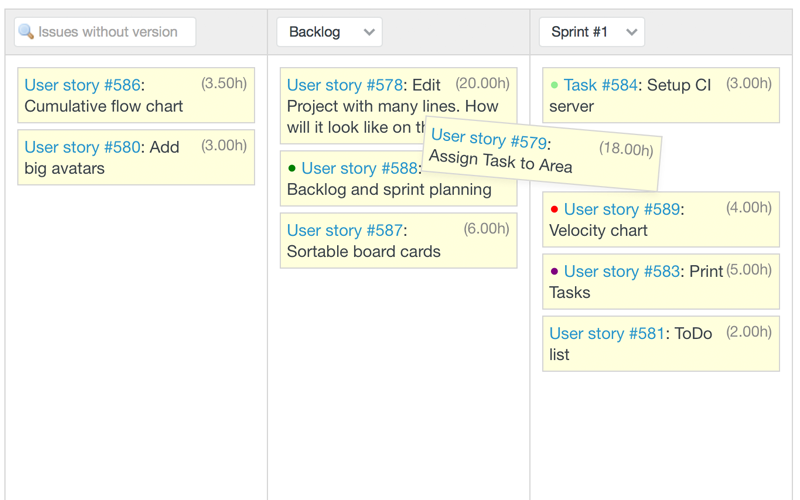
The planner with issues without a version, the Backlog and Sprint #1 side by side, while a user story is dragged into the sprint.
Story points and work-in-progress limits (PRO)
The Redmine Agile plugin PRO lets you estimate each issue in story points, with totals per column and per board, and you can restrict the allowed values to a fixed series such as Fibonacci numbers. Work-in-progress limits cap how many cards a column may hold, and the board warns you when a column goes over its limit.
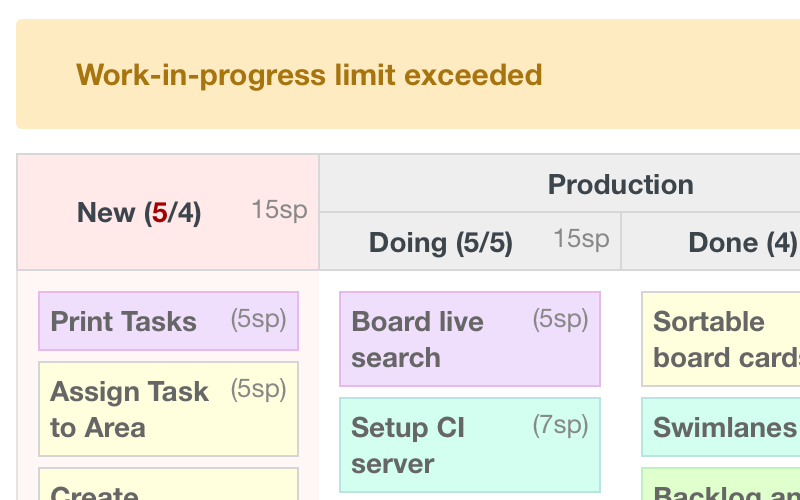
A "Work-in-progress limit exceeded" warning above a board whose New column holds 5 cards against a limit of 4, with story points shown on each card.
Sub-columns, swimlanes and saved boards (PRO)
The Redmine Agile plugin PRO splits a phase into sub-columns (Production into Doing and Done, for example) and arranges cards in horizontal swimlanes by assignee, parent task, tracker and other fields. Boards can be saved with their own columns and settings and shared by user, role or project, and cards can be colored by issue, priority, project or spent time.
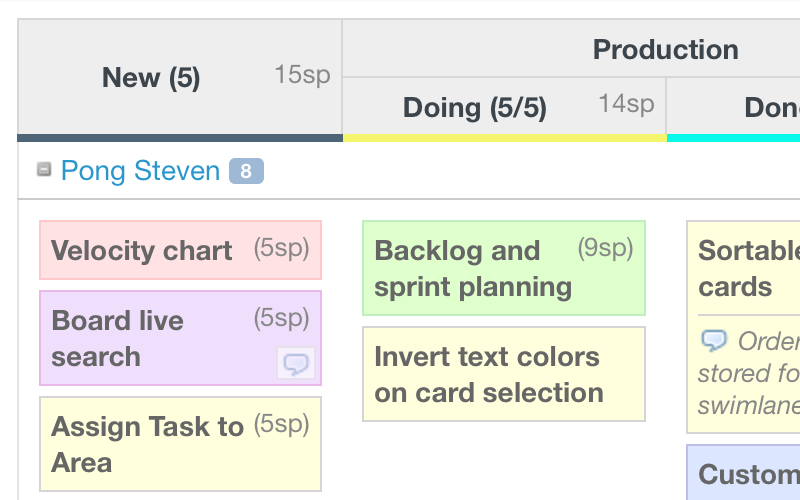
A Production column split into Doing and Done sub-columns, a swimlane for one assignee, story point totals in the headers and cards colored by type.
11 Agile charts
The Redmine Agile plugin includes the burndown chart in every edition. PRO adds the rest of the 11 charts, among them burn-up, cumulative flow, velocity (by story points or hours) and the cycle time chart, which shows the average and total time to finish tasks per issue type. Charts can be limited to a time range, follow the selected sprint on a Scrum board, and be saved for reuse.
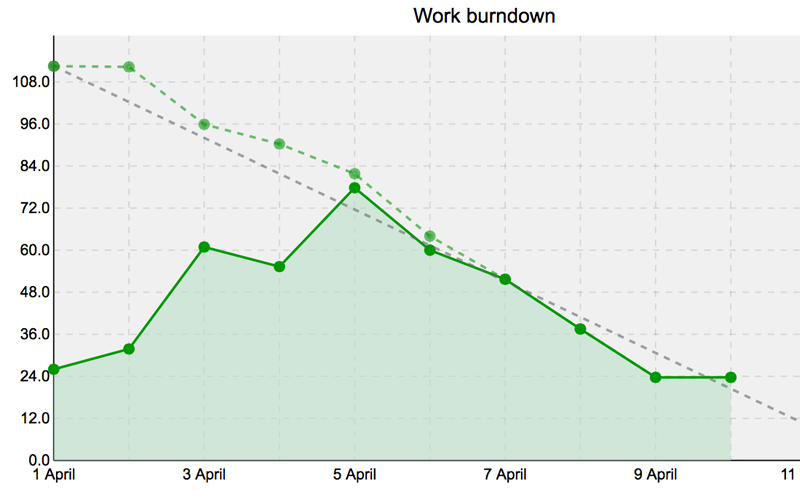
A work burndown chart plotting the remaining work against the ideal line over a sprint.
History of changes and the Redmine API
The Redmine Agile plugin records each issue's changes of status, assignee and % done in one view, which makes it easy to see where a task stalled. Sprints are also available through the Redmine API, for teams that script their Redmine.
Benefits
No second tool. Your issues, time entries and history stay in Redmine, so nobody copies tickets into a separate board app or wonders which one is current.
Planning you can see. A board with WIP limits shows a bottleneck the moment it forms, and a burndown shows a slipping sprint days before the review meeting.
Your data on your server. Because it runs inside your own Redmine, there's no per-user monthly fee and no project data leaving your network.
Real-World Uses
- A software team runs two-week Scrum sprints: it plans in the Backlog tab, estimates in story points and checks the burndown at each stand-up.
- An operations group uses a Kanban board with WIP limits for infrastructure work, with swimlanes per engineer.
- An agency with many client projects saves one board per project and colors cards by priority, so urgent work stands out.
- A team lead reviews the cycle time and velocity charts each month to see whether estimates are getting better.
Who It's For
The Redmine Agile plugin is for teams that already run a self-hosted Redmine, or plan to, and want boards and sprint planning without leaving it. Smaller teams that only need a simple board can start with the free Light edition. It isn't for teams without anyone to install server plugins, and it adds nothing to a hosted service that doesn't allow plugins.
Usage Guide
- Check your versions. You need Redmine 5.0 to 7.0 and Ruby 3.1 to 4.0. Back up the Redmine database before installing any plugin.
- Get the plugin. After you order, RedmineUP emails a download link, and later updates come from its License Manager.
- Install it. Extract the plugin into Redmine's
plugins folder, run bundle install, then bundle exec rake redmine:plugins NAME=redmine_agile RAILS_ENV=production, and restart Redmine.
- Turn it on per project. Enable the Agile module in each project that needs it and give your roles the Agile permissions.
- Set up the board. Pick Scrum or Kanban, choose columns and sub-columns, swimlanes, card fields and WIP limits, then save the board.
- Plan the first sprint. Create a sprint with start and end dates, drag issues into it from the Backlog tab, and estimate them in story points.
Tips
- Install on a test server first. Both license types allow any number of test installations, including developers' own machines.
- Define your story point values (Fibonacci, for example) before the team starts estimating, so the numbers stay comparable.
- Upgrade the plugin before or together with Redmine, never after, and back up first.
What Users Say
The ratings on redmine.org
The Redmine Agile plugin has 141 user ratings on redmine.org, the Redmine project's own plugin directory: 119 five-star, 14 four-star, none at three stars, 3 two-star and 5 one-star, which works out to 4.7 out of 5. Four of the one-star ratings are protests about the company rather than comments on the plugin. The reviews below are quoted exactly as written, with the age redmine.org shows for each.
What teams like
"Our software development team relies on this superb plugin to manage our agile process. The graphs, boards, and grids are very customizable, making it a pleasure to work with for our unique combination of Kanban and Scrum techniques." Alex Silverstein, 5 stars, over 8 years ago
"We use this plugin to manage our IT infrastructure projects. RedmineUp integrates perfectly into the exact global configuration of Redmine, adding Agile functionalities (backlog, sprint, story points) and making it simple and ergonomic to use." Guillaume Capiod, 5 stars, over 2 years ago
"Useful and easy-to-use plugin that helps us a lot to implement agile development processes in our organisation. Also, the support they provide is excellent." Veit Jahns, 5 stars, about 1 year ago
"Work really well for multi-project team. Great support." Ninjoe Nojin, 5 stars, about 1 year ago
"Most impressive. We are using Redmine Agile for standards development, which some may consider an oxymoron, but is becoming more pressing as the industry outpaces our innovation cycle. I would suggest it for any standards organization." William Sobel, 5 stars, over 6 years ago
On RedmineUP's own page, Alain SALMETOZ, Software Firmware R&D Efficiency leader in Schneider Electric, writes: "We worked with this Agile plugin for 2 years, it's incredibly simple with many features. What we love first - outside simplicity I already mentioned - is that you can use whatever framework / method / process / practice you have. I would recommend giving it a try."
Support and upgrades
"One of the best plugins supported by an excellent support staff. No questions took more than 24 hours to answer. They have a well documented user manual. I am using their Agile Plugin and Helpdesk plugin and I am extremely satisfied with both." Nitin Srivastava, 5 stars, about 3 years ago
"I like the support, functionalities are great of course, but if I have any doubts, support answers in minutes with accuracy and great how-to Cheers guys !" Renaud GOSSE, 5 stars, over 5 years ago
"Work as description says. Easy migration from free to full version." Diego CEBRIÁN MARTÍNEZ, 5 stars, over 6 years ago
Criticism
"Great plugin! Makes Redmine usable for us (agile team). Closed sprint filter is needed almost everywhere. Once a sprint is closed, you cannot view the charts for the closed sprint otherwise. Great support team!" Serhat Güler, 5 stars, over 4 years ago. Version 1.6.4 (April 2022) added closed sprints to the filter.
"Can't find a way to change default sorting order when new issues go to the bottom of columns but pretty impressed with dragging functionality, thanks!" Roman Belyakovsky, 4 stars, about 10 years ago
"Very good plugin, need more Kanban indicator, such cycle time, debit, ..." yannick quenec'hdu, 4 stars, almost 12 years ago. A cycle time chart has since been added.
"I like the idea what the majority of diagrams don't really explain themselfes and I miss customization at different aspects. The company should really invest some time and money into a good user documentation." Martin Hartung, 2 stars, about 11 years ago
The recurring themes: users praise how well the board fits into Redmine, how flexible it is across Scrum and Kanban, and above all RedmineUP's support, which reviewers often thank by name. The complaints are about missing details (sorting, filters, extra Kanban metrics) and chart documentation, and several of the older ones were addressed in later releases.
Comparisons
Light vs PRO
The free Light edition gives you the Agile board and the burndown chart on any number of servers. Everything else on this page needs PRO:
| Feature | Light (free) | PRO |
|---|
| Agile board with drag and drop | ✓ | ✓ |
| Burndown chart | ✓ | ✓ |
| Sprints, Backlog and version planner | ✗ | ✓ |
| Saved boards and default boards | ✗ | ✓ |
| Horizontal swimlanes and board sub-columns | ✗ | ✓ |
| Additional Agile charts, saved charts | ✗ | ✓ |
| Additional card fields, colors, card context menu, bulk edit | ✗ | ✓ |
Agile plugin vs the RedmineUP full stack bundle
The RedmineUP full stack bundle ($1,799) includes this same Agile PRO plugin plus 14 more PRO plugins, among them Helpdesk, CRM, Invoices, Resources and Budgets. Bought separately, Agile, Helpdesk, CRM, Resources and Budgets come to $1,795, so the bundle makes sense once you need four of the bigger plugins besides Agile. For boards and sprints alone, the Agile plugin is the cheaper buy.
Agile plugin vs plain Redmine
Plain Redmine tracks the same issues, but as lists, with versions as the only planning unit and no board, story points, WIP limits or burndown. The plugin adds those on top of your existing data, so you can turn it on for one project and leave the rest unchanged.
Editions and Pricing
| Edition | Price | Servers | Includes |
|---|
| Light | Free | Unlimited | Agile board and burndown chart |
| PRO Single-server | $499 | One production server, unlimited test installs | All PRO features, lifetime use, 12 months of updates and support |
| PRO Multi-server | $1,099 at checkout | Unlimited installations within one company | All PRO features, lifetime use, 12 months of updates and support |
Renewing the single-server license for another 12 months of updates and support was offered at $349.30 at checkout. RedmineUP accepts cards, PayPal, bank transfer and more than 30 other payment methods through 2Checkout, and it offers discounts and special terms to students, non-profits and open source projects.
FAQs
Does the Redmine Agile plugin work with Redmine 4?
The Redmine Agile plugin 1.7.0 supports Redmine 5.0 through 7.0 only. Version 1.6.13, released January 2026, was the last one that listed Redmine 4.0 to 4.2, so on Redmine 4 you would need an older plugin release or a Redmine upgrade.
Can I try the Redmine Agile plugin PRO before buying?
Yes. RedmineUP offers a 30-day free trial of the full Redmine Agile plugin, emails a link to a fully functional online demo on request, and has the free Light edition for a permanent basic board.
What happens when the 12 months of updates end?
The Redmine Agile plugin keeps working for as long as you like. You only stop getting updates and technical support until you renew, which was offered at $349.30 a year for the single-server license.
Is the Redmine Agile plugin included in the RedmineUP full stack bundle?
Yes. The RedmineUP full stack bundle includes the Redmine Agile plugin PRO along with 14 other RedmineUP PRO plugins, for $1,799 on a single server.
Do Redmine Agile plugin sprints replace Redmine versions?
No. Redmine Agile plugin sprints sit alongside Redmine versions. A sprint has its own start and end dates, and a version can serve as the higher-level release that several sprints feed into.
Can I change the Redmine Agile plugin's code?
Yes. RedmineUP releases the Redmine Agile plugin's Ruby code under the GPL and allows modifications, but it no longer supports a plugin whose code has been changed and can't promise that future updates will stay compatible.
Does the Redmine Agile plugin work in my language?
The Redmine Agile plugin is translated into 10 languages: English, German, Spanish, French, Polish, Portuguese (Brazil), Russian, Chinese, Chinese (Taiwan) and Korean.
System Requirements
- Redmine: 5.0 to 7.0
- Ruby: 3.1 to 4.0
- Database: SQLite, MySQL, PostgreSQL or SQL Server
- Server OS: Linux, macOS (OS X) or Windows
- Browsers: Chrome, Safari, Firefox or Internet Explorer
Conclusion
The Redmine Agile plugin is the most established way to run Scrum or Kanban inside your own Redmine: a workflow-aware board, real sprint planning, story points, WIP limits and a full set of charts, backed by support that its users keep praising. It asks for a self-hosted Redmine 5.0 or later and someone to install it, and it costs more than a simple board app would.
If your team already lives in Redmine, start the 30-day trial or the free Light edition on a test server. If the board becomes how you run your stand-ups, the $499 PRO license is a straightforward buy.
Buy Now