Devart ODBC Driver for WooCommerce: Query Your Store With SQL From Excel, Power BI and Access
Devart ODBC Driver for WooCommerce is a Windows ODBC driver, $139.95 a year for one desktop user, that turns a WooCommerce store into a SQL data source. Excel, Access, Power BI, Tableau, a SQL Server linked server or a Python script can read the store's data and write changes back, using only the shop's domain and a pair of WooCommerce REST API keys.
WooCommerce runs inside WordPress, so its sales data normally lives behind the WordPress admin, its reports and CSV exports. If you want last quarter's orders next to your accounting figures, or a stock list that refreshes in a spreadsheet without another export, a driver like this is the shortcut.
Quick facts
- Version: 1.5.0, released October 16, 2026 (first release August 10, 2022)
- Developer: Devart
- Platform: Windows Vista or later, 32-bit and 64-bit, including Terminal Server, with .NET Framework 4.5 or later. No macOS or Linux build
- Connects with: your store's domain plus a WooCommerce Consumer Key and Consumer Secret, over HTTPS or through a proxy
- SQL: SQL-92 SELECT with JOINs, subqueries, GROUP BY and aggregates, plus INSERT, UPDATE and DELETE
- Price: $139.95 per year (Desktop, 1-year subscription) or $279.95 perpetual
- Trial: 30 days, activated with a trial key from a free Devart account
- Refund: full refund within 30 days of purchase only when a technical problem stops the driver working and Devart support can't fix it
- What we checked: the order page charged $139.95 for Desktop for Windows on a 1-year subscription, and Devart's price list showed $279.95 perpetual and $899.95 a year for Server Standard. The download page listed version 1.5.0 with a 32.02 MB EXE installer. All checked on November 14, 2026. We didn't connect the driver to a live store
Before you buy
The Consumer Key and Secret you generate in WooCommerce carry a permission level (read, write or read/write). Give the driver a read-only key if all you need is reporting, and a read/write key only when you really mean to change orders or products from SQL. Every query travels through the store's REST API, so a busy shop on cheap hosting will feel it when someone refreshes a large report.
Download Free Trial Buy Now
Overview
The driver sits between WooCommerce and any ODBC program on a Windows computer. You create a DSN (data source name) once, with your store's domain and the two keys, and from then on every ODBC-aware tool on that machine sees the shop as a database. Your SELECT statements are translated into WooCommerce API requests, and the answers come back as rows and columns.
There is nothing to install on the web server and no plugin to add to WordPress: the driver talks to the API WooCommerce already exposes. It is a single 32 MB installer for Windows, with an MSI available for managed rollouts.
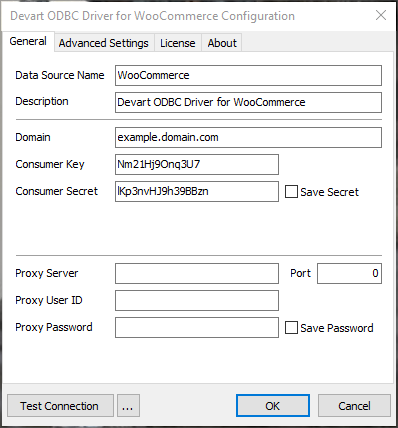
The driver's Windows configuration dialog: the store domain, the WooCommerce Consumer Key and Consumer Secret, and optional proxy settings.
Features
Store data as SQL tables
Devart ODBC Driver for WooCommerce lets you filter, join, group and total store data with ordinary SQL-92 SELECT statements, so "revenue per product per month" becomes one query instead of an export and a pivot table.
Changes written back to the shop
Devart ODBC Driver for WooCommerce supports INSERT, UPDATE and DELETE. A price change for a whole product line, or a status fix on a batch of records, can be done from Access or a SQL tool rather than one edit screen at a time.
Key-based sign-in, stored encrypted
Devart ODBC Driver for WooCommerce authenticates with the Consumer Key and Consumer Secret that WooCommerce issues for its REST API. Since version 1.2.0 (March 2024) the secret is saved encrypted in the DSN record rather than as plain text.
Tuned for the usual reporting tools
Devart ODBC Driver for WooCommerce has a release history of fixes for specific clients: SQL Server linked servers, Microsoft Access linked tables, Alteryx, Tableau, Excel imports, Microsoft Query, Qlik Replicate, the PHP PDO_ODBC extension, Node.js, Visual FoxPro and DBeaver.
Benefits
- Fewer CSV exports. Reports read the store directly, so the numbers are current when the workbook refreshes.
- Shop data meets the rest of the business. Join orders with a supplier price list in Access or with your ERP in SQL Server.
- No WordPress changes. The driver uses the store's existing REST API, so your hosting and plugins stay as they are.
- One license, many tools. The same DSN serves Excel, Power BI, Tableau and scripts on that computer.
Real-World Uses
- Monday sales sheet. A shop owner keeps an Excel workbook of the previous week's orders by product and refreshes it each Monday morning.
- Margin check. An analyst joins WooCommerce line items with a cost-price table in Access to see which products actually make money.
- Bulk catalogue edit. Before a sale, a store manager updates prices for one category with a single UPDATE in DBeaver, after testing on two products.
- Dashboard for a client. An agency running several shops points Power BI at each store's DSN for a monthly performance report.
Who It's For, and Who Should Skip It
Devart ODBC Driver for WooCommerce suits shop owners, analysts and agencies on Windows who already live in Excel, Access or Power BI and want WooCommerce data there without hand-made exports, or who need SQL-sized edits across many products or orders.
Skip it if you work on a Mac or Linux, because there is no build for them. Skip it too if you have direct MySQL access to your WordPress database and only need read-only reports: any MySQL client reads the raw tables, though WooCommerce's own table layout is much harder to query than the API view. And if WooCommerce's built-in Analytics already answers your questions, there's nothing here to pay for.
Usage Guide
- In WordPress, open WooCommerce > Settings > Advanced > REST API, add a key for a user with the right access, choose Read or Read/Write, and copy the Consumer Key and Consumer Secret.
- Download the trial with the button on this page (a free Devart account is required) and run the EXE, or the MSI for deployment tools.
- Open the ODBC Data Source Administrator whose bitness (32 or 64) matches your application, add a User or System DSN and choose Devart ODBC Driver for WooCommerce.
- On the License tab, activate the trial or your purchased key.
- On the General tab, enter the store domain and both keys, add proxy details if your network needs them, then click Test Connection.
- In Excel, Power BI or another tool, choose ODBC as the source and select your new DSN.
Tip
Create the REST API key under a dedicated WordPress user rather than your own admin account. If you later revoke that key or delete the user, every workbook that used it stops at once, which is exactly what you want when someone leaves the business.
Where It Falls Short
- Windows only. No macOS or Linux edition is sold.
- Bound by the API and your hosting. Each query becomes REST calls to your web server, so big order histories load slowly compared with a real database, and an overloaded host slows both the report and the shop.
- Thin product-specific documentation. Devart's documentation for this driver is mostly the shared ODBC manual and doesn't publish a table list, so you learn the schema by browsing the DSN in your tool during the trial.
- Pricier than most of Devart's SaaS drivers. At $139.95 a year it sits in Devart's higher tier for single cloud drivers, where many others cost $109.95.
What Users Say
Review sites don't rate the WooCommerce driver on its own: Capterra, GetApp and the others list Devart's ODBC drivers as one product, so the feedback below is about the line and, where named, about other drivers in it.
Ratings for the ODBC line
Capterra shows 4.7 out of 5 from 26 reviews of Devart ODBC Drivers, and GetApp a similar 4.7 from 25. TrustRadius is the outlier with a score of 5.2 out of 10.
What reviewers say
Short, practical praise is typical. One Capterra reviewer summed up the setup in four words: "It was easy to setup!" Another explained why they moved from a competing connector vendor: "My specific platform support, some databases are not yet supported by CData." The main complaint in the sample is cost: a G2 reviewer of Devart's Salesforce driver wrote that "Pricing options for Devart ODBC driver is relatively high when compared with other competitive service providers."
Taken together: easy installation and broad source coverage are what people value, price is what some push back on. For a store-specific driver the deciding test is your own shop, so use the 30-day trial against your real order volume.
Comparisons
ODBC driver vs. WooCommerce Analytics and CSV exports
WooCommerce Analytics and CSV exports are free and good enough for standard sales reports inside WordPress. Devart ODBC Driver for WooCommerce costs $139.95 a year and adds live connections from outside tools, SQL joins with other data, and edits written back to the store.
WooCommerce driver vs. the ODBC Universal Bundle
If you also need Shopify, BigCommerce, Magento or a dozen other sources, Devart's ODBC Universal Bundle covers all its drivers. For one WooCommerce store, the single driver is the cheaper buy.
Editions and Pricing
| Edition | 1-year subscription | Perpetual | Who can use it |
|---|
| Desktop for Windows | $139.95 | $279.95 | One user at a time on one computer |
| Server Standard for Windows | $899.95 | $1,799.95 | Several users on one server with up to 6 cores, one legal entity |
| Server Enterprise, Site, OEM | Quote | Quote | Any core count, a whole company, or shipping the driver in your own app |
All editions and terms are one product at checkout. The Buy Now button opens the order page set to Desktop for Windows with a 1-year subscription, and you switch the edition, the subscription length or the perpetual license there. Priority support is an optional add-on, and Devart takes 5, 10 or 15 percent off orders of 5, 10 or 20 or more copies.
FAQs
Does Devart ODBC Driver for WooCommerce need a plugin on my WordPress site?
No. Devart ODBC Driver for WooCommerce connects to the REST API that WooCommerce already provides, using a Consumer Key and Secret you create in WooCommerce settings. Nothing is installed on the server.
Can the WooCommerce ODBC driver work with a read-only key?
Yes. Devart ODBC Driver for WooCommerce uses whatever permission the key has, so a Read key gives you reporting only and any INSERT, UPDATE or DELETE will be refused by the store.
Can I use the WooCommerce driver with Power BI scheduled refresh?
Devart ODBC Driver for WooCommerce works with Power BI through a DSN. If several people's reports refresh through one shared gateway machine, Devart's license terms call for a Server edition, since Desktop allows one user at a time.
Does it run on macOS?
No. Devart ODBC Driver for WooCommerce is built only for 32-bit and 64-bit Windows with .NET Framework 4.5 or later.
What happens when the WooCommerce driver subscription ends?
A subscription license of Devart ODBC Driver for WooCommerce works only during the paid term and needs internet access to activate and confirm the license. A perpetual license keeps the purchased version working indefinitely and can be activated offline.
Is a refund possible if it doesn't suit my store?
Only for technical failure. Devart refunds within 30 days when a technical problem stops Devart ODBC Driver for WooCommerce from working and its support team can't solve it, so use the free trial to decide whether it fits.
System Requirements
- Windows Vista or later, 32-bit or 64-bit, including Windows Server and Terminal Server
- .NET Framework 4.5 or later
- 32.02 MB installer, and only one version of the driver installed at a time
- A WooCommerce store reachable over HTTPS and a REST API Consumer Key and Secret
- Internet access to activate a subscription license
Conclusion
Devart ODBC Driver for WooCommerce is worth $139.95 a year if you report on a WooCommerce shop in Excel, Access or Power BI every week, or need to change many products or orders at once with SQL. It needs nothing on the server, and Devart keeps it updated twice a year.
The reason to hold back: it is Windows-only and runs at the speed of your store's API and hosting. Try it for 30 days with a read-only key on your real data before you buy.
Download Free Trial Buy Now