Devart ODBC Driver for Snowflake: Query and Update Snowflake From Excel, Power BI and SQL Server on Windows
Devart ODBC Driver for Snowflake is a $109.95-per-year Windows ODBC driver that connects Excel, Access, Power BI, Tableau, SQL Server Linked Server, DBeaver, Python and other ODBC tools straight to a Snowflake data warehouse over HTTPS. It reads and writes, including MERGE and bulk operations, and needs no Snowflake client software.
Snowflake already publishes its own ODBC driver, so the question with this one is what it adds: a single Windows installer that shares its setup dialog, licensing and support with Devart's 90-plus other drivers, a long list of tools Devart tests against, and help from a vendor whose whole business is connectivity. For a team that already runs Devart drivers, that consistency is the selling point.
Quick facts
- Version: 2.0.0, released October 16, 2026 (first released August 2022)
- Developer: Devart
- Platform: Windows Vista or later, 32-bit and 64-bit, including Terminal Server, with .NET Framework 4.5 or later. There is no macOS or Linux edition
- Connects to: your Snowflake account URL over HTTPS, optionally through a proxy, with a chosen database, warehouse, schema and role
- Authentication: user name and password, OAuth 2.0, or key-pair (the last two added in 2.0.0)
- SQL: Snowflake SQL functions and data types; INSERT, UPDATE, DELETE and MERGE; bulk reads and writes
- Price: $109.95 per year for a Desktop license, or $219.95 perpetual
- Trial: 30 days, activated with a trial key from a Devart account
- Refund: within 30 days of purchase, if a technical problem that support can't fix stops the driver from working
- What we checked: the Buy Now order page charged $109.95 for Desktop for Windows with a 1-year subscription, and the same cart showed $219.95 for a perpetual Desktop license and $799.95 per year for Server Standard. The download page listed version 2.0.0 with a 37.77 MB EXE and a 43.66 MB MSI installer. All checked on November 13, 2026. We didn't install the driver or connect it to a Snowflake account
Before you buy
Versions before 2.0.0 could only sign in with a user name and password. If your Snowflake account requires multi-factor sign-in for people or you use service users, plan on the key-pair or OAuth 2.0 login that 2.0.0 added, and make sure your copy is at least that version. Queries run on your Snowflake warehouse, so a refreshing dashboard uses compute credits like any other client. A subscription license needs internet access to activate and to check the license.
Download Free Trial Buy Now
Overview
Devart ODBC Driver for Snowflake is a standalone ODBC driver: install one package, create a DSN (data source name) with your account URL, database, warehouse and login, and every ODBC program on that Windows computer can query Snowflake. It talks to Snowflake directly over HTTPS, or through a proxy server where direct access is blocked, and needs no Snowflake SDK or client libraries.
It handles Snowflake's own SQL dialect, so window functions, semi-structured JSON functions, geospatial and date functions written for Snowflake pass through unchanged. Devart lists more than 200 tested tools, among them Power BI, Tableau, Qlik Sense, Excel, Access, SQL Server Management Studio and Data Tools, Informatica, DBeaver, Alteryx, Visual Studio, Delphi, PHP and Python.
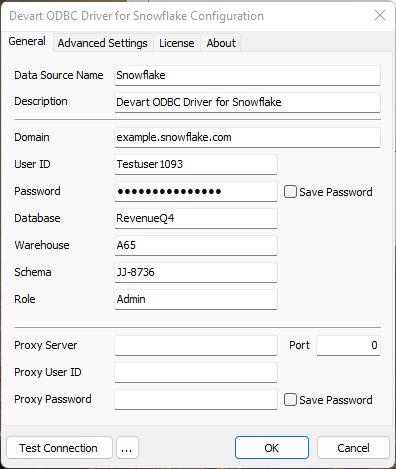
The driver's Windows configuration dialog with Basic authentication: account domain, user and password, then database, warehouse, schema and role, and proxy settings below.
Features
Snowflake SQL, not a lowest common denominator
Devart ODBC Driver for Snowflake supports Snowflake-specific expressions and all Snowflake data types: aggregate and window functions, date and time, string and binary, semi-structured (JSON), geospatial, conversion and hash functions. Queries you already run in Snowsight work from Excel or Power BI without rewriting.
Read and write, including MERGE
Devart ODBC Driver for Snowflake supports INSERT, UPDATE, DELETE and MERGE, and can read and write large volumes in one operation to cut round trips, which suits ETL jobs and data migrations as well as reporting.
Three sign-in methods
Devart ODBC Driver for Snowflake supports Basic user and password login, OAuth 2.0 with a client ID and secret and a browser sign-in that fills the token in, and key-pair authentication with a private key file and an optional passphrase. OAuth and key-pair arrived in version 2.0.0; passwords have been stored encrypted in the DSN since 1.2.0.
Warehouse, schema and role in the DSN
Devart ODBC Driver for Snowflake lets you set the database, warehouse, schema and role for each DSN, so a finance DSN can use a small warehouse and a read-only role while an ETL DSN uses another, without anyone typing USE statements.
Caching and pooling
Devart ODBC Driver for Snowflake caches Snowflake schema information locally to speed up repeated metadata lookups, reuses connections across requests, and exposes foreign keys so BI tools and query builders can work out joins on their own.
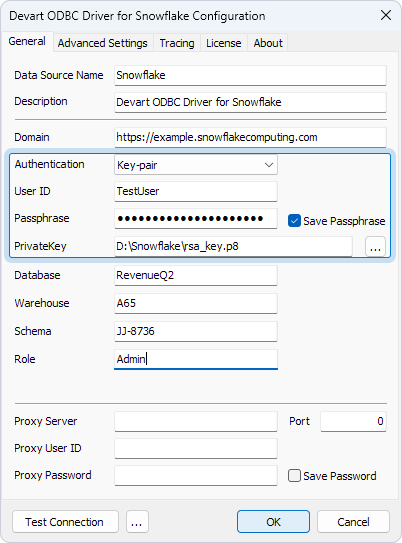
The same dialog set to Key-pair authentication: user ID, the passphrase for an encrypted private key, and the path to the private key file.
Benefits
- Live warehouse data in everyday tools. Analysts work in Excel or Access against current Snowflake tables instead of exported extracts.
- One vendor for many sources. If you already use Devart drivers for other databases or cloud apps, Snowflake joins the same setup, licensing and support.
- Linked server access. SQL Server can query Snowflake through a linked server, so existing stored procedures and SSRS reports can join warehouse data.
- Modern sign-in. Key-pair login suits scheduled jobs and service users without storing a password in the DSN.
Real-World Uses
- Excel models on warehouse data. A finance team pulls monthly figures from Snowflake views into pivot tables that refresh when opened.
- SQL Server bridge. A DBA sets up Snowflake as a linked server so an on-premises SQL Server can read and write warehouse tables during a migration.
- Access front end. An operations team links Snowflake tables in Access and keeps a small reference table up to date with forms.
- Scheduled loads with key-pair login. A Windows task runs a Python script with pyodbc that MERGEs daily files into Snowflake, signing in with a private key.
Who It's For, and Who Should Skip It
Devart ODBC Driver for Snowflake is for Windows-based analysts, DBAs and developers who want Snowflake in Excel, Access, SQL Server, Power BI or their own code through standard ODBC, especially teams that already use other Devart drivers or want vendor support for the connection.
Skip it if you're on macOS or Linux: this driver is Windows-only, while Snowflake's own ODBC driver covers other platforms. Skip it too if a single BI tool is all you use and it already has a native Snowflake connector, as Power BI and Tableau do. If you need many sources, Devart's ODBC Universal Bundle covers all its ODBC drivers from $499.95 per year.
Usage Guide
- Download the trial from the Download button (a free Devart account is needed) and run the EXE, or the MSI for managed deployment.
- Open the ODBC Data Source Administrator that matches your application's bitness (32-bit or 64-bit), choose User DSN or System DSN, click Add and select Devart ODBC Driver for Snowflake.
- On the License tab, enter the trial or purchased activation key; the trial needs activating too.
- Enter your Snowflake account URL in Domain and choose the authentication: user ID and password; client ID and secret, then Sign in to Snowflake for OAuth 2.0; or user ID, passphrase and private key file for Key-pair.
- Enter the database, and optionally the warehouse, schema and role, then click Test Connection and OK.
- In Excel, Power BI or your tool, choose ODBC and pick the DSN, then select tables or type a Snowflake SQL query.
Tip
Give each DSN a warehouse sized for its job and a role with only the rights it needs. A small warehouse for a refreshing Excel report keeps credit use predictable, and a read-only role keeps a stray UPDATE from reaching production tables.
Where It Falls Short
- Windows only. There's no macOS or Linux build, so mixed-platform teams need Snowflake's own driver for the other machines.
- A paid alternative to a vendor driver. Snowflake publishes its own ODBC driver, so this one has to earn its price through support, tool compatibility and consistency with other Devart drivers.
- Older copies lack modern sign-in. OAuth and key-pair login only arrived in 2.0.0, so installs from before October 2026 can only use a password.
- Per-user licensing. A Desktop license covers one user at a time; a shared report server or gateway needs Server Standard at $799.95 a year.
What Users Say
We found no reviews of the Snowflake driver on its own in November 2026: review sites file Devart's ODBC drivers as one product. The ratings and comments below cover the whole line, which shares this driver's setup dialog, licensing and support team.
Ratings
Capterra shows 4.7 out of 5 from 26 reviews of Devart ODBC Drivers. G2 lists Devart ODBC Driver at 4.5 out of 5 from 17 reviews on its product page and 4.6 from 18 on a comparison page. TrustRadius gives an aggregate 5.2 out of 10 from 58 ratings, noticeably cooler than the other two.
What reviewers like
Setup is the most common compliment: reviewers describe installation and DSN configuration as simple, and one Capterra reviewer said the drivers just work. Reliability comes next, with a TrustRadius reviewer crediting "almost no connection failures" for making it "very reliable". Price gets praise from people comparing it with enterprise connectors: a Capterra reviewer wrote that "for less than $200 per year, you can't beat it", and another liked that a perpetual license was available.
What reviewers complain about
The criticism is about polish and paperwork rather than broken connections. A TrustRadius reviewer wrote that the "user interface could be better" and that "error messages could be improved to be more relevant and specific". A G2 reviewer found the documentation confusing at times, and one buyer said licensing "took a while to be ready and delivered". On Devart's Salesforce driver, another cloud-API driver, a reviewer said it "isn't very fast" but could be tuned until speed was no problem.
The pattern: people trust Devart's drivers to connect and stay connected, and find them cheap next to enterprise alternatives, while the rough edges are terse error messages, documentation gaps and per-user licensing. For this driver, check during the 30-day trial that your sign-in method and the Snowflake functions your reports rely on work in your own tools.
Comparisons
Devart driver vs. Snowflake's own ODBC driver
Snowflake's own driver comes from the database vendor and covers more platforms. Devart ODBC Driver for Snowflake costs $109.95 a year, runs only on Windows, and adds a graphical DSN dialog shared with Devart's other drivers, a published list of tested tools, write support including MERGE, and Devart's support desk.
ODBC driver vs. native BI connectors
Power BI and Tableau include Snowflake connectors of their own. Devart ODBC Driver for Snowflake matters for the tools that don't, such as Excel's ODBC import, Access, SQL Server linked servers, FileMaker or older reporting tools, and when you want one DSN shared across them.
Desktop vs. Server editions
Desktop covers one user at a time on one Windows computer. A reporting server, Power BI gateway or web server that several people use needs Server Standard (one server with up to 6 cores) or Server Enterprise. Site licenses cover a whole company, and OEM lets you ship the driver inside your own application.
Editions and Pricing
| Edition | Subscription (1 year) | Perpetual | Who can use it |
|---|
| Desktop for Windows | $109.95 | $219.95 | One user at a time on one computer |
| Server Standard for Windows | $799.95 | $1,599.95 | Many users on one server with up to 6 cores |
| Server Enterprise, Site, OEM | On request | On request | Any core count, a whole company, or redistribution |
Every edition and term is sold under one product: the Buy Now button opens the order page set to Desktop for Windows with a 1-year subscription, and you pick the edition, subscription length or perpetual license there. Each license includes a year of support and upgrades, priority support costs extra, and Devart takes 5, 10 or 15 percent off for 5, 10 or 20 or more copies.
FAQs
Does Devart ODBC Driver for Snowflake support key-pair authentication?
Yes, from version 2.0.0. Devart ODBC Driver for Snowflake accepts a user ID, a private key file and an optional passphrase for an encrypted key, alongside OAuth 2.0 and user name and password.
Do I need to install Snowflake's client or SDK?
No. Devart ODBC Driver for Snowflake is a standalone installer that talks to Snowflake over HTTPS itself, with no Snowflake client libraries.
Can I set the warehouse and role per connection?
Yes. Devart ODBC Driver for Snowflake has Database, Warehouse, Schema and Role fields in the DSN and matching connection string parameters, so each data source can use its own warehouse and role.
Does the Snowflake ODBC driver work on a Mac?
No. Devart ODBC Driver for Snowflake runs only on 32-bit and 64-bit Windows with .NET Framework 4.5 or later.
Can I use it through a corporate proxy?
Yes. Devart ODBC Driver for Snowflake has proxy server, port, user and password settings for networks without direct HTTPS access to Snowflake.
What happens when the subscription ends?
Devart ODBC Driver for Snowflake on a subscription license works only during the paid term and needs internet access to check the license. A perpetual license keeps the version you bought working indefinitely and can be activated offline.
System Requirements
- Windows Vista or later, 32-bit or 64-bit, including Windows Server and Terminal Server
- .NET Framework 4.5 or later
- 37.77 MB EXE or 43.66 MB MSI installer; only one version of the driver installed at a time
- A Snowflake account and a user with password, OAuth 2.0 client credentials, or a key pair
- Internet access to Snowflake over HTTPS (or through a proxy), and to activate a subscription license
Conclusion
Devart ODBC Driver for Snowflake is worth $109.95 a year for Windows teams that want Snowflake in Excel, Access, SQL Server or older reporting tools through one supported, well-tested ODBC driver, particularly if they already use Devart for other sources. Version 2.0.0 fixed its biggest gap by adding key-pair and OAuth sign-in.
The reason not to buy: Snowflake's own driver exists, and if it already works in your tools, this one mostly adds support and polish. Use the 30-day trial to compare the two on your own reports before you pay.
Download Free Trial Buy Now