ODBC Driver for Zoho CRM: Query and Update Live Zoho CRM Data with SQL from Excel, Power BI and Any ODBC Tool
Devart ODBC Driver for Zoho CRM is a commercial Windows ODBC driver that turns your Zoho CRM modules (Leads, Contacts, Accounts, Deals and the rest) into SQL tables, so Excel, Access, Power BI, Tableau, SQL Server and other ODBC tools can read and update live CRM data. A single-desktop license costs $139.95 a year, or $279.95 as a perpetual license.
Zoho CRM's own reports are fine until you need to join CRM data with your accounting database, feed a Power BI dashboard, or let an old Access app write back to the CRM. Then you're stuck exporting CSV files or learning the Zoho REST API. Devart's driver removes that step: you sign in to Zoho once in a DSN dialog, and every ODBC application on the PC can run SELECT * FROM Deals WHERE Stage = 'Closed Won' against your live account.
Quick facts
- Version: 3.3.0, released October 16, 2026
- Developer: Devart
- Platform: Windows only, 32-bit and 64-bit drivers (Vista and later, including Windows Server and Terminal Server), .NET Framework 4.5 required
- Zoho CRM support: API version 2 or 4, all standard and custom field types, every Zoho data center (US, EU, India, China, Canada, Australia, Japan, Saudi Arabia) and custom domains
- Sign-in: OAuth 2.0 through your default browser, with the refresh token stored encrypted in the DSN
- SQL: SQL-92 SELECT with joins, grouping, aggregates and subqueries, plus INSERT, UPDATE and DELETE
- Price: $139.95 per year for the Desktop edition (subscription), $279.95 perpetual
- Trial: 30 days, free, activated with a trial key from a Devart account
What we checked: version 3.3.0 (released October 16, 2026) on Devart's download page and revision history, installer sizes of 32.90 MB (EXE) and 36.81 MB (MSI), and prices on the order page of $139.95 a year for Desktop for Windows, $279.95 perpetual, $279.95 for two years, $419.95 for three years, and $899.95 a year or $1,799.95 perpetual for Server Standard, all on November 2, 2026. We didn't install the trial (the download needs a Devart account) or connect it to a Zoho CRM account.
Before you buy
This driver runs only on Windows. There's no macOS or Linux build, so a Mac analyst or a Linux ETL server can't use it.
The default price is a subscription: the driver works only while it's paid up, and it needs an internet connection to activate and to check the license (it needs one to reach Zoho anyway). A perpetual license costs twice as much and keeps the version you bought working after the support year ends.
Download Free TrialBuy Now
Overview
ODBC is the common plug that almost every spreadsheet, reporting, BI and ETL tool on Windows still understands. Devart ODBC Driver for Zoho CRM sits behind that plug and translates SQL into Zoho CRM API calls over HTTPS. Your tool sends a query, the driver works out which Zoho requests to make, and rows come back as if they came from a database table.
The driver has been around since July 2016 and gets two releases a year. Version 3.0 in April 2025 added Zoho CRM API version 4, 3.1 in November 2025 added the Canada and Saudi Arabia data centers, and 3.2 and 3.3 in April and October 2026 improved compatibility with Qlik Replicate, PHP's PDO_ODBC, Node.js, Visual FoxPro and DBeaver.
Features
Browser sign-in to Zoho, no API code to write
Devart ODBC Driver for Zoho CRM connects with OAuth 2.0. In the DSN dialog you pick your Zoho domain (crm.zoho.com, crm.zoho.eu, crm.zoho.in and so on), click Sign in to Zoho, log in and accept the permissions in your browser, and the driver fills in a refresh token and can save it, encrypted, in the DSN. You never register an app in Zoho's developer console or handle tokens yourself.
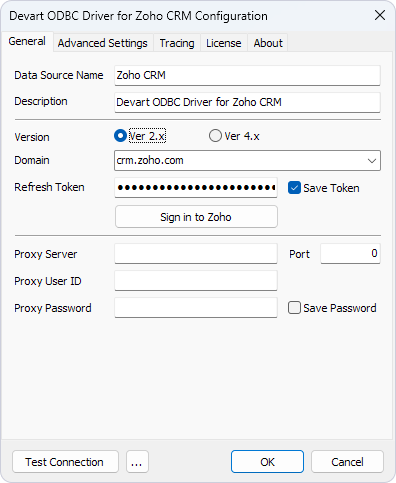
The driver's configuration dialog: data source name, API version (Ver 2.x or Ver 4.x), Zoho domain, a saved refresh token with the Sign in to Zoho button, and optional proxy server settings.
Real SQL against CRM modules, with COQL pushdown
Devart ODBC Driver for Zoho CRM exposes each CRM module as a table and runs SQL-92 SELECT statements on it, including JOINs, WHERE conditions, GROUP BY, ORDER BY, aggregate functions and subqueries. Zoho's API can't do all of that itself, so the driver sends what it can to Zoho and finishes the rest locally. Turn on Query API mode and it pushes supported filters to Zoho as COQL queries, so a filtered query fetches only the matching records instead of the whole module.
Write back to Zoho CRM in batches
Devart ODBC Driver for Zoho CRM is read-write. INSERT, UPDATE and DELETE statements change records in Zoho, and several statements can be sent as a batch for bulk changes. That means an Access form, an SSIS package or a SQL Server Linked Server can update CRM records, not only report on them. A Non-Approved Records option also lets you read records still waiting for approval in Zoho.
Every Zoho data center, API v2 or v4
Devart ODBC Driver for Zoho CRM works with accounts in the US, EU, India, China, Canada, Australia, Japan and Saudi Arabia, and you can type in a new or custom domain yourself. You choose between Zoho CRM API version 2 and version 4 per DSN, and all standard and custom field types are mapped to ODBC data types. If your network only allows web traffic through a proxy, the driver can connect through an HTTP proxy with its own user name and password.
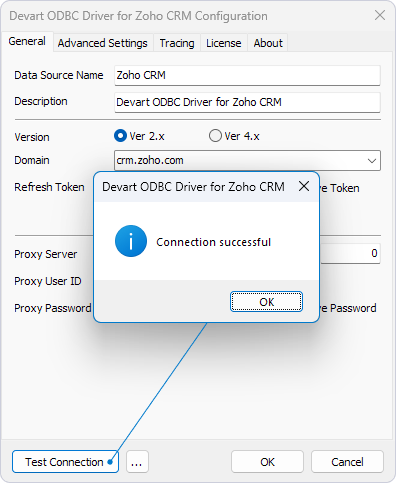
Test Connection in the same dialog, with the "Connection successful" message for a DSN pointed at crm.zoho.com.
Switches that make picky tools work
Devart ODBC Driver for Zoho CRM has an Advanced Settings tab for the tools that don't behave. You can cache metadata for an hour, a day, a month or permanently so tools that list tables over and over aren't slowed by API calls, turn foreign-key metadata on or off, replace dots in field names for tools that choke on them, return dates in UTC, set connection and query timeouts, force ODBC 2.x behavior, and return strings as ANSI or Unicode. Connection pooling speeds up tools that open and close connections often.
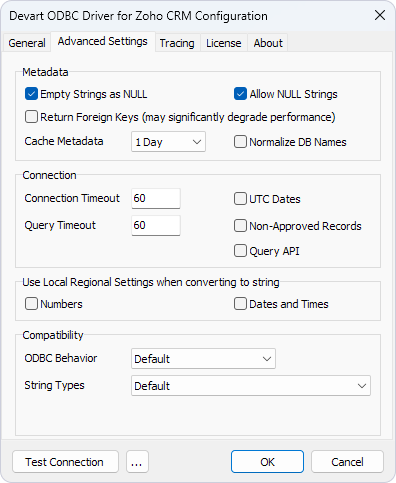
The Advanced Settings tab: metadata options (empty strings as NULL, foreign keys, Cache Metadata set to 1 Day), connection and query timeouts, UTC Dates, Non-Approved Records and Query API, regional formats, and the ODBC Behavior and String Types compatibility lists.
Benefits
- Reports that refresh themselves. A pivot table or dashboard pulls today's pipeline instead of last Monday's export.
- CRM data next to everything else. SQL joins let you combine Zoho deals with invoices or stock levels from your own databases.
- No developer needed. A business analyst who knows SQL can do what would otherwise take REST API code.
- One setup for every tool. A DSN made once serves Excel, Access, Power BI, Tableau and your scripts alike.
- Old software keeps working. The 32-bit driver lets 32-bit Office or a legacy line-of-business app reach Zoho CRM.
Real-World Uses
- A sales manager in Excel builds a refreshable pivot table of deals by stage and owner straight from the Deals table.
- A BI analyst connects Power BI or Tableau to Zoho CRM through the ODBC connector and puts the pipeline on the same dashboard as finance data.
- A DBA adds a Linked Server in SQL Server, so stored procedures and reports can join CRM accounts with order tables using T-SQL.
- An operations team on Access links Zoho CRM modules as Access tables and updates contact records from an existing form.
- A developer reads and writes CRM records from Python, PHP, C# or Delphi with ordinary SQL instead of the Zoho REST API.
Who It's For, and Who Should Skip It
It's for Windows-based analysts, DBAs and developers whose Zoho CRM data has to show up in ODBC tools: Excel and Access users, Power BI and Tableau report builders, SQL Server shops that want CRM data inside T-SQL, and teams with 32-bit applications that newer connectors don't support.
Skip it if you work on a Mac or need the connection on a Linux server, since there's no build for either. Skip it too if Zoho's built-in reports and dashboards already answer your questions, if you only need a one-off export, or if your tool already has a native Zoho CRM connector you're happy with. If you also need Zoho Books, Desk or other sources, price Devart's ODBC Universal Bundle (from $499.95 a year for all its ODBC drivers) before buying drivers one at a time.
Usage Guide
- Get the installer. Sign in to (or create) a Devart account on the download page and download the EXE, or the MSI if you deploy software through Group Policy.
- Install and activate. Run the setup wizard and enter your trial or purchased activation key on the License Information page, or later on the License tab of the DSN dialog. The driver must be activated even for the trial.
- Create a DSN. Open ODBC Data Sources (32-bit or 64-bit, matching your application), choose User DSN, System DSN or File DSN, click Add and pick Devart ODBC Driver for Zoho CRM.
- Sign in to Zoho. Choose the API version and your Zoho domain, click Sign in to Zoho, log in and accept the permissions. Tick Save Token, then click Test Connection.
- Connect your tool. In Excel use Data, Get Data, From Other Sources, From ODBC, in Power BI choose the ODBC connector, or pass a connection string with the Domain and Refresh Token parameters from code.
Where It Falls Short
- The trial takes paperwork. You can't just download and try: the installer is behind a Devart sign-in and the driver won't run until you enter a trial key.
- It's only as fast as Zoho's API. Every query becomes API calls over the internet, and joins and aggregates Zoho can't do are processed on your PC. Large modules can be slow without Query API mode and metadata caching, and Devart's own dialog warns that returning foreign keys "may significantly degrade performance".
- Tool compatibility is an ongoing job. Nearly every release fixes behavior in a specific tool: Tableau date columns (2.7.1), DBeaver (2.7.0 and 3.3.0), Excel imports and Microsoft Query (3.0.0), Node.js in each of the last three releases. Test your exact tool during the trial.
- Licensing is per machine and per seat. The Desktop edition allows one user at a time on one computer. A shared server, a terminal server with several users or a gateway needs Server Standard at $899.95 a year, or Server Enterprise for more than 6 cores, quoted on request.
What Users Say
We found no published user reviews of Devart ODBC Driver for Zoho CRM itself. Its listing on the Zoho Marketplace has no ratings or reviews. Review sites list Devart's ODBC drivers as one product line covering all of its 90-plus drivers, mostly reviewed for databases such as MySQL, Oracle and SQL Server, so treat these ratings as a guide to the vendor rather than to this driver. The line's ratings as listed in November 2026:
- Capterra: 4.7 out of 5 from 25 reviews of Devart ODBC Drivers, ranging from a 5-star review praising the easy setup to a 2-star review that complained about the documentation and drivers that didn't work
- G2: 4.6 out of 5 from 18 reviews of Devart ODBC Driver, where reviewers praise easy installation, speed and responsive support, and the main complaint is trouble connecting to some files
- TrustRadius: a much lower 5.2 out of 10 from 3 reviews, with praise for performance and reliability, a note that every user needs their own license, and a wish for better error messages
The recurring picture: people like how quickly the drivers install and how responsive Devart's support is, while the complaints are about connection problems with specific tools, unclear error messages and per-user licensing costs. The free trial is the only reliable way to know how this driver behaves with your own tool and Zoho account.
Comparisons
ODBC driver vs. Devart's other Zoho CRM tools
Devart sells several ways into Zoho CRM. The ODBC driver is the general one: any ODBC tool on Windows can use it. The Excel Add-in for Zoho CRM works only inside Excel. SSIS Data Flow Components for Zoho CRM are for SQL Server Integration Services packages, dotConnect for Zoho CRM is an ADO.NET provider for .NET developers, and the free MCP Server for Zoho CRM gives AI tools access to the data. Pick the ODBC driver when several different tools need the same connection.
Devart vs. CData's Zoho CRM ODBC driver
CData sells a competing ODBC Driver for Zoho CRM, and its documentation also covers Linux, which Devart's driver doesn't support. If you need the same connection on Windows and Linux machines, compare CData's driver during your trial period. On Windows alone, compare the two on price and on how each handles the tool you actually use.
Desktop vs. Server editions
The Desktop edition covers one computer used by one person at a time, directly or remotely. Server Standard covers one server with up to 6 cores used by many people within one company, such as a web, application or report server. Server Enterprise removes the core limit. Site licenses (unlimited computers in one company) and OEM licenses (shipping the driver inside your own application) are quoted on request.
Editions and Pricing
| Edition | Subscription | Perpetual | Who can use it |
|---|
| Desktop for Windows | $139.95 per year | $279.95 | One user at a time on one computer |
| Server Standard for Windows | $899.95 per year | $1,799.95 | Many users on one server with up to 6 cores |
| Server Enterprise, Site, OEM | On request | On request | Any core count, whole company, or redistribution |
Each license includes a year of support and upgrades. A Desktop subscription paid for two years up front costs $279.95 (the same as a perpetual license) and for three years $419.95. Priority support is an optional extra, and Devart takes 5, 10 or 15 percent off for 5, 10 or 20 copies.
FAQs
Does Devart ODBC Driver for Zoho CRM work with 32-bit Excel or Access?
Yes. Devart ODBC Driver for Zoho CRM installs both a 32-bit and a 64-bit driver. Create the DSN in the ODBC Data Sources tool that matches your application's bitness (the 32-bit one for 32-bit Office) so the application can see it.
Do I need a Zoho developer account or API client ID to use the Zoho CRM ODBC driver?
No. Devart ODBC Driver for Zoho CRM gets its own OAuth refresh token when you click Sign in to Zoho and approve access with your normal Zoho CRM login. The driver can only see what that Zoho user is allowed to see.
Can the Zoho CRM ODBC driver read custom modules and custom fields?
Yes. Devart ODBC Driver for Zoho CRM supports all standard and custom Zoho CRM field types, and modules appear as tables in your tool. A NormalizeDbNames option replaces dots in field names for tools that can't handle them.
What happens when the Devart Zoho CRM driver subscription ends?
Devart ODBC Driver for Zoho CRM on a subscription license only works for the term you've paid for, and it checks the license status online. A perpetual license keeps the version you bought working indefinitely, and only updates and support stop after the included year.
Can I use the Zoho CRM ODBC driver with Power BI Gateway or on a report server?
Not with the Desktop license. Devart ODBC Driver for Zoho CRM on a server that several people use at once needs a Server edition: Server Standard for up to 6 cores, or Server Enterprise for more.
Can I roll the driver out to many PCs at once?
Yes. Devart ODBC Driver for Zoho CRM comes as an MSI installer for deployment through Group Policy, can be installed from the command line, and can be activated through Group Policy. Each PC still needs its own Desktop license.
Does Devart's Zoho CRM driver also work with Zoho Books or Zoho Desk?
No. Devart ODBC Driver for Zoho CRM connects only to Zoho CRM. Devart sells separate ODBC drivers for Zoho Books, Zoho Desk, Zoho Inventory, Zoho Invoice and Zoho People, and all of them are included in the ODBC Universal Bundle.
System Requirements
- Windows: Vista or later, 32-bit or 64-bit, including Windows Server and Terminal Server
- .NET Framework: 4.5 or later
- Installation: only one version of the driver can be installed at a time
- Zoho CRM: an account in any Zoho data center, reachable over HTTPS directly or through an HTTP proxy
Conclusion
Devart ODBC Driver for Zoho CRM is worth $139.95 a year if your Zoho CRM data needs to live inside Windows tools that speak ODBC: Excel and Access, Power BI or Tableau, a SQL Server Linked Server, or a 32-bit legacy app that has to write back to the CRM. The one reason to buy it is that it turns the Zoho API into plain SQL with a browser sign-in, no code required. The main reason not to is that it's Windows-only and only as fast as Zoho's API, so Mac users, Linux servers and very large modules are better served elsewhere. It's actively maintained, with releases in April and October 2026. Run the 30-day trial against your own Zoho account and tool, and choose a perpetual license if you'd rather not depend on a yearly subscription.
Download Free TrialBuy Now