Excel Add-in for Dynamics 365: Clean Up and Bulk-Edit Your CRM Records From Excel
Excel Add-in for Dynamics 365 is a $179.95 Devart add-in for Excel on Windows that connects a worksheet to your Microsoft Dynamics 365 organization (the product used to be called Excel Add-in for Dynamics CRM): you import contacts, accounts, opportunities, leads, products or any other entity into a sheet, refresh it with one click, and write edits, new rows and deletions back to Dynamics 365. It's built for CRM administrators, sales operations staff and analysts who clean, de-duplicate and report on CRM data in Excel. The price buys a perpetual license with a year of updates.
Anyone who has fixed job titles, owners or phone numbers on a few hundred contacts through Dynamics forms knows how slow it is. Here the worksheet is a live view of the entity: sort, filter, fill down, check the highlighted changes and press Commit.
Quick facts
- Version: 3.2.145, released November 18, 2026
- Developer: Devart
- Excel: Microsoft Excel 2007 to 2024, Excel for Windows only
- Connection: your Dynamics 365 URL with a user name and password, or OAuth 2.0 through Microsoft's sign-in page (Web Login)
- Download: 81.18 MB installer (Devart's shared Excel Add-ins setup), free Devart account required
- Price: $179.95 with one year of support and upgrades; 2- and 3-year terms and priority support are options on the order page
- Trial: 30 days
- Refunds: the order page promises a 30-day money-back guarantee "if you are not satisfied with the product"; Devart's ordering FAQ limits refunds to technical problems its support can't fix, within 30 days
What we checked: version 3.2.145 at 81.18 MB on the download page, the Dynamics 365 entries in the revision history, the requirements on the compatibility page, and the order page, which charged $179.95 for one license with a year of support and upgrades on November 23, 2026. We didn't connect it to a Dynamics 365 organization.
Download Free TrialBuy Now ($179.95)
Overview
The add-in adds a Devart tab to Excel's ribbon with Get Data, Refresh, Edit Mode, Commit, Rollback and Manage Connections. Get Data opens the Import Data Wizard, where you choose the Dynamics data source, type your organization's address (such as https://yourorg.crm4.dynamics.com/), and either enter credentials or pick RefreshToken authentication and sign in through Microsoft's own page. Checkboxes decide whether the connection string and password are stored in the workbook.
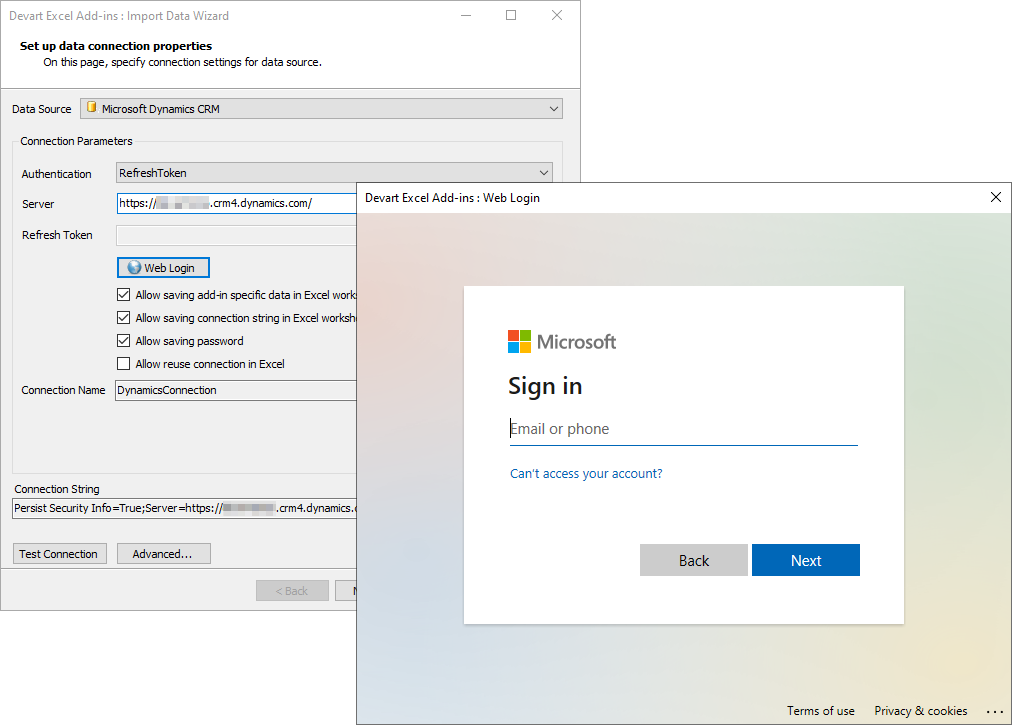
The Import Data Wizard with RefreshToken authentication and a crm4.dynamics.com server address, next to the Web Login window showing Microsoft's sign-in page. The wizard still labels the data source "Microsoft Dynamics CRM".
Features
Any entity, picked visually or with SQL
Excel Add-in for Dynamics 365 lists your organization's entities in a Visual Query Builder: choose one such as contact, tick the attributes you need, and add WHERE, ORDER BY and row-limit conditions. The SQL Query tab takes a SELECT statement when the builder isn't enough, and a preview shows the rows before they're imported.
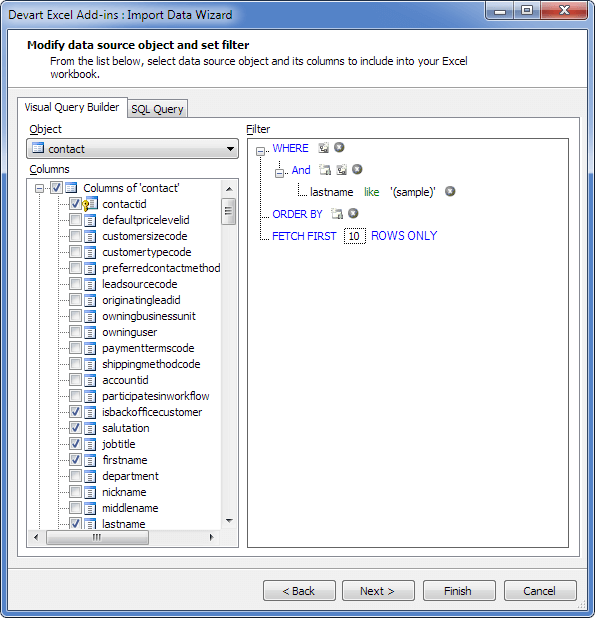
The Visual Query Builder on the contact entity: contactid, isbackofficecustomer, salutation, jobtitle, firstname and lastname ticked, filtered on lastname like '(sample)' and limited to the first 10 rows.
Edit Mode for cleansing and de-duplication
Excel Add-in for Dynamics 365 turns an imported table into an edit session. Click Edit Mode and change values, add rows or delete rows; every change is highlighted, and nothing reaches Dynamics 365 until you click Commit. Rollback discards the lot. Devart pitches it for data cleansing and de-duplication, and that's where Excel's sorting, conditional formatting and formulas help most: spot the duplicate contacts, fix or delete them, commit once.
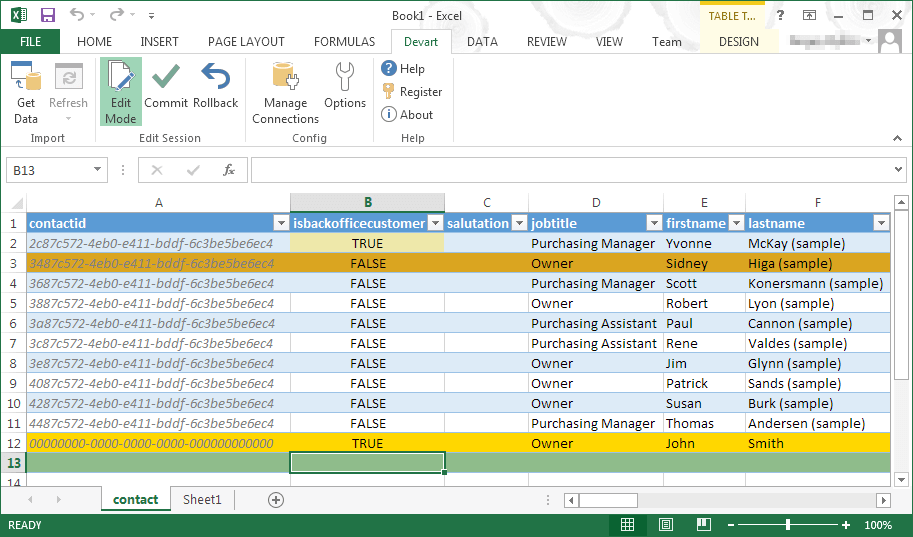
Dynamics 365 sample contacts in an Excel table with Edit Mode on: a changed cell and an edited row are highlighted, a new contact (John Smith) has been added with a placeholder ID, and an empty row waits at the bottom.
Validation as you type
Excel Add-in for Dynamics 365 checks each entry against the attribute's type and marks bad values in the sheet, such as text in a date column or a misspelled Boolean, so errors are fixed before the commit instead of being rejected by Dynamics 365 halfway through.
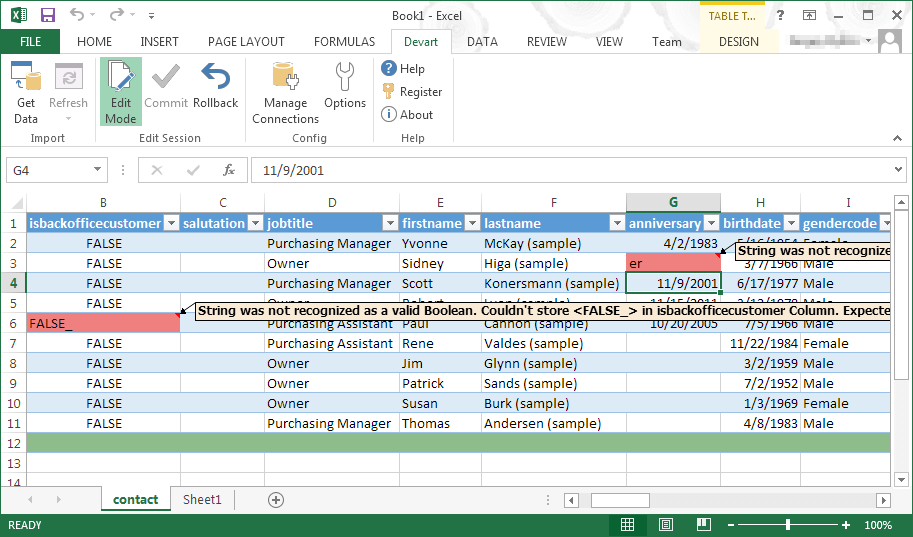
Validation errors: "FALSE_" in isbackofficecustomer isn't a valid Boolean and "er" in the anniversary column isn't a date; both cells are red and Commit is greyed out.
Refresh for live CRM reports
Excel Add-in for Dynamics 365 re-reads the data when you click Refresh, so a pipeline or activity workbook with pivot tables and charts updates to the current state without a new export.
Benefits
- Bulk edits without forms. Hundreds of records change in one commit.
- Cleaner CRM data. Excel's tools make duplicates and inconsistent values easy to find and fix.
- Current reports. Refresh replaces export-and-paste.
- Controlled writes. Changes are validated and staged, and Rollback undoes a mistake before it's sent.
Real-World Uses
- Territory change: sales operations loads all accounts in a region and reassigns owners with fill-down.
- Contact clean-up: a CRM admin sorts contacts by email to find duplicates, merges details by hand and deletes the extras.
- Product price list: paste new prices for the product entity from a supplier sheet and commit.
- Weekly pipeline review: a manager refreshes an opportunities workbook before each meeting.
Who It's For, and Who Should Skip It
Excel Add-in for Dynamics 365 is for Dynamics 365 administrators, sales operations and analysts on Windows who need to edit or report on many records at once and are comfortable in Excel.
Skip it on a Mac or in Excel for the web, which aren't supported. If you only export a view to Excel occasionally, Dynamics 365's own Export to Excel is free. And if the data should flow into a BI tool or database on a schedule rather than into a person's workbook, Devart's ODBC driver or SSIS components for Dynamics 365 fit better.
Usage Guide
- Download the 81.18 MB installer (a free Devart account is needed) and install it with an administrator account.
- In Excel, open the Devart tab, click Get Data and choose the Dynamics data source.
- Enter your organization's URL, then either type credentials or choose RefreshToken, click Web Login and sign in with your Microsoft account; click Test Connection.
- Pick an entity, tick attributes, add filters or write a SELECT, preview and click Finish.
- Click Edit Mode, make your changes, fix any cells validation flags, then Commit.
Before you buy
- It writes with your Dynamics rights. Commits run as the user who signed in, so deletes and updates are only limited by that user's security role. Try it on a sandbox organization first.
- Admin consent may be needed. Version 3.1.49 fixed OAuth login for accounts that need administrator confirmation; in a locked-down tenant, ask your Microsoft 365 admin before the trial.
- Price the packs. Buy Now orders one license with a year of support and upgrades for $179.95. For Excel access to several cloud apps, the Excel Add-in Cloud Pack is $499.95, and the Universal Pack, adding the database add-ins, is $599.95.
Where it falls short
- Windows Excel only. No Mac, web or mobile Excel.
- No scheduling. Refresh and Commit are manual; automated syncs need an ODBC or SSIS setup.
- Sign-in has needed fixes. The 2026 releases fixed a "Could not load file" error when connecting (3.0.0), OAuth login for accounts needing admin confirmation (3.1.49) and another OAuth login issue (3.1.70). Keep it updated.
- Dated labels. The wizard still calls the data source "Microsoft Dynamics CRM", and Devart's screenshots show Excel 2013.
What Users Say
We found no user reviews of Excel Add-in for Dynamics 365 on the software review sites. What the record does show is steady maintenance: the add-in shares Devart's Excel Add-ins release train, which reached 3.2.145 on November 18, 2026, and Dynamics 365 got its own fixes in versions 3.0.0, 3.1.49 and 3.1.70, including clearer error messages for unsupported data types and a fix for reading the Account table. The 30-day trial is the way to judge it on your own organization.
Comparisons
vs. Dynamics 365's own Excel export and import
Dynamics 365's built-in Export to Excel and data import cost nothing and suit a one-off export or a first load. The add-in is worth it when you repeatedly edit existing records with different values, want validation and rollback before anything is written, or keep a workbook that refreshes in place.
vs. Devart's other Dynamics 365 connectors
Devart also sells Dynamics 365 access as an ODBC driver, an ADO.NET provider, a Python connector and SSIS components. The add-in is the one for people working by hand in Excel; the others serve BI tools, developers and scheduled integrations.
Editions and Pricing
There's one edition. The Buy Now button orders one license with a year of support and upgrades; a second or third year and priority support are options on the order page.
| Option | Price | What you get |
|---|
| Excel Add-in for Dynamics 365 | $179.95 | Perpetual license, one year of support and upgrades |
| Excel Add-in Cloud Pack | $499.95 | Devart's cloud-app add-ins, Dynamics 365 included |
| Excel Add-in Universal Pack | $599.95 | All Devart Excel add-ins, cloud apps and databases |
All three prices were read on the order page on November 23, 2026. Buying 5 or more licenses of one add-in takes 5% off, 10 or more 10%, and 20 or more 15%.
FAQs
Is Excel Add-in for Dynamics 365 the same product as Excel Add-in for Dynamics CRM?
Yes. Excel Add-in for Dynamics 365 is the current name of Devart's Excel Add-in for Dynamics CRM; the product page describes Dynamics 365 as "formerly Dynamics CRM", and the connection wizard still uses the old label.
Can Excel Add-in for Dynamics 365 sign in with a Microsoft account that uses MFA?
Excel Add-in for Dynamics 365 offers OAuth 2.0 sign-in through Microsoft's own Web Login page, which is the route for accounts where a plain user name and password won't work. Your tenant may require an administrator to approve the app first.
Does Excel Add-in for Dynamics 365 run on Excel for Mac or the web?
No. Excel Add-in for Dynamics 365 supports Microsoft Excel 2007 to 2024 on Windows only.
Can colleagues refresh my Dynamics 365 workbook?
Only with Excel Add-in for Dynamics 365 installed and a connection of their own, unless you let the workbook store the connection string and password. Leaving those unticked keeps your credentials out of shared files.
Does Excel Add-in for Dynamics 365 keep working after the first year?
Yes. Excel Add-in for Dynamics 365 is a perpetual license; renewing brings new versions and support, which matters when Microsoft changes the Dynamics 365 API or sign-in.
What is the refund policy for Excel Add-in for Dynamics 365?
Devart's order page for Excel Add-in for Dynamics 365 advertises a 30-day money-back guarantee if you're not satisfied. Its ordering FAQ says refunds within 30 days are given when a technical problem stops the product working and support can't fix it. Test with the 30-day trial first.
System Requirements
- Microsoft Excel 2007, 2010, 2013, 2016, 2019, 2021 or 2024 for Windows
- .NET Framework 4.0 or higher and the Visual Studio 2010 Tools for Office Runtime
- An administrator account to install
- A Dynamics 365 organization URL and a user who can sign in to it
Conclusion
Excel Add-in for Dynamics 365 is worth $179.95 for a CRM admin or sales operations person on Windows who regularly bulk-edits, cleans or reports on Dynamics 365 data. The reason to buy it is the edit-validate-commit loop on live CRM records, which beats both form-by-form editing and Dynamics' export-and-reimport. The reasons not to are the Windows-only Excel requirement, no scheduling, and a sign-in that has needed several fixes, so trial it against your own tenant. If you need more than one cloud app in Excel, the $499.95 Cloud Pack is better value.
Download Free TrialBuy Now ($179.95)