Excel Add-in for QuickBooks Online: Edit Your QuickBooks Records in a Spreadsheet and Save Them Back
Excel Add-in for QuickBooks Online is a $179.95 Devart add-in for Excel on Windows that connects a worksheet to a QuickBooks Online company: you import accounts, customers, invoices, sales receipts, transactions or report data into a sheet, refresh it with one click, and write edits, new rows and deletions back to QuickBooks Online. It's for bookkeepers, accountants and finance staff who already do their real work in Excel, and the price buys a perpetual license with a year of updates.
QuickBooks Online can export reports to Excel and import some lists from files, but fixing fifty customer records or recoding a batch of accounts still means clicking through them one at a time. With this add-in the sheet is the connection: change the cells, check the highlighted edits, press Commit.
Quick facts
- Version: 3.2.145, released November 18, 2026
- Developer: Devart
- Excel: Microsoft Excel for Windows only (Devart lists Excel 2007 to 2021, and version 3.0.0 added Excel 2024)
- Connection: production or sandbox environment, Intuit Web Login, then pick the company
- Download: 81.18 MB installer (Devart's shared Excel Add-ins setup), free Devart account required
- Price: $179.95 with one year of support and upgrades; 2- and 3-year terms and priority support are options on the order page
- Trial: 30 days
- Refunds: the order page promises a 30-day money-back guarantee "if you are not satisfied with the product"; Devart's ordering FAQ limits refunds to technical problems its support can't fix, within 30 days
What we checked: version 3.2.145 at 81.18 MB on the download page, the QuickBooks entries in the revision history, the requirements on the compatibility page, and the order page, which charged $179.95 for one license with a year of support and upgrades on November 23, 2026. We didn't connect it to a QuickBooks Online company.
Download Free TrialBuy Now ($179.95)
Overview
The add-in puts a Devart tab on Excel's ribbon with Get Data, Refresh, Edit Mode, Commit, Rollback and Manage Connections. Get Data opens the Import Data Wizard: choose QuickBooks as the data source, pick the Production or Sandbox environment, click Web Login and sign in on Intuit's own page, then choose the company and authorize the add-in. It keeps a refresh token, so you don't sign in every time.
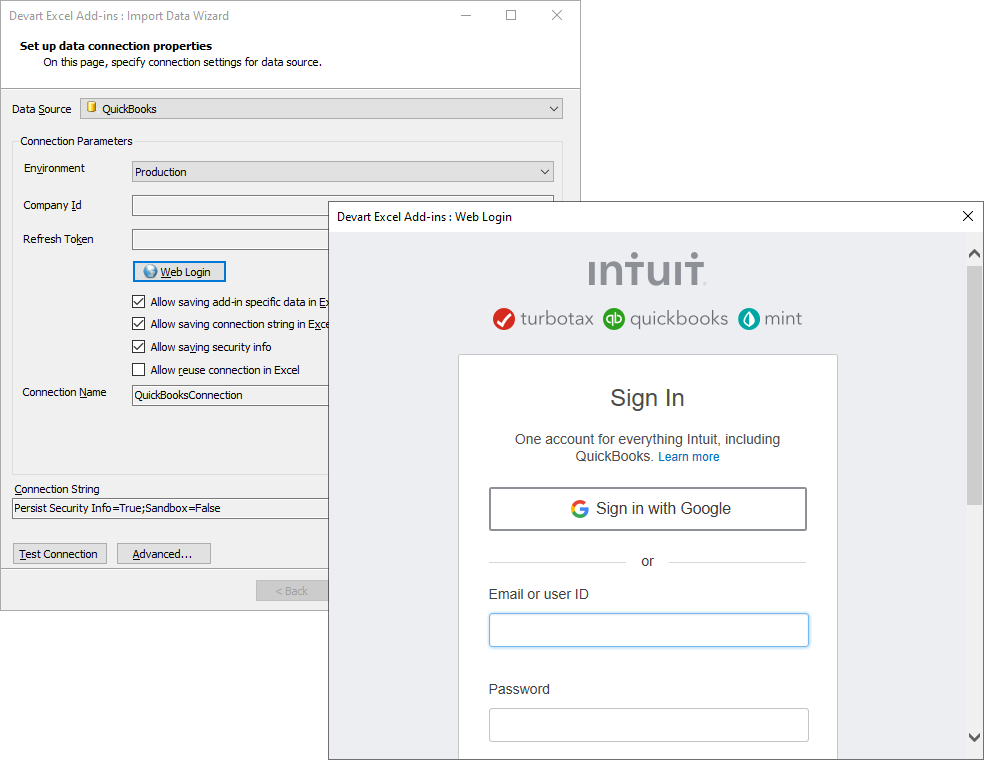
The Import Data Wizard with QuickBooks as the data source and the Production environment, next to the Web Login window showing Intuit's sign-in page; checkboxes below decide whether the connection string and security info are saved in the workbook.
Features
Pick QuickBooks data visually or with SQL
Excel Add-in for QuickBooks Online lists QuickBooks objects in a Visual Query Builder: choose an object such as Account, tick its columns and columns of related tables, and add WHERE and ORDER BY conditions. If you need more control, the SQL Query tab takes a SELECT statement. A Data Preview window shows the result before anything lands in the workbook. Version 3.0.0 (June 2026) added 50 QuickBooks report objects, so report data can be pulled the same way.
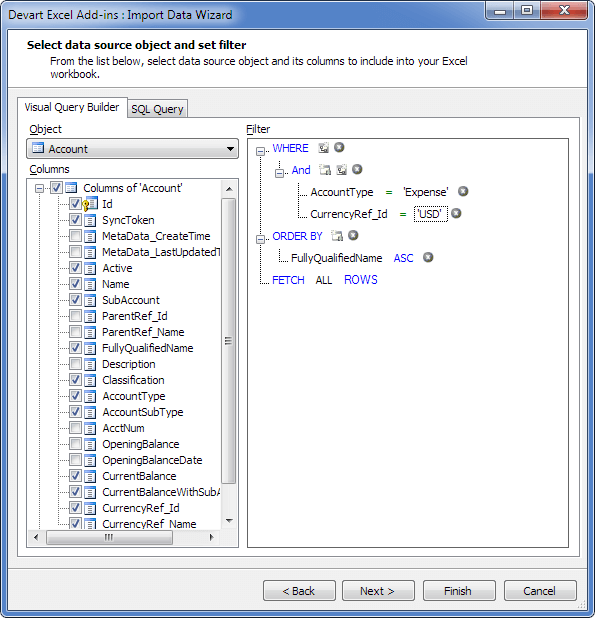
The Visual Query Builder with the QuickBooks Account object: selected columns on the left, and a filter for AccountType = 'Expense' and CurrencyRef_Id = 'USD', ordered by FullyQualifiedName.
Edit Mode with commit and rollback
Excel Add-in for QuickBooks Online turns an imported table into an edit session. Click Edit Mode and you can change cells, add rows and delete rows as in any sheet; each change is highlighted. Nothing reaches QuickBooks Online until you click Commit, and Rollback throws the changes away.
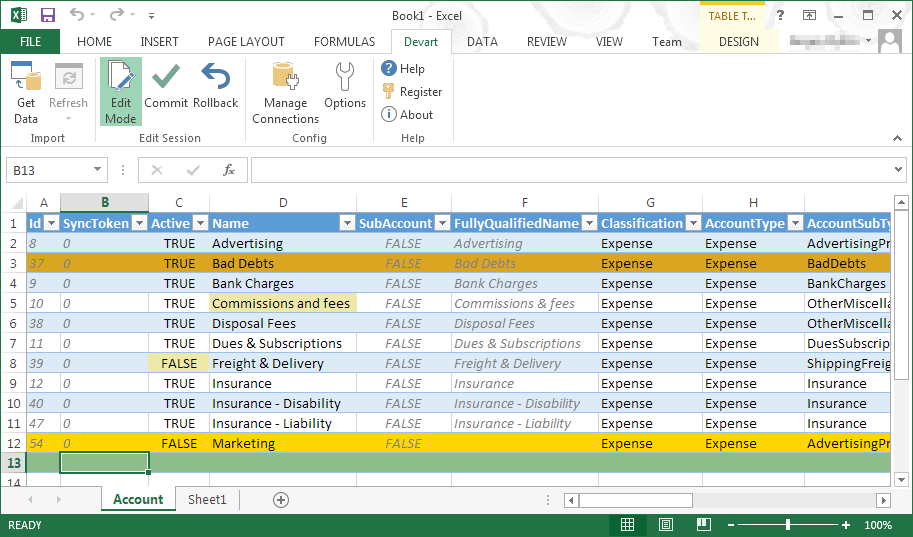
QuickBooks expense accounts loaded into an Excel table with Edit Mode on: edited cells and rows (Bad Debts, Commissions and fees, Marketing) are highlighted, read-only columns are grey, and an empty row waits at the bottom for a new account.
Validation before anything is sent
Excel Add-in for QuickBooks Online checks entered values against the column types as you type and marks errors in the sheet, such as a wrong date, a value that isn't a valid Boolean, or an empty required column, so a typo is caught before QuickBooks rejects it halfway through a batch.
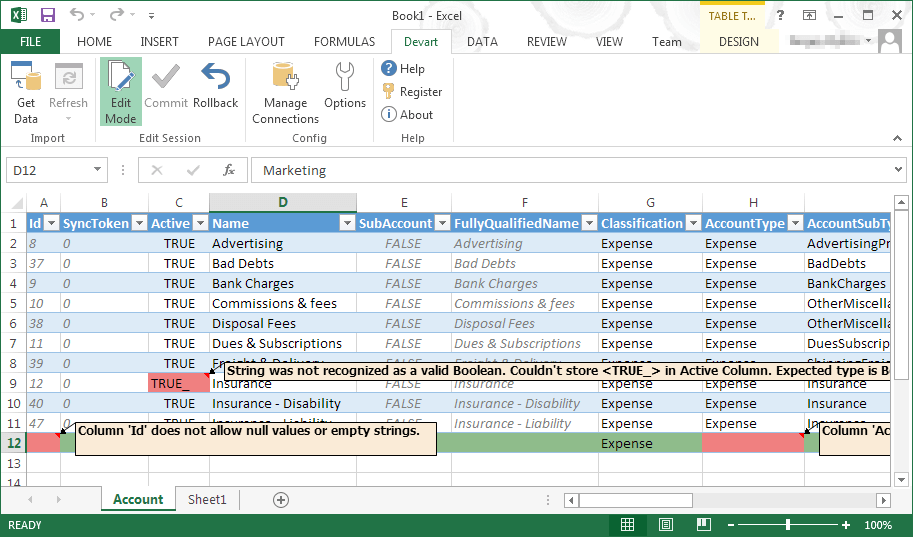
Validation in action: "TRUE_" in the Active column is flagged as not a valid Boolean, and a new row is flagged because the Id column doesn't allow empty values; Commit stays greyed out until they're fixed.
One-click refresh and reusable connections
Excel Add-in for QuickBooks Online re-reads the data and updates the table, and the charts and formulas built on it, when you click Refresh. Connections can be stored in the workbook, or in the Windows registry on your own PC, so you can share a workbook without sharing your QuickBooks credentials and still reuse the connection yourself.
Benefits
- Bulk corrections at spreadsheet speed. Fill-down, find-and-replace and formulas work on live QuickBooks records.
- No export and re-import. The sheet reads from and writes to QuickBooks Online directly.
- Reports that stay current. A monthly workbook refreshes instead of being rebuilt.
- Safe edits. Changes are staged, validated and committed only when you say so, and you can test against a sandbox company first.
Real-World Uses
- Chart of accounts clean-up: load all expense accounts, rename and deactivate the duplicates in the sheet, and commit.
- Customer list updates: paste corrected emails, terms or addresses for hundreds of customers at once.
- Month-end reporting: pull report objects and invoices into a workbook with pivot tables and refresh it each month.
- Accountants with several clients: save a named connection per company and switch between them.
Who It's For, and Who Should Skip It
Excel Add-in for QuickBooks Online is for QuickBooks Online users on Windows who live in Excel: bookkeepers fixing records in bulk, accountants keeping recurring workbooks, and finance staff who want live QuickBooks figures in their models.
Skip it on a Mac or in Excel for the web, since only Excel for Windows is supported, and if you use QuickBooks Desktop rather than QuickBooks Online. If you want QuickBooks data in Power BI, Tableau or a database instead of Excel, Devart's ODBC driver for QuickBooks Online fits better. And if you only need a report in Excel now and then, QuickBooks Online's own export to Excel is free.
Usage Guide
- Download the 81.18 MB installer (a free Devart account is needed) and install it with an administrator account.
- In Excel, open the Devart tab and click Get Data, then choose QuickBooks.
- Pick Production or Sandbox, click Web Login, sign in to Intuit, select the company and authorize the add-in, then Test Connection.
- Choose an object, tick columns, add filters or write a SELECT on the SQL Query tab, preview, and click Finish.
- Click Edit Mode, make your changes, fix anything validation flags, then click Commit, or Rollback to cancel.
Before you buy
- It writes to your books. Commits run with the rights of the QuickBooks user who signed in. Try edits on a sandbox company before your live one.
- Price the packs if you use other apps. Buy Now orders one license with a year of support and upgrades for $179.95. If you also need Excel access to other cloud apps, the Excel Add-in Cloud Pack is $499.95 and the Universal Pack, with the database add-ins too, is $599.95.
- The license is perpetual. The support year only covers new versions and support.
Where it falls short
- Windows Excel only. No Mac, web or mobile Excel.
- QuickBooks Online only. QuickBooks Desktop isn't supported.
- No scheduling. Refresh and Commit are buttons; an automatic nightly sync needs an ODBC or SSIS setup instead.
- QuickBooks API quirks surface as errors. Recent releases fixed QuickBooks errors such as "An application error has occurred while processing your request" (3.1.49) and an InvalidCastException with IS NULL filters (3.2.145), so keep the add-in updated.
What Users Say
We found no user reviews of Excel Add-in for QuickBooks Online on the software review sites. The add-in itself isn't new: its revision history runs from version 1.00 to 3.2.145, and the QuickBooks connector gets fixes and additions in most releases, including the TaxExemptionReasonId field on customers and 50 report objects in 3.0.0 and new Item fields in 3.1.49. Use the 30-day trial on a sandbox company to judge it.
Comparisons
vs. QuickBooks Online's export and import
QuickBooks' built-in export to Excel costs nothing and is fine for a one-off report. The add-in wins when you edit many existing records, each with a different value, or keep a workbook that must show current figures.
vs. Devart's other QuickBooks connectors
Devart also sells QuickBooks Online as an ODBC driver (for BI tools and databases), a Python connector and SSIS components. Pick the add-in when the people doing the work are in Excel; pick the others when a tool or a schedule does the work.
Editions and Pricing
There's one edition. The Buy Now button orders one license with a year of support and upgrades; a second or third year and priority support are options on the order page.
| Option | Price | What you get |
|---|
| Excel Add-in for QuickBooks Online | $179.95 | Perpetual license, one year of support and upgrades |
| Excel Add-in Cloud Pack | $499.95 | Devart's cloud-app add-ins, QuickBooks Online included |
| Excel Add-in Universal Pack | $599.95 | All Devart Excel add-ins, cloud apps and databases |
All three prices were read on the order page on November 23, 2026. Buying 5 or more licenses of one add-in takes 5% off, 10 or more 10%, and 20 or more 15%.
FAQs
Does Excel Add-in for QuickBooks Online work with QuickBooks Desktop?
No. Excel Add-in for QuickBooks Online connects only to QuickBooks Online companies, in the production or sandbox environment.
Can I use Excel Add-in for QuickBooks Online with several companies?
Yes. Excel Add-in for QuickBooks Online picks the company when you sign in, and you can save a named connection for each company and reuse it from Manage Connections.
Does Excel Add-in for QuickBooks Online run on Excel for Mac or Excel for the web?
No. Excel Add-in for QuickBooks Online supports only Microsoft Excel for Windows.
Can I share a workbook without sharing my QuickBooks login?
Yes. Excel Add-in for QuickBooks Online lets you untick saving the connection string and security info in the workbook and keep the connection in your own registry instead. Colleagues see the data already in the sheet but need their own connection to refresh or commit.
Does Excel Add-in for QuickBooks Online keep working after the first year?
Yes. Excel Add-in for QuickBooks Online is a perpetual license, so your version keeps working; renewing brings new versions and support, which matters when Intuit changes its API.
What is the refund policy for Excel Add-in for QuickBooks Online?
Devart's order page for Excel Add-in for QuickBooks Online advertises a 30-day money-back guarantee if you're not satisfied. Its ordering FAQ says refunds within 30 days are given when a technical problem stops the product working and support can't fix it. Test with the 30-day trial before buying.
System Requirements
- Microsoft Excel for Windows: 2007, 2010, 2013, 2016, 2019 or 2021, and 2024 from version 3.0.0
- .NET Framework 4.0 or higher and the Visual Studio 2010 Tools for Office Runtime
- An administrator account to install
- A QuickBooks Online company and a user who can sign in to it
Conclusion
Excel Add-in for QuickBooks Online is worth $179.95 to anyone who regularly corrects or reports on QuickBooks Online data in Excel on Windows. The reason to buy it is the edit-validate-commit loop on live accounting records, with a sandbox to practise on, which QuickBooks' own export and import can't match. The reasons not to are the Windows-only Excel requirement, no QuickBooks Desktop support and no scheduling; and if you need several cloud apps in Excel, the $499.95 Cloud Pack is the better buy. Run the trial against a sandbox company first.
Download Free TrialBuy Now ($179.95)