dbForge Documenter for MySQL: Turn a Database Schema into Browsable Documentation
dbForge Documenter for MySQL is Devart's Windows tool that reads a MySQL or MariaDB database and generates documentation of every table, view, routine, trigger and index as HTML, PDF or Markdown. It costs $64.95 a year or $129.95 for a perpetual license, and it's for developers, DBAs and analysts who need a data dictionary they don't have to write by hand.
A new developer joins and asks what the 80 tables in the orders database do. Instead of a stale wiki page, you point Documenter at the server, tick what to include, and hand over a searchable HTML site with every column, key and dependency, regenerated whenever the schema changes.
Quick facts
- Version: 2026.2.96, released November 9, 2026
- Developer: Devart
- Platform: Windows 7 to 11 and Windows Server 2008 to 2025, with .NET Framework 4.7.2; macOS and Linux through CodeWeavers CrossOver
- Databases: MySQL 5.5 to 26.7, MariaDB 5.5 to 13, Percona 5.5 to 8.4; Amazon RDS and Aurora, Azure Database for MySQL, Google Cloud, Alibaba Cloud, HeatWave and other cloud services
- Output: HTML, PDF and Markdown
- Download: 110.80 MB
- Price: $64.95 for a 1-year subscription or $129.95 perpetual; one edition
- Trial: free for 30 days with no feature limits (the download asks you to sign in with a free Devart account)
- What we checked: version 2026.2.96 and its November 9, 2026 date on Devart's download page and revision history, the 110.80 MB download size listed there, and the order page price of $64.95 for the default 1-year subscription on November 13, 2026. We didn't generate documentation for our own database.
Before you buy
- It documents structure, not data. You get tables, columns, keys, code and dependencies, not row contents or ER diagrams.
- dbForge Studio for MySQL Enterprise includes the same documenter, along with test data generation, source control and compare tools. If you'd buy two or three dbForge MySQL tools, price the Studio first.
- A subscription stops working when it ends; the $129.95 perpetual license keeps working, with a year of updates.
Download Free TrialBuy Now
Overview
Documenter works as a project: you add one or more connections, pick databases, and get a live preview of the documentation in the right-hand pane, with a tree of every object on the left. Each section (properties, columns, indexes, SQL script, dependencies) has an On/Off switch, so you decide exactly what ends up in the output. Hit Generate, choose HTML, PDF or Markdown, and you're done; the same settings can be saved as a command line for scheduled runs.
Devart ships Documenter on the same build schedule as dbForge Studio for MySQL. The September 2026 release added MySQL 26.7 and MariaDB 13 support, and a May 2026 fix made Documenter's table queries read the FULL_COLLATION_NAME field correctly.
Features
Every object, with columns, keys, code and dependencies
dbForge Documenter for MySQL extracts each object's type, properties and description: table and view columns with data types, nullability, defaults and auto-increment, indexes and constraints, routine parameters, the DDL script and the dependencies between objects. Tables, views, procedures, functions and triggers are all covered.
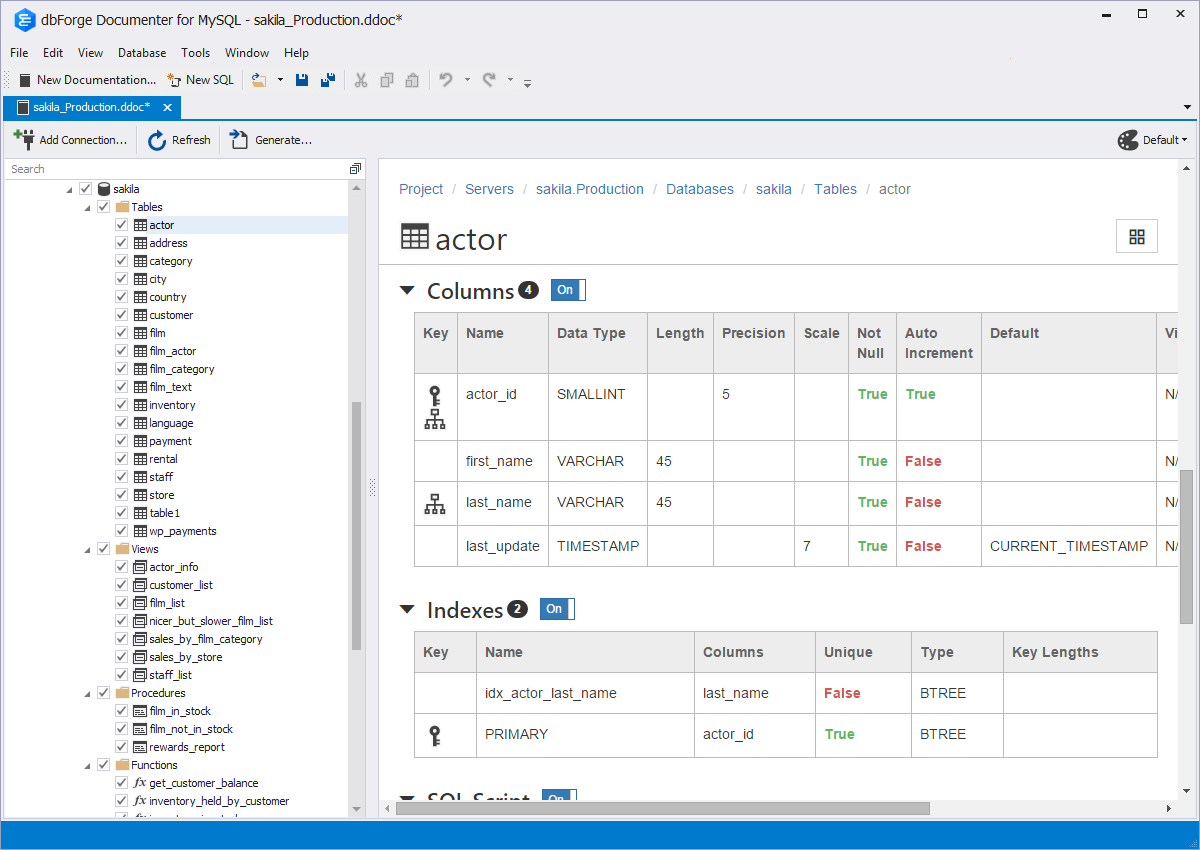
The actor table from sakila: four columns with types, keys and defaults, and its two BTREE indexes, with the object tree on the left (an earlier version of the interface).
You choose what goes in, and how it looks
dbForge Documenter for MySQL lets you tick individual objects and switch each section and property on or off. You can type a description for any object that lacks one, or change an existing one, and pick a style theme for the output: Default, Bootstrap, Cerulean, Cyborg, Default Dark, Flatly, Journal, Paper or Yeti.
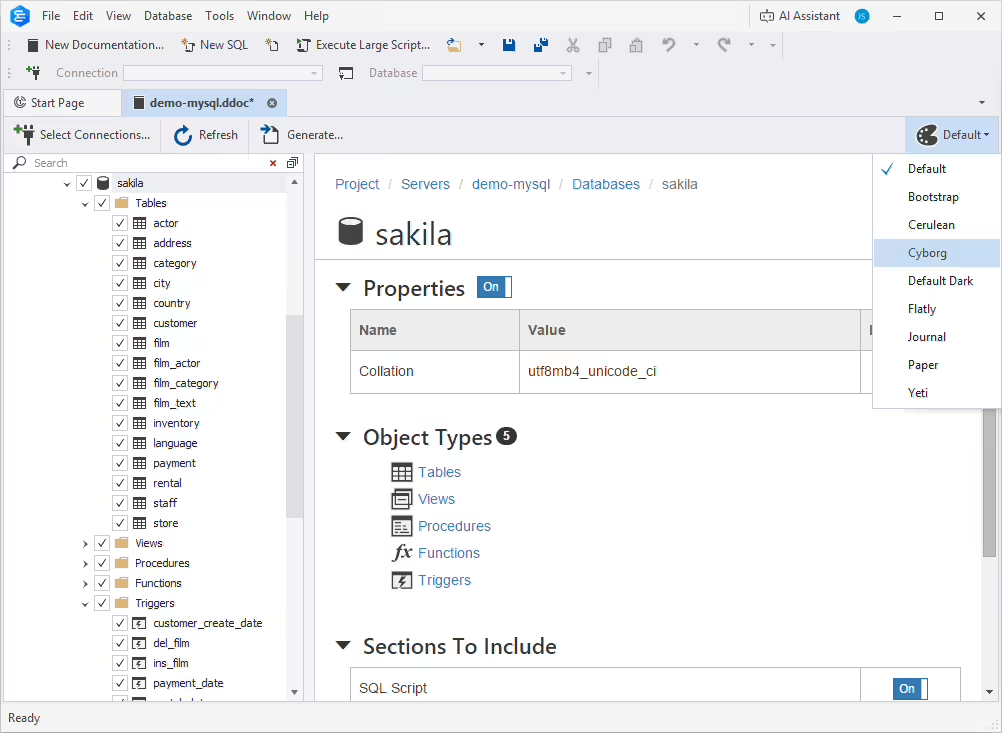
The style menu open over the sakila overview page, with its five object types and the On switches for properties and the SQL script section.
HTML for the web, PDF for print, Markdown for repositories
dbForge Documenter for MySQL generates HTML (to publish on an intranet), PDF (to print or send) and Markdown (to keep next to code in a Git repository). It can append a timestamp to the output folder name and open the result when it's done. Devart publishes a sample of the sakila database documented as PDF on its site.
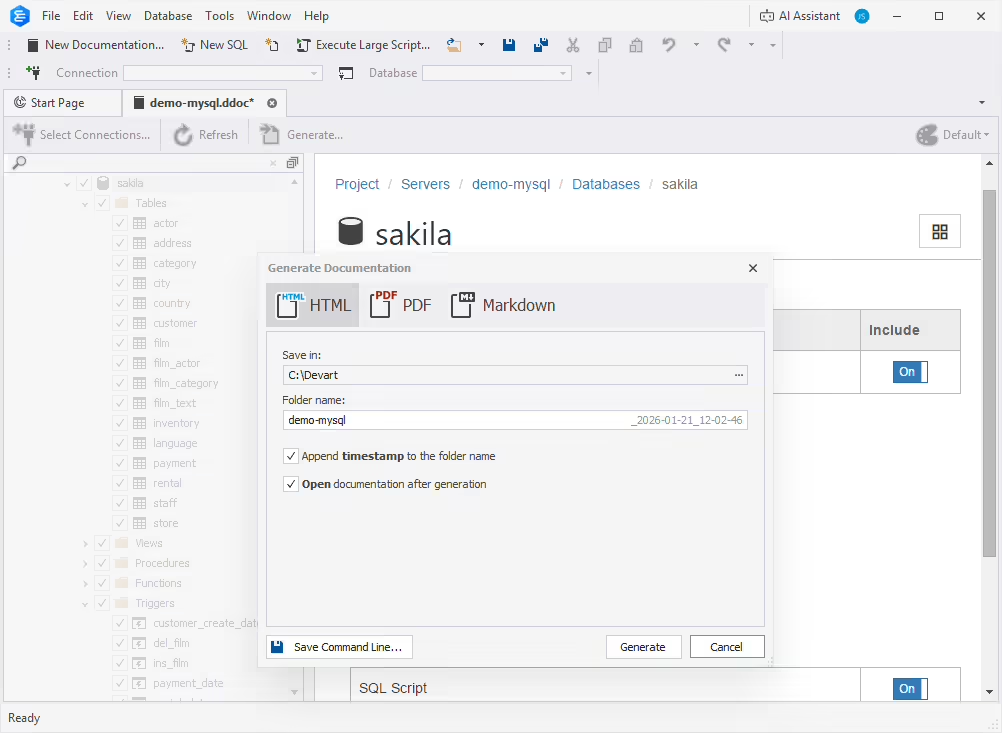
The Generate Documentation dialog with HTML selected, a timestamped folder name, and the Save Command Line button.
Search as you type
dbForge Documenter for MySQL filters the object tree as you type and highlights matching names, so finding every object with "film" in its name across tables, views, procedures and triggers takes a second. The generated documentation has hyperlinks between objects for the same kind of navigation.
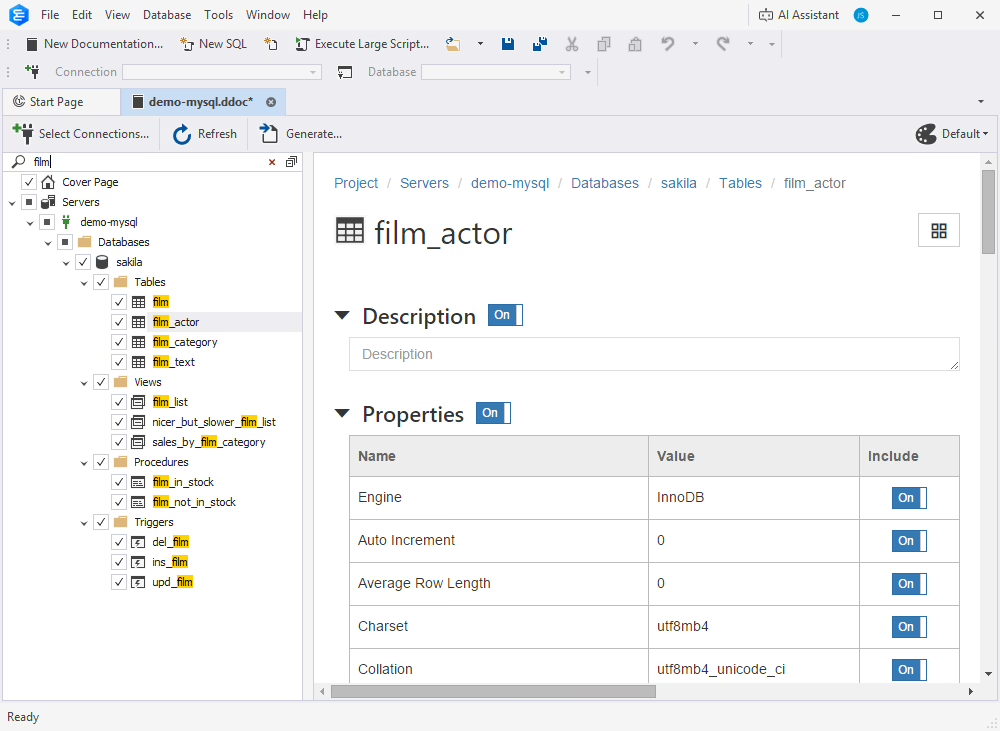
Searching for "film" highlights matches across tables, views, procedures and triggers, with film_actor's description and properties on the right.
Scheduled regeneration from the command line
dbForge Documenter for MySQL saves any documentation job as a command-line execution file. Run it from PowerShell or add it to Windows Task Scheduler and the documentation rebuilds itself every night or after every release. The AI Assistant is built in as well, for generating, explaining and fixing SQL.
Benefits
- Documentation that matches reality. It's generated from the live schema, so it can't drift the way hand-written pages do.
- Faster onboarding. New team members browse the structure instead of reading DDL or asking around.
- Audit and handover material. A PDF of the schema is a quick deliverable for auditors, clients or a team taking over a system.
- Low cost. At $64.95 a year it's the cheapest dbForge MySQL tool.
Real-World Uses
- Intranet data dictionary: schedule a nightly HTML build and publish it on an internal web server.
- Docs in the repository: generate Markdown into the project folder so schema docs are versioned with the code.
- Client handover: a consultant delivers a PDF of the finished database along with the application.
- Legacy cleanup: document an old database before a migration to see every table, routine and dependency in one place.
Who It's For, and Who Should Skip It
Buy it if you maintain MySQL or MariaDB databases that other people need to understand, and you want current documentation without writing it.
Skip it if you need ER diagrams more than a data dictionary (dbForge Studio for MySQL has a database designer); if you already own dbForge Studio for MySQL Enterprise, which includes the documenter; or if a one-off export of the schema DDL is all you need.
Usage Guide
- Download and install Documenter from Devart's download page (sign in with a free Devart account) and start the 30-day trial.
- Click New Documentation and select connections: add your MySQL server, with SSL or SSH if needed.
- Tick the databases and objects to document in the tree.
- Review the preview, switch sections on or off, and add descriptions where they're missing.
- Pick a theme from the style menu.
- Click Generate, choose HTML, PDF or Markdown and a folder, and optionally Save Command Line for scheduled runs.
Where It Falls Short
- No diagrams in the output. Relationships appear as dependency lists, not ER drawings.
- Good descriptions are still your job. Documenter shows the descriptions it finds and lets you add more, but it can't explain what a cryptic column means.
- No native Mac or Linux build. CrossOver is a separate license.
- Almost no independent reviews, so the trial is the best test.
What Users Say
Independent reviews of the stand-alone Documenter for MySQL are very thin: review sites such as Capterra and GetApp list it with at most a single review, and Devart's product page quotes only a dbForge Studio user. Here's what there is.
Quoted on Devart's product page
Goran Pavkovic, Expert Associate, on dbForge Studio, which includes the same documenter: "dbForge Studio shortens the time to perform any database-related task. What's more, now I can easily manage server security, database diagrams and database documentation. Excellent, simply excellent."
That's not much to go on, which is why the full-featured 30-day trial matters here: generate documentation for your own largest database and see whether the output is something you'd hand to a colleague.
Comparisons
Documenter vs dbForge Studio for MySQL Enterprise
dbForge Studio for MySQL Enterprise ($229.95 a year at checkout) includes database documentation along with test data generation, source control, schema and data compare and a full IDE. Documenter alone at $64.95 is the better buy if documentation is the only gap in your toolkit.
Documenter vs exporting DDL
mysqldump or a schema export gives you the raw CREATE statements for free. Documenter turns the same information into a navigable, searchable document with descriptions, which is what non-DBAs actually read.
Editions and Pricing
dbForge Documenter for MySQL has a single Standard edition. The order page opens on the 1-year subscription; the perpetual license, 2- or 3-year terms and priority support are options you choose there.
| License | Price | What you get |
|---|
| Standard, 1-year subscription | $64.95 | Use and updates for a year, renews yearly |
| Standard, perpetual | $129.95 | Use forever, 1 year of updates included |
Devart takes 5% off for 5 to 9 licenses, 10% for 10 to 19 and 15% for 20 or more.
FAQs
Does dbForge Documenter for MySQL work with MariaDB?
Yes. dbForge Documenter for MySQL supports MariaDB 5.5 to 13 and Percona Server 5.5 to 8.4 as well as MySQL 5.5 to 26.7.
Can it document an Amazon RDS or Azure database?
Yes. dbForge Documenter for MySQL connects to Amazon RDS and Aurora, Azure Database for MySQL, Google Cloud, Alibaba Cloud, HeatWave and other MySQL cloud services.
Can I document several databases in one file?
Yes. A dbForge Documenter for MySQL project can include several connections and databases, and the output is organized by server and database.
Is the trial limited?
No. The dbForge Documenter for MySQL trial runs for 30 days with every feature enabled.
What happens when my subscription ends?
A dbForge Documenter for MySQL subscription stops working when it ends, until you renew. Documentation you've already generated stays yours, and a perpetual license keeps working.
Does it run on a Mac?
Only through CodeWeavers CrossOver. dbForge Documenter for MySQL is a Windows program; Devart supports running it on macOS and on Ubuntu, Debian, Fedora and RHEL with CrossOver installed.
System Requirements
- Windows 7, 8, 8.1, 10 or 11, or Windows Server 2008, 2012, 2016, 2019, 2022 or 2025
- .NET Framework 4.7.2 or later
- macOS or Linux (Ubuntu, Debian, Fedora, RHEL): CodeWeavers CrossOver
- MySQL 5.5 to 26.7, MariaDB 5.5 to 13, Percona 5.5 to 8.4
- About 111 MB for the installer download
Conclusion
dbForge Documenter for MySQL is worth $64.95 a year if other people depend on understanding your MySQL or MariaDB schemas: it produces clean, searchable HTML, PDF or Markdown documentation and can rebuild it on a schedule, so it never goes stale. The reason not to buy it alone is dbForge Studio for MySQL Enterprise, which includes it with a lot more, so check whether you'd use the rest. For documentation alone, it's an easy, cheap win. Try the full version free for 30 days.
Download Free TrialBuy Now