dotConnect for Oracle: An ADO.NET Provider for Oracle With Direct Mode and Full ORM Support
dotConnect for Oracle is Devart's $369.95 ADO.NET data provider that lets C#, VB.NET and F# applications talk to Oracle Database, with or without an Oracle Client installed, and with support for EF Core 1 to 10, Entity Framework 6, Dapper and NHibernate. It's built for .NET developers who ship Oracle-backed applications on Windows, Linux or macOS and want more Oracle-specific tooling than the free drivers give them.
If you've ever had to install and configure an Oracle Client on every build agent, web server and developer laptop just to open one connection, you already know the problem it solves. In Direct mode, the connection string takes a host, port and service name, and that's it.
Quick facts
- Version: 11.2.237, released October 30, 2026
- Developer: Devart
- Price: $369.95 for one developer with a year of updates and support; renewal $189.95 a year. A free Express edition covers basic connectivity
- License: perpetual and royalty-free, so the version you bought keeps working and your end users need no license
- Oracle versions: 8.0 to 26ai, including Express and Personal editions, Oracle Cloud, Oracle on Azure, Amazon RDS for Oracle and TimesTen
- .NET: .NET 5 to 10, .NET Core 2.0 to 3.1, .NET Standard 2.0/2.1, .NET Framework 2.0 to 4.8
- Platforms: Windows, Linux and macOS, x64 and x86; NuGet package
Devart.Data.Oracle
- Trial: 30 days, fully functional, no credit card, but a free Devart account is needed to download and activate it
- What we checked: the order page lists the default option as Professional, single developer, 1 year of support and upgrades, at $369.95 with a $189.95 renewal; the download page shows version 11.2.237 (33.86 MB); the revision history and the Devart.Data.Oracle NuGet package (version 11.2.237, about 5.9 million downloads), all on November 2, 2026. We didn't connect it to an Oracle database or build an application with it.
Before you buy
Oracle's own ODP.NET Managed Driver is free and also connects without an Oracle Client. dotConnect for Oracle earns its price only if you'll use what it adds: EF Core and EF6 support that tracks every new EF Core release, NHibernate and LinqConnect, the Visual Studio wizards, OracleLoader bulk loading, script execution, tracing and Devart's support. The free Express edition is not a cut-down trial of the same thing: it has no Direct mode (it needs an Oracle Client), no .NET Core support and no Entity Framework.
Download Free TrialBuy Now
Overview
dotConnect for Oracle sits where System.Data.OracleClient used to: it's a full ADO.NET provider with the familiar OracleConnection, OracleCommand, OracleDataReader and OracleDataAdapter classes, so existing data-access code reads the same. On top of that, Devart adds classes for the Oracle features that generic providers leave to raw PL/SQL calls: Advanced Queuing, alerts, pipes, change notifications, packages and object types.
It connects two ways. Direct mode talks to the server over TCP/IP with no client software, which keeps deployment to a single assembly or NuGet package. OCI mode goes through an installed Oracle Client (8.0 to 26ai, Instant Client included) when you need something only the client provides. Devart ships updates often: eight releases came out between February and October 2026, adding Oracle 26ai, the VECTOR, BOOLEAN and JSON data types, and keeping EF Core 8, 9 and 10 support current.
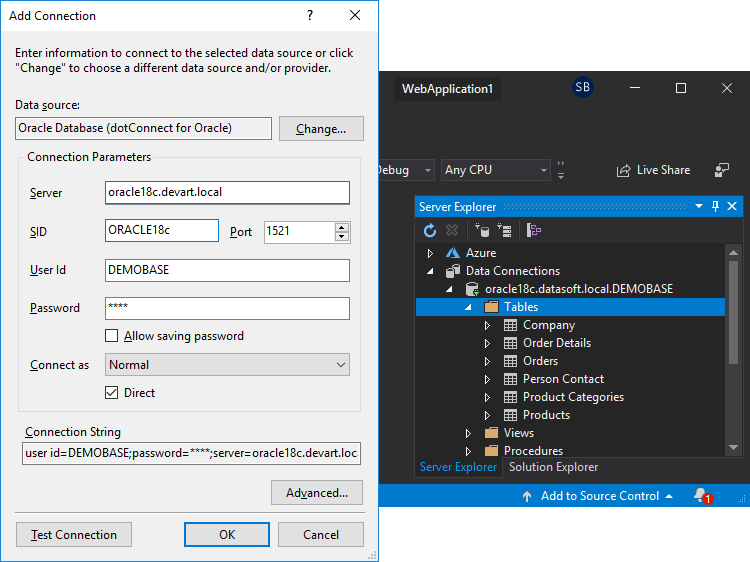
The Add Connection dialog with the "Oracle Database (dotConnect for Oracle)" data source: server, SID, port 1521, user and password, with Direct checked. Server Explorer on the right lists the schema's tables.
Features
Connect to Oracle without an Oracle Client
dotConnect for Oracle's Direct mode opens a connection with just Server, Port, User Id, Password, Service Name and Direct=True in the connection string. Nothing else has to be installed on the machine, which matters most in containers, on Linux and macOS servers, and on locked-down production boxes. Direct mode still supports Oracle RAC, Single Client Access Name (SCAN), load balancing, Database Resident Connection Pooling and Session Data Unit tuning.
EF Core, Entity Framework, Dapper and NHibernate
dotConnect for Oracle supports Entity Framework Core 1 to 10, Entity Framework 1 to 6, Dapper 1.x and 2.x, NHibernate 1.x to 5.x and Devart's LinqConnect. The EF providers cover spatial data (NetTopologySuite 2.6 in EF Core), TPH, TPT and TPCT inheritance mapping, stored procedures and functions, and full-text search, and come as separate NuGet packages (Devart.Data.Oracle.EFCore and Devart.Data.Oracle.EF6). Entity Developer, Devart's visual model designer, works with it but is a separate product.
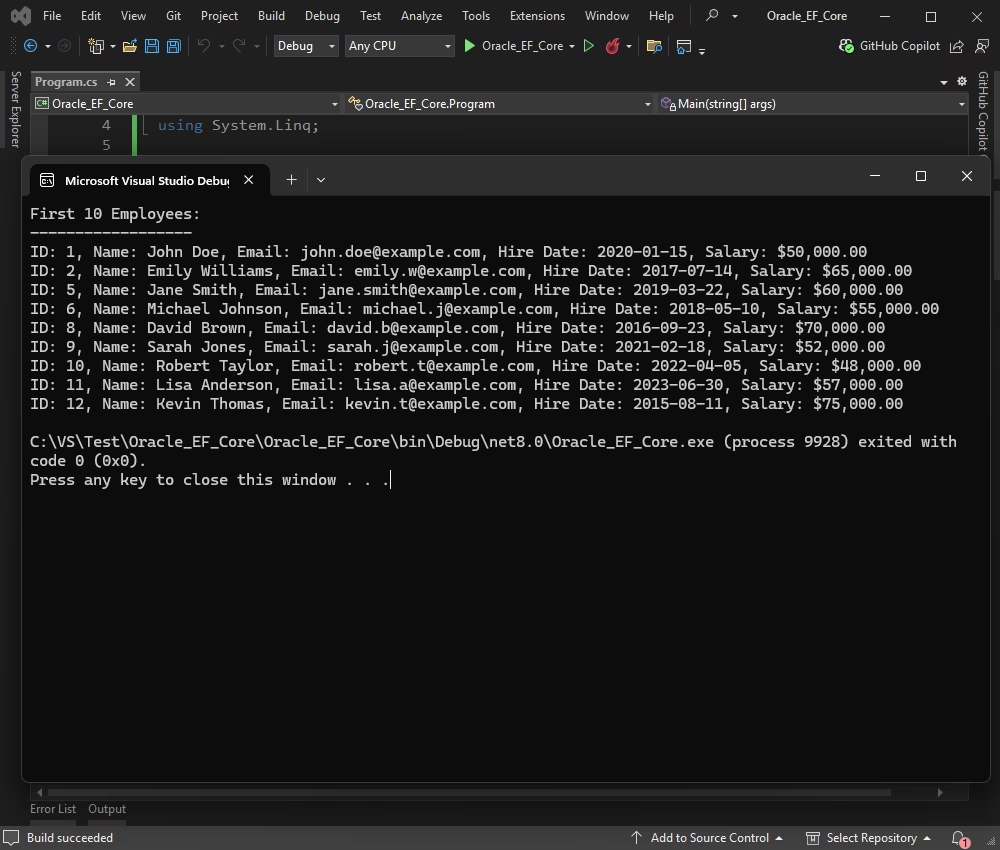
An EF Core console app in Visual Studio printing the first ten rows of an Oracle EMPLOYEES table (ID, name, email, hire date, salary).
Every Oracle data type, including the new ones
dotConnect for Oracle maps LOBs and BFILEs (with direct and temporary LOB handling), TIMESTAMP and INTERVAL types, PL/SQL tables and records, REF CURSORs (IN, OUT and IN/OUT), object types including NOT FINAL objects, nested tables, VARRAYs and XMLTYPE. For Oracle 23ai and 26ai it adds the BOOLEAN type and sparse and dense VECTOR types (BINARY, INT8, FLOAT32, FLOAT64), and the JSON type for 21c and later.
Oracle-specific classes you'd otherwise write yourself
dotConnect for Oracle wraps Advanced Queuing (OracleQueue), DBMS_ALERT (OracleAlerter), pipes (OraclePipe), query and object change notifications (OracleDependency), PL/SQL packages (OraclePackage), and SQL and PL/SQL tracing (OracleTrace). It also supports local and distributed transactions, Oracle Services for MTS, Transparent Application Failover with RAC high-availability events, and Transaction Guard.
Bulk loading, scripts and SQL monitoring
dotConnect for Oracle's OracleLoader uses Oracle's Direct Path interface for fast bulk inserts, and OracleCommand.ExecuteArray() runs DML array operations with no iteration limit since version 11.1.33. OracleScript runs whole scripts in SQL*Plus syntax, including large files loaded on the fly. OracleMonitor and Devart's dbMonitor tool show every SQL statement the application sends, per component, which helps when an ORM's generated SQL is slow.
Visual Studio wizards and design-time tools
dotConnect for Oracle registers itself as a Visual Studio 2015 to 2026 data provider, so Server Explorer can browse tables, views, procedures, packages and sequences and show table data. It adds a DataSet Wizard, DataSet Manager and Editor, an Oracle Package Wizard, an Oracle Object Wizard, and a Migration Wizard that moves projects from System.Data.OracleClient and ODP.NET. In VS Code, JetBrains Rider and other NuGet-capable IDEs you get the library without the design-time tools.
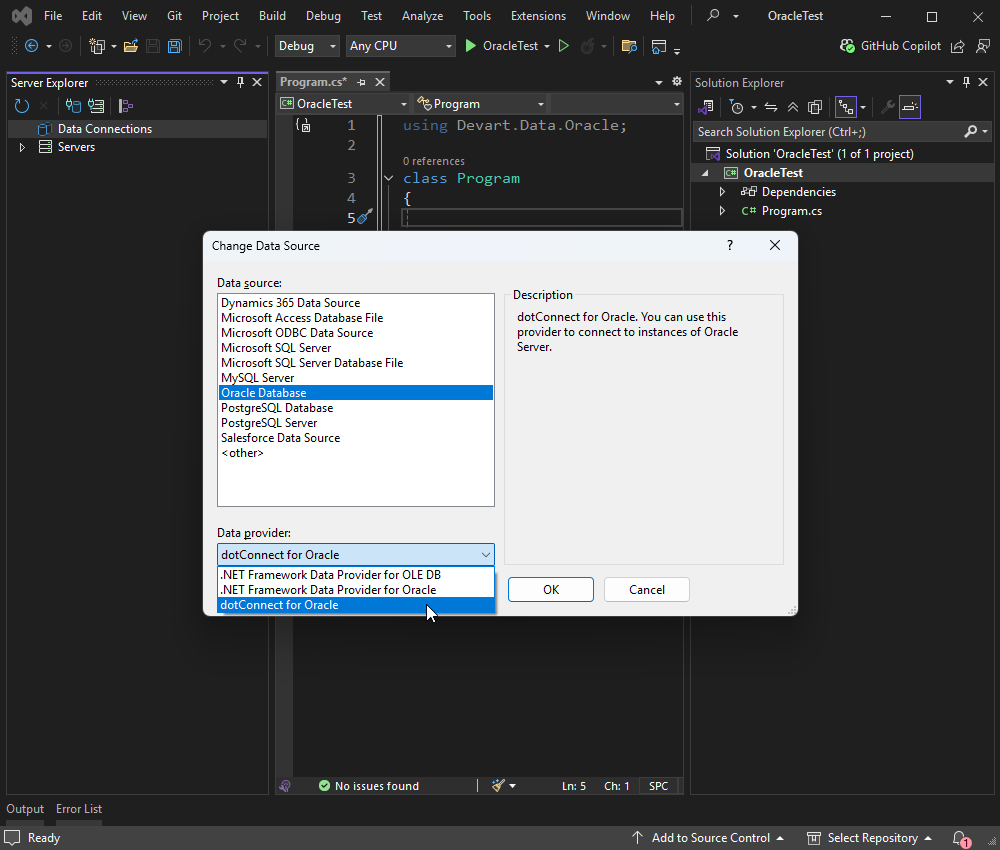
Visual Studio's Change Data Source dialog with Oracle Database selected and dotConnect for Oracle chosen as the data provider, next to Microsoft's two built-in providers.
Encrypted and authenticated connections
dotConnect for Oracle supports SSL/TLS and SSH tunnels (including PuTTY PPK3 keys since version 11.2.192), proxy authentication, OS authentication (NTLM), and Oracle's native data encryption (AES-128/192/256, DES and RC4 variants) and integrity checksums (MD5 and SHA1 to SHA512). It can run in FIPS 140-2 mode on Windows, and the OracleCredential class passes passwords as a SecureString.
Benefits
- Simpler deployment. No Oracle Client to install, version-match or patch on every server and container. You ship your app and the NuGet package.
- One provider for every .NET flavor. The same package serves an old .NET Framework 4.8 WinForms app and a new .NET 10 API on Linux.
- Less custom PL/SQL plumbing. Queues, alerts and change notifications become .NET events and classes instead of hand-written calls to DBMS packages.
- Fast EF Core upgrades. Devart updated its EF Core 8, 9 and 10 support in nearly every release from February to October 2026, so an EF Core upgrade isn't held back by the provider.
- Someone to call. Paid licenses include a year of support and updates, with premium support available as an option at checkout.
Real-World Uses
- An EF Core app that has to use a customer's Oracle database. A team that builds on EF Core code-first migrations keeps its tooling and points it at Oracle instead of rewriting the data layer.
- Containerized .NET services on Linux. A Docker image with only the .NET runtime and the NuGet package connects to Oracle in Direct mode, with no Instant Client layer to maintain.
- Nightly data loads. An ETL job pushes millions of rows into staging tables with
OracleLoader, then runs a cleanup script with OracleScript.
- Event-driven back ends. A service listens on an Advanced Queuing queue or a query change notification and reacts when orders arrive, instead of polling a table.
- Migrating a legacy WinForms app. The Migration Wizard moves a project off the deprecated System.Data.OracleClient, and the WinForms data-binding components keep the forms working.
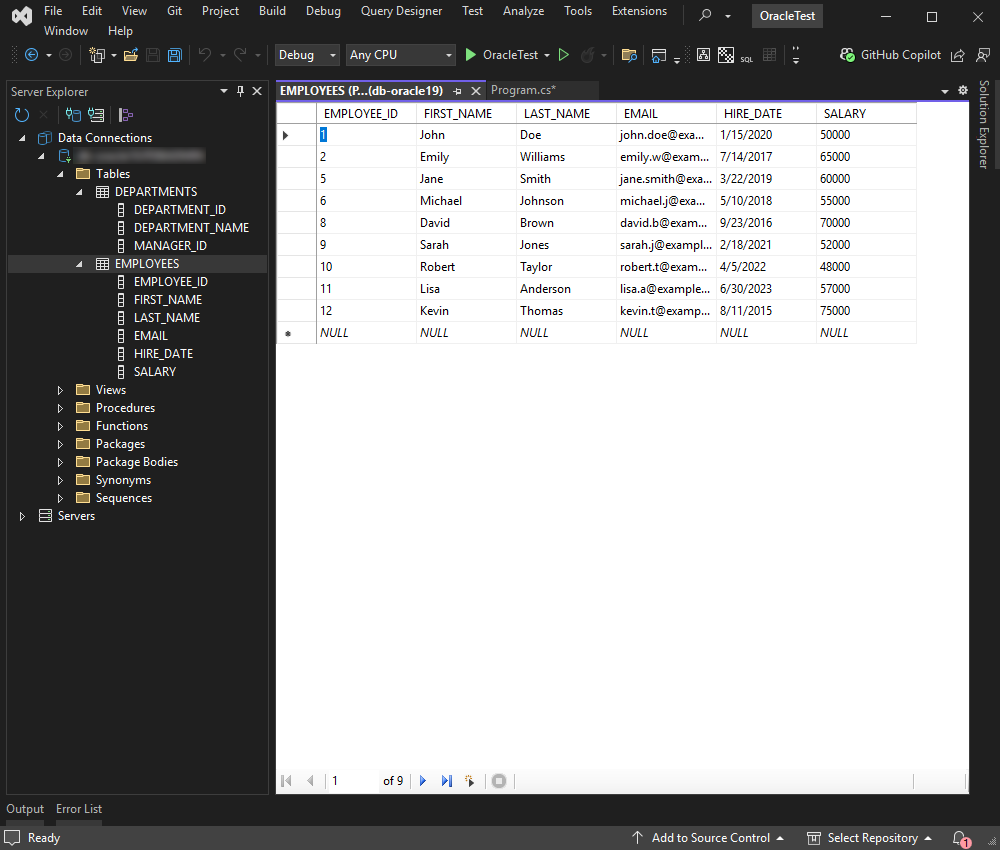
Server Explorer with an Oracle connection open: the DEPARTMENTS and EMPLOYEES tables with their columns, the Views, Procedures, Packages and Sequences folders, and the EMPLOYEES rows shown in a Visual Studio data grid.
Who It's For, and Who Should Skip It
It's for .NET teams whose applications live on Oracle and who use an ORM, especially EF Core, or who need the Oracle features Devart wraps (queues, notifications, bulk loading, RAC failover). It's also a good fit for teams that deploy to many servers or containers and are tired of managing Oracle Client installs, and for anyone who wants a vendor to answer support tickets.
Skip it if you only run plain SQL and stored procedures from .NET: Oracle's free ODP.NET Managed Driver does that without a client install. Skip it too if your shop isn't on .NET (Devart makes separate Delphi data access components), or if you'd rather connect BI tools and Excel through ODBC, where Devart's ODBC Driver for Oracle fits better. And if your data spans Oracle, SQL Server and MySQL behind one API, look at dotConnect Universal instead.
Usage Guide
- Get the trial. Sign in or create a free Devart account, download the installer (33.86 MB) from the download page and run it.
- Activate the trial with your Devart account. You get 30 days of the full product.
- Or skip the installer. In any IDE, run
dotnet add package Devart.Data.Oracle (add Devart.Data.Oracle.EFCore for EF Core).
- Connect. In Visual Studio, open Server Explorer, choose Add Connection, pick Oracle Database with the dotConnect for Oracle provider, enter the server, port, service name or SID and credentials, check Direct and click Test Connection.
- Write code. Add
using Devart.Data.Oracle;, create an OracleConnection with your connection string (including License Key once you've bought it), and call Open().
- Use an ORM. For EF Core, scaffold a model from the database with
Scaffold-DbContext or design it in Entity Developer, then query with LINQ.
- Trace the SQL. Enable
OracleMonitor and run dbMonitor to see each statement and its timing while you test.
Where it falls short
- Upgrading .NET Framework projects to version 11 takes a code change. Since version 11.0.0 (December 18, 2025) the licenses.licx file and the License Wizard no longer work for .NET Framework projects. Apps fail with "License key is missing" until you put the key in the connection string or call
OracleConnection.LoadLicenseKey() before opening a connection.
- The licensing is per developer, and the editions are confusing. The product page lists Developer and Express editions, while the order page still offers Standard, Professional, Developer and Mobile options plus Single, Team and Site license types. Check that you're buying the edition you tried.
- Frequent releases mean frequent fixes. The October 2026 builds alone fixed an AccessViolationException in OCI mode, a stack overflow in
OracleConnection.Open(), leaked temporary LOBs in Direct mode and time-zone errors with TIMESTAMP WITH LOCAL TIME ZONE. Updating quickly is part of owning it.
- Entity Developer costs extra. The visual ORM designer shown in Devart's material is licensed separately.
- Design-time tools are Visual Studio only. VS Code and Rider users get the library but not the wizards and DataSet editors.
What Users Say
Independent reviews of dotConnect for Oracle are scarce: it's a developer library, and the big review sites list only a handful of ratings. What's there is positive.
Customer stories on Devart's site
Michael Palgon, Senior Software Engineer at Himformatics, a US healthcare IT company, needed EF Core on a client's Oracle database for a clinical application and had no native EF Core provider for Oracle at the time:
"This has allowed me to maintain my working routine by knowing I have a dependable, well-tested, EF Core provider for Oracle. In addition, I'm now able to offer Oracle as an option to other clients when building their applications."
At Ecuavisa, an Ecuadorian TV network, the IT team had used Oracle's default data access and switched for faster connections and stored procedure mapping. Software Engineer Yajaira Barragan Arteaga:
"The connection to the database improved, therefore the users of our systems improved their processes in the system."
Review sites and usage
Capterra, GetApp and Software Advice show dotConnect for Oracle at 5.0 out of 5 from three reviews, and G2 at 4.6 out of 5 from fewer than ten. Those samples are too small to say much.
A better sign of real use is NuGet: the Devart.Data.Oracle package had about 5.9 million downloads and Devart.Data.Oracle.EFCore about 3.9 million on November 2, 2026. For scale, Oracle's free Oracle.ManagedDataAccess.Core had about 140 million, so dotConnect is the well-established paid alternative, not the default choice.
The recurring themes: people buy it for EF Core on Oracle and for connecting without an Oracle Client, and they credit it with faster development. The complaints you'll find are about licensing and installation errors, mostly when upgrading or when the provider is bundled inside another vendor's tool.
Comparisons
dotConnect for Oracle vs Oracle's ODP.NET
ODP.NET is Oracle's official provider and it's free; its Managed Driver also connects without an Oracle Client, and Oracle publishes its own EF Core provider (Oracle.EntityFrameworkCore) for it. If plain ADO.NET or EF Core with Oracle's driver works for you, there's no reason to pay. dotConnect for Oracle is worth it when you want EF6 and NHibernate as well as EF Core, LinqConnect, the Visual Studio wizards and DataSet tools, wrappers for queues, alerts and pipes, OracleLoader and OracleScript, SQL tracing with dbMonitor, and a vendor's support desk.
Developer vs the free Express edition
| Feature | Developer | Express |
|---|
| Price | $369.95 per developer | Free |
| .NET Framework / .NET Core | Both | .NET Framework only |
| Direct mode (no Oracle Client) | Yes | No |
| Entity Framework, LinqConnect, NHibernate | Yes | No |
| OracleLoader, OracleScript, OracleMonitor, queues and alerts | Yes | No |
| Visual Studio integration | Yes, with wizards and DataSet tools | Yes, without the wizards |
Editions and Pricing
A single-developer license costs $369.95 with one year of updates and support, and renews at $189.95 a year. On the order page you can stretch the first term to 2 or 3 years, add premium support, or switch to a Team license (up to four developers) or a Site license (unlimited developers at one company address). Server, Site and OEM licenses for 10 to 100 or 100+ devices are priced separately. Buying 5 to 9 licenses takes 5% off, 10 to 19 takes 10% and 20 or more takes 15%.
The license is perpetual: when the update year ends, you keep using the last version you downloaded, and renewing only buys newer builds and continued support. Your application's end users never need a license, and you can redistribute the runtime assemblies with your app.
FAQs
Does dotConnect for Oracle need the Oracle Client installed?
No. dotConnect for Oracle's Direct mode connects over TCP/IP with no Oracle Client. You can still use OCI mode with any client from 8.0 to 26ai, including Instant Client, when you want to. The free Express edition is the exception: it always needs a client.
Can I use dotConnect for Oracle in a .NET app on Linux or in Docker?
Yes. dotConnect for Oracle runs on .NET 5 to 10 and .NET Core on Windows, Linux and macOS, x64 and x86, through the Devart.Data.Oracle NuGet package. Since version 11.1.33 the license key also applies on Red Hat-based distributions (RHEL, AlmaLinux, Rocky Linux) with the default crypto policy.
Does dotConnect for Oracle work with Oracle Cloud and Amazon RDS?
dotConnect for Oracle supports Oracle Cloud Database as a Service, Oracle Database on Azure and Amazon RDS for Oracle, along with on-premises servers from 8.0 to 26ai and Oracle TimesTen 11g.
Do my build servers and production servers each need a dotConnect for Oracle license?
dotConnect for Oracle is licensed per developer, not per machine: a licensed developer may install it on as many computers as they personally use to develop, test and deploy. End users of your application need no license. Devart also sells a separate Server license for a single server used by one organization, so check the license terms for your setup before you buy.
Can I move an ODP.NET project to dotConnect for Oracle?
Yes. dotConnect for Oracle's Visual Studio Migration Wizard converts projects that use ODP.NET or Microsoft's System.Data.OracleClient. The class names follow the same ADO.NET pattern (OracleConnection, OracleCommand), so most code changes are the namespace and connection string.
Does dotConnect for Oracle support Oracle 23ai vector search?
dotConnect for Oracle supports the sparse and dense VECTOR data types (BINARY, INT8, FLOAT32 and FLOAT64) in Oracle Database 23ai and 26ai, both in ADO.NET and in EF Core, since version 11.1.33 of February 2026.
What happens to my dotConnect for Oracle trial after 30 days?
The dotConnect for Oracle trial lasts 30 days. A purchased license comes with a license key that your application supplies in the connection string (License Key=...) or loads with OracleConnection.LoadLicenseKey() before opening a connection.
System Requirements
- .NET: .NET 5.0 to 10.0, .NET Core 2.0 to 3.1, .NET Standard 2.0 and 2.1, .NET Framework 2.0 to 4.8; ASP.NET Core, Blazor, .NET MAUI and Mono
- Languages: C#, VB.NET, F#
- Operating systems: Windows, Linux and macOS, x64 and x86 (the installer and Visual Studio integration are Windows only)
- Oracle Database: 8.0, 8i, 9i, 10g, 11g, 12c, 18c, 19c, 21c, 23c/23ai and 26ai, including Express and Personal editions; Oracle TimesTen 11g
- IDE: Visual Studio 2015 to 2026 for design-time tools; VS Code, Rider and any NuGet-capable IDE for the library
- Download: 33.86 MB installer
Conclusion
dotConnect for Oracle is worth $369.95 for a .NET team that uses an ORM against Oracle or leans on Oracle's own features. The one reason to buy it is breadth: Direct mode, EF Core through EF6 and NHibernate, Oracle's queues and notifications as .NET classes, bulk loading and tracing, in one provider that Devart updates nearly every month. The main reason not to is that Oracle's free ODP.NET already covers plain data access without a client install, so if you only run SQL and stored procedures, you'd be paying for tools you won't touch. Try it for 30 days on your real schema and your EF Core version before deciding, and if you're upgrading an older .NET Framework project, budget an hour for the new license key setup.
Download Free TrialBuy Now